# Zyke Resources Documentation
> Documentation for Zyke Resources' products.
Source: Zyke-Resources/gitbook@6017f20
Generated: 2026-05-31T14:16:50.508Z
## Machine-Readable Exports
- [llms.txt](https://docs.zykeresources.com/llms.txt)
- [Structured docs export](https://docs.zykeresources.com/api/docs/export)
- [Search index](https://docs.zykeresources.com/api/search)
## Table of Contents
- [Introduction](#page-readme)
- [Common Issues](#page-common-issues)
- [Issues Regarding zyke_lib](#page-common-issues-zyke-lib-error)
- [Lacking Entitlement](#page-common-issues-lacking-entitlement)
- [Resource Starting Sequence](#page-common-issues-resource-starting-sequence)
- [Item Not Usable](#page-common-issues-item-not-usable)
- [Invalid Files](#page-common-issues-invalid-files)
- [QB & ox_inv Issues](#page-common-issues-qb-and-ox-inv-issues)
- [Dependency Override](#page-common-issues-dependency-override)
- [UI Not Mounting](#page-common-issues-ui-not-mounting)
- [Any other issues?](#page-common-issues-any-other-issues)
- [FAQ](#page-faq)
- [Miscellaneous](#page-faq-miscellaneous)
- [Inventory Support](#page-faq-inventory-support)
- [Target Support](#page-faq-target-support)
- [Discord Webhooks / Logs](#page-faq-discord-webhooks-logs)
- [Consumables](#page-paid-resources-consumables)
- [Resource Description](#page-paid-resources-consumables-resource-description)
- [Config](#page-paid-resources-consumables-config)
- [Exports & Events](#page-paid-resources-consumables-exports-and-events)
- [Dependencies](#page-paid-resources-consumables-dependencies)
- [Changelog](#page-paid-resources-consumables-changelog)
- [Guides](#page-paid-resources-consumables-guides)
- [World- & Player Interaction](#page-paid-resources-consumables-guides-world-and-player-interaction)
- [Packs](#page-paid-resources-consumables-guides-packs)
- [Ingredient-based Items](#page-paid-resources-consumables-guides-ingredient-based-items)
- [Conversions](#page-paid-resources-consumables-guides-conversions)
- [Consumption Rewards](#page-paid-resources-consumables-guides-consumption-rewards)
- [Setup](#page-paid-resources-consumables-setup)
- [Caveats](#page-paid-resources-consumables-caveats)
- [Smoking](#page-paid-resources-smoking)
- [Resource Description](#page-paid-resources-smoking-resource-description)
- [Config](#page-paid-resources-smoking-config)
- [Exports & Events](#page-paid-resources-smoking-exports-and-events)
- [Examples](#page-paid-resources-smoking-examples)
- [Dependencies](#page-paid-resources-smoking-dependencies)
- [Changelog](#page-paid-resources-smoking-changelog)
- [Test Server](#page-paid-resources-smoking-test-server)
- [Setup](#page-paid-resources-smoking-setup)
- [Garages](#page-paid-resources-garages)
- [Resource Description](#page-paid-resources-garages-resource-description)
- [Config](#page-paid-resources-garages-config)
- [Exports & Events](#page-paid-resources-garages-exports-and-events)
- [Transfer Ownership](#page-paid-resources-garages-exports-and-events-transfer-ownership)
- [Can-Check Hooks](#page-paid-resources-garages-exports-and-events-can-check-hooks)
- [Dependencies](#page-paid-resources-garages-dependencies)
- [Changelog](#page-paid-resources-garages-changelog)
- [Guides](#page-paid-resources-garages-guides)
- [Profession Vehicles](#page-paid-resources-garages-guides-profession-vehicles)
- [Setup](#page-paid-resources-garages-setup)
- [Common Issues](#page-paid-resources-garages-common-issues)
- [Drugdealer](#page-paid-resources-drugdealer)
- [Resource Description](#page-paid-resources-drugdealer-resource-description)
- [Config](#page-paid-resources-drugdealer-config)
- [Exports & Events](#page-paid-resources-drugdealer-exports-and-events)
- [Dependencies](#page-paid-resources-drugdealer-dependencies)
- [Changelog](#page-paid-resources-drugdealer-changelog)
- [Crafting](#page-paid-resources-crafting)
- [Resource Description](#page-paid-resources-crafting-resource-description)
- [Config](#page-paid-resources-crafting-config)
- [Exports & Events](#page-paid-resources-crafting-exports)
- [Dependencies](#page-paid-resources-crafting-dependencies)
- [Changelog](#page-paid-resources-crafting-changelog)
- [Guides](#page-paid-resources-crafting-guides)
- [Blueprints](#page-paid-resources-crafting-guides-blueprints)
- [Plants](#page-paid-resources-plants)
- [Resource Description](#page-paid-resources-plants-resource-description)
- [Config](#page-paid-resources-plants-config)
- [Exports & Events](#page-paid-resources-plants-exports)
- [Dependencies](#page-paid-resources-plants-dependencies)
- [Changelog](#page-paid-resources-plants-changelog)
- [Mugging](#page-paid-resources-mugging)
- [Resource Description](#page-paid-resources-mugging-resource-description)
- [Config](#page-paid-resources-mugging-config)
- [Exports & Events](#page-paid-resources-mugging-exports-and-events)
- [Changelog](#page-paid-resources-mugging-changelog)
- [Zyke Lib](#page-free-resources-zyke-lib)
- [Resource Description](#page-free-resources-zyke-lib-resource-description)
- [Dependencies](#page-free-resources-zyke-lib-dependencies)
- [Config](#page-free-resources-zyke-lib-config)
- [Setup](#page-free-resources-zyke-lib-setup)
- [Changelog](#page-free-resources-zyke-lib-changelog)
- [Guides](#page-free-resources-zyke-lib-guides)
- [Missing GTX Label](#page-free-resources-zyke-lib-guides-missing-gtx-label)
- [Interface API](#page-free-resources-zyke-lib-guides-interface-api)
- [Status](#page-free-resources-status)
- [Resource Description](#page-free-resources-status-resource-description)
- [Exports & Events](#page-free-resources-status-exports-and-events)
- [Dependencies](#page-free-resources-status-dependencies)
- [Changelog](#page-free-resources-status-changelog)
- [Guides](#page-free-resources-status-guides)
- [Editing Statuses](#page-free-resources-status-guides-editing-statuses)
- [Direct Effects](#page-free-resources-status-guides-direct-effects)
- [Broken Values & HUD](#page-free-resources-status-guides-broken-values-and-hud)
- [Setup](#page-free-resources-status-setup)
- [Propaligner](#page-free-resources-propaligner)
- [Resource Description](#page-free-resources-propaligner-resource-description)
- [Exports & Events](#page-free-resources-propaligner-exports-and-events)
- [Dependencies](#page-free-resources-propaligner-dependencies)
- [Changelog](#page-free-resources-propaligner-changelog)
- [Realistic Vehicles](#page-free-resources-realistic-vehicles)
- [Resource Description](#page-free-resources-realistic-vehicles-resource-description)
- [Config](#page-free-resources-realistic-vehicles-config)
- [Exports & Events](#page-free-resources-realistic-vehicles-exports-and-events)
- [Changelog](#page-free-resources-realistic-vehicles-changelog)
- [Vending Machines](#page-free-resources-vending-machines)
- [Resource Description](#page-free-resources-vending-machines-resource-description)
- [Config](#page-free-resources-vending-machines-config)
- [Dependencies](#page-free-resources-vending-machines-dependencies)
- [Changelog](#page-free-resources-vending-machines-changelog)
- [Sounds](#page-free-resources-sounds)
- [Resource Description](#page-free-resources-sounds-resource-description)
- [Config](#page-free-resources-sounds-config)
- [Exports & Events](#page-free-resources-sounds-exports-and-events)
- [Changelog](#page-free-resources-sounds-changelog)
- [Key Minigame](#page-free-resources-key-minigame)
- [Resource Description](#page-free-resources-key-minigame-resource-description)
- [Exports & Events](#page-free-resources-key-minigame-exports-and-events)
- [Changelog](#page-free-resources-key-minigame-changelog)
- [Stabwheels](#page-free-resources-stabwheels)
- [Resource Description](#page-free-resources-stabwheels-resource-description)
- [Dependencies](#page-free-resources-stabwheels-dependencies)
- [Changelog](#page-free-resources-stabwheels-changelog)
- [Burncars](#page-free-resources-burncars)
- [Resource Description](#page-free-resources-burncars-resource-description)
- [Dependencies](#page-free-resources-burncars-dependencies)
- [Changelog](#page-free-resources-burncars-changelog)
## Pages
### Introduction
Canonical URL: https://docs.zykeresources.com/
Markdown URL: https://docs.zykeresources.com/readme.md
# Introduction
## Links
- [Discord Community](https://discord.zykeresources.com)
- [Tebex Store](https://zykeresources.com/)
- [YouTube](https://youtube.com/@zykeresources)
- [FiveM Forum Profile](https://forum.cfx.re/u/zyke/summary)
### Common Issues
Canonical URL: https://docs.zykeresources.com/common-issues
Markdown URL: https://docs.zykeresources.com/common-issues.md
# Common Issues
### Issues Regarding zyke_lib
Canonical URL: https://docs.zykeresources.com/common-issues/zyke_lib-error
Markdown URL: https://docs.zykeresources.com/common-issues/zyke_lib-error.md
# Issues Regarding zyke\_lib
## No such export Fetch in resource zyke\_lib
### Starting zyke\_lib in the wrong place
The most common issue when getting errors regarding zyke\_lib is that it's started in the wrong place. The simplest fix for this is to place it right under it's dependencies, which at the time of writing this is the framework file. Placing it above everything else ensures that you didn't miss anything. If you do however have other dependencies, placing "zyke\_lib" above "zyke\_x" scripts will be fine.
Please note that simple mistakes can happen. If you for example placed "zyke\_drugdealer" inside of "\[qb]" folder, then you start "zyke\_lib" above starting "zyke\_drugdealer", but below starting "\[qb]", you will get an error because "zyke\_drugdealer" has been started above "zyke\_lib" since it existed inside of the "\[qb]" folder.
### Incorrect name for zyke\_lib
When downloading from Github, your folder will automatically be named "x-master". This means that "zyke\_lib" will be named "zyke\_lib-master". When using exports, the server is looking for af older named "zyke\_lib", which means that it can't find the correct folder. Simply change the name of your folder and your issue should be resolved.
## Attempt to call a nil value
### What does this mean?
When developing, Zyke Resources will use the latest versions available. This means that if you're running an older server your functions may not align with the newly available ones. Inside of "zyke\_x" scripts, we trigger functions inside of "zyke\_lib" which will then trigger the correct function for your framework. This means that if you're missing the function that is triggered by default, you can swap them out for functions that works for your version.
Please note that this can also occur on newer servers that are running custom inventories, custom progressbars etc that are not default for your framework, following the same guide as above will also fix this.
### Lacking Entitlement
Canonical URL: https://docs.zykeresources.com/common-issues/lacking-entitlement
Markdown URL: https://docs.zykeresources.com/common-issues/lacking-entitlement.md
# Lacking Entitlement
### Why does this happen?
In order to use my resources you need a valid license to my resource connected to the [license key](https://keymaster.fivem.net/) you're using for your server.
### Just purchased the resource
If you purchased a resource, dropped it in, refreshed and started it and this message appears, you have to restart the server. After restart, the issue should be resolved.
### My friend sent me the file
As stated above, you need a valid license. This means that if you're sent my files, you would also be required to have the license transferred.
### Still having issues
If you're still having issues, despite completing all of the steps above, please open a ticket in our [Discord](https://discord.gg/UaXtUFRr66). It is a possibility that FiveMs validators are currently down, so if you want to double check the payment and license, head over to the Discord. The link can be found in [introduction ](../)or [here](https://discord.gg/UaXtUFRr66).
### Resource Starting Sequence
Canonical URL: https://docs.zykeresources.com/common-issues/resource-starting-sequence
Markdown URL: https://docs.zykeresources.com/common-issues/resource-starting-sequence.md
# Resource Starting Sequence
To ensure our resources run smoothly, we have to explicitly verify that our resources are being correctly started. This is not always needed, it entirely depends on your server and the resources you are running.
Below you will find various common issues and our fixes for your server.cfg structure.
## Starting Entire Directories
First up, a very common practice to start a lot of resources. Starting an entire directory, also known as a folder, can prove problematic. It attempts to start the resources in an alphabetic order, meaning any resource alphabetically before the `l` in `zyke_lib` will attempt to start first. This can cause various issues. Make sure that you are starting every resource manually in the server.cfg.
This means that if you are currently starting your resources something like this:
```lua
ensure [zyke]
```
You have to instead run them like this:
```lua
ensure zyke_lib
ensure zyke_sounds
ensure zyke_smoking
...
```
## Starting Before Dependencies
If you are using resources such as `ox_inventory` or perhaps some death system, such as `wasabi_ambulance`, our library needs to be started afterwards to ensure the dependencies are correctly recognized.
Our best recommendation is that you start `zyke_lib` at the end of your starting sequence, and all of your other resources from us after that. This ensures that everything is propertly started before.
### Item Not Usable
Canonical URL: https://docs.zykeresources.com/common-issues/item-not-usable
Markdown URL: https://docs.zykeresources.com/common-issues/item-not-usable.md
# Item Not Usable
### Universal
* Item may be required to be unique / non-stackable. For example, blueprints, smokable packs, consumables packs, vapes, bongs. Any item that has to carry metadata (info inside the item) must be unique / non-stackable.
### ox\_inventory
* If you are using ox\_inventory & QBCore, checkout [qb-and-ox\_inv-issues.md](/common-issues/qb-and-ox_inv-issues "mention") for the most common issues.
* If you have an item with `consume = x` in the item config at `ox_inventory/data/items.lua`, remove that line. This is the most common reason for unusable items.
### Invalid Files
Canonical URL: https://docs.zykeresources.com/common-issues/invalid-files
Markdown URL: https://docs.zykeresources.com/common-issues/invalid-files.md
# Invalid Files
### Incorrect Resource Name
The most common issue with the UI not showing is because you renamed the script without going into the JavaScript file and matching that name in there. By default, everything is set up to work with the name that I sell the script as. If you do change the resource's name, make sure to also change it in the files.
### Downloading Source Files
If you have been sent here, most likely you have incorrect files on your server. We build our UI files which means the source code is not ready to be ran on your server. This section specifically covers the fix for the console spamming about missing UI build.
Another big reason for downloading the latest release is because that has been tested. We may have breaking changes in the latest files straight in the repository that are not guaranteed to work for all of our resources.
#### Examples
When downloading zyke\_propaligner, head into the release page and download the option with the exact name of the resource.
If you download it from any other resource, it is not guaranteed that you have the correct files. Note that you need to download the `.zip`, and not the one named `Source code ...`. The `Source code ...` will give you the files without the built files.
#### Links
* [Latest zyke\_lib](https://github.com/ZykeWasTaken/zyke_lib/releases)
* [Latest zyke\_status](https://github.com/ZykeWasTaken/zyke_status/releases)
* [Latest zyke\_propaligner](https://github.com/ZykeWasTaken/zyke_propaligner/releases)
* [Latest zyke\_sounds](https://github.com/ZykeWasTaken/zyke_sounds/releases)
* [Latest zyke\_keyminigame](https://github.com/ZykeWasTaken/zyke_keyminigame/releases)
* [Latest zyke\_vehdeformation](https://github.com/ZykeWasTaken/zyke_vehdeformation/releases)
* [Latest zyke\_burncars](https://github.com/ZykeWasTaken/zyke_burncars/releases)
* [Latest zyke\_stabwheels](https://github.com/ZykeWasTaken/zyke_stabwheels) (No release download needed)
### Missing Files
When uploading using FTP (WinSCP, FileZilla etc), some files may disappear. The easiest identifier of a missing file is the server console warning it could not find certain files. This error will show up right when you start the resource. If you are unsure if you are missing any files, simply restart the resource and the console will let you know.
The fix is rather simple - reupload the missing file by itself and place it into the correct folder.
### QB & ox_inv Issues
Canonical URL: https://docs.zykeresources.com/common-issues/qb-and-ox_inv-issues
Markdown URL: https://docs.zykeresources.com/common-issues/qb-and-ox_inv-issues.md
# QB & ox\_inv Issues
This is an experimental fix that I put together after having repeated issues with users following outdated guides for this setup. This issue is not present for all servers with such setups, it depends on versioning and whatnot.
We **do not** assist with fixing your inventory. QBCore & ox\_inventory has never been 100% compatible, and most guides out there are outdated and they got no clue what is going on. We are not going to put together a whole guide for the entire process. This snippet is simply intended to fix a specific broken link that users seem to stumble upon.
### The Fix:
Navigate into `ox_inventory/modules/bridge/qb/server.lua` and find the `server.UseItem` function. Replace the entire function with the snippet below:
```lua
function server.UseItem(source, itemName, data)
local itemData = QBCore.Functions.CanUseItem(itemName)
if type(itemData) == "table" and itemData.func then
itemData.func(source, data)
end
end
```
### Dependency Override
Canonical URL: https://docs.zykeresources.com/common-issues/dependency-override
Markdown URL: https://docs.zykeresources.com/common-issues/dependency-override.md
# Dependency Override
By default, `zyke_lib` automatically detects which systems you are running (framework, inventory, target, etc.). If auto-detection fails or you want to explicitly specify a system, you can configure this in `dependency_override.lua`.
### Common Issues
First, we will cover common issues in case you were led here and don't want to submerge yourself in the configs.
#### X is taking a long time to start...
If you have a misconfigured system and keep a bunch of old files on your server, you may experience a wall of warnings in your consoles waiting for other systems to start. This issue could often arise if you keep two scripts that we both support, like two fuelsystems, in your server, even if you are just using one of them. Our lib will, by default, attempt to wait for the resource to start.
### Configurations
Each system supports the following values:
| Value | Description |
| ------------------- | ---------------------------------------------------------------------- |
| `"auto"` | Automatically detect which system to use **(default)** |
| `""` | Use a specific resource (will wait for it to start) |
| `"none"` | Skip detection entirely, fall back to your framework's built-in system |
> [!WARNING]
> `"none"` is only valid for **optional** systems (gang, fuel, death, banking). Setting it means the library will use your framework's default behavior instead.
These must always resolve to a valid resource.
| System | Options |
| ----------- | ----------------------------------------------------------------------------------------------------------- |
| `framework` | `"auto"`, `"es_extended"`, `"qb-core"` |
| `inventory` | `"auto"`, `"qs-inventory"`, `"ox_inventory"`, `"tgiann-inventory"`, `"codem-inventory"`, `"core_inventory"` |
| `target` | `"auto"`, `"ox_target"`, `"qb-target"` |
#### Optional Systems
These can be set to `"none"` to use your framework's built-in system.
| System | Options |
| --------- | ------------------------------------------------------------------------------------------ |
| `gang` | `"auto"`, `"none"`, `"zyke_gangs"` |
| `fuel` | `"auto"`, `"none"`, `"ox_fuel"`, `"LegacyFuel"`, `"cdn-fuel"`, `"lc_fuel"` |
| `death` | `"auto"`, `"none"`, `"wasabi_ambulance"` |
| `banking` | `"auto"`, `"none"`, `"Renewed-Banking"`, `"RxBanking"`, `"okokBanking"`, `"bablo-banking"` |
#### Example
> Full configuration example for `dependency_override.lua`:
>
> ```lua
> return {
> framework = "auto",
> inventory = "ox_inventory",
> target = "auto",
>
> gang = "none",
> fuel = "ox_fuel",
> death = "auto",
> banking = "none",
> }
> ```
### **Troubleshooting**
If your server gets stuck on the dependency loading step, set the appropriate system to the exact resource name you use instead of `"auto"`.
### UI Not Mounting
Canonical URL: https://docs.zykeresources.com/common-issues/ui-not-mounting
Markdown URL: https://docs.zykeresources.com/common-issues/ui-not-mounting.md
# UI Not Mounting
If you are attempting to open one of our UIs and get something along the lines of "UI Not Mounted" as feedback, something is stuck.
You can have false alarms if the script is genuinely still loading, but if you wait for 10+ seconds, check your client (F8)- & server console for errors. If you have errors, the UI won't be able to fetch what it needs and will stay in this loading state. Create a ticket in our [Discord](https://discord.zykeresources.com) for assistance.
### Any other issues?
Canonical URL: https://docs.zykeresources.com/common-issues/any-other-issues
Markdown URL: https://docs.zykeresources.com/common-issues/any-other-issues.md
# Any other issues?
If you are having issues that are not listed in this section, please open a ticket in our [Discord](https://discord.gg/UaXtUFRr66).
### FAQ
Canonical URL: https://docs.zykeresources.com/faq
Markdown URL: https://docs.zykeresources.com/faq.md
# FAQ
Please visit the sub-pages.
### Miscellaneous
Canonical URL: https://docs.zykeresources.com/faq/miscellaneous
Markdown URL: https://docs.zykeresources.com/faq/miscellaneous.md
# Miscellaneous
### Switch Language
Language switches are made in `zyke_lib/config.lua` under the language value. Set this to the language you want to use, and if it doesn't exist, it will fall back to the `en.lua` file, so it is always safe to set this to a translation that exists in one resource but not in another.
You can see a list of supported languages for each resource in the resource's `locales` directory.
### Are any of the files locked?
In all of our resources we protect ourselves from unauthorized distribution by using Tebex's Escrow technology which allows us to lock the core functionalities. At the same time we are open for customization in our resource with various unlocked files, access to change various functions in zyke\_lib and large configuration files. If you have any questions about a specific resource, we are happy to help you in our [Discord](https://discord.zykeresources.com/).
If you want to learn more about how Escrow works, you can read more [here](https://forum.cfx.re/t/introducing-asset-escrow-for-your-resources/4777151).
### Can I purchase the source code?
No. We do not offer source code for any resources for the reason above.
### How do I claim my resource?
First, head over to your [Keymaster](https://keymaster.fivem.net/) and log into the cfx.re (FiveM) account you purchased the script with. When you've logged in, head over to [Granted Assets](https://keymaster.fivem.net/asset-grants) and you will be shown a menu will all of your assets (resources, scripts, props etc).
### Do you take suggestions?
Yes, we happily take suggestions, for both new resource ideas and feature ideas for older resources! All you have to do is head over to our [Discord](https://discord.zykeresources.com/), go into the [suggestions ](https://discord.com/channels/925195604068565003/1056209989590601809)channel and share your thoughts!
### Can I switch framework for the scripts I have purchased?
Yes. This is because all of our resources are dependant on [zyke\_lib](https://github.com/ZykeWasTaken/zyke_lib). You can change all framework dependencies in our library.
Since version 1.0.0 your framework gets fetched automatically. This allows for an easy drag-and-drop straight from one framework to another.
### What is a starting sequence?
When script depend on eachother for functionality, you need to verify your resources are starting in the correct order. Sometimes you can run almost any starting sequence, but when you start including more advanced resources in your server, you may need to get more specific.
The usual suspect is that you are starting entire folders at once, and your resources may start in the wrong sequence. One resource that depends on another is queued first, and it all breaks.
When you start your server, the easiest way to tell if a dependency is not started is to have a look in the server console. It will explicitly tell you that your resource is missing dependencies.
If a support is asking you to provide your resource starting sequence, what you need to provide is a part of your server.cfg file so we can analyze it. We do not need the entire file, none of your personal keys etc. All we need is the list of all of your resources starting. Additionally, we may ask for the structures of your folders to see where each resource starts.
**Our recommendation** is that you start zyke\_lib at the bottom of your starting sequence, and all other zyke resources after that. This ensures that each resource is explicitly started in the correct order, and will not cause issues.
### Script Version
To check a script version, open up the script folder and look for the fxmanifest.lua file. In this file, usually somewhere at the top, you will find a "version" text, describing what version your resource is.
### What VSCode extensions do you use?
This is sort of unrelated, but after receiving this question a few times, I thought I would link the VSCode extensions that I use. I do exclude very unrelated ones from this list.
Please keep in mind that some of these are mainly meant for developers, and won't really benefit the average person changing stuff in the config or making minor changes in some file.
Another headsup, specifically for the FiveM related ones, some natives have bad data type definitions, and can require/return incorrect values, along with accepting values that seems incorrect. It may be that your code is warning you yet it still works.
#### These are in random order and not based on importance:
* [https://marketplace.visualstudio.com/items?itemName=usernamehw.errorlens](https://marketplace.visualstudio.com/items?itemName=usernamehw.errorlens)
* [https://marketplace.visualstudio.com/items?itemName=dhawton.fivem-lua](https://marketplace.visualstudio.com/items?itemName=dhawton.fivem-lua)
* [https://marketplace.visualstudio.com/items?itemName=thirst.cfxlua-typings](https://marketplace.visualstudio.com/items?itemName=thirst.cfxlua-typings)
* [https://marketplace.visualstudio.com/items?itemName=sumneko.lua](https://marketplace.visualstudio.com/items?itemName=sumneko.lua)
#### Extras - not related to Lua or FiveM:
* [https://marketplace.visualstudio.com/items?itemName=johnpapa.vscode-peacock](https://marketplace.visualstudio.com/items?itemName=johnpapa.vscode-peacock)
* For those that find tabbing between multiple instances confusing, I usually color code them. For ex. red overlay means my lib. Speeds up trying to find the correct tab.
* [https://marketplace.visualstudio.com/items?itemName=zhuangtongfa.Material-theme](https://marketplace.visualstudio.com/items?itemName=zhuangtongfa.Material-theme)
* The best theme collection, I use the "One Dark Pro Darker" theme from this collection.
### Inventory Support
Canonical URL: https://docs.zykeresources.com/faq/inventory-support
Markdown URL: https://docs.zykeresources.com/faq/inventory-support.md
# Inventory Support
> [!INFO]
> If your inventory is not listed here, it may still work if it's backwards-compatible with one of the supported systems. Create a ticket in our Discord for assistance.
There may be changes for specific resources, view each resource's dependencies carefully before purchasing.
| Inventory | Support Level | Notes |
| -------------------------- | ------------- | ------------------------------------------------------------------------------------------------------------------------------------------------------------------------------------------------------------------- |
| Regular QBCore inventories | Full | Variations like ps or ak47 may be incompatible since they are no longer following the standard procedures. Please consult us in our [Discord](https://discord.zykeresources.com) before purchase if you are unsure. |
| ox\_inventory | Full | |
| qs-inventory | Full | |
| TGIANN-inventory | Full | |
| codem-inventory | Full | |
| core\_inventory | Full | QBCore only |
### Target Support
Canonical URL: https://docs.zykeresources.com/faq/target-support
Markdown URL: https://docs.zykeresources.com/faq/target-support.md
# Target Support
| Target System | Support Level | Notes |
| ------------- | ------------- | ----- |
| ox\_target | Full | |
| qb-target | Full | |
We are now using a most-fitting approach for our releases, which means some features may require a target system if it fits the best. Not all resources require a target system — check each resource's dependencies page.
### Discord Webhooks / Logs
Canonical URL: https://docs.zykeresources.com/faq/discord-webhooks-logs
Markdown URL: https://docs.zykeresources.com/faq/discord-webhooks-logs.md
# Discord Webhooks / Logs
### How does it work?
All of our resources trigger logs for various actions. This entire system resides in zyke\_lib, and can be completely swapped out if wanted. All types, inputs and such that are used are documented, and you must work within these limits if you want to have a preditcible outcome if you swap out the system.
We do not provide support for swapping this mechanic out for anything else, but you are free to do so by yourself.
#### Relevant Files:
* `zyke_lib/functions/log/server.lua` (Entire logging mechanic)
* `zyke_lib/webhooks/*.lua` (Action routing list, this is where you put your Discord webhooks)
### Consumables
Canonical URL: https://docs.zykeresources.com/paid-resources/consumables
Markdown URL: https://docs.zykeresources.com/paid-resources/consumables.md
# Consumables
### Resource Description
Canonical URL: https://docs.zykeresources.com/paid-resources/consumables/resource-description
Markdown URL: https://docs.zykeresources.com/paid-resources/consumables/resource-description.md
# Resource Description
## Links
* [Tebex](https://zykeresources.com/package/consumables) & [Nexus Bundle](https://zykeresources.com/package/nexus-1m)
* [Showcase](https://www.youtube.com/watch?v=f3D5wAqCpP0)
## Features
* Starter items available - to get going immediately.
* Extensive documentation & in-game help menu to get started.
* Immersive interaction with your equipped item, giving you more control of your gameplay.
* Optionally force items to be opened & closed properly with sound & animation.
* Manual & automatic consumption.
* Seamless user-interface integration for configuration:
* Creation & registering of the item as usable.
* Props & animations.
* Item types, use amounts and rewards on consumption.
* Importing, exporting & duplicating configurations.
* Configure sounds for each interaction for each item.
* Item decay.
* And much more...
* Immersive interactions with props, animations & synced sounds.
* World item interactions:
* Place & share synced items in the world.
* Transfer items directly to other players.
* Throwable items.
* Pouring drinks into glasses for immersive bartender / waiter RP.
* Subtle indications for items & their content.
* Correct handling of animations to avoid cancelling external ones.
* Multiple item types to support all your needs. (Eating, drinking, pills etc)
* Direct consumption rewards or use ingredient-based items.
* Optional animation breaks for realistic consumption.
* Idle stages for smoother animations & gameplay when not using items.
* Item quality & decaying over time, affecting the reward output & possible illness. Also allows reversed logic.
* Personal settings menu to tailor your experience.
* Keybinds for maximum control of your gameplay.
* Choking mechanic.
* Consumption haste mechanic.
* Trash-can interactions for disposing of items.
* Rich ecosystem for exports.
* Only dependent on free & open-source resources. Most of which we personally develop.
* Infinite item support for ox\_inventory.
* Seamless installation with automatic dependency detection & database initialization.
* Carefully optimized for performance whilst retaining functionality.
### Config
Canonical URL: https://docs.zykeresources.com/paid-resources/consumables/config
Markdown URL: https://docs.zykeresources.com/paid-resources/consumables/config.md
# Config
> [!INFO]
> ## General Information
>
> **Additional Settings**\
> If there is a feature within the script that you can't find in the script's config, there is a chance that the configuration lies within [zyke-lib](../../free-resources/zyke-lib/ "mention").\
> \
> **Keymapping**\
> When stated to utilize keymapping, the key can be changed in your GTA / FiveM keybinds.\
> \
> **Prop Models**\
> All prop models can be found [here](https://forge.plebmasters.de/objects/).
### Settings
> Groups the main configuration options for this resource. The child sections below document each nested setting.
#### debug
> Controls debug logging for the resource. When set to `true`, additional diagnostic output is enabled.\
> \
> **Example:**
>
> ```lua
> debug = false
> ```
#### helpMenu
> A table of command strings that open the help menu. The source comment describes this menu as the command for getting players started.\
> \
> **Example:**
>
> ```lua
> helpMenu = {"consum:help"}
> ```
#### promptHelpMenuOnFirstUse
> When enabled, the help menu automatically opens the first time a player uses any consumable item. This helps introduce new players to the resource's mechanics. The menu only appears once per player; subsequent uses will not trigger it.\
> \
> **Example:**
>
> ```lua
> promptHelpMenuOnFirstUse = true
> ```
#### pickupDistance
> Maximum distance from which a player can pick up a placed item.\
> \
> **Example:**
>
> ```lua
> pickupDistance = 1.0
> ```
#### placeDistance
> Maximum distance at which a player can place an item.\
> \
> **Example:**
>
> ```lua
> placeDistance = 1.0
> ```
#### transferDistance
> Distance used when transferring items to other players.\
> \
> **Example:**
>
> ```lua
> transferDistance = 1.3
> ```
#### objectInteractionDistance
> Distance used to interact with world items, such as pouring a consumable into a glass.\
> \
> **Example:**
>
> ```lua
> objectInteractionDistance = 1.0
> ```
#### itemCloseDistance
> The distance threshold used to determine if the player is very close to an item, triggering a quick iteration check for that item.\
> \
> **Example:**
>
> ```lua
> itemCloseDistance = 10.0
> ```
#### itemVicinityDistance
> The rough scan distance used to find items in the vicinity.\
> \
> **Example:**
>
> ```lua
> itemVicinityDistance = 300.0
> ```
#### pauseConsumptionOnAnimBreak
> Controls whether consumption pauses during an animation break. When disabled, consumption continues despite the animation pause; the source comment also notes that sound playback is tied to the animation and that the choking meter decreases when this setting is `true`.\
> \
> **Example:**
>
> ```lua
> pauseConsumptionOnAnimBreak = true
> ```
#### forcePropsOnGround
> Controls whether placed props are always forced onto a solid surface. The source warns this can cause placement issues on non-solid props; when disabled, items can be placed anywhere.\
> \
> **Example:**
>
> ```lua
> forcePropsOnGround = false
> ```
#### objectPlacementThreshold
> Additional object-placement distance threshold used to space placed objects apart.\
> \
> **Example:**
>
> ```lua
> objectPlacementThreshold = 0.075
> ```
#### triggeredTargetSystem
> A list of configured target-system command strings. The default entries are `"+ox_target"` and `"+playerTarget"`.\
> \
> **Example:**
>
> ```lua
> triggeredTargetSystem = { "+ox_target", "+playerTarget"}
> ```
#### fetchOxConversions
> Controls whether possible conversions are fetched from `ox_inventory`.\
> \
> **Example:**
>
> ```lua
> fetchOxConversions = true
> ```
#### worldItems
> Controls world item mode, per-player and server-wide item limits, and cleanup behavior for placed world items. The source comments warn that FiveM networked prop restrictions limit dynamic world items to 80 rendered networked objects per client shared across scripts, and recommend static mode for servers with 50+ players, big parties, or many restaurants.
>
> * **`dynamic`**: selects dynamic or static world item mode.
> * **`maxPerPlayer`**: caps how many world items one player can have.
> * **`limit`**: caps stored world items server-wide, not spawned props.
> * **`cleanup`**: groups proximity, thread-deletion, and start-up cleanup settings.
>
> **Example:**
>
> ```lua
> worldItems = {
> dynamic = false,
> maxPerPlayer = 50,
> limit = 3000,
> cleanup = { ... },
> }
> ```
#### worldItems.dynamic
> `dynamic` selects whether world items use dynamic or static mode.\
> \
> **Example:**
>
> ```lua
> dynamic = false
> ```
#### worldItems.maxPerPlayer
> `maxPerPlayer` sets the maximum number of world items a single player can have.\
> \
> **Example:**
>
> ```lua
> maxPerPlayer = 50
> ```
#### worldItems.limit
> Maximum number of world items tracked on the server. The source comment notes this is a server limit for stored world items, not the number of spawned props.\
> \
> **Example:**
>
> ```lua
> limit = 3000
> ```
#### worldItems.cleanup
> Controls cleanup timing for world items. The source comments explain that `last_interaction` is updated when world item data changes and by proximity checks; cleanup settings use that timestamp.
>
> * **`proximity`**: refreshes `last_interaction` for nearby world items without deleting them.
> * **`threadDeletion`**: deletes world items older than the configured lifetime on an interval.
> * **`onStart`**: deletes world items on script start when they are older than the configured lifetime.
>
> **Example:**
>
> ```lua
> cleanup = {
> proximity = { ... },
> threadDeletion = { ... },
> onStart = { ... },
> }
> ```
#### worldItems.cleanup.proximity
> Proximity will check the proximity of the world item, if any player is within the configured area, we update `last_interaction`. This is only responsible for updating the `last_interaction`, not for deleting the item. This setting is meant to allow you placing items around yourself, such as in a bar, that won't disappear if you leave the area for a while, since when you come back it refreshes the timer.\
> \
> **Example:**
>
> ```lua
> proximity = {
> enabled = true,
> distance = 30.0,
> interval = 120, -- Seconds
> }
> ```
#### worldItems.cleanup.proximity.enabled
> `enabled` turns on proximity checks that update `last_interaction` when a player is within the configured distance. This setting does not delete items.\
> \
> **Example:**
>
> ```lua
> enabled = true
> ```
#### worldItems.cleanup.proximity.distance
> The `distance` value sets the proximity check radius.\
> \
> **Example:**
>
> ```lua
> distance = 30.0
> ```
#### worldItems.cleanup.proximity.interval
> The `interval` value sets the number of seconds between proximity checks.\
> \
> **Example:**
>
> ```lua
> interval = 120
> ```
#### worldItems.cleanup.threadDeletion
> Controls the background thread that manages world item lifetime. The source comments state that it works with proximity because proximity updates `last_interaction`, and that items older than the configured lifetime are deleted when the interval passes.
>
> * **`enabled`**: controls whether the background lifetime-management thread is active.
> * **`interval`**: sets the number of seconds between deletion checks.
> * **`lifetime`**: sets how old `last_interaction` can be before an item is deleted.
>
> **Example:**
>
> ```lua
> threadDeletion = {
> enabled = false,
> interval = 60, -- Seconds
> lifetime = 172800, -- Seconds
> }
> ```
#### worldItems.cleanup.threadDeletion.enabled
> `enabled` controls whether the background world item lifetime thread runs.\
> \
> **Example:**
>
> ```lua
> enabled = false
> ```
#### worldItems.cleanup.threadDeletion.interval
> The interval in seconds between each cleanup cycle. The thread checks all active world items against the configured `lifetime` and removes any that have expired.\
> \
> **Example:**
>
> ```lua
> interval = 60
> ```
#### worldItems.cleanup.threadDeletion.lifetime
> The `lifetime` value sets the number of seconds after `last_interaction` before a world item is old enough for thread-based deletion.\
> \
> **Example:**
>
> ```lua
> lifetime = 172800
> ```
#### worldItems.cleanup.onStart
> Controls the cleanup check performed when the script starts. The source comments state that world items are deleted on start when their `last_interaction` value is older than the configured lifetime.
>
> * **`enabled`**: controls whether the startup cleanup check runs.
> * **`lifetime`**: sets the age threshold used by the startup cleanup check.
>
> **Example:**
>
> ```lua
> onStart = {
> enabled = true,
> lifetime = 172800, -- Seconds
> }
> ```
#### worldItems.cleanup.onStart.enabled
> `enabled` controls whether the script-start world item cleanup check runs. The source comments say world items older than the configured time are deleted.\
> \
> **Example:**
>
> ```lua
> enabled = true
> ```
#### worldItems.cleanup.onStart.lifetime
> The `lifetime` value sets the maximum age, in seconds, checked on script start. If a world item's `last_interaction` is older than this value, the source comments say it is deleted.\
> \
> **Example:**
>
> ```lua
> lifetime = 172800
> ```
#### defaultProp
> Groups the nested `defaultProp` options. The child sections below document each setting.\
> \
> **Example:**
>
> ```lua
> defaultProp = {
> model = "prop_paper_bag_small", -- Default prop for placement when no prop is set
> bone = 18905, -- Default bone for placement when no bone is set (SKEL_L_Hand)
> offset = vec(0.0, 0.0, 0.0), -- Default prop offset for placement when no prop offset is set
> rotation = vec(0.0, 0.0, 0.0), -- Default prop rotation for placement when no prop rotation is set
> }
> ```
#### defaultProp.model
> Default prop model used for placement when no prop model is set.\
> \
> **Example:**
>
> ```lua
> model = "prop_paper_bag_small"
> ```
#### defaultProp.bone
> Default placement bone used when no bone is set. The source comment identifies this default as `SKEL_L_Hand`.\
> \
> **Example:**
>
> ```lua
> bone = 18905
> ```
#### defaultProp.offset
> Default prop offset vector for placement when no prop offset is set.\
> \
> **Example:**
>
> ```lua
> offset = vec(0.0, 0.0, 0.0)
> ```
#### defaultProp.rotation
> Default prop rotation vector for placement when no prop rotation is set.\
> \
> **Example:**
>
> ```lua
> rotation = vec(0.0, 0.0, 0.0)
> ```
#### infiniteItems
> With infinite items, you can create any item based on its type. This functionality is only available in modern inventories. Note that managing these items outside of our resources may be challenging unless you are experienced. Enabling this does not restrict the finite items from being created or used.\
> \
> **Example:**
>
> ```lua
> infiniteItems = {
> enabled = false, -- You can enable if using ox_inventory
> baseItemPrefix = "base_", -- type is appended, ex. "base_drink"
> defaultImage = "https://r2.fivemanage.com/mS9apQyi6ahmBBRtVnQAv/image/question_mark.png", -- In case no image exists, default to this
> }
> ```
#### infiniteItems.enabled
> Controls whether infinite items are enabled. The source comment notes this can be enabled when using `ox_inventory`.\
> \
> **Example:**
>
> ```lua
> enabled = false
> ```
#### infiniteItems.baseItemPrefix
> Prefix used when forming base item names for infinite items. The source comment says the item type is appended, for example `"base_drink"`.\
> \
> **Example:**
>
> ```lua
> baseItemPrefix = "base_"
> ```
#### infiniteItems.defaultImage
> Fallback image URL used when no image exists for an infinite item.\
> \
> **Example:**
>
> ```lua
> defaultImage = "https://r2.fivemanage.com/mS9apQyi6ahmBBRtVnQAv/image/question_mark.png"
> ```
#### keys
> Defines a keyed collection of `keys` entries. The child sections below document the fields available for each entry.\
> \
> **Example:**
>
> ```lua
> keys = {
> ["use"] = {key = "E", keyType = "keyboard"},
> ...
> }
> ```
#### keys\[x].key
> The keyboard key assigned to this action. It is used together with `keyType` to register the full keybind for the action.\
> \
> **Example:**
>
> ```lua
> key = "E"
> ```
#### keys\[x].keyType
> The input device type for this key binding, such as `"keyboard"`.\
> \
> **Example:**
>
> ```lua
> keyType = "keyboard"
> ```
#### throwing
> Groups the nested `throwing` options. The child sections below document each setting.\
> \
> **Example:**
>
> ```lua
> throwing = {
> enabled = true,
> power = 25.0, -- 20 if you want it super realistic
> mass = 300.0, -- ~50 if you want it super realistic
> }
> ```
#### throwing.enabled
> `enabled` controls whether item throwing is enabled.\
> \
> **Example:**
>
> ```lua
> enabled = true
> ```
#### throwing.power
> Controls the force applied to thrown items. Higher values result in faster throw speeds. The source comment suggests setting to `20.0` for a more realistic feel.\
> \
> **Example:**
>
> ```lua
> power = 25.0
> ```
#### throwing.mass
> The `mass` value configures item throwing mass. The source comment notes `~50` for a more realistic feel; the default value is `300.0`.\
> \
> **Example:**
>
> ```lua
> mass = 300.0
> ```
#### itemTypes
> Defines a keyed collection of `itemTypes` entries. The child sections below document the fields available for each entry.\
> \
> **Example:**
>
> ```lua
> itemTypes = {
> ["drink"] = {
> label = "Drink",
> -- This multiplies how fast you consume a category
> -- The base values are rather realistic and slow, you can speed them up if you want to, this only affects how fast you consume it
> consumptionSpeed = 50.0,
> },
> ...
> }
> ```
#### itemTypes\[x].label
> A human-readable name for this item type, displayed in menus and notifications. This label helps administrators and players identify the category of consumable items.\
> \
> **Example:**
>
> ```lua
> label = "Drink"
> ```
#### itemTypes\[x].consumptionSpeed
> A multiplier that controls how quickly an item in this category is consumed. The base consumption speeds are designed to be realistic and slow; increasing this value speeds up consumption for the entire category.\
> \
> **Example:**
>
> ```lua
> consumptionSpeed = 50.0
> ```
#### consumptionTick
> The interval in milliseconds at which the resource processes consumption effects. Lower values provide more responsive status updates but increase performance usage; higher values feel sluggish but reduce overhead. A range of 250-500 is recommended. This value does not affect core functionality, only the display and processing frequency.\
> \
> **Example:**
>
> ```lua
> consumptionTick = 250
> ```
#### creatorMenu
> Groups the nested `creatorMenu` options. The child sections below document each setting.\
> \
> **Example:**
>
> ```lua
> creatorMenu = {
> command = {"consum:creator", "consum:ic"},
> permissions = {
> useMenu = "command", -- Lock to staffs
> createItem = "command", -- Lock to staffs
> ...
> }
> }
> ```
#### creatorMenu.command
> The chat commands that open the item creator menu. When a player types one of these commands, the resource checks their permissions and opens the creator interface if they have access.\
> \
> **Example:**
>
> ```lua
> command = {"consum:creator", "consum:ic"}
> ```
#### creatorMenu.permissions
> Groups the nested `permissions` options. The child sections below document each setting.\
> \
> **Example:**
>
> ```lua
> permissions = {
> useMenu = "command", -- Lock to staffs
> createItem = "command", -- Lock to staffs
> editItem = "command", -- Lock to trusted people
> deleteItem = "command", -- Lock to trusted people
> }
> ```
#### creatorMenu.permissions.useMenu
> Specifies the permission string required to access the creator menu. The value `"command"` corresponds to an ace permission that restricts use to staff members (as noted in the source comment "Lock to staffs"). Players without this permission will be denied access to the menu.\
> \
> **Example:**
>
> ```lua
> useMenu = "command"
> ```
#### creatorMenu.permissions.createItem
> The permission string required to create items through the creator menu. Players must have this permission to access the item creation functionality. The inline comment indicates this is intended to restrict creation to staff members.\
> \
> **Example:**
>
> ```lua
> createItem = "command"
> ```
#### creatorMenu.permissions.editItem
> Permission identifier required to edit an existing item through the creator menu. The source marks this action as locked to trusted people, with the default permission value set to `"command"`.\
> \
> **Example:**
>
> ```lua
> editItem = "command"
> ```
#### creatorMenu.permissions.deleteItem
> The permission level required to delete items through the creator menu. Set to `"command"` to restrict deletion to trusted people.\
> \
> **Example:**
>
> ```lua
> deleteItem = "command"
> ```
#### creatorMenu.itemsPerPage
> Controls how many items are displayed per page in the creator menu. The source comment recommends leaving this value unchanged unless you need a different page size.\
> \
> **Example:**
>
> ```lua
> itemsPerPage = 24
> ```
#### importMenu
> Groups the nested `importMenu` options. The child sections below document each setting.\
> \
> **Example:**
>
> ```lua
> importMenu = {
> command = {"consum:import"},
> permission = "command",
> activateBatchCommand = "consum:activate_batch",
> activateBatchPermission = "command",
> }
> ```
#### importMenu.command
> The chat command that opens the item import menu. The resource checks the player's permission (see `importMenu.permission`) and presents the import interface.\
> \
> **Example:**
>
> ```lua
> command = {"consum:import"}
> ```
#### importMenu.permission
> The permission required to use the import menu. This is checked before allowing a player to import items from raw text input. The default value `"command"` refers to a permission defined elsewhere in the configuration.\
> \
> **Example:**
>
> ```lua
> permission = "command"
> ```
#### importMenu.activateBatchCommand
> The command string configured for activating an import batch.\
> \
> **Example:**
>
> ```lua
> activateBatchCommand = "consum:activate_batch"
> ```
#### importMenu.activateBatchPermission
> The permission required to activate a batch of imported items. This permission is checked when a player runs the batch activation command, and players without it receive a "no permission" notification.\
> \
> **Example:**
>
> ```lua
> activateBatchPermission = "command"
> ```
#### ingredientMenu
> Groups the nested `ingredientMenu` options. The child sections below document each setting.\
> \
> **Example:**
>
> ```lua
> ingredientMenu = {
> command = {"consum:ingredient"},
> permission = {
> useMenu = "command", -- Lock to staffs
> createIngredient = "command", -- Lock to staffs
> ...
> }
> }
> ```
#### ingredientMenu.command
> Defines the chat command(s) that open the ingredient menu.\
> \
> **Example:**
>
> ```lua
> command = {"consum:ingredient"}
> ```
#### ingredientMenu.permission
> Groups the nested `permission` options. The child sections below document each setting.\
> \
> **Example:**
>
> ```lua
> permission = {
> useMenu = "command", -- Lock to staffs
> createIngredient = "command", -- Lock to staffs
> editIngredient = "command", -- Lock to trusted people
> deleteIngredient = "command", -- Lock to trusted people
> }
> ```
#### ingredientMenu.permission.useMenu
> The permission required to open the ingredient menu. Set to `"command"` to restrict access to staff members.\
> \
> **Example:**
>
> ```lua
> useMenu = "command"
> ```
#### ingredientMenu.permission.createIngredient
> Permission identifier required to create an ingredient. The source marks this action as locked to staff members, with the default permission value set to `"command"`.\
> \
> **Example:**
>
> ```lua
> createIngredient = "command"
> ```
#### ingredientMenu.permission.editIngredient
> Permission identifier required to edit an existing ingredient. The source marks this action as locked to trusted people, with the default permission value set to `"command"`.\
> \
> **Example:**
>
> ```lua
> editIngredient = "command"
> ```
#### ingredientMenu.permission.deleteIngredient
> The permission required to delete an ingredient from the menu. Set this to a permission string to restrict deletion to trusted players.\
> \
> **Example:**
>
> ```lua
> deleteIngredient = "command"
> ```
#### ingredientMenu.itemsPerPage
> Controls how many ingredient items are displayed per page in the ingredient selection menu. The inline comment recommends against changing this value.\
> \
> **Example:**
>
> ```lua
> itemsPerPage = 24
> ```
#### whitelistedItems
> Groups the nested `whitelistedItems` options. The child sections below document each setting.\
> \
> **Example:**
>
> ```lua
> whitelistedItems = {
> command = {"consum:witems"},
> permission = {
> useMenu = "command", -- Lock to developers
> },
> }
> ```
#### whitelistedItems.command
> The chat command(s) that open the whitelisted items management menu. Each entry in this table is a command string that players can type to trigger the menu.\
> \
> **Example:**
>
> ```lua
> command = {"consum:witems"}
> ```
#### whitelistedItems.permission
> Groups the nested `permission` options. The child sections below document each setting.\
> \
> **Example:**
>
> ```lua
> permission = {
> useMenu = "command", -- Lock to developers
> }
> ```
#### whitelistedItems.permission.useMenu
> The permission identifier required to access the whitelisted items management menu. The default value `"command"` locks this menu to developers.\
> \
> **Example:**
>
> ```lua
> useMenu = "command"
> ```
#### allowedJobs
> Defines the jobs allowed to make usable items. Each entry identifies an allowed job and the minimum grade required.\
> \
> **Example:**
>
> ```lua
> allowedJobs = {
> {label = "Police", name = "police", minGrade = 1},
> ...
> }
> ```
#### allowedJobs\[x].label
> Human-readable label for this allowed job entry, such as `"Police"`. Use it to identify the job entry alongside its job `name` and `minGrade`.\
> \
> **Example:**
>
> ```lua
> label = "Police"
> ```
#### allowedJobs\[x].name
> Job name for this allowed job entry.\
> \
> **Example:**
>
> ```lua
> name = "police"
> ```
#### allowedJobs\[x].minGrade
> The minimum job grade required for this job entry to have access. Players must hold at least this grade level in the specified job to use the resource's features.\
> \
> **Example:**
>
> ```lua
> minGrade = 1
> ```
#### qualityLabels
> Defines quality label identifiers for numeric quality thresholds. A quality value must be equal to or above a threshold to use that label; use locale entries prefixed with `quality:`, and the last label covers the remaining lower values.\
> \
> **Example:**
>
> ```lua
> qualityLabels = {
> -- Quality labels to display your quality in a user-friendly manner
> -- The quality has to be equal to or above the number to be recognized as such
> -- You can freely add more in here along with translations in your locale file, it will automatically detect it, don't forget to prefix your translation with "quality:"
> -- Note that the last quality in this list will be spread across the rest of the bottom ones to avoid non-existent translations
> ...
> }
> ```
#### qualityLabels.90
> Maps quality threshold `90` to the label `"very_high"`.\
> \
> **Example:**
>
> ```lua
> [90] = "very_high"
> ```
#### qualityLabels.80
> Maps quality threshold `80` to the label `"good"`.\
> \
> **Example:**
>
> ```lua
> [80] = "good"
> ```
#### qualityLabels.70
> Maps quality threshold `70` to the label `"okay"`.\
> \
> **Example:**
>
> ```lua
> [70] = "okay"
> ```
#### qualityLabels.50
> Maps quality threshold `50` to the label `"bad"`.\
> \
> **Example:**
>
> ```lua
> [50] = "bad"
> ```
#### qualityLabels.40
> Maps quality threshold `40` to the label `"terrible"`.\
> \
> **Example:**
>
> ```lua
> [40] = "terrible"
> ```
#### qualityLabels.30
> Maps quality threshold `30` to the label `"moldy"`.\
> \
> **Example:**
>
> ```lua
> [30] = "moldy"
> ```
#### discardBelowQuality
> Items with a quality value below this threshold are automatically discarded when interacting with a trash can.\
> \
> **Example:**
>
> ```lua
> discardBelowQuality = 30
> ```
#### qualityDisplay
> Controls how quality information is displayed for items and ingredients. The child settings choose whether to display an average quality value and whether to label each ingredient's quality.\
> \
> **Example:**
>
> ```lua
> qualityDisplay = {
> displayAverage = true, -- Average for ingredients, or the entire item if not ingredient-based
> displayIngredient = true -- Specifically labeling each ingredient's quality
> }
> ```
#### qualityDisplay.displayAverage
> Controls whether quality display uses the average quality for ingredient-based items, or the entire item quality when the item is not ingredient-based.\
> \
> **Example:**
>
> ```lua
> displayAverage = true
> ```
#### qualityDisplay.displayIngredient
> Controls whether each ingredient's individual quality level is shown in the item description. When set to `true`, the quality of each ingredient is labeled separately alongside the ingredient name. When `false`, only the ingredient name is displayed without its quality.\
> \
> **Example:**
>
> ```lua
> displayIngredient = true
> ```
#### qualityDecay
> Controls item quality decay over time, including the global enable switch, decay processing timers, and container-specific decay multipliers. The source comments caution that very long or very short timer intervals can create precision or performance problems.\
> \
> **Example:**
>
> ```lua
> qualityDecay = {
> -- TLDR: Don't change timers
> -- Note that dealing with long intervals (10+ days to decay 100.0 quality), the calculation when processing will be so small there will be hardware-related computational issues
> -- Unless you know what you are doing, we recommend you do not change the configuration below
> -- We have restrictions in place to avoid these issues, but having intervals running too quickly will just waste performance as we skip the requests
> ...
> }
> ```
#### qualityDecay.enabled
> Global switch that enables or disables the quality decay system. When set to `false`, the resource skips all quality decay processing entirely.\
> \
> **Example:**
>
> ```lua
> enabled = true
> ```
#### qualityDecay.processThreshold
> The interval, in seconds, between quality decay processing cycles. The source comments recommend leaving this timer at its default unless you understand the decay timing tradeoff: very low intervals waste processing, while very high intervals can prevent small decay changes from registering reliably.\
> \
> **Example:**
>
> ```lua
> processThreshold = 60
> ```
#### qualityDecay.threadInterval
> Controls how often the background thread processes quality decay updates, in seconds. Set to `0` to disable decay processing entirely. The recommended interval is 60 seconds.\
> \
> **Example:**
>
> ```lua
> threadInterval = 180
> ```
#### qualityDecay.containerMultiplier
> Maps container types to quality decay multipliers. The default `fridge` value is `0.3` and the default `freezer` value is `0.1`, matching the source comments for 30% and 10% decay rates.\
> \
> **Example:**
>
> ```lua
> containerMultiplier = {
> -- WIP
> ["fridge"] = 0.3, -- 30% decay rate
> ["freezer"] = 0.1, -- 10% decay rate
> }
> ```
#### qualityDecay.containerMultiplier.fridge
> Multiplier applied to the quality decay rate for items stored in a fridge container. A value of `0.3` means items decay at 30% of the normal rate, effectively slowing spoilage. This key is a work in progress.\
> \
> **Example:**
>
> ```lua
> fridge = 0.3
> ```
#### qualityDecay.containerMultiplier.freezer
> The decay rate multiplier applied to items stored in a freezer container. A value of `0.1` means items decay at 10% of the normal rate, significantly slowing spoilage.\
> \
> **Example:**
>
> ```lua
> freezer = 0.1
> ```
#### sounds
> Defines a list of `sounds` entries. The child sections below document the fields available for each entry.\
> \
> **Example:**
>
> ```lua
> sounds = {
> {label = "Eating Normal", file = "eating_normal.ogg"},
> ...
> }
> ```
#### sounds\[x].label
> A human-readable name for this sound entry.\
> \
> **Example:**
>
> ```lua
> label = "Eating Normal"
> ```
#### sounds\[x].file
> The filename of the sound file to play. The file should be located in the resource's sound assets directory.\
> \
> **Example:**
>
> ```lua
> file = "eating_normal.ogg"
> ```
#### developmentCommands
> Groups developer command settings for this resource. The current child settings configure the clear-world-items developer command and its permission.\
> \
> **Example:**
>
> ```lua
> developmentCommands = {
> clearWorldItems = {
> command = {"consum:clear_world"},
> -- The server console can also run this command
> permission = "command", -- Lock to developers
> }
> }
> ```
#### developmentCommands.clearWorldItems
> Contains the command and permission settings for the clear-world-items developer command. The source notes that the server console can also run this command.\
> \
> **Example:**
>
> ```lua
> clearWorldItems = {
> command = {"consum:clear_world"},
> -- The server console can also run this command
> permission = "command", -- Lock to developers
> }
> ```
#### developmentCommands.clearWorldItems.command
> The command string table for the clear-world-items developer action. The default configured command is `"consum:clear_world"`.\
> \
> **Example:**
>
> ```lua
> command = {"consum:clear_world"}
> ```
#### developmentCommands.clearWorldItems.permission
> The ACE permission required to run the clear world items command. The server console can also execute this command. When set to `"command"`, the command is locked to developers with the appropriate ACE permission.\
> \
> **Example:**
>
> ```lua
> permission = "command"
> ```
#### consumptionHaste
> Controls consumption haste, which lets consumption speed increase through mouse-wheel scrolling up to the configured maximum multiplier. The child settings also configure the related choking mechanics.\
> \
> **Example:**
>
> ```lua
> consumptionHaste = {
> enabled = true, -- Enable/disable consumption haste
> max = 2.0, -- Multiplier, 2.0 = 2x consumption speed, one scroll adds 20% of the configured value
> choking = {
> enabled = true, -- Enable/disable choking, most functionality won't work unless you have consumption haste enabled
> ...
> }
> }
> ```
#### consumptionHaste.enabled
> `enabled` toggles the consumption haste feature on or off.\
> \
> **Example:**
>
> ```lua
> enabled = true
> ```
#### consumptionHaste.max
> The maximum consumption speed multiplier when haste is active. A value of `2.0` means items are consumed at twice the normal speed. Each scroll of the mouse wheel adds 20% of this configured value toward the player's current haste level.\
> \
> **Example:**
>
> ```lua
> max = 2.0
> ```
#### consumptionHaste.choking
> Groups the nested `choking` options. The child sections below document each setting.\
> \
> **Example:**
>
> ```lua
> choking = {
> enabled = true, -- Enable/disable choking, most functionality won't work unless you have consumption haste enabled
> -- Tolerance goes from 0.0-100.0 with one decimal
> -- If you exceed the maxTolerance, you will have a chance of choking
> -- We have blue progressbar at low tolerance, orange when you are at 75% of the max and red when you are at 100% of the max and exceeding it, do some nice lerping maybe? Or only do drastic changes? See what fits
> ...
> }
> ```
#### consumptionHaste.choking.enabled
> Toggles the choking mechanic. When enabled, players who exceed the configured tolerance threshold have a chance of choking while consuming items. Most choking-related functionality depends on `consumptionHaste` being enabled to function correctly.\
> \
> **Example:**
>
> ```lua
> enabled = true
> ```
#### consumptionHaste.choking.maxTolerance
> The choke tolerance threshold, using the source-defined `0.0` to `100.0` range with one decimal place. When current tolerance exceeds this value, the player has a chance of choking.\
> \
> **Example:**
>
> ```lua
> maxTolerance = 60.0
> ```
#### consumptionHaste.choking.chokeChance
> The percentage chance (0.0-100.0) that the player will choke each second when their consumption haste tolerance exceeds `maxTolerance`. This check runs once per second.\
> \
> **Example:**
>
> ```lua
> chokeChance = 20.0
> ```
#### consumptionHaste.choking.toleranceDecay
> Controls how quickly the choking tolerance value decreases each second when the player is not consuming. A higher number means tolerance drops faster, reducing the risk of choking since tolerance is lower.\
> \
> **Example:**
>
> ```lua
> toleranceDecay = 4.0
> ```
#### consumptionHaste.choking.toleranceDecayDuringConsumption
> Controls the rate at which choking tolerance decays while the player is actively consuming. During consumption, tolerance decays at a much slower rate than normal, allowing players to manage tolerance at low speeds while still recovering quickly when consumption stops.\
> \
> **Example:**
>
> ```lua
> toleranceDecayDuringConsumption = 1.0
> ```
#### consumptionHaste.choking.hasteToTolernace
> Maps consumption haste levels to the tolerance amount added at each level. The table contains six values for levels `0` through `5`, with the first value used for level `0`.\
> \
> **Example:**
>
> ```lua
> hasteToTolernace = {4.0, 9.0, 14.0, 19.0, 24.0, 29.0}
> ```
#### consumptionHaste.choking.alertHighRisk
> Controls whether a one-time notification is sent when the player exceeds the `maxTolerance` value for choking. This alert is only triggered once per exceedance event.\
> \
> **Example:**
>
> ```lua
> alertHighRisk = true
> ```
#### consumptionHaste.choking.casualRisk
> The percentage chance every second while consuming for the player to choke regardless of current choke tolerance. Set this to `0.0` to disable the casual choking risk.\
> \
> **Example:**
>
> ```lua
> casualRisk = 0.1
> ```
#### consumptionHaste.choking.casualChokeDifficulty
> A two-element table defining the minimum and maximum random difficulty threshold for casual choking events. The value is randomly selected between these bounds each time a casual choke occurs. Valid range for each element is `0.1` to `100.0`. This represents how much the player must clear before they stop choking, functioning similarly to `maxTolerance` exceeding but with additional variance since casual choking can occur at any time.\
> \
> **Example:**
>
> ```lua
> casualChokeDifficulty = {10.0, 20.0}
> ```
#### consumptionHaste.choking.chokeRelieveAmount
> A two-element table defining the minimum and maximum random amount of choking tolerance removed each time a task is completed. Values range from `0.0` to `100.0`. Once the tolerance reaches `0.0`, the player is no longer at risk of choking.\
> \
> **Example:**
>
> ```lua
> chokeRelieveAmount = {12.0, 50.0}
> ```
#### consumptionHaste.choking.damagePerSecond
> The amount of damage applied each second while the player is choking. This value is used when the player exceeds the choking tolerance threshold and enters the choking state.\
> \
> **Example:**
>
> ```lua
> damagePerSecond = 2
> ```
#### consumptionHaste.choking.chokeToleranceMuiltipliers
> A table of client-side functions that are iterated and executed every interval to calculate multipliers that increase the choke risk. Each function returns a multiplier applied to the base `chokeTolerance` value. For example, if the base tolerance is 5.0 and two functions return 0.2 each, the effective tolerance becomes 5.0 + (5.0 \* 0.2) + (5.0 \* 0.2) = 6.0. The default functions return 0.5 when the player is running or sprinting, and return the player's stress level from the `zyke_status` resource divided by 200.0.\
> \
> **Example:**
>
> ```lua
> chokeToleranceMuiltipliers = { function() local ply = PlayerPedId() return (IsPedRunning(ply) or IsPedSprinting(ply)) and 0.5 or 0.0 end, function() return exports["zyke_status"]:GetStress() / 200.0 end }
> ```
#### consumptionHaste.choking.chokeChanceMultipliers
> Defines client functions that increase the base choke chance by adding `baseChance * returnedMultiplier` for each function. It uses the same additive multiplier pattern as the tolerance multiplier table, but applies it to choke chance; for example, the source comment says a stress level of `24.0` applies `orgValue + (orgValue * 0.12)`.\
> \
> **Example:**
>
> ```lua
> chokeChanceMultipliers = { function() local ply = PlayerPedId() return (IsPedRunning(ply) or IsPedSprinting(ply)) and 0.5 or 0.0 end, function() return exports["zyke_status"]:GetStress() / 200.0 end }
> ```
#### consumptionHaste.choking.chokingSound
> Groups the nested `chokingSound` options. The child sections below document each setting.\
> \
> **Example:**
>
> ```lua
> chokingSound = {
> volume = 0.2,
> distance = 2.0,
> files = {
> ["male"] = {"cough_m1.wav", "cough_m2.ogg", "cough_m3.ogg", "cough_m4.ogg", "cough_m5.ogg"},
> ...
> }
> }
> ```
#### consumptionHaste.choking.chokingSound.volume
> Controls the volume level for the choking sound effect. The default value is 0.2.\
> \
> **Example:**
>
> ```lua
> volume = 0.2
> ```
#### consumptionHaste.choking.chokingSound.distance
> Maximum distance at which the choking sound is audible to other players.\
> \
> **Example:**
>
> ```lua
> distance = 2.0
> ```
#### consumptionHaste.choking.chokingSound.files
> Groups the nested `files` options. The child sections below document each setting.\
> \
> **Example:**
>
> ```lua
> files = {
> ["male"] = {"cough_m1.wav", "cough_m2.ogg", "cough_m3.ogg", "cough_m4.ogg", "cough_m5.ogg"},
> ["female"] = {"cough_f1.wav", "cough_f2.wav", "cough_f3.wav", "cough_f4.wav", "cough_f5.wav", "cough_f6.wav"},
> }
> ```
#### consumptionHaste.choking.chokingSound.files.male
> A table of audio file names used for the male choking sound effect.\
> \
> **Example:**
>
> ```lua
> male = {"cough_m1.wav", "cough_m2.ogg", "cough_m3.ogg", "cough_m4.ogg", "cough_m5.ogg"}
> ```
#### consumptionHaste.choking.chokingSound.files.female
> A table of audio file names used for female choking sounds. Each entry is a string referencing a sound file that the resource will play when a female character is choking.\
> \
> **Example:**
>
> ```lua
> female = {"cough_f1.wav", "cough_f2.wav", "cough_f3.wav", "cough_f4.wav", "cough_f5.wav", "cough_f6.wav"}
> ```
#### personalSettings
> Groups the nested `personalSettings` options. The child sections below document each setting.\
> \
> **Example:**
>
> ```lua
> personalSettings = {
> command = {"consum:settings"},
> kvp = "consum:settings", -- KVP to store the settings in, has to be unique
> settings = {
> {
> ...
> }
> }
> }
> ```
#### personalSettings.command
> The chat command used to open the personal settings menu. This is a table containing a single string value that defines the command players type to access their personal settings interface.\
> \
> **Example:**
>
> ```lua
> command = {"consum:settings"}
> ```
#### personalSettings.kvp
> The KVP (key-value pair) storage key used to persist personal settings across sessions. This value must be unique to avoid conflicts with other resources or settings systems.\
> \
> **Example:**
>
> ```lua
> kvp = "consum:settings"
> ```
#### personalSettings.settings
> Defines a list of `settings` entries. The child sections below document the fields available for each entry.\
> \
> **Example:**
>
> ```lua
> settings = {
> {
> -- Displays the exact amount left in your item
> -- We allow a default value, this is ensured the first time someone runs our script, and can be changed in the menu
> -- `force` will force the default value, if set to true, the user can't change it in the menu, and will override previous configuration
>
> name = "displayAmount",
> values = {false, "basic", "contained"}, -- false | "basic" | "contained"
> default = false,
> force = false,
> },
> ...
> }
> ```
#### personalSettings.settings\[x].name
> The unique identifier for a personal setting entry. This string is used to reference the setting within the settings table.\
> \
> **Example:**
>
> ```lua
> name = "displayAmount"
> ```
#### personalSettings.settings\[x].values
> Allowed values for this personal setting, such as `false`, `"basic"`, and `"contained"`.\
> \
> **Example:**
>
> ```lua
> values = {false, "basic", "contained"}
> ```
#### personalSettings.settings\[x].default
> Initial default value for this personal setting.\
> \
> **Example:**
>
> ```lua
> default = false
> ```
#### personalSettings.settings\[x].force
> When set to `true`, this setting's default value is forced and the user cannot change it through the personal settings menu.\
> \
> **Example:**
>
> ```lua
> force = false
> ```
#### pouring
> Groups the nested `pouring` options. The child sections below document each setting.\
> \
> **Example:**
>
> ```lua
> pouring = {
> sound = {
> name = "pouring.ogg",
> volume = 0.2,
> distance = 2.0,
> }
> }
> ```
#### pouring.sound
> Groups the nested `sound` options. The child sections below document each setting.\
> \
> **Example:**
>
> ```lua
> sound = {
> name = "pouring.ogg",
> volume = 0.2,
> distance = 2.0,
> }
> ```
#### pouring.sound.name
> The audio file name for the pouring sound effect. This sound plays when a player is actively pouring liquid from a container.\
> \
> **Example:**
>
> ```lua
> name = "pouring.ogg"
> ```
#### pouring.sound.volume
> Controls the volume level of the pouring sound effect. The value is a float between `0.0` (silent) and `1.0` (full volume).\
> \
> **Example:**
>
> ```lua
> volume = 0.2
> ```
#### pouring.sound.distance
> Maximum distance from the pouring source at which the sound remains audible.\
> \
> **Example:**
>
> ```lua
> distance = 2.0
> ```
#### colors
> Groups the nested `colors` options. The child sections below document each setting.\
> \
> **Example:**
>
> ```lua
> colors = {
> -- All colors are in css format, meaning you can access our css variables that we use for consistency throughout the UI
> -- RGB/RGBA is required
> progressBar = "rgb(var(--blue1))",
> progressBarChoking = "rgb(var(--red2))",
> }
> ```
#### colors.progressBar
> Sets the color of the progress bar UI element using CSS format. The value must use `rgb()` or `rgba()` syntax and can reference CSS variables defined in the resource's UI for consistent theming.\
> \
> **Example:**
>
> ```lua
> progressBar = "rgb(var(--blue1))"
> ```
#### colors.progressBarChoking
> The CSS color value used for the progress bar when the player is choking. Accepts RGB or RGBA format, and supports the resource's CSS variables for UI consistency.\
> \
> **Example:**
>
> ```lua
> progressBarChoking = "rgb(var(--red2))"
> ```
#### packs
> Groups pack spawning, permission, placement, cleanup, and admin debug settings. The spawn command is primarily needed when using a generic item; unique items populate the command data automatically.
>
> * **`spawnCommand`**: command table used for spawning packs, primarily when using a generic item.
> * **`permission`**: permission required to use the spawn command.
> * **`genericItem`**: item name for the generic pack item.
> * **`maxPlacedPerPlayer`**: maximum number of packs one player can place.
> * **`cleanupInterval`**: cleanup timing for placed pack props.
> * **`adminDebugPermission`**: permission for the admin debug target option.
>
> **Example:**
>
> ```lua
> packs = {
> spawnCommand = {"spawn_pack"},
> permission = "command",
> genericItem = "pack_generic",
> maxPlacedPerPlayer = 10,
> cleanupInterval = 43200,
> adminDebugPermission = "command",
> }
> ```
#### packs.spawnCommand
> The chat command used to spawn a pack. When a player runs this command with an item name as the argument, the resource attempts to spawn the corresponding pack. This is primarily useful when using a generic pack item, as unique items already populate the necessary data automatically.\
> \
> **Example:**
>
> ```lua
> spawnCommand = {"spawn_pack"}
> ```
#### packs.permission
> The permission identifier required for a player to use the spawn command. Players must have this permission assigned to be able to spawn pack items.\
> \
> **Example:**
>
> ```lua
> permission = "command"
> ```
#### packs.genericItem
> The `genericItem` value is the item name for the generic pack item.\
> \
> **Example:**
>
> ```lua
> genericItem = "pack_generic"
> ```
#### packs.maxPlacedPerPlayer
> Maximum number of packs a single player can have placed at one time.\
> \
> **Example:**
>
> ```lua
> maxPlacedPerPlayer = 10
> ```
#### packs.cleanupInterval
> The time in seconds after a placed prop's last use before it is automatically cleaned up. The cleanup check runs every minute, and the default value of 43200 corresponds to 12 hours.\
> \
> **Example:**
>
> ```lua
> cleanupInterval = 43200
> ```
#### packs.adminDebugPermission
> The permission required to see an "admin debug" option in the target menu. Players holding this permission will have additional debug functionality available when interacting with pack entities.\
> \
> **Example:**
>
> ```lua
> adminDebugPermission = "command"
> ```
### Exports & Events
Canonical URL: https://docs.zykeresources.com/paid-resources/consumables/exports-and-events
Markdown URL: https://docs.zykeresources.com/paid-resources/consumables/exports-and-events.md
# Exports & Events
> [!INFO]
> **Types & Classes**
>
> All types & classes can be found in types.lua.
> [!INFO]
> **Suggestions?**
>
> If you wish to have any exports and or events added, please head over to our Discord and create a suggestion post. We are happy to allow for easier integration within other resources.
## Client Exports
### Is Current Empty
> Returns if the current item you are holding is empty or not. Will also return false if you are not holding any item.\
> \
> **Example:**
>
> ```lua
> ---@return boolean
> local isEmpty = exports["zyke_consumables"]:IsCurrentItemEmpty()
> ```
### Has Item Equipped
> Returns if you currently have an item.\
> \
> **Example:**
>
> ```lua
> ---@return boolean
> local hasItem = exports["zyke_consumables"]:HasItemEquipped()
> ```
### Is Occupied
> Returns if you are currently occupied with any action within our script. Placement, consuming, grabbing item etc. If you are using the script and not idling it, you are most likely labeled as occupied.\
> \
> If you are ever struggling with this, you can enable debug mode and it will explicitly tell you what is making you occupied.\
> \
> **Example:**
>
> ```lua
> ---@return boolean
> local isOccupied = exports["zyke_consumables"]:IsOccupied()
> ```
### Get Equipped Item Metadata
> Returns the cached metadata for the item you have equipped. You can find guaranteed values in `zyke_consumables/types.lua`, along with all of the metadata that already existed on the item before you equipped it.\
> \
> **Example:**
>
> ```lua
> ---@return table | nil
> local metadata = exports["zyke_consumables"]:GetCurrentMetadata()
> ```
### Force Item Unequip
> Forcefully unequips your item into your inventory if you have one equipped. Still performs the interaction animations & delays. This does wait for all of the interactions to finish before before you can proceed.\
> \
> This will skip the check for the setting `autoPourDrinkOnGround` and automatically do it if needed.\
> \
> **Example:**
>
> ```lua
> exports["zyke_consumables"]:ForceUnequip()
> ```
### Is Consuming
> Check if you are currently consuming.\
> \
> **Example:**
>
> ```lua
> ---@return boolean
> local isConsuming = exports["zyke_consumables"]:IsConsuming()
> ```
## Client Events
### Personal Setting Changed (Catch)
> When you change any of your personal settings, this is triggered.\
> \
> **Example:**
>
> ```lua
> ---@param setting string
> ---@param value string | boolean
> RegisterNetEvent("zyke_consumables:OnPersonalSettingChanged", function(setting, value)
> -- Perform any action in here
> end)
> ```
### World Item Created (Catch)
> When someone places an item, this is triggered. It does not track if you are in render, this will trigger for all world items on creation.\
> \
> **Example:**
>
> ```lua
> ---@param activeItemId string
> ---@param data table
> RegisterNetEvent("zyke_consumables:WorldItemCreated", function(activeItemId, data)
> -- Perform any action in here
> end)
> ```
### World Item Removed (Catch)
> When someone removes an item, this is triggered. It does not track if you are in render, this will trigger for all world items on removal.\
> \
> **Example:**
>
> ```lua
> ---@param activeItemId string
> ---@param netId integer
> RegisterNetEvent("zyke_consumables:WorldItemRemoved", function(activeItemId, netId)
> -- Perform any action in here
> end)
> ```
## Server Exports
### Is Current Empty
> Returns if the current item you are holding is empty or not. Will also return false if you are not holding any item.\
> \
> **Example:**
>
> ```lua
> ---@param plyId integer
> ---@return boolean
> local isEmpty = exports["zyke_consumables"]:IsCurrentItemEmpty(plyId)
> ```
### Has Item Equipped
> Returns if you currently have an item.\
> \
> **Example:**
>
> ```lua
> ---@param plyId integer
> ---@return boolean
> local hasItem = exports["zyke_consumables"]:HasItemEquipped(plyId)
> ```
### Is Occupied
> Returns if you are currently occupied with any action within our script. Placement, consuming, grabbing item etc. If you are using the script and not idling it, you are most likely labeled as occupied.\
> \
> If you are ever struggling with this, you can enable debug mode and it will explicitly tell you what is making you occupied.\
> \
> **Example:**
>
> ```lua
> ---@param plyId integer
> ---@return boolean
> local isOccupied = exports["zyke_consumables"]:IsOccupied(plyId)
> ```
### Get Equipped Item Metadata
> Returns the cached metadata for the item you have equipped. You can find guaranteed values in `zyke_consumables/types.lua`, along with all of the metadata that already existed on the item before.\
> \
> **Example:**
>
> ```lua
> ---@param plyId integer
> ---@return table | nil
> local metadata = exports["zyke_consumables"]:GetCurrentMetadata(plyId)
> ```
### Force Item Unequip
> Forcefully unequips your item into your inventory if you have one equipped. Still performs the interaction animations & delays. This does wait for all of the interactions to finish before before you can proceed.\
> \
> This will skip the check for the setting `autoPourDrinkOnGround` and automatically do it if needed.\
> \
> **Example:**
>
> ```lua
> ---@param plyId integer
> exports["zyke_consumables"]:ForceUnequip(plyId)
> ```
### Add To Current Item
> Add amount to the current item of the target. This is limited to direct consumption-reward items.\
> \
> **Example:**
>
> ```lua
> ---@param plyId integer
> ---@param amount number
> ---@param valueType? "amount" | "percentage" @Default "amount"
> ---@return boolean
> local success = exports["zyke_consumables"]:AddToCurrentItem(plyId, amount, valueType)
> ```
### Give Ingredient
> Gives an ingredient, and allows you to configure the metadata easily in one go.\
> \
> **Example:**
>
> ```lua
> ---@param plyId integer
> ---@param name string @Item name
> ---@param amount? integer @Default 1
> ---@param quality? number @Default 100.0
> exports["zyke_consumables"]:GiveIngredient(plyId, name, amount, quality)
> ```
### Add Item
> Gives a consumable item.\
> \
> **This export will be replaced with specifics for consumption-reward-based & ingredient-based.**\
> \
> **Example:**
>
> ```lua
> ---@param plyId integer
> ---@param itemIdentifier string @item id in settings or item name
> ---@param amount? integer @Default 1
> ---@param activeItemId? string @If the metadata is currently cached, most likely won't use this
> ---@param metadataIngredients? MetadataIngredient[] @If item is ingredient-based, pass in the ingredients you want, see types.lua
> ---@param quality? number @If item is direct consumption rewards, this is the quality
> exports["zyke_consumables"]:AddItem(plyId, itemIdentifier, amount, activeItemId, metadataIngredients, quality)
> ```
### Craft Item
> Crafts an ingredient-based consumable item. Do keep in mind that the ingredients you input will be added on top of the base ingredient configuration.\
> \
> **Example:**
>
> ```lua
> ---@param plyId integer
> ---@param itemIdentifier string @item id or item name
> ---@param ingredients? MetadataIngredient[] | {name: string, quality: number}[] @If none provided, it will just have the base items
> ---@param requireIngredients? boolean @If enabled, it will check & require the items, along with removing them
> ---@return boolean
> local success = exports["zyke_consumables"]:CraftItem(plyId, itemIdentifier, ingredients,
> ```
>
> \
> **Example:**
>
> ```lua
> -- This will craft a burger with the following ingredient list
> -- You can also add in quality, but having none in here will default it to 100.0
> -- This export is for demonstration purposes, and won't require any items in your
> -- inventory because of the `requireIngredients` set as false
> exports["zyke_consumables"]:CraftItem(plyId, "burger", {
> {name = "burger_bun_top", quality = 87.4}, -- Precise quality example
> {name = "pickles"},
> {name = "lettuce"},
> {name = "burger_patty"},
> {name = "burger_patty"},
> {name = "burger_patty"},
> {name = "cheese"},
> {name = "burger_patty"},
> {name = "ketchup"},
> {name = "burger_bun_bottom"},
> }, false)
>
> -- Example command if you want to test this out
> -- Make sure that you have these items configured already
> -- Check our guide if you need more assistance
> RegisterCommand("craft_basic_item", function(source, args)
> local plyId = source
>
> exports["zyke_consumables"]:CraftItem(plyId, "burger", {
> {name = "burger_bun_top"},
> {name = "pickles"},
> {name = "lettuce"},
> {name = "burger_patty"},
> {name = "burger_patty"},
> {name = "burger_patty"},
> {name = "cheese"},
> {name = "burger_patty"},
> {name = "ketchup"},
> {name = "burger_bun_bottom"},
> }, false)
> end, false)
> ```
### Is Consuming
> Check if the target player is currently consuming.\
> \
> **Example:**
>
> ```lua
> ---@param plyId integer
> ---@return boolean
> local isConsuming = exports["zyke_consumables"]:IsConsuming(plyId)
> ```
### Dependencies
Canonical URL: https://docs.zykeresources.com/paid-resources/consumables/dependencies
Markdown URL: https://docs.zykeresources.com/paid-resources/consumables/dependencies.md
# Dependencies
### Click the names to be redirected
#### Required Dependencies (Free)
* [OxMySQL](https://github.com/overextended/oxmysql)
* [zyke\_lib](https://github.com/ZykeWasTaken/zyke_lib) - Dependency Bridge
* [zyke\_propaligner](https://github.com/ZykeWasTaken/zyke_propaligner) - Prop Alignments
* [zyke\_status](https://github.com/ZykeWasTaken/zyke_status) - Performance & Functionality - any other alternative will cause performance issues
#### Optional Dependencies - VERY Recommended (Free)
* [zyke\_sounds](https://github.com/ZykeWasTaken/zyke_sounds) - Immersion
#### Optional Dependencies - Recommended (Free)
* [zyke\_keyminigame](https://github.com/ZykeWasTaken/zyke_keyminigame) - Smoother Gameplay
* [zyke\_vending](https://github.com/ZykeWasTaken/zyke_vending) - Fun Addition
### Changelog
Canonical URL: https://docs.zykeresources.com/paid-resources/consumables/changelog
Markdown URL: https://docs.zykeresources.com/paid-resources/consumables/changelog.md
# Changelog
Changelog - Version 1.2.2
## Changes
* Fixed confusion for pack usage, it now opens a zyke_lib context menu to handle your action.
## Files Affected
* client/locked/packs/events.lua
* server/locked/main.lua
* server/unlocked/events.lua
* server/unlocked/functions.lua
* nui/\*
* fxmanifest.lua
2026-05-28 00:49 CET
Changelog - Version 1.2.1
## Changes
* Improved handling of external dependencies so features work immediately when a dependency starts, even if it started after this resource.
* Fixed an issue where `zyke_sounds` presets (consumable item sounds and coughing sounds) wouldn’t register if `zyke_sounds` was started later.
## Files Affected
* client/unlocked/main.lua
* shared/unlocked/dependencies.lua
* fxmanifest.lua
Changelog - Version 1.2.0
## Changes
* Fixed an animation sync issue causing idle stages to not replicate to other clients when the idle and active animations were the same.
* Added new server-side exports to create world items programmatically. Check it out [here](/paid-resources/consumables/guides/world-and-player-interaction#coordinate-spawn-exports-packs-and-consumables).
* Simplified the import process: copying blank items is now more intuitive when setting up conversion templates.
* Added support for setting metadata on unequipped and used stackable items, ensuring proper data persistence after use or unequip.
## Files Affected
* client/\*
* server/\*
* locales/\*
* types.lua
* fxmanifest.lua
Changelog - Version 1.1.14
## Changes
* Added an option in the import menu to generate blank item definitions.
* A new "Generate Blank Items" button appears next to the "Import" button.
* This creates placeholder items saved to a batch file, allowing you to set up items without needing full definitions upfront.
## Files Affected
* client/unlocked/import.lua
* server/unlocked/conversions/import/init.lua
* locales/\*
* fxmanifest.lua
Changelog - Version 1.1.13
### Changes
* Added automatic validation of prop models when equipping an item. If a prop model fails to load, the item will be unequipped and you'll be notified instead of getting stuck.
### Files Affected
* client/unlocked/functions.lua
* server/unlocked/events.lua
* locales/\*
* fxmanifest.lua
Changelog - Version 1.1.12
### Changes
* Added automatic saving of clean item definitions when importing items.
* A file is generated in `import_batches/` with stripped-down item data (no client-side status, animations, props, or usetime), ready to be copied into your `ox_inventory/data/items.lua`.
### Files Affected
* server/unlocked/conversions/import/init.lua
* import\_batches/.gitkeep
* fxmanifest.lua
Changelog - Version 1.1.11
### Changes
* Added an in-game import menu for bulk-importing consumable items via a configurable command.
* Includes an Ox inventory text format parser.
* Imported items can be activated in batches through a separate command.
* Added translations for 15 new languages: Arabic, Czech, German, Spanish, French, Italian, Japanese, Dutch, Polish, Portuguese, Romanian, Swedish, Thai, Turkish, and Chinese.
* Fixed the idle animation not resetting properly when it shared the same animation clip as the consume animation, which could cause the animation to freeze or not replay correctly after consumption ended.
* Replaced internal print statements with the debug system for cleaner and toggleable console output.
### Files Affected
* client/locked/consuming.lua
* client/locked/functions.lua
* client/unlocked/import.lua
* server/\*
* shared/unlocked/config.lua
* locales/\*
* types.lua
* fxmanifest.lua
Changelog - Version 1.1.10
### Changes
* Added a fallback in the ox\_inventory converter to handle more generic items that may not have been previously supported.
### Files Affected
* server/unlocked/conversions/ox\_inventory.lua
* fxmanifest.lua
Changelog - Version 1.1.9
### Changes
* Added support for `zyke_sounds` presets.
* Automatically registers "Consumables (Items)" sound files if `zyke_sounds` is detected.
* Automatically registers "Consumables (Coughing)" sound files for the consumption haste system.
* Unlocked a significant portion of the item creator and core server functions to allow for easier debugging and custom modifications.
* Renamed the `IsInteracting` export to `IsOccupied` for better parity across resources.
* Added a new list of starter ingredients to the default setup.
* Fixed an issue where the Item Creator UI could fail to respond after exporting an item.
* Fixed a bug where consumption rewards would fail to process if the data was not formatted correctly as a table.
* Added validation checks to ensure consumption reward values exist before they are applied.
### Files Affected
* client/locked/events.lua
* client/unlocked/exports.lua
* client/unlocked/main.lua
* server/\*
* nui/\*
* fxmanifest.lua
Changelog - Version 1.1.8
### Changes
* Added support for stackable (non-unique) items.
* Non-unique items are now excluded from the quality decay system.
* Updated the item creator and ingredient menus to display both unique and non-unique items.
* Added several new exports to check player states, including whether they are currently interacting, if their current item is empty, or if they have an item equipped.
* Added a server-side export to force a player to unequip their current item.
* Improved the item creator to provide smarter warnings when attempting to use items that are not whitelisted.
* Automatically translate consumption rewards to status changes for easier configuration.
* Fixed rounding inconsistencies in consumption reward amounts.
* Reduced console noise by only logging ox\_inventory item conversions when items are actually available to convert.
* Moved exports into dedicated files for better organization.
### Files Affected
* client/locked/events.lua
* client/locked/quality\_decay/main.lua
* client/unlocked/exports.lua
* client/unlocked/functions.lua
* server/\*
* shared/locked/functions.lua
* shared/unlocked/exports.lua
* shared/unlocked/functions.lua
* shared/unlocked/items.lua
* nui/\*
* locales/en.lua
* types.lua
* fxmanifest.lua
Changelog - Version 1.1.7
## Changes
* Version checker.
* Using zyke\_lib's method for getting accurate time since server start.
* Some misc logging.
## Files Affected
* nui/\*
* server/locked/main.lua
* server/unlocked/functions.lua
* fxmanifest.lua
Changelog - Version 1.1.6
## Changes
* Stop consuming when preparing to throw.
* Added fallback for missing item labels in inventory config.
* Stop idle stage correctly when you finish an item.
* Experimental qb-smallresources conversion tool for consumables.
* Some misc internal changes.
## Files Affected
* client/locked/dui/main.lua
* client/locked/events.lua
* client/locked/functions.lua
* client/unlocked/functions.lua
* client/unlocked/throw\_prop.lua
* nui/\*
* server/unlocked/conversions/qb-smallresources.lua
* server/unlocked/functions.lua
* shared/unlocked/functions.lua
* fxmanifest.lua
Changelog - Version 1.1.5
## Changes
* Fixed an early variable definition raising an error due to timing issue where your cached item data may be cleared too early when coughing & unequipping your item.
* Moved some locked code into unlocked files, mainly for debug purposes.
* Removed some dev prints.
## Files Affected
* server/locked/functions.lua
* server/unlocked/functions.lua
* nui/\*
* fxmanifest.lua
Changelog - Version 1.1.4
## Changes
* More robust fetching for dependencies used to fix timing related issues. This fixes instances where you could not apply sounds.
## Files Affected
* client/locked/events.lua
* nui/\*
* fxmanifest.lua
Changelog - Version 1.1.3
## Changes
* Added some debugging.
* Fixed missing database column not being added.
## Files Affected
* client/locked/events.lua
* client/locked/dui/main.lua
* client/locked/events.lua
* client/unlocked/functions.lua
* client/unlocked/keybinds.lua
* server/unlocked/database.lua
* nui/\*
* fxmanifest.lua
Changelog - Version 1.1.2
## Changes
* Fixed targeting not being recognized correctly for world interactions using the new loader.
## Files Affected
* client/unlocked/world\_interaction/pickup.lua
* fxmanifest.lua
Changelog - Version 1.1.1
## Changes
* Removed dependency that was added during testing.
* Fixed trash cans by waiting for target systems to be initialized properly.
* Added client-sided consumption rewards, allowing new rewards such as health & armor to be added.
* Added health & armor rewards.
* Added a "max amount" input for rewards. This allows limiting the max amount a reward can give you. For example, consuming an item can give you at most 25 armor, once you have 25 armor it doesn't give the reward anymore.
## Files Affected
* client/unlocked/threads/trash\_can.lua
* client/locked/consuming.lua
* client/locked/events.lua
* client/unlocked/on\_consumption.lua
* server/locked/functions.lua
* server/unlocked/on\_consumption.lua
* shared/unlocked/functions.lua
* locales/en.lua
* ing:ingredientRewardMaxAmount
* ing:ingredientRewardMaxAmountTooltip
* nui/\*
* types.lua
* fxmanifest.lua
Changelog - Version 1.1.0
## Changelog
* Moved to the new zyke\_lib loader.
* Fixed a reversed logical operator.
* Set interaction when pouring, to block new actions.
* Avoid timing issue when ensuring idle stage right when you unequip your item.
* Block changes to consumption haste when you are in placement mode.
* Added sounds when pouring drinks.
* Cleanup active items connected to an item id if the item id is invalid and is no longer connected to a item configuration.
* Validate item settings exist when constructing item metadata.
* Fixed an incorrect variable used when adding to list of items.
* Reset loading when duplicating ingredients.
* Adjusted the choking settings for a better default.
* Correctly updating the metadata after closing the item (usually drinks) when placing it down.
* Config setting to fetch possible ox conversions for items.
* Fixed spelling error for `discardedCurrentItem`.
* Moved methods for translating keys into zyke\_lib.
* Registering keybinds earlier to avoid timing issues.
* Conversion system from pixel-consumables to our system.
* Added item hooks, to create additional functionality on item events like starting or stopping consumption, much more has been added but keeping it brief.
* Fixed an issue where restarting the script would throw errors if you had players without a selected character.
* Truncating item weight to one decimal.
* Configurable toggle for item quality in the descriptions.
* Additional search fields, you can search for both label & name to find items.
* Hint setting for trashcans, you can now select if you want it to be displayed or not.
* Fixed an issue with converting certain ox\_inventory.lua items.
* An items.lua file is now created with all of the items you converted, ready to be pasted into your old items.lua file. This speeds up converting tons of items with one copy & paste.
* Keybind menu next to your consumption bar to dynamically display all active keybinds.
* Configurable discard rewards for items, for example, giving an empty banana peel when finishing a banana, a bone after eating a chicken leg or a generic can when finishing a drink.
* Sorting available items in the item configurator list in alphabetical order.
* Smoother wait for items to spawn when equipping them.
* Additional rIght-arm throwing for items that are in your right arm.
* Moved item validation into new file.
* Added item categories to filter your items in the configurator.
* Preview sounds in the item configurator.
* Allow pre-animation without playing a sound, for example, when peeling a banana by using it for the first time.
* Discard items that are below the configured quality when interacting with a trash can.
* Fixed a rounding issue for the reward calculation affecting some people.
* Item name is now being truncated in the item list for the configurator.
* Colored the pagination dots correctly.
* The consumption bar color can now be changed in the config.
* Updated the setup link to the docs instead of the old beta-testing channel.
* Added in item packs, for example, this allows you to grab multiple donuts from one donut case.
* These packs are placable in the world, if configured.
* Can be configured to require placement. Perhaps you don't want players to have packs they can just grab from in their inventory.
* The packs can be made generic to only require one item with dynamic metadata, or item-specific if you wish to sell these packs easily in stores and have a dedicated item for each pack.
* A personal setting has been added for displaying the contents inside of a placed pack. You can have just the pack, a static prop on top or a rotating prop on top.
* Cleans up automatically after a configured time of not being interacted with.
* Configurable max packs placed by one player at a time.
* Admin-debug exists for placed packs to catch malicious users.
## Files Affected
* All
## SQL Modifications
```sql
ALTER TABLE `zyke_consumables_configured_items`
ADD COLUMN `discard_rewards` TEXT DEFAULT NULL,
ADD COLUMN `categories` TEXT DEFAULT "[]",
ADD COLUMN `pack` TEXT DEFAULT NULL;
```
Changelog - Version 1.0.0
Official release for ESX, QBCore & Qbox.
### Guides
Canonical URL: https://docs.zykeresources.com/paid-resources/consumables/guides
Markdown URL: https://docs.zykeresources.com/paid-resources/consumables/guides.md
# Guides
## Get Started
Wondering how to get started? We recommend starting with our [setup guide](/paid-resources/consumables/setup).
## Dedicated Pages
Take note that there are dedicated pages for longer guides, you can find them here:
* [world-and-player-interaction.md](/paid-resources/consumables/guides/world-and-player-interaction "mention")
* [packs.md](/paid-resources/consumables/guides/packs "mention")
* [ingredient-based-items.md](/paid-resources/consumables/guides/ingredient-based-items "mention")
* [conversions.md](/paid-resources/consumables/guides/conversions "mention")
## Help Menu
To get you started with commands and keybinds, we have an in-game help menu. This menu will be prompted the first time you use a consumable, and has to be manually opened after that if you wish to see it. You can disable this behaviour in the config, but it is recommended to keep enabled.
By default, you can access the menu via `/consum:help`.
## Personal Settings
To customize your personal experience and how you will experience certain aspects, you can configure your personal settings. The settings we allow you to personalize are rather basic and won't provide any advantage or disadvantage is any way.
As a server owner you can force certain behaviour, see LINK for more information on that.
By default, you can access this menu via `/consum:settings`.
## Item Creator
To streamline the creation of items, we have constructed an item configurator UI. We advise you to use the [#help-menu](./#help-menu "mention") to get started. Below, you can find configuration warnings that would make a creation invalid.
### Creation Warnings
When you create an item, you will be prompted warnings if any configuration issues arise. Below you can see an explanation for every issue.
#### Invalid Item
There are two triggers for this:
* The item doesn't exist in your server.
* The item name is not provided during the validation.
This is one of the core flags required to be valid to create a draft. If you are receiving this error, make sure the item exists on your server.
#### Item Is Not Whitelisted
This warning is relevant for job-created items, since all admin-created items are automatically whitelisted.
To ensure fair items are configured by jobs, an admin has to whitelist items that are allowed to configure. Read [#whitelisted-items](./#whitelisted-items "mention") for more information on this.
#### Item Is Not Unique
To have "smart" items that can save the amount used, quality etc. an item has to be unique (non-stackable).
If you receive this warning, you need to go into your inventory and set the `unique` property to `true`, or `stackable` to `false`. What you need to do is based on the inventory you are using, if you need assistance, you can always create a ticket in our Discord.
#### Item Already Exists
This is an "internal" warning that would show up if you are trying to configure an item without providing a valid id in the data request and the item name is in use already. If this happens, create a ticket in our Discord as this would only be possible if a bug occurs.
#### No Item Data
This is an "internal" warning indicating that the data provided was completely invalid. If this happens, create a ticket in our Discord as this would only be possible if a bug occurs.
#### Missing Item Type
You haven't set an item type yet.
#### Invalid Use Amount
If you are using a direct consumption-based reward, you need to specify an amount the item will contain.
#### Failed Job Item Requirements
Job-restricted items are required to be ingredients. Set the use rewards to the required type and it will be resolved.
#### Invalid Animation Combination
The animation combination (dictionary or clip) is invalid, these are configured in the alignments menu. Make sure that they are valid, you can verify this via ex. [https://forge.plebmasters.de/animations](https://forge.plebmasters.de/animations).
Note that if you are absolutely sure your configuration is correct and it still isn't working, the animation you are trying to input may be from a later Gta update. This is something you would have to discuss with the server owners.
#### Invalid Idle Animation
Mostly same as [#invalid-animation-combination](./#invalid-animation-combination "mention"), but this is configured in the accordion in the creator menu.
#### Invalid Prop Models
The props you have configured inside of the alignment menu are invalid. As [#invalid-animation-combination](./#invalid-animation-combination "mention") suggests, it may be because of mismatching Gta versions.
However, always double check that your props are valid first, ex. [https://forge.plebmasters.de/objects](https://forge.plebmasters.de/objects).
#### Item Name Occupied
If your item is already registered to be a usable directly within your inventory item configuration, it will prioritize it before us, this will restrict any of our functionality.
This is ox\_inventory only at the time of making this.
## Ingredient Creator
In addition to the [#item-creator](./#item-creator "mention"), we constructed a creator for ingredients. It is far more basic than the item creator, and allows you to configure the ingredients to put into ingredient-based items.
## Whitelisted Items
We allow configured jobs to access the item creator to promote businesses making their own food using ingredients. To restrict what items can be configured, you can whitelist them via our menu.
When an admin configures an item, it is automatically whitelisted when created.
By default, you can access this menu via `/consum:witems`.
### Dynamic & Static Props
We offer two types of world items you can tailor towards your needs.
#### Dynamic
Enabling dynamic props is the best way to enjoy the resource, however, FiveM has strict limitations for network-synced props which makes this alternative less than ideal for large servers. We have implemented a lifetime manager to filter the active and relevant items to spawn, but we still recommend only enabling this on smaller servers.
When using dynamic props, they become an immersed part of your world. You can move them by pushing/shooting etc instead of being frozen like static ones.
#### Static
Static items is the safer way to create world items. With this approach, a non-networked item is spawned at a set of coordinates that are synced to all clients. It larrgely works the same as dynamic items, but you can't move it in the world unless you pick it up or throw it.
## Consumption Haste & Choking
Consumption haste & choking is an optional feature to enhance the realism. By changing the consumption haste you are able to consume quicker, but at a higher risk of choking.
By scrolling up/down, your consumption haste changes between 5 levels. Each level changes how fast you consume along with the risk of choking.
## Deleting / Disabling / Enabling Items
All of these options are available in the dropdown found top-right of your item configurator.
### World- & Player Interaction
Canonical URL: https://docs.zykeresources.com/paid-resources/consumables/guides/world-and-player-interaction
Markdown URL: https://docs.zykeresources.com/paid-resources/consumables/guides/world-and-player-interaction.md
# World- & Player Interaction
## World and Player Interactions
zyke\_consumables includes world interactions for placed consumables, placed packs, player handoffs, and pouring drinks into glasses. Server scripts can also spawn targetable consumables and packs at exact coordinates through the world spawn exports.
All keybinds for player-controlled interactions can be changed in the player's keybind settings.
> Even if you are not using a targeting system, you must use the internal targeting key to interact with placed objects. This avoids accidental pickups and clumsy overlap with normal controls.
***
### Table of Contents
* [Placement and Pickup](/paid-resources/consumables/guides/world-and-player-interaction#placement-and-pickup)
* [Transferring to Another Player](/paid-resources/consumables/guides/world-and-player-interaction#transferring-to-another-player)
* [Glass Interaction (Pouring)](/paid-resources/consumables/guides/world-and-player-interaction#glass-interaction-pouring)
* [Coordinate Spawn Exports (Packs & Consumables)](/paid-resources/consumables/guides/world-and-player-interaction#coordinate-spawn-exports-packs-and-consumables)
* [SpawnWorldConsumable](/paid-resources/consumables/guides/world-and-player-interaction#spawnworldconsumable)
* [SpawnWorldPack](/paid-resources/consumables/guides/world-and-player-interaction#spawnworldpack)
* [RemoveWorldSpawn](/paid-resources/consumables/guides/world-and-player-interaction#removeworldspawn)
* [Temporary and Persistent Spawns](/paid-resources/consumables/guides/world-and-player-interaction#temporary-and-persistent-spawns)
* [Pack Behavior](/paid-resources/consumables/guides/world-and-player-interaction#pack-behavior)
* [Examples](/paid-resources/consumables/guides/world-and-player-interaction#examples)
* [Failure Reasons](/paid-resources/consumables/guides/world-and-player-interaction#failure-reasons)
* [World Spawn FAQ](/paid-resources/consumables/guides/world-and-player-interaction#world-spawn-faq)
***
### Placement and Pickup
Any consumable can be placed in the world. The item uses its first configured prop as the world model. If no prop is configured, a default model is used.
#### Placing an Item
1. Enter placement mode using the keybind (Arrow Up, by default).
2. A preview of the item appears and follows your aim.
3. Confirm the placement to drop the item in the world.
4. The item is removed from your hand and placed at the chosen position.
#### Picking Up an Item
1. Look at a placed item and use your targeting key to interact with it.
2. The indicator turns **green** when you are within range.
3. Interact with it to pick the item back up.
Placed items persist in the world and can be picked up by any player within range.
***
### Transferring to Another Player
You can hand your currently held item directly to another player.
1. Enter placement mode using the keybind (Arrow Up, by default).
2. Aim at another player instead of the ground.
3. The outline turns **green** when the transfer is possible.
4. Confirm to transfer the item to that player.
The item is moved from your inventory to the other player's inventory, keeping its current state, including remaining amount, quality, and metadata.
***
### Glass Interaction (Pouring)
You can pour the contents of a held drink into a placed glass in the world. This is the core mechanic behind bartender RP.
#### How to Pour
1. Hold a drink item in your hand.
2. Look at a placed glass and interact with it using your targeting key.
3. Use scroll to set the amount you want to pour.
4. Press the interaction button to pour.
#### Mixing
Glasses support mixing multiple drinks together:
* You can pour any drink or ingredient-based item into a glass.
* Multiple different drinks can be combined in the same glass.
* You can also add **one-hit items** like pills into a glass, even when the glass is already full.
* Each poured item retains its own metadata, quality, and rewards, and contributes proportionally when consumed.
#### Limits
* The glass has a maximum capacity based on its configured amount.
* If you try to pour more than the glass can hold, it fills to the max and the leftover stays in your held item.
* If your held drink runs out during a pour, the pour stops at whatever amount was left.
***
### Coordinate Spawn Exports (Packs & Consumables)
Server scripts can spawn configured consumables and packs at exact coordinates. This is useful for events, restaurants, jobs, staged scenes, stash rewards, and temporary props that players interact with through the normal world interaction system.
The exports are server-side exports. Call them from another server script, not from client code.
The item must exist as an active configured item in zyke\_consumables. Inventory-only items are not enough.
Coordinates can be a `vector3` or a table with `x`, `y`, and `z`.
Temporary spawns are the default. They can be removed by TTL (Time to Live), manual cleanup, player interaction, invoking-resource stop, or zyke\_consumables restart cleanup. Persistent spawns are saved and restored like normal placed world items or packs.
```lua
local activeItemId, reason = exports["zyke_consumables"]:SpawnWorldConsumable("burger", vector3(0.0, 0.0, 0.0), {
rotation = 90.0,
bucketId = 0,
ttl = 300,
})
local packId, packReason = exports["zyke_consumables"]:SpawnWorldPack("burger", vector3(0.0, 0.0, 0.0), {
amount = 4,
canPickup = false,
})
```
***
### SpawnWorldConsumable
Spawns one configured consumable directly into the world.
```lua
local activeItemId, reason = exports["zyke_consumables"]:SpawnWorldConsumable(itemNameOrId, coords, options)
```
#### Options
| Option | Type | Description |
| ------------- | ----------------------------- | -------------------------------------------------------------------------------------------------------------------------------------- |
| `persist` | `boolean` | Saves the spawn so it survives restart. Default: `false`. |
| `ttl` | `number` | Seconds before temporary spawn removal. Cannot be used with `persist = true`. |
| `owner` | `string` | Custom owner value. Default: `resource:`. |
| `rotation` | `number`, `vector3`, or table | Heading number or full rotation. Default: `vector3(0.0, 0.0, 0.0)`. |
| `bucketId` | `number` | Routing bucket. Default: `0`. |
| `amount` | `number` | Current amount. Omit it to use the configured max amount for normal consumables. Glass items start empty unless an amount is supplied. |
| `quality` | `number` | Quality from `0` to `100`. Values outside that range are clamped. |
| `ingredients` | `table` | Optional ingredient metadata for ingredient-based items. |
| `metadata` | `table` | Extra metadata to merge into the spawned item before normal item metadata is constructed. |
#### Behavior
Players interact with the spawned consumable like a normal placed world item. Picking it up equips it in hand. If the spawn is temporary, pickup also removes it from export-spawn tracking.
`amount` is clamped to the item's max amount. If `quality` is omitted, normal metadata handling decides the item quality.
***
### SpawnWorldPack
Spawns a world pack that gives one consumable each time a player uses it.
```lua
local packId, reason = exports["zyke_consumables"]:SpawnWorldPack(itemNameOrId, coords, options)
```
#### Options
| Option | Type | Description |
| ----------- | --------- | ----------------------------------------------------------------------------------- |
| `persist` | `boolean` | Saves the pack so it survives restart. Default: `false`. |
| `ttl` | `number` | Seconds before temporary pack removal. Cannot be used with `persist = true`. |
| `owner` | `string` | Custom owner value. Default: `resource:`. |
| `amount` | `number` | Servings inside the pack. Required when the item does not have packs enabled. |
| `metadata` | `table` | Extra pack metadata. |
| `canPickup` | `boolean` | Allows picking up the whole pack when the item has packs enabled. Default: `false`. |
| `prop` | `string` | World model for the pack. Default: `v_serv_abox_02`. |
#### Behavior
Using the pack gives the player one base consumable item and reduces the pack amount by one. When the amount reaches zero, the pack is removed.
If the item has packs enabled in the creator, the export can use the item's pack settings. If the item does not have packs enabled, pass `amount` and treat the pack as world-only. World-only packs should use `canPickup = false` because there is no registered inventory pack item to return.
`canPickup = true` only takes effect when the item has packs enabled. If packs are not enabled for that item, the spawned world pack can still be used, but it cannot be picked up as an inventory pack.
***
### RemoveWorldSpawn
Removes a spawn created by `SpawnWorldConsumable` or `SpawnWorldPack`.
```lua
local success, reason = exports["zyke_consumables"]:RemoveWorldSpawn(spawnId)
```
Use the `activeItemId` returned by `SpawnWorldConsumable` or the `packId` returned by `SpawnWorldPack`.
`RemoveWorldSpawn` only removes export-spawned world items and packs that are still tracked by the spawn system. It is not a generic delete function for every placed item in the world.
***
### Temporary and Persistent Spawns
Temporary spawns are the default.
```lua
local activeItemId, reason = exports["zyke_consumables"]:SpawnWorldConsumable("burger", coords, {
ttl = 300,
})
```
Temporary spawns are removed when one of these happens:
* The TTL expires.
* `RemoveWorldSpawn` is called.
* The player picks up the consumable or finishes the pack.
* The invoking resource stops.
* zyke\_consumables restarts and cleanup runs.
Persistent spawns are saved and restored on restart.
```lua
local activeItemId, reason = exports["zyke_consumables"]:SpawnWorldConsumable("burger", coords, {
persist = true,
})
```
Do not pass `ttl` with `persist = true`.
***
### Pack Behavior
Packs do not require the item to have packs enabled when spawned as temporary world-only packs.
This lets you create event packs for any configured consumable:
```lua
local packId, reason = exports["zyke_consumables"]:SpawnWorldPack("djs_bigplate_creamcheeseavocadotoast", coords, {
amount = 4,
ttl = 300,
canPickup = false,
prop = "prop_food_cb_tray_01",
})
```
For items that already have packs enabled, `canPickup = true` allows players to pick up the whole pack and receive the proper pack inventory item.
```lua
local packId, reason = exports["zyke_consumables"]:SpawnWorldPack("donut", coords, {
amount = 6,
canPickup = true,
})
```
***
### Examples
#### Temporary Item With Max Amount
Omit `amount` to use the configured max amount for normal consumables.
```lua
local activeItemId, reason = exports["zyke_consumables"]:SpawnWorldConsumable("djs_bigplate_creamcheeseavocadotoast", coords, {
quality = 100,
ttl = 300,
})
```
#### Temporary Item With Custom Amount
```lua
local activeItemId, reason = exports["zyke_consumables"]:SpawnWorldConsumable("water_50cl", coords, {
amount = 250,
quality = 90,
ttl = 120,
})
```
#### Persistent Item in a Routing Bucket
```lua
local activeItemId, reason = exports["zyke_consumables"]:SpawnWorldConsumable("burger", vector3(100.0, 200.0, 30.0), {
persist = true,
bucketId = 12,
rotation = vector3(0.0, 0.0, 180.0),
})
```
#### Temporary Custom Pack
```lua
local packId, reason = exports["zyke_consumables"]:SpawnWorldPack("bagel", coords, {
amount = 4,
ttl = 60,
canPickup = false,
})
```
#### Persistent World Pack
```lua
local packId, reason = exports["zyke_consumables"]:SpawnWorldPack("donut", coords, {
amount = 6,
persist = true,
canPickup = true,
})
```
#### Manual Cleanup
```lua
local success, reason = exports["zyke_consumables"]:RemoveWorldSpawn(packId)
```
***
### Failure Reasons
The spawn exports return `nil, reason` when something fails. `RemoveWorldSpawn` returns `false, reason`.
| Reason | Meaning |
| ----------------------------- | ----------------------------------------------------------------------------------------------- |
| `missingItemSettings` | The item is not configured in zyke\_consumables. |
| `itemNotActive` | The configured item is disabled. |
| `itemDraft` | The item is saved as a draft. |
| `invalidCoords` | The coordinates are missing or invalid. |
| `invalidAmount` | The amount is missing or invalid. For world-only packs, `amount` is required. |
| `invalidTtl` | TTL must be a positive number. |
| `ttlRequiresTemporarySpawn` | TTL cannot be used with `persist = true`. |
| `globalWorldItemLimitReached` | The world item limit has been reached. |
| `notWorldSpawn` | `RemoveWorldSpawn` was called for an id not tracked as an export spawn. |
| `noPack` | `RemoveWorldSpawn` was called for a tracked pack that no longer exists. |
| `invalidWorldSpawnType` | The tracked spawn type is invalid. This should only happen if spawn tracking data is corrupted. |
***
### World Spawn FAQ
#### Can I spawn an item that only exists in my inventory?
No. The item must be configured and active in zyke\_consumables.
#### How do I use max amount?
Omit `amount` when spawning a normal consumable. The export uses the configured max amount for that item. Glass items are the exception: they start empty unless you pass an amount.
#### Can packs be temporary?
Yes. Packs are temporary by default. Add `ttl` if you want automatic cleanup after a set number of seconds.
#### Can a custom pack be picked up?
Only if the item has packs enabled and has a valid pack inventory item. For packs created from items without pack settings, use `canPickup = false`.
#### What happens when the invoking resource stops?
Temporary spawns created by that resource are removed. Persistent spawns are kept.
### Packs
Canonical URL: https://docs.zykeresources.com/paid-resources/consumables/guides/packs
Markdown URL: https://docs.zykeresources.com/paid-resources/consumables/guides/packs.md
# Packs
## Packs
Packs allow you to bundle multiple servings of a consumable item into a single inventory item. Instead of giving a player 6 individual donuts, you give them one "Pack of Donut" containing 6 servings. Players can use items directly from the pack in their inventory, or optionally place the pack on the ground for other players to take from.
***
### Table of Contents
* [How Packs Work](/paid-resources/consumables/guides/packs#how-packs-work)
* [Enabling Packs on an Item](/paid-resources/consumables/guides/packs#enabling-packs-on-an-item)
* [Registering Pack Items in Your Inventory](/paid-resources/consumables/guides/packs#registering-pack-items-in-your-inventory)
* [Spawning a Pack (Command)](/paid-resources/consumables/guides/packs#spawning-a-pack-command)
* [Spawning a Pack (Export)](/paid-resources/consumables/guides/packs#spawning-a-pack-export)
* [Packs in Shops](/paid-resources/consumables/guides/packs#packs-in-shops)
* [Placing Packs on the Ground](/paid-resources/consumables/guides/packs#placing-packs-on-the-ground)
* [Interacting with Placed Packs](/paid-resources/consumables/guides/packs#interacting-with-placed-packs)
* [Showcase Display Modes](/paid-resources/consumables/guides/packs#showcase-display-modes)
* [Configuration Reference](/paid-resources/consumables/guides/packs#configuration-reference)
* [Pack Item Settings Reference](/paid-resources/consumables/guides/packs#pack-item-settings-reference)
* [Generating Pack Items Automatically](/paid-resources/consumables/guides/packs#generating-pack-items-automatically)
* [FAQ](/paid-resources/consumables/guides/packs#faq)
***
### How Packs Work
1. **An item has packs enabled** via the creator menu (the `pack` field on the item settings).
2. **A pack item** is registered in your inventor, named `pack_` (ex. `pack_donut`).
3. **Using a pack from inventory** removes one serving from the pack and gives the player one individual consumable item. When the pack is empty, it is removed.
4. **Placing a pack on the ground** (if `canPlace` is enabled) creates a physical prop in the world that other players can interact with via the target system (ox\_target, qb-target, etc).
***
### Enabling Packs on an Item
In the **Creator Menu**, you can enable packs for any item. The pack configuration is stored as part of the item settings. The relevant fields are:
| Field | Type | Description |
| ------------------- | ---------- | ---------------------------------------------------------------------------------------------------------------------- |
| `enabled` | `boolean` | Whether the pack is active for this item |
| `amount` | `number` | Number of servings in the pack |
| `canPlace` | `boolean` | Whether the pack can be placed on the ground |
| `prop` | `string?` | Custom prop model for the placed pack (defaults to `v_serv_abox_02`, which is just a box) |
| `placementRequired` | `boolean?` | If `true`, the pack **must** be placed on the ground before it can be used — it cannot be used directly from inventory |
***
### Registering Pack Items in Your Inventory
Each pack-enabled consumable needs a corresponding pack item in your inventory resource. The naming convention is `pack_`.
#### ox\_inventory
```lua
["pack_donut"] = {
label = "Pack of Donut",
weight = 0,
stack = false,
},
```
#### qb-core
```lua
["pack_donut"] = {["name"] = "pack_donut", ["label"] = "Pack of Donut", ["weight"] = 0, ["unique"] = true, ["image"] = "pack_donut.png", ["type"] = "item"},
```
> A `pack_box.png` image is included in `extras/items/images/` that you can use as a default pack image.
***
### Spawning a Pack (Command)
Use the spawn command to give a player a pack in-game:
```
/spawn_pack
```
* `` is the **base consumable name**, not the pack name (ex. `donut`, not `pack_donut`)
* Requires the permission configured in `Config.Settings.packs.permission` (default: `"command"`)
* The command name is configurable via `Config.Settings.packs.spawnCommand`
**Example:**
```
/spawn_pack donut
```
***
### Spawning a Pack (Export)
You can give a player a pack from another script using the server export:
```lua
exports["zyke_consumables"]:SpawnPack(playerId, "donut")
```
* `playerId` — The server ID of the player
* Second argument is the **base item name** (not the pack name)
***
### Packs in Shops
Since this is just a normal item in your inventory, you can add the packs into any shop script.
***
### Placing Packs on the Ground
If `canPlace` is enabled for the item's pack settings:
1. The player uses the pack item from their inventory
2. A placement preview appears (the pack prop)
3. The player confirms the placement position
4. The pack is removed from inventory and placed in the world
5. A physical prop appears that other players can interact with
#### Limits
* Each player can have a maximum number of placed packs, configured by `Config.Settings.packs.maxPlacedPerPlayer` (default: `10`)
* Placed packs are automatically cleaned up after a configurable inactivity period — `Config.Settings.packs.cleanupInterval` (default: `43200` seconds / 12 hours)
***
### Interacting with Placed Packs
When a placed pack is in range, players can interact via the target system. Two options appear:
| Option | Description |
| ---------- | ------------------------------------------------------------------------------------------------------------------------------------------------ |
| **Use** | Takes one serving from the pack and gives the player the consumable item. The pack's remaining count decreases. When empty, the pack is removed. |
| **Pickup** | Picks up the entire pack and puts it back in the player's inventory with its current amount. |
If the player has the `adminDebugPermission`, an additional **Admin Debug** option appears that prints the pack data to the F8 console.
***
### Showcase Display Modes
Players can choose how placed packs appear via the **Personal Settings** menu (`/consum:settings`). The `packShowcase` setting controls the display prop on top of placed packs:
| Mode | Description |
| ---------- | ---------------------------------------------------------------------------- |
| `basic` | No prop on top of the pack, just the box |
| `static` | A static (non-moving) ghost prop of the item is displayed on top of the pack |
| `advanced` | A slowly rotating ghost prop of the item is displayed on top of the pack |
Default: `static`
The ghost prop uses the item's first prop model and appears semi-transparent (40% opacity).
***
### Configuration Reference
All pack-related settings in `Config.Settings.packs`:
```lua
packs = {
spawnCommand = {"spawn_pack"}, -- Command(s) to spawn a pack
permission = "command", -- Permission required to use the spawn command
maxPlacedPerPlayer = 10, -- Max packs a player can place in the world
cleanupInterval = 43200, -- Seconds before an unused placed pack is removed (12h)
adminDebugPermission = "command", -- Permission for the admin debug target option
}
```
***
### Pack Item Settings Reference
The `pack` field on an item's settings (set via item creator menu). This is just a flattened visual reference of the UI configuration.
```lua
pack = {
enabled = true, -- Toggle packs for this item
amount = 6, -- Number of servings in each pack
canPlace = true, -- Allow placing in the world
prop = "v_serv_abox_02", -- Custom prop model (optional, defaults to v_serv_abox_02)
placementRequired = false, -- Force placement before use (optional)
}
```
***
### Generating Pack Items Automatically
Use the `consum:gen_packs` server console command to automatically generate a `packs.lua` file containing inventory definitions for all pack-enabled items. This file can be copy-pasted directly into your inventory resource.
There's different modes of generating the items, so that you can decide what the template for the pack image name will be. Functionality of this may vary based on inventory.
| Command | Description |
| -------------------------------------------- | ----------------------------------------------------------------------------------------------------- |
| `/consum:gen_packs` or `/consum:gen_packs 1` | Generates `packs.lua` with image set to `pack_.png` |
| `/consum:gen_packs 2` | Image set to the base item's image (`.png`) — useful if you don't have separate pack images |
| `/consum:gen_packs 3` | Image set to `pack_box.png` for all packs — a generic box image included in `extras/items/images/` |
The generated file is saved to the root of the `zyke_consumables` resource folder.
***
### FAQ
**Q: Do I need to register pack items in my inventory?** Yes. Each pack-enabled item needs a `pack_` entry in your inventory resource.
**Q: What happens when a pack runs out of servings?** The pack is removed, from inventory if used from inventory, or from the world if used from a placed pack.
**Q: What prop is used for placing packs?** By default `v_serv_abox_02` (a small cardboard box). You can override it per-item via the `prop` field in the pack settings.
**Q: Can other players take from my placed pack?** Yes. Any player within range can interact with a placed pack to either use a serving or pick up the entire pack.
**Q: How do I change the spawn command?** Modify `Config.Settings.packs.spawnCommand`. It accepts an array, you can add multiple commands.
### Ingredient-based Items
Canonical URL: https://docs.zykeresources.com/paid-resources/consumables/guides/ingredient-based-items
Markdown URL: https://docs.zykeresources.com/paid-resources/consumables/guides/ingredient-based-items.md
# Ingredient-based Items
## Ingredient-based Items
Ingredient-based items let you create consumables that are built from individual ingredients. Instead of a burger with fixed stats, you start with a clean slate and the final result depends entirely on what ingredients go in. This is great for restaurant RP where players prepare food with real input.
To be clear, this is unrelated to the "pouring" functionality, which is more geared towards bartender RP.
***
### Table of Contents
* [How It Works](/paid-resources/consumables/guides/ingredient-based-items#how-it-works)
* [Step 1: Configure Your Ingredients](/paid-resources/consumables/guides/ingredient-based-items#step-1-configure-your-ingredients)
* [Step 2: Create the Base Item](/paid-resources/consumables/guides/ingredient-based-items#step-2-create-the-base-item)
* [Step 3: Craft the Item](/paid-resources/consumables/guides/ingredient-based-items#step-3-craft-the-item)
* [Quality](/paid-resources/consumables/guides/ingredient-based-items#quality)
* [Requiring Ingredients from Inventory](/paid-resources/consumables/guides/ingredient-based-items#requiring-ingredients-from-inventory)
* [Giving Ingredients to Players](/paid-resources/consumables/guides/ingredient-based-items#giving-ingredients-to-players)
* [Supported Resources](/paid-resources/consumables/guides/ingredient-based-items#supported-resources)
* [FAQ](/paid-resources/consumables/guides/ingredient-based-items#faq)
***
### How It Works
1. **Ingredients are configured** in the Ingredient Configurator. Each ingredient defines what it provides when consumed (ex. how much food it gives).
2. **A base item is created** in the Item Creator with its reward type set to `ingredients`. You can optionally add default ingredients that are always included.
3. **The item is crafted** using the `CraftItem` export, which combines the base item with a list of ingredients to produce the final consumable.
When a player consumes the finished item, the rewards are calculated from the combined ingredients. Better quality ingredients give better rewards.
***
### Step 1: Configure Your Ingredients
Open the **Ingredient Configurator** menu. This is where you define what each ingredient does when it is part of a consumable item.
Each ingredient has the following fields:
| Field | Description |
| ----------------------- | -------------------------------------------------------------------------------------- |
| **Name** | The inventory item name for this ingredient (ex. `burger_patty`, `lettuce`) |
| **Amount** | How much this ingredient contributes to the item's total amount (total servings/bites) |
| **Decay** | How quickly this ingredient decays over time |
| **Consumption Rewards** | What the ingredient gives when consumed (ex. food, thirst, health) |
If an ingredient that gets put into an item is **not** configured here, it will simply be ignored. It won't cause any errors, but it also won't contribute any rewards.
***
### Step 2: Create the Base Item
Go into the **Item Creator** and create the item that players will receive after crafting (ex. `burger`, `pizza`, `sandwich`).
Fill in the item information as you normally would (name, label, type, props, animations, etc.), but pay attention to these key points:
#### Reward Type
Set the reward type to `ingredients`. This tells the system that this item's rewards come from its ingredients rather than from fixed consumption rewards.
#### Base Ingredients
In the **Ingredients** section of the item, you can optionally add default ingredients. These are ingredients that are always included in every crafted version of this item, regardless of what the player adds during crafting.
* If you want a completely clean slate, leave this empty
* If you want every burger to always have buns, add `burger_bun_top` and `burger_bun_bottom` as base ingredients
#### Consumption Rewards
For ingredient-based items, leave the **Consumption Rewards** section empty. The rewards will be calculated from the ingredients instead. If you do add consumption rewards here, they will act as base rewards that exist on top of whatever ingredients are added.
***
### Step 3: Craft the Item
To actually create an ingredient-based item for a player, use the `CraftItem` server export:
```lua
exports["zyke_consumables"]:CraftItem(playerId, itemName, ingredients, requireIngredients)
```
| Parameter | Type | Description |
| -------------------- | --------- | ----------------------------------------------------------------------------- |
| `playerId` | `number` | Server ID of the player receiving the item |
| `itemName` | `string` | Name of the base item (ex. `"burger"`) |
| `ingredients` | `table` | Array of ingredients to add (see below) |
| `requireIngredients` | `boolean` | If `true`, checks the player's inventory for the ingredients and removes them |
#### Ingredients Format
Each entry in the ingredients array needs a `name` and a `quality`:
```lua
local ingredients = {
{ name = "burger_patty", quality = 85.0 },
{ name = "cheese", quality = 100.0 },
{ name = "lettuce", quality = 72.5 },
{ name = "ketchup", quality = 100.0 },
}
exports["zyke_consumables"]:CraftItem(playerId, "burger", ingredients, true)
```
You can also pass ingredient metadata directly if you already have it:
```lua
{ name = "burger_patty", metadata = { quality = 85.0 } }
```
If no quality is provided for an ingredient, it defaults to `100.0`.
***
### Quality
Each ingredient carries a quality value (0 to 100). Quality affects the rewards the player receives when consuming the item.
* Higher quality ingredients give better rewards
* Ingredients with quality above the `qualityThreshold` (configured per reward) provide the full reward multiplier
* Ingredients below the threshold provide reduced rewards
Ingredient quality can decay over time based on the ingredient's `decay` setting. Fresh ingredients are better ingredients.
***
### Requiring Ingredients from Inventory
When `requireIngredients` is set to `true` in the `CraftItem` export:
1. The system checks if the player has all the specified ingredients in their inventory
2. For each ingredient, it finds the closest quality match in the player's inventory
3. If all ingredients are found, they are removed from the player's inventory
4. The actual quality from the inventory items is used (not the quality you passed in)
5. If any ingredients are missing, the craft fails and the player is notified of what they're missing
When set to `false`, the ingredients are not checked or removed from inventory. The item is simply created with whatever ingredients you provide. This is useful for scripted scenarios where you handle ingredient removal yourself.
***
### Giving Ingredients to Players
Do note that you can just give someone the basic item, it doesn't have to go via this export, this is just a convenience wrapper that lets you easily set the quality. Our `ensureMetadata` lib method already handles all of the missing metadata when you spawn in the item.
Use the `GiveIngredient` server export to add ingredient items to a player's inventory:
```lua
exports["zyke_consumables"]:GiveIngredient(playerId, ingredientName, amount, quality)
```
| Parameter | Type | Description |
| ---------------- | --------- | ------------------------------------------------------ |
| `playerId` | `number` | Server ID of the player |
| `ingredientName` | `string` | Name of the ingredient (ex. `"burger_patty"`) |
| `amount` | `number?` | How many to give (defaults to `1`) |
| `quality` | `number?` | Quality of the ingredient, 0-100 (defaults to `100.0`) |
***
### Supported Resources
The `CraftItem` export can be integrated with any restaurant, cooking, or crafting script. The following resources have built-in support:
* _None yet_
If you would like support for a specific resource, please reach out in our [**Discord**](https://discord.gg/zykeresources) and we will work on adding it.
***
### FAQ
**Q: What happens if I put an unconfigured ingredient into an item?** Nothing bad. It gets ignored silently. It won't provide any rewards, but it won't cause errors either. This will be printed as a warning in the server console.
**Q: Can I mix ingredient-based and fixed rewards on the same item?** Yes. If you add consumption rewards to an ingredient-based item, they act as base rewards. The ingredient rewards are added on top.
**Q: Do base ingredients count towards the craft requirement?** Yes. When `requireIngredients` is `true`, the player needs both the base ingredients and the additional ingredients in their inventory.
**Q: How is the item's total amount (servings) calculated?** The total amount is the sum of each ingredient's configured `amount` value. Adding more ingredients means more servings.
**Q: Can players see what ingredients are in their item?** Yes. The ingredient list and their qualities are stored in the item's metadata and displayed in the item description.
### Conversions
Canonical URL: https://docs.zykeresources.com/paid-resources/consumables/guides/conversions
Markdown URL: https://docs.zykeresources.com/paid-resources/consumables/guides/conversions.md
# Conversions
To speed up migrating to our resource, we have built conversion tools for popular consumable setups. These tools read your existing item configurations and automatically create equivalent items in zyke\_consumables.
Ease of use is a priority for us. If you use a consumable resource that we don't support yet, or if there's a format you'd like the Quick Import to recognize, just ask in our [Discord](https://discord.gg/zykeresources). We are always happy to add more tools and will look into it.
***
#### Table of Contents
* [Quick Import](/paid-resources/consumables/guides/conversions#quick-import)
* [Generate Blank Items](/paid-resources/consumables/guides/conversions#generate-the-blank-items)
* [Supported Resources](/paid-resources/consumables/guides/conversions#supported-resources)
* [ox\_inventory](/paid-resources/consumables/guides/conversions#ox_inventory)
* [qb-smallresources](/paid-resources/consumables/guides/conversions#qb-smallresources)
* [pixel-consumables](/paid-resources/consumables/guides/conversions#pixel-consumables)
* [Activating Items](/paid-resources/consumables/guides/conversions#activate-items)
* [FAQ](/paid-resources/consumables/guides/conversions#faq)
***
#### Quick Import
The `consum:import` command is the fastest way to bring consumable items into zyke\_consumables. Instead of requiring the original resource to be running on your server, you simply **paste your item definitions** into an in-game form and the system handles the rest.
It currently recognizes `ox_inventory` item definitions (items with `client.status` fields). If you need support for a different format, let us know in our [Discord](https://discord.gg/zykeresources) and we can add more preset recognition.
Unlike the other conversion commands, `consum:import` is an **in-game command** (not server console).
#### Importing from a creator's item pack
Many creators (like DJ's Collections) provide their items in two versions: **non-consumable** (for your inventory) and **consumable** (for our import). If the creator provides both, use the fastest method below. If they only provide the consumable version, use **Copy Blank Items** to copy the clean versions automatically.
#### **Fastest method (recommended)**
Use **Copy Blank Items** — you only need the consumable item definitions. The system strips out all consumable data and copies clean item definitions ready for your inventory.
> [!STEP]
> #### Copy the blank items
>
> Go in-game and type `/consum:import`. Paste the **consumable** item definitions into the form and click **Copy Blank Items**.
> [!STEP]
> #### Add clean items to your inventory
>
> The clean item definitions are copied to your clipboard with all consumable data stripped out. Paste them into your `ox_inventory/data/items.lua`.
>
> Restart your server so ox\_inventory picks up the new items.
> [!STEP]
> #### Import the consumable definitions
>
> Run `/consum:import` again. Paste the same **consumable** item definitions and click **Import**.
> [!STEP]
> #### Activate the items
>
> If everything looks correct, run `/consum:activate_batch` in-game (or `consum:activate_batch` in the server console) to activate your imported items.
>
> Alternatively, open the Creator Menu (`/consum:ic`) to review and activate them individually.
#### Manual method (if the creator provides both versions)
> [!STEP]
> #### Add clean items to your inventory
>
> Copy the **non-consumable** item definitions from the creator's docs and paste them into your `ox_inventory/data/items.lua`.
>
> Restart your server so ox\_inventory picks up the new items.
> [!STEP]
> #### Import the consumable definitions
>
> Go in-game and type `/consum:import`. Paste the **consumable** item definitions into the form and click **Import**.
> [!STEP]
> #### Activate the items
>
> If everything looks correct, run `/consum:activate_batch` in-game (or `consum:activate_batch` in the server console) to activate your imported items.
>
> Alternatively, open the Creator Menu (`/consum:ic`) to review and activate them individually.
#### Importing from your existing server
If you are migrating items that are already consumable on your server (they have `client.status` in your `ox_inventory/data/items.lua`):
> [!STEP]
> #### Run the import
>
> Go in-game and type `/consum:import`. Paste the consumable item definitions into the form and click **Import**.
> [!STEP]
> #### Update your inventory items
>
> The import generates a clean file in the `import_batches` folder inside zyke\_consumables (e.g. `batch_2026-04-10_18-00-00.lua`). This file contains your items with all consumable data stripped out. Copy the contents into your `ox_inventory/data/items.lua`, replacing the old consumable versions.
>
> Each batch file ends with a trailing comma, so you can safely paste multiple batches into your items file without worrying about Lua syntax errors.
> [!STEP]
> #### Restart the server
>
> Restart so ox\_inventory loads the clean items and no longer registers them as consumable. This is required so zyke\_consumables can register them as usable instead.
> [!STEP]
> #### Activate the items
>
> If everything looks correct, run `/consum:activate_batch` in-game (or `consum:activate_batch` in the server console) to activate your imported items.
>
> Alternatively, open the Creator Menu (`/consum:ic`) to review and activate them individually.
***
#### Supported Resources
| Resource | Command | Where | Auto-detect on Startup |
| ----------------- | --------------- | -------------- | ---------------------------------------- |
| ox\_inventory | `consum:import` | In-game | N/A (paste-based, no resource required) |
| ox\_inventory | `ox_convert` | Server console | Yes (if `fetchOxConversions` is enabled) |
| qb-smallresources | `qb_convert` | Server console | No |
| pixel-consumables | `pixel_convert` | Server console | No |
All server console commands are **server console only** (not available in the F8 client console). Remember that you don't prefix the slash for commands in the server console.
Items that are already configured in zyke\_consumables are automatically skipped during conversion.
#### Which method should I use?
* **Quick Import (`consum:import`)**: Best for adding items from creator packs, or importing specific items by pasting their definitions. Works in-game and doesn't require the original resource to be running.
* **Import** button: Imports the items into zyke\_consumables and generates a clean batch file.
* **Generate Blank Items** button: Only generates the clean batch file without importing — useful when you just need the stripped items for your inventory.
* **ox\_inventory (`ox_convert`)**: Best for migrating an entire server in one go. Requires ox\_inventory to be running and reads directly from its files. Also generates a cleaned `items.lua` to replace the original.
* **qb-smallresources / pixel-consumables**: Use these if you are migrating from those specific resources. They read from the running resource's config.
***
#### ox\_inventory
The tool detects items in `ox_inventory/data/items.lua` that have a `client.status` field. It converts status effects (hunger, thirst, stress) into consumption rewards, along with animations and props.
This is a server-side migration tool. It requires ox\_inventory to be running on your server so it can read its item files directly. If you just want to import items from a creator pack, use Quick Import instead.
Make sure `fetchOxConversions` is enabled in your config before starting.
> [!STEP]
> #### Restart zyke\_consumables
>
> When the script starts, it will display the number of available conversions in the server console.
> [!STEP]
> #### Run the command
>
> Run `ox_convert` in the server console. This creates all detected consumable items in zyke\_consumables and generates a cleaned `items.lua` file in the root of the zyke\_consumables folder.
> [!STEP]
> #### Replace your items file
>
> The generated `items.lua` contains your items with all the old consumable data stripped out (animations, props, status effects, etc.), leaving only the inventory-relevant fields.
>
> Copy this file into `ox_inventory/data/items.lua`.
>
> Make a backup of your original `items.lua` before replacing it.
> [!STEP]
> #### Restart the server
>
> Restart the server so both ox\_inventory and zyke\_consumables pick up the changes.
> [!STEP]
> #### Activate items
>
> See Activating Items below.
***
#### qb-smallresources
The tool reads the `Config.Consumables` table from qb-smallresources and processes all categories: food, drink, alcohol, and custom items. Default animations and props are assigned based on item type.
Since qb-smallresources items don't typically have detailed prop/animation data, we recommend customizing these after conversion. The tool allows a blanket-conversion that speeds up getting all of the items over.
> [!STEP]
> #### Make sure qb-smallresources is running
>
> The resource needs to be started so the tool can read its config.
> [!STEP]
> #### Run the command
>
> Run `qb_convert` in the server console. All converted items are created as **inactive drafts**.
>
> The following categories are processed:
>
> | Category | Item Type | Default Rewards |
> | --------- | --------- | ----------------------- |
> | `eat` | Food | Food |
> | `drink` | Drink | Drink |
> | `alcohol` | Drink | Drink + Alcohol |
> | `custom` | Varies | Based on replenish type |
>
> Open the Creator Menu to review and customize each item before activating.
> [!STEP]
> #### Activate items
>
> See Activating Items below.
***
#### pixel-consumables
The tool reads `Config.ConsumablesCustom` from pixel-consumables and converts replenish types (Hunger, Thirst, Stress, Alcohol), animations, and prop data.
> [!STEP]
> #### Make sure pixel-consumables is available
>
> The resource needs to be available so the tool can read its config.
> [!STEP]
> #### Run the command
>
> Run `pixel_convert` in the server console. Converted items are created as **inactive**.
> [!STEP]
> #### Review your items
>
> Open the Creator Menu to review and activate them.
> [!STEP]
> #### Activate items
>
> See Activating Items below.
***
#### Activating Items
After conversion or import, items need to be activated before players can use them.
> [!STEP]
> #### Option A: Batch activate (Quick Import)
>
> If you used `consum:import`, run `/consum:activate_batch` in-game (or `consum:activate_batch` in the server console). This activates the most recent batch of imported items.
> [!STEP]
> #### Option B: Force activate all
>
> Run `consum:force_activate` in the server console. This activates **all** inactive items across every conversion method.
> [!STEP]
> #### Option C: Manually activate each item
>
> Open the Creator Menu (`/consum:ic`) and activate items individually. This is slower but lets you verify each item first. We recommend this approach since automatic conversions may not always be perfect.
***
#### FAQ
**Q: Will running a conversion twice create duplicate items?** No. The tool skips any items that are already configured in zyke\_consumables.
**Q: Do I need to remove the old consumable resource after converting?** For ox\_inventory, you replace the items file so the old consumable behavior is removed. For qb-smallresources and pixel-consumables, you should stop those resources after conversion so they don't conflict.
**Q: Can I customize items after conversion?** Yes. All converted items can be fully edited in the Creator Menu. We recommend reviewing converted items since default animations and props may not match your specific items.
**Q: What if the conversion gets something wrong?** You can delete the item in the Creator Menu and recreate it manually, or simply edit the converted item to fix it. The conversion is a starting point, not a final result.
**Q: What's the difference between `consum:import` and `ox_convert`?** `consum:import` is an in-game command where you paste item definitions into a form. It doesn't require ox\_inventory to be running on your server, making it ideal for adding items from creator packs. It has two buttons: **Import** (imports items and generates a clean batch file) and **Generate Blank Items** (only generates the clean batch file without importing). `ox_convert` is a server console command that reads directly from the ox\_inventory resource files. It's designed for full server migrations and also generates a cleaned `items.lua` to replace the original with.
**Q: What does "Generate Blank Items" do?** It parses your consumable item definitions and produces a clean file with all consumable data stripped (animations, props, status effects, etc.), leaving only inventory-relevant fields. This is the fastest way to get the non-consumable versions of items into your `items.lua` — you don't need a separate non-consumable pack from the creator.
**Q: What are the files in the `import_batches` folder?** Each time you use `consum:import`, a timestamped file is generated in the `import_batches` folder inside zyke\_consumables containing the clean (non-consumable) versions of your imported items. Copy these into your `ox_inventory/data/items.lua` so that ox\_inventory doesn't try to handle the consumable behavior itself. Each batch is timestamped and nothing is ever overwritten, even across server restarts.
**Q: Can I combine multiple batch files?** Yes. Each batch file ends with a trailing comma, so you can safely paste the contents of multiple batch files into your `items.lua` one after another without Lua syntax errors.
### Consumption Rewards
Canonical URL: https://docs.zykeresources.com/paid-resources/consumables/guides/consumption-rewards
Markdown URL: https://docs.zykeresources.com/paid-resources/consumables/guides/consumption-rewards.md
# Consumption Rewards
## Consumption Rewards
Consumption rewards control what effects are applied when a player consumes an item. Food can restore hunger, drinks can quench thirst, drugs can trigger addictions, and so on. These are split across **server** and **client**, so you have control over both authoritative state changes and local effects.
---
### Table of Contents
- [How It Works](/paid-resources/consumables/guides/consumption-rewards#how-it-works)
- [Server vs Client](/paid-resources/consumables/guides/consumption-rewards#server-vs-client)
- [Reward Calculation](/paid-resources/consumables/guides/consumption-rewards#reward-calculation)
- [Adding a New Server Reward](/paid-resources/consumables/guides/consumption-rewards#adding-a-new-server-reward)
- [Adding a New Client Reward](/paid-resources/consumables/guides/consumption-rewards#adding-a-new-client-reward)
- [Modifying Existing Rewards](/paid-resources/consumables/guides/consumption-rewards#modifying-existing-rewards)
- [Callback Data Reference](/paid-resources/consumables/guides/consumption-rewards#callback-data-reference)
- [Quality and Thresholds](/paid-resources/consumables/guides/consumption-rewards#quality-and-thresholds)
- [Built-in Rewards](/paid-resources/consumables/guides/consumption-rewards#built-in-rewards)
- [FAQ](/paid-resources/consumables/guides/consumption-rewards#faq)
---
### How It Works
1. **Items are configured** in the Creator Menu with one or more consumption rewards (e.g. `food`, `drink`, `health`).
2. **Each reward has a multiplier** on the item, and a **global multiplier** defined in the reward registration.
3. **When a player consumes**, the system calculates the reward amount from the consumed quantity, multipliers, and quality, then calls each reward's registered function.
The reward functions are where your actual logic lives. This is where you apply status effects, heal, add addictions, or do anything else you want to happen on consumption.
---
### Server vs Client
Consumption rewards are split into two files:
| Side | File | Use Cases |
| --- | --- | --- |
| **Server** | `server/unlocked/on_consumption.lua` | Authoritative changes like hunger, thirst, stress, drug effects. Anything that should be validated server-side |
| **Client** | `client/unlocked/on_consumption.lua` | Local effects like health, armor, screen effects. Anything that needs to run on the player's client |
Both sides use the same pattern: register a reward with a name, label, global multiplier, and a callback function.
>
>
>
> The client file is also streamed to the server so the system knows which client-side rewards exist for validation purposes. You don't need to do anything special for this, it happens automatically.
>
>
>
---
### Reward Calculation
Every time a player consumes, the reward amount is calculated as:
```
rewardAmount = consumedAmount × globalMultiplier × itemMultiplier × (quality / 100)
```
| Factor | Description |
| --- | --- |
| `consumedAmount` | How much of the item was consumed in this tick |
| `globalMultiplier` | Set when registering the reward. Affects all items using this reward |
| `itemMultiplier` | Set per-item in the Creator Menu. Lets individual items give more or less |
| `quality` | Item quality from 0 to 100, applied as a percentage |
The callback also receives `rewardAmountNoQuality`, which is the amount before quality is applied. This is useful when you want to do your own math with quality.
---
### Adding a New Server Reward
Open `server/unlocked/on_consumption.lua` and add a new `RegisterConsumptionReward` call:
```lua
---@param cData ConsumptionData
RegisterConsumptionReward({name = "my_effect", label = "My Effect", globalMultiplier = 0.1}, function(cData)
-- cData.plyId = Player server ID
-- cData.rewardAmount = Calculated amount (with quality applied)
-- Do something with it:
print("Applying my_effect to player:", cData.plyId, cData.rewardAmount)
end)
```
| Field | Type | Description |
| --- | --- | --- |
| `name` | `string` | Internal name, must be unique across all rewards |
| `label` | `string` | Display name shown in the Creator Menu |
| `globalMultiplier` | `number` | Global scale factor for this reward across all items |
After adding the reward, restart the resource. The new reward will automatically appear in the Creator Menu when configuring items.
#### Example: Energy Drink Effect
```lua
---@param cData ConsumptionData
RegisterConsumptionReward({name = "energy", label = "Energy", globalMultiplier = 0.08}, function(cData)
exports["zyke_status"]:AutoToStatus(cData.plyId, {"stamina"}, cData.rewardAmount)
end)
```
---
### Adding a New Client Reward
Open `client/unlocked/on_consumption.lua` and use the local `registerConsumptionReward` function:
```lua
---@param cData ConsumptionClientData
registerConsumptionReward({name = "my_client_effect", label = "My Client Effect", globalMultiplier = 0.1}, function(cData)
-- No plyId here, this runs on the consuming player's client
-- cData.rewardAmount = Calculated amount (with quality applied)
print("Client effect:", cData.rewardAmount)
end)
```
The client side works the same as the server side, with two differences:
- There is no `plyId` since the function always runs on the consuming player's client
- Use this for effects that need to happen client-side (health, armor, screen effects, local particles, etc.)
#### Example: Screen Flash
```lua
---@param cData ConsumptionClientData
registerConsumptionReward({name = "screen_flash", label = "Screen Flash", globalMultiplier = 1.0}, function(cData)
AnimpostfxPlay("FocusOut", 500, false)
Wait(500)
AnimpostfxStop("FocusOut")
end)
```
---
### Modifying Existing Rewards
#### Changing the Global Multiplier
Find the reward in the corresponding file and change the `globalMultiplier` value:
```diff
-RegisterConsumptionReward({name = "drink", label = "Drink", globalMultiplier = 0.15}, function(cData)
+RegisterConsumptionReward({name = "drink", label = "Drink", globalMultiplier = 0.20}, function(cData)
```
This scales the reward across **every item** that uses it. A higher multiplier means players need to consume less to fill their status, and a lower one means they need more.
#### Changing the Callback Logic
The callback function is where the actual effect is applied. You can change what happens without affecting the calculation:
```lua
RegisterConsumptionReward({name = "food", label = "Food", globalMultiplier = 0.25}, function(cData)
-- Original: just adds to hunger
exports["zyke_status"]:AutoToStatus(cData.plyId, {"hunger"}, cData.rewardAmount)
-- You could also add a secondary effect:
if (cData.rewardAmount > 5.0) then
exports["zyke_status"]:AutoToStatus(cData.plyId, {"stress"}, -1.0)
end
end)
```
#### Changing Per-Item Multipliers
Per-item multipliers are configured in the **Creator Menu**, not in code. Open the menu, select the item, and adjust the multiplier on the specific consumption reward.
---
### Callback Data Reference
#### Server (`ConsumptionData`)
| Field | Type | Description |
| --- | --- | --- |
| `plyId` | `number` | Server ID of the consuming player |
| `id` | `string` | Item ID |
| `amount` | `number` | Raw consumed amount |
| `consumName` | `string` | Name of this consumption reward |
| `itemMetadata` | `table` | Full metadata table from the item |
| `rewardAmount` | `number` | Final calculated amount (quality applied) |
| `rewardAmountNoQuality` | `number` | Calculated amount without quality scaling |
| `quality` | `number` | Item quality (0 to 100) |
| `qualityThreshold` | `number` | Minimum quality required for this reward to activate |
| `qualityType` | `string` | `"basic"` or `"chance"` |
| `maxAmount` | `number?` | Optional cap. A helper value for your logic, not enforced automatically |
#### Client (`ConsumptionClientData`)
Same as above, except there is no `plyId` field. The function always runs on the consuming player's client.
---
### Quality and Thresholds
Each consumption reward on an item can have a **quality threshold** and a **quality type**:
#### Quality Threshold
The minimum quality an item must have for this reward to activate. If the item's quality is below the threshold, the reward is skipped entirely.
You can also **reverse** the threshold, which flips the behavior so the reward only activates when quality is **below** the threshold. This is useful for negative effects like food poisoning from low-quality food.
#### Quality Types
| Type | Description |
| --- | --- |
| `basic` | Standard behavior. Quality scales the reward amount linearly |
| `chance` | The reward amount can be used as a probability. Useful for random effects |
#### Max Amount
The `maxAmount` field is a helper value that you can set per-reward in the Creator Menu. It is **not** enforced automatically. It is passed into your callback so you can check against it in your own logic:
```lua
RegisterConsumptionReward({name = "heal", label = "Heal", globalMultiplier = 0.1}, function(cData)
if (cData.maxAmount and cData.rewardAmount > cData.maxAmount) then
return -- Skip if over the cap
end
exports["zyke_status"]:AddToStat("health", cData.rewardAmount, cData.maxAmount)
end)
```
If the reward amount is negative, `maxAmount` acts as a floor (the lowest the value can go).
---
### Built-in Rewards
#### Server Rewards
| Name | Label | Global Multiplier | Description |
| --- | --- | --- | --- |
| `drink` | Drink | `0.15` | Adds to thirst status |
| `food` | Food | `0.25` | Adds to hunger status |
| `stress` | Stress | `0.05` | Adds to stress status |
| `nicotine` | Nicotine | `1.0` | Adds nicotine addiction and high |
| `cocaine` | Cocaine | `1.0` | Adds cocaine addiction and high |
| `lsd` | LSD | `1.0` | Adds LSD addiction and high |
| `alcohol` | Alcohol | `0.2` | Adds drunk effect |
| `caffeine` | Caffeine | `0.04` | Adds caffeine effect |
| `custom_example` | Custom Example | `1.0` | Example with dice-roll logic (for reference) |
#### Client Rewards
| Name | Label | Global Multiplier | Description |
| --- | --- | --- | --- |
| `health` | Health | `0.1` | Adds to player health |
| `armor` | Armor | `0.1` | Adds to player armor |
---
### FAQ
**Q: Where do I add new consumption rewards?** Server-side rewards go in `server/unlocked/on_consumption.lua`. Client-side rewards go in `client/unlocked/on_consumption.lua`. After adding, restart the resource and the new reward will appear in the Creator Menu.
**Q: Do I need to register rewards somewhere else for them to show up in the Creator Menu?** No. The system automatically picks up all registered rewards and makes them available in the Creator Menu.
**Q: What's the difference between `rewardAmount` and `rewardAmountNoQuality`?** `rewardAmount` has quality scaling applied (`× quality / 100`). `rewardAmountNoQuality` is the raw amount before quality. Use the latter when you want to handle quality in your own way.
**Q: Can a single item have both server and client rewards?** Yes. An item can have any combination of server and client rewards. They are processed independently.
**Q: How do I balance rewards across all items?** Use the `globalMultiplier`. For example, if all drinks feel too weak, increase the `drink` reward's global multiplier. For individual items, adjust the per-item multiplier in the Creator Menu.
**Q: How does the global multiplier interact with the per-item multiplier?** They stack multiplicatively. If the global multiplier is `0.15` and the per-item multiplier is `2.0`, the effective multiplier is `0.30`.
**Q: Can I use item metadata in my reward callback?** Yes. `cData.itemMetadata` contains the full metadata table from the item. You can use this to create rewards that behave differently based on custom metadata fields.
**Q: What happens if I register two rewards with the same name?** The second one overwrites the first. Each reward name must be unique.
### Setup
Canonical URL: https://docs.zykeresources.com/paid-resources/consumables/setup
Markdown URL: https://docs.zykeresources.com/paid-resources/consumables/setup.md
# Setup
In-depth Guide
You just downloaded our resources and wondering where to get started? This is for you. We will instruct you on how to get it set up for all different types of servers.
## Basic Setup
To get started, follow all of the required steps. We do also heavily recommend you take a look at the optional but recommended steps.
> [!STEP]
> ## Dependencies
>
> First, make sure to download all dependencies & follow their setups. It is also important that you follow a proper starting sequence, you can use our guide ([resource-starting-sequence.md](/common-issues/resource-starting-sequence "mention")) if you are uncertain.
>
> Dependencies can be found here: [dependencies.md](/paid-resources/consumables/dependencies "mention").
> [!STEP]
> ## Default/Base Items (Optional, but recommended)
>
> Want to get started with a few items? First, make sure to add the items to your inventory so they can be recognized.
>
> ### FIles for items
>
> `zyke_consumables/extras/items/`
>
> * ox\_inventory.lua
> * qb-core.lua
> * qs-inventory.lua
>
> ### Imports
>
> When you start the resource you will be prompted by an importing command in the server console. By running the command, you will automatically import a set of base items. **This is only available in your server console.**
>
>
>
> All you have to do after that is activating them, which can also be automatically done via the command that is prompted.
>
> If you know what you are doing, is lazy, or starting a fresh server, you can force activate all of these. **This is only available in your server console.**
>
>
> [!STEP]
> ## Bones (Optional)
>
> Visit `zyke_consumables/shared/unlocked/bones.lua` if you want to modify the available bones. We slimmed it down to avoid confusion when creating items, since most are not used.
### Caveats
Canonical URL: https://docs.zykeresources.com/paid-resources/consumables/caveats
Markdown URL: https://docs.zykeresources.com/paid-resources/consumables/caveats.md
# Caveats
## Menyoo
There is a recordde issue with Menyoo that will cause the DUI (Direct-rendered UI) to glitch, basically the UI that sits on top of world items. This is not resource-specific, which means it is not something explicitly caused by our resource, and is not something we can fix. Similar issues can be found with other resources utilizing DUI.
## RPEmotes (& Similar UI Menus) - **Fixable**
Certain UI menus may cause issues when being started after our menu with the DUI, similar to Menyoo. Unlike Menyoo, these are scripts and can be started before our consumables and that will fix any issues with the DUI rendering.
### Smoking
Canonical URL: https://docs.zykeresources.com/paid-resources/smoking
Markdown URL: https://docs.zykeresources.com/paid-resources/smoking.md
# Smoking
### Resource Description
Canonical URL: https://docs.zykeresources.com/paid-resources/smoking/resource-description
Markdown URL: https://docs.zykeresources.com/paid-resources/smoking/resource-description.md
# Resource Description
## Links
* [Tebex Package](https://zykeresources.com/package/smoking) & [Nexus Bundle](https://zykeresources.com/package/nexus-1m)
* [Showcase](https://youtu.be/Jo4WDEzxn8g)
## Features
* Immersive smoking experience. Synced sounds, particles and animations.
* Pre-configured and ready to be used with little setup. Simply add your server's items or use our default ones and you're ready.
* Cigarettes, joints, cigars, vapes & bongs available.
* Sleek UI to display keybinds, status of the item you are smoking and your inhale timer.
* Different animation, props & offsets based on each item.
* Easily configure all multipliers, such as passive- & exhaling particle amount, amount used when inhaling and any other value you would need, all in our config.
* **Inhaling**
* Hold your key to inhale, allowing for a more natural flow.
* Animated progressbar to display your inhale timer.
* Coughing when inhaling too long.
* Effects & amount used will be impacted by inhale length.
* **Effects**
* Health, armor, stamina, visual and client- & server functions out of the box. More to come as the community requests.
* Effects are specific to each item, or impacted by flavor & item added for vape & bong.
* **Sounds**
* Sounds follow source & modify volume based on distance.
* Easily modify volume, distance, audio file or removing audio entirely.
### Config
Canonical URL: https://docs.zykeresources.com/paid-resources/smoking/config
Markdown URL: https://docs.zykeresources.com/paid-resources/smoking/config.md
# Config
> [!INFO]
> ## General Information
>
> **Additional Settings**\
> If there is a feature within the script that you can't find in the script's config, there is a chance that the configuration lies within [zyke-lib](../../free-resources/zyke-lib/ "mention").\
> \
> **Keymapping**\
> When stated to utilize keymapping, the key can be changed in your GTA / FiveM keybinds.\
> \
> **Keys**\
> All available keys can be found [here](https://github.com/ZykeWasTaken/zyke_lib/blob/master/client/keys.lua).\
> \
> **Prop Models**\
> All prop models can be found [here](https://forge.plebmasters.de/objects/).\
> \
> **Ped Models**\
> All ped models can be found [here](https://forge.plebmasters.de/peds).\
> \
> **Blip Settings**\
> All blip settings can be found [here](https://docs.fivem.net/docs/game-references/blips/).
## Settings
> All basic settings.
### debug
> Enables extra logging, usually to track down issues.\
> \
> **Example:**
>
> ```lua
> debug = false
> ```
### hud
> Enables internal hud for all actions, this can be switched off if you want more server uniformity. This is only recommended to switch off if you know what you are doing.\
> \
> **Events:**\
> [Sync Item Data](/paid-resources/smoking/exports-and-events#sync-item-data-catch)\
> [Stop Using Item](/paid-resources/smoking/exports-and-events#stop-using-item-catch)\
> [Start Inhaling](/paid-resources/smoking/exports-and-events#start-inhaling-catch)\
> [Stop Inhaling](/paid-resources/smoking/exports-and-events#stop-inhaling-catch)\
> \
> **Example:**
>
> ```lua
> hud = true
> ```
### lighterItem
> Simply the lighter item that is required to light your cigarettes, joints, cigars and bong.
>
> **Example:**
>
> ```lua
> lighterItem = "lighter"
> ```
### maxInhale
> The max length you can hold you breath for, in seconds. Minimum required value is 0.1. It is recommended to keep this around 2.5-4.0.\
> \
> **Example:**
>
> ```lua
> maxInhale = 3.0
> ```
### cancelBenefitsOnMaxHit
> When you inhale for the entire duration, you still start coughing. If this option is set to `true`, all the effects that are usually applied will be removed.\
> \
> Note that the visual effects are unchanged by this value.\
> \
> **Example:**
>
> ```lua
> cancelBenefitsOnMaxHit = true
> ```
### firstTimeUseDisclaimer
> When you use a smokeable item for the first time, a popup will appear displaying all the default keybinds. This will only appear once, and when closed down it is saved on the client. You can reset this by running /reset\_disclaimer, or when you reinstall your game.\
> \
> All keys used in the resource can be changed in your FiveM keybind settings, constantly displaying them on the selected keys on screen was a design choice we didn't think would fit.\
> \
> You can also disable this disclaimer by setting the value to `false`, however, it is very much recommended to keep it as `true` to avoid any confusion.\
> \
> **Example:**
>
> ```lua
> firstTimeUseDisclaimer = true
> ```
### keys
> The default keys for all actions. These are all configurable in your FiveM keybind settings.\
> \
> **Example:**
>
> ```lua
> keys = {
> ["hit"] = "E",
> ["switchPlacement"] = "H",
> ["cancel"] = "X",
> ["transferItem"] = "J",
> },
> ```
### passiveSmoke
> Configurable values for the passive smoke particles that appear for different types of smokeables.\
> \
> **Example:**
>
> ```lua
> passiveSmoke = {
> joint = 0.03,
> cigarette = 0.03,
> cigar = 0.05,
> },
> ```
### exhaleSmoke
> Configurable values for the exhale smoke particles that appears for different types of smokeables.\
> \
> **Example:**
>
> ```lua
> exhaleSmoke = {
> joint = 0.17,
> cigarette = 0.15,
> cigar = 0.18,
> bong = 0.3,
> vape = 0.25,
> },
> ```
### decay
> When joints, cigarettes or cigars are lit, there is a decay that takes place every second. It is a small amount that gets removed from the total amount to simulate the passive burning.\
> \
> **Example:**
>
> ```lua
> decay = {
> joint = 0.1,
> cigarette = 0.1,
> cigar = 0.2,
> },
> ```
### useMultiplier
> This configuration allows you to change the base amount that will be used. A value of `1.0` is the default, and allows for 100 seconds of inhaling. Modifying this multiplier will change how everything for that drug is calculated.\
> \
> All values will be multiplied by the `useMultplier`, this allows you to configure the smoking length as you please, whilst also having predictible effects.\
> \
> Please see our examples below. The overall takeaway is that values are multiplied by the `useMultiplier`.\
> \
> **Multiplier : 1.0**
>
> * 100 seconds of inhaling.
> * With an effect set as 60.0, you will receive 0.6 of said effect per second.
>
> \
> **Multiplier : 2.0**
>
> * 50 seconds of inhaling.
> * With an effect set as 60.0, you will receive 1.2 of said effect per second.
>
> \
> **Multiplier : 0.5**
>
> * 200 seconds of inhaling.
> * With an effect set as 60.0, you will receive 0.3 of said effect per second.
>
> \
> **Multiplier : 0.1**
>
> * 1000 seconds of inhaling.
> * With an effect set as 60.0, you will receive 0.06 of said effect per second.
>
> \
> **Example:**
>
> ```lua
> useMultiplier = {
> joint = 1.4,
> cigarette = 1.6,
> cigar = 1.3,
> bong = 1.0,
> vape = 0.4,
> },
> ```
### propPosition
> Various settings for the positions of the props spawning. It is important to modify these values when adding or changing the props to ensure that props are correctly aligned.\
> \
> If you are using the script as is, there is no need to care for these values.
### particles
> Various settings for particles.\
> \
> **Example:**
>
> ```lua
> particles = {
> dict = "core",
> name = "exp_grd_bzgas_smoke",
> offsets = {
> ["p_amb_joint_01"] = {x = -0.11, y = 0.0, z = 0.0},
> ["ng_proc_cigarette01a"] = {x = -0.07, y = 0.0, z = 0.0},
> ["prop_cigar_03"] = {x = -0.01, y = 0.0, z = 0.0},
> }
> },
> ```
### particles.color
> Default rgba color for the smoke particles. This will be overriden by item-specific configurations.\
> \
> **Example:**
>
> ```lua
> color = {190, 190, 190, 1.0}
> ```
### particles.offsets
> Particle offsets for the different props, deciding where the particles spawn. Make sure to configure all props you add. Note that this does not count for vapes or bongs.
### effects
> Various settings for the effects.\
> \
> The effects work in a queue. This means that if you have smoked different substances, you will experience them all, for however long you consumed the smokeable for.\
> \
> **Example:**
>
> ```lua
> effects = {
> maxDuration = 600,
> minAmount = 100.0,
> multiplier = 7.5,
> decay = 1.0,
> },
> ```
### effects.maxDuration
> The total and max duration for your effects. Note that this combined all your queued effects to determine if you can add more.\
> \
> **Example:**
>
> ```lua
> maxDuration = 600
> ```
### effects.minAmount
> The minimum total amount of seconds you need queued for your effects to start playing. This amount is recommended to be rather high to prevent instant highs that fade if you're not constantly smoking. It also ensures that you consume a good amount of product before a high can be felt.\
> \
> **Example:**
>
> ```lua
> minAmount = 100.0
> ```
### effects.multiplier
> Multiplier for the screen effect time based on the amount you used, can be configured to your server's needs but overall serves as a way to better display the high felt when smoking, not when you consume an unreal amount of the product.\
> \
> **Example:**
>
> ```lua
> multiplier = 7.5
> ```
### effects.decay
> If you stop smoking, we want to slowly remove the product from your system. Every 5 seconds, the decay is removed from your effect time. This approach ensures that you won't get hit with a high when you consume a very small amount of product once significant time has passed.\
> \
> **Example:**
>
> ```lua
> decay = 1.0
> ```
### vapeExtras
> Various extra settings specifically for vapes.\
> \
> **Example:**
>
> ```lua
> vapeExtras = {
> batteryItem = "vape_battery",
> batteryDrain = 0.12,
> items = {
> ["vape_flavour_capsule"] = {
> color = "rainbow",
> effects = {...}
> }
> }
> },
> ```
### vapeExtras.batteryItem
> The item used to refill the battery in your vape.\
> \
> **Example:**
>
> ```lua
> batteryItem = "vape_battery"
> ```
### vapeExtras.batteryDrain
> The battery drained per second when inhaling.\
> \
> **Example:**
>
> ```lua
> batteryDrain = 0.12
> ```
### vapeExtras.items
> Available flavour packs for the vape. Each flavour allows for a different effect when consumed.\
> \
> Each flavour has access to the same effect properties as any of the cigarettes, joints and cigars.\
> \
> **Example:**
>
> ```lua
> items = {
> ["vape_flavour_capsule"] = {
> color = "rainbow",
> effects = {...}
> }
> }
> ```
### bongExtras
> Various extra settings specifically for bongs.\
> \
> **Example:**
>
> ```lua
> bongExtras = {
> waterItem = "bong_water",
> waterDrain = 0.5,
> items = {
> ["weed_nugget"] = {
> effects = {...}
> }
> }
> },
> ```
### bongExtras.waterItem
> The item used to refill the water in your bong.\
> \
> **Example:**
>
> ```lua
> waterItem = "bong_water"
> ```
### bongExtras.waterDrain
> The water drained per second when inhaling.\
> \
> **Example:**
>
> ```lua
> waterDrain = 0.5
> ```
### bongExtras.items
> Available products to fill the bong with and smoke. Each product allows for a different effect when consumed.\
> \
> Each product has access to the same effect properties as any of the cigarettes, joints and cigars.\
> \
> **Example:**
>
> ```lua
> items = {
> ["weed_nugget"] = {
> effects = {...}
> }
> }
> ```
### sound
> Various sound files for different actions. Make sure that you have all of these files in your zyke\_sounds resource.\
> \
> **Example:**
>
> ```lua
> sound = {
> ["exhale"] = {
> name = "exhale.wav",
> volume = 0.2,
> distance = 2.0,
> },
> ["inhale"] = {
> name = "inhale.wav",
> volume = 0.05,
> distance = 2.0,
> },
> ...
> }
> ```
### sounds.name
> The file sound name that will be played.\
> \
> **Example:**
>
> ```lua
> name = "exhale.wav"
> ```
### sounds.volume
> The max volume that can be played. This volume is affected by the distance to the source.\
> \
> **Example:**
>
> ```lua
> volume = 0.2
> ```
### sounds.distance
> The max distance you can hear the sounds playing.\
> \
> **Example:**
>
> ```lua
> distance = 2.0
> ```
### packs
> Usable packs containing cigarettes, joints or cigars. Create these based on your needs, when given by any means our resource makes sure the required data exists for them item. Drag the pack to ues, and you will receive the item configured to be given.\
> \
> **Example:**
>
> ```lua
> packs = {
> ["cigarette_pack"] = {
> itemToGive = "cigarette",
> amount = 20,
> },
> -- Feel free to add more types of packs below
> }
> ```
### packs\[x].itemToGive
> The item to give when the pack is used.\
> \
> **Example:**
>
> ```lua
> itemToGive = "cigarette"
> ```
### packs\[x].amount
> The initial amount for the pack, will be subtracted when the pack is used.\
> \
> **Example:**
>
> ```lua
> amount = 20
> ```
### itemDataIndicators
> Various styling properties you can change to easily personalize the design of the UI.\
> \
> **Example:**
>
> ```lua
> itemDataIndicators = {
> color = "var(--blue)",
> animation = {
> ["finished"] = {
> opacity = 1,
> bottom = "0.5rem",
> },
> ["exit"] = {
> opacity = 0,
> bottom = "-2rem",
> }
> },
> style = {
> transform = "translateX(calc(-50% - 17rem))",
> }
> },
> ```
## Cigarettes
> Available cigarettes to smoke.\
> \
> **Example:**
>
> ```lua
> Config.Cigarettes = {
> ["joint"] = {
> type = "joint",
> prop = "p_amb_joint_01",
> color = {0, 255, 0, 1.0},
> effects = {...}
> },
> ...
> }
> ```
### Cigarettes\[x].type
> The type of cigarette.\
> \
> Available types: `joint`, `cigarette` & `cigar`\
> \
> **Example:**
>
> ```lua
> type = "joint"
> ```
### Cigarettes\[x].prop
> The prop for your cigarette.\
> \
> **Example:**
>
> ```lua
> prop = "p_amb_joint_01"
> ```
### Cigarettes\[x].color
> item-specific coloring for the smoke particles. This overrides the default coloring when smoking this item, also applies to idle particles.\
> \
> This has to be rgba or the string "rainbow".
>
> **Example (Rainbow color):**
>
> ```lua
> color = "rainbow"
> ```
>
> \
> **Example (Static color):**
>
> ```lua
> color = {0, 255, 0, 1.0}
> ```
### Cigarettes\[x].effects
> Various effects available to apply after inhaling. All these effects are applied based on the amount used, see [#usemultiplier](/paid-resources/smoking/config#usemultiplier "mention") for more information.\
> \
> **Example:**
>
> ```lua
> effects = {
> health = 50.0,
> armor = 25.0,
> screenEffect = "BikerFilter",
> clientFunc = function(value, item, metadata)
> -- print("Total amount has been removed:", value)
> -- print("Used item", item)
> end,
> serverFunc = function(value, item, metadata)
> -- print("Total amount has been removed:", value)
> -- print("Used item", item)
> end
> }
> ```
### Cigarettes\[x].effects.health
> The total health you will gain when consuming an entire product.\
> \
> **Example:**
>
> ```lua
> health = 50.0
> ```
### Cigarettes\[x].effects.armor
> The total armor you will gain when consuming an entire product.\
> \
> **Example:**
>
> ```lua
> armor = 25.0
> ```
### Cigarettes\[x].effects.stress
> The total stress you will gain when consuming an entire product. **If you want to lose stress**, put this as a negative value.\
> \
> **Example:**
>
> ```lua
> stress = -100.0
> ```
### Cigarettes\[x].effects.stamina
> The total stamina you will gain when consuming an entire product.\
> \
> This value has to be quite high since you lose stamina fast. If you are quick & have good timings for your inhales, you can constantly run if the value is \~3100.0, this may depend on your gym / stamina script on your server.\
> \
> **Example:**
>
> ```lua
> stamina = 2500.0
> ```
### Cigarettes\[x].effects.food
> The total food you will gain when consuming an entire product. **If you want to lose food**, put this as a negative value.\
> \
> This effect requires you to have [zyke\_status](https://github.com/Zyke-Resources/zyke_status) installed.\
> \
> **Example:**
>
> ```lua
> food = 100.0
> ```
### Cigarettes\[x].effects.water
> The total water you will gain when consuming an entire product. **If you want to lose water**, put this as a negative value.\
> \
> This effect requires you to have [zyke\_status](https://github.com/Zyke-Resources/zyke_status) installed.\
> \
> **Example:**
>
> ```lua
> water = 100.0
> ```
### Cigarettes\[x].effects.screenEffect
> The screen effect that will be played if you reach the minimum amount, more information can be found [here](/paid-resources/smoking/config#effects). You can find more effects [here](https://forge.plebmasters.de/timecyclemods).\
> \
> **Example:**
>
> ```lua
> screenEffect = "BikerFilter"
> ```
### Cigarettes\[x].effects.walkEffect
> The walkeffect that will be played if you reach the minimum amount, more information can be found [here](/paid-resources/smoking/config#effects).\
> \
> **Example:**
>
> ```lua
> walkEffect = "move_m@drunk@verydrunk"
> ```
### Cigarettes\[x].effects.multiplier
> This is an item-specific multiplier that can simulate a specific potency for the smokeable. There is a type-specific multiplier found [here](/paid-resources/smoking/config#effects.multiplier) that will be overriden.\
> \
> **Example:**
>
> ```lua
> multiplier = 5.0
> ```
### Cigarettes\[x].effects.clientFunc
> A client function that is ran after inhaling, providing you with the amount used and the current item, or current flavour/product, that was used.\
> \
> This can be used to incorporate other status systems creating external effects.\
> \
> **Example:**
>
> ```lua
> ---@param value number
> ---@param item string
> ---@param metadata table
> clientFunc = function(value, item, metadata)
> -- print("Total amount has been removed:", value)
> -- print("Used item", item)
> end,
> ```
### Cigarettes\[x].effects.serverFunc
> A server function that is ran after inhaling, providing you with the player id that triggered the function, the amount used and the current item, or current flavour/product, that was used.\
> \
> This can be used to incorporate other status systems creating external effects.\
> \
> **Example:**
>
> ```lua
> ---@param playerId integer
> ---@param value number
> ---@param item string
> ---@param metadata table
> serverFunc = function(playerId, value, item, metadata)
> -- print("Server function triggered by", playerId)
> -- print("Total amount has been removed:", value)
> -- print("Used item", item)
> end,
> ```
## Refillables
> Various items and props for bongs and vapes.\
> \
> **Example:**
>
> ```lua
> Config.Refillables = {
> ["bong"] = {
> type = "bong",
> prop = "prop_bong_01",
> },
> ["vape"] = {
> type = "vape",
> prop = "ba_prop_battle_vape_01",
> },
> ... Add more items with different props
> }
> ```
## LighterProps
> Customize the lighter prop model and it's attachment properties, allowing a range of lighters to all fit perfectly with some adjustments.\
> \
> **Example:**
>
> ```lua
> Config.LighterProps = {
> ["lighter"] = {
> model = "p_cs_lighter_01",
>
> ["hand"] = {
> ["bong"] = {
> bone = 64016,
> offset = {x = 0.01, y = -0.03, z = -0.02},
> rotation = {x = -50.0, y = 50.0, z = -50.0},
> },
> ...
> },
>
> ["mouth"] = {
> ["cigarette"] = {
> bone = 64016,
> offset = {x = 0.0, y = -0.03, z = -0.02},
> rotation = {x = -50.0, y = 50.0, z = -50.0},
> },
> ...
> }
> },
> -- Add other lighter props here
> }
> ```
### Exports & Events
Canonical URL: https://docs.zykeresources.com/paid-resources/smoking/exports-and-events
Markdown URL: https://docs.zykeresources.com/paid-resources/smoking/exports-and-events.md
# Exports & Events
> [!INFO]
> ### Types & Classes
>
> All types & classes can be found in shared/unlocked/types.lua.
> [!INFO]
> ### Suggestions?
>
> If you wish to have any exports and or events added, please head over to our [Discord](https://discord.zykeresources.com/) and create a suggestion post. We are happy to allow for easier integration within other resources.
## Client Sided Exports
### Get Item Data
> Returns all of the active item data in the cache. This will be empty if you don't have an item out at the time.\
> \
> **Example:**
>
> ```lua
> ---@return CigaretteData | CigaretteData | BongData | VapeData | nil
> exports["zyke_smoking"]:GetItemData()
> ```
### Transfer Item
> This export will find the closest player, and transfer the smokeable you currently have equipped to that player if it is within range.\
> \
> **Example:**
>
> ```lua
> exports["zyke_smoking"]:TransferItem()
> ```
### Switch Placement
> Switches placement of your smokeable, if possible. Toggles between your hand and mouth.\
> \
> **Example:**
>
> ```lua
> exports["zyke_smoking"]:SwitchItemPlacement()
> ```
### Is High
> Returns if you currently have any effect running from our resource.\
> \
> **Example:**
>
> ```lua
> ---@return boolean
> exports["zyke_smoking"]:IsHigh()
> ```
### Has Walk Effect
> Returns if you currently have any walking effect because of your high.\
> \
> **Example:**
>
> ```lua
> ---@return boolean
> exports["zyke_smoking"]:HasWalkEffect()
> ```
### Has Screen Effect
> Returns if you currently have any screen effect because of your high.\
> \
> **Example:**
>
> ```lua
> ---@return boolean
> exports["zyke_smoking"]:HasScreenEffect()
> ```
### Get Amount In Smokeable
> Returns the amount you have left for your smokeable.\
> \
> **Example:**
>
> ```lua
> ---@return number | 0
> exports["zyke_smoking"]:GetAmount()
> ```
### Get Battery In Vape
> Returns the battery level for your vape.\
> \
> **Example:**
>
> ```lua
> ---@return number | 0
> exports["zyke_smoking"]:GetAmount()
> ```
### Get Water In Bong
> Returns the water level for your bong.\
> \
> **Example:**
>
> ```lua
> ---@return number | 0
> exports["zyke_smoking"]:GetWater()
> ```
### Is Occupied
> Check if a player is currently occupied with any smokeable.\
> \
> **Example:**
>
> ```lua
> ---@return boolean
> exports["zyke_smoking"]:IsOccupied()
> ```
### Refill Bong Water
> Refill the bong water, you can tie this export with an inventory like ox\_inventory, and avoid having to use a separate water item since usability is already occupied.\
> \
> **Example:**
>
> ```lua
> exports["zyke_smoking"]:RefillBongWater()
> ```
>
> ```lua
> ["water"] = {
> label = "Water",
> weight = 200,
> stack = true,
> close = false,
> buttons = {
> {
> label = "Refill Bong",
> action = function()
> exports["zyke_smoking"]:RefillBongWater()
> end
> },
> },
> },
> ```
## Server Sided Exports
### Is Occupied
> Check if a player is currently occupied with any smokeable.\
> \
> **Example:**
>
> ```lua
> ---@param playerId integer
> ---@return boolean
> exports["zyke_smoking"]:IsOccupied(playerId)
> ```
## Client Sided Events
### Sync Item Data (Catch)
> Gives you a table of the latest item data for your current item.\
> \
> **Example:**
>
> ```lua
> ---@param itemData CigaretteData | CigaretteData | BongData | VapeData | nil
> RegisterNetEvent("zyke_smoking:SyncItemData", function(itemData)
> -- Do something
> end)
> ```
### Stop Using Item (Catch)
> Triggered when you stop using an item.\
> \
> **Example:**
>
> ```lua
> RegisterNetEvent("zyke_smoking:StopUsingItem", function()
> -- Do something
> end)
> ```
### Start Inhaling (Catch)
> Triggered when you start inhaling.\
> \
> **Example:**
>
> ```lua
> RegisterNetEvent("zyke_smoking:StartInhaling", function()
> -- Do something
> end)
> ```
### Stop Inhaling (Catch)
> Triggered when you stop inhaling.\
> \
> **Example:**
>
> ```lua
> RegisterNetEvent("zyke_smoking:StopInhaling", function()
> -- Do something
> end)
> ```
## Server Sided Events
### Transfer Item (Send)
> Additional to the client sided export, you can trigger the transfer item event directly and transfer your smokeable.\
> \
> **Example:**
>
> ```lua
> ---@param targetId integer @Server id
> TriggerServerEvent("zyke_smoking:TransferItem", targetId)
> ```
### Examples
Canonical URL: https://docs.zykeresources.com/paid-resources/smoking/examples
Markdown URL: https://docs.zykeresources.com/paid-resources/smoking/examples.md
# Examples
> [!WARNING]
> #### Expanded Standard Actions
>
> Since the release of [smoking v1.2.1](/paid-resources/smoking/changelog#changelog-version-1.2.1), you can trigger additional effects if you are using [zyke\_status](https://github.com/Zyke-Resources/zyke_status).\
> \
> If you want to easily trigger effects for:
>
> * Stress
> * Stamina
> * Health
> * Armor
> * Food
> * Water
>
> Check out [this config](/paid-resources/smoking/config#cigarettes-x-.effects).
### Custom Smoking Actions
> This approach is one example of how to add client- & server-sided actions. We also offer the core functionalities to be modified in unlocked files, allowing for more advanced modifications.\
> \
> The most basic way to add custom actions is by utilizing the [clientFunc](/paid-resources/smoking/config#cigarettes-x-.effects.clientfunc) and [serverFunc](/paid-resources/smoking/config#cigarettes-x-.effects.serverfunc) functions available in the config. These functions are ran when exhaling, and provides all relevant information as arguments. We can utilize this information to quickly add actions, such as reducing stress.\
> \
> Below you will find the configuration snippet for a joint containing basic effects. It triggers qb-core's event to reduce stress, and provides it with a value reflecting the amount used.\
> \
> As stated, this can be extended further. By utilizing the provided functions you can run any piece of code you would like.\
> \
> **Example of qb-core stress reduction:**\
> &#xNAN;_The important part here is `TriggerServerEvent('hud:server:RelieveStress', value)`. This will trigger a common event and supply the inhale length. You can do mathematic operations on the value variable like `value * 1.2` if you want a stronger input._
>
> ```lua
> ["joint"] = {
> type = "joint",
> prop = "p_amb_joint_01",
> effects = {
> clientFunc = function(value, item, metadata)
> TriggerServerEvent('hud:server:RelieveStress', value)
>
> -- Math example:
> -- TriggerServerEvent('hud:server:RelieveStress', value * 1.2)
> end
> }
> },
> ```
>
> \
> **Even if you are not using the QBCore** and their default stress system, you can most likely still use this event since it is adopted by the majority of systems.
### Dependencies
Canonical URL: https://docs.zykeresources.com/paid-resources/smoking/dependencies
Markdown URL: https://docs.zykeresources.com/paid-resources/smoking/dependencies.md
# Dependencies
### Click the names to be redirected
* [zyke\_lib](https://github.com/ZykeWasTaken/zyke_lib/releases) ([ESX](https://github.com/esx-framework)/[QBCore](https://github.com/qbcore-framework)/[Qbox](https://github.com/Qbox-project))
* Full support for ox\_inventory
* Full support for qs-inventory
* Full support for qb-inventory
* Full support for tgiann-inventory
* Full support for codem-inventory
* Full QBCore support for core\_inventory
* [OxMySQL](https://github.com/overextended/oxmysql)
* [zyke\_sounds](https://github.com/ZykeWasTaken/zyke_sounds)
### Changelog
Canonical URL: https://docs.zykeresources.com/paid-resources/smoking/changelog
Markdown URL: https://docs.zykeresources.com/paid-resources/smoking/changelog.md
# Changelog
Changelog - Version 1.2.1
## Changes
* Moved to the new zyke\_lib loader.
* Moved effects to use zyke\_status, old system still works but the switch is recommended.
* Better alignment for idle particles.
* Added more base flavours for vapes, along with their items.
* Removable cartridges for vapes. If your cartridge is set as unique in your inventory, it carries the amount metadata.
* Added possibility to hide the UI via config. More info [here](/paid-resources/smoking/config#hud).
* Added client `GetItemData` export to get the item data for your equipped item.
* Added ability to modify coloring of the inhale progress bar.
* Made stress management easily available even without using zyke\_status.
## Files Affected
* client/unlocked/functions.lua
* client/locked/eventhandler.lua
* client/unlocked/eventhandler.lua
* using\_loops/functions.lua
- nui/\*
- extras/images/vape\_green\_flavour.png
- extras/images/vape\_green\_flavour.png
- extras/images/vape\_green\_flavour.png
- extras/images/vape\_vanilla\_flavour.png
- extras/images/vape\_flavour\_capsule.png
- server/locked/functions.lua
- server/unlocked/eventhandler.lua
- shared/unlocked/config.lua
* Showcasing how to use the new effects.
* Config.Settings.hud
* Config.Settings.itemDataIndicators
- extras/items/ox\_inventory.lua
- extras/items/qb-core.lua
- shared/unlocked/main.lua
* shared/unlocked/types.lua
* fxmanifest.lua
Changelog - Version 1.2.0
## Changes
* Colored smoke.
* Updates sounds configuration to align with the latest zyke\_sounds.
* Removed manual database setup, it now runs automatically.
* Stop playing sounds when you unequip the item.
* Instantly hide the inhaling bar when unequipping.
* `force_stop_use` command to forcefully stop use in case of issues to not prevent flow of gameplay. Please still report bugs if you encounter them.
- Instantly syncing UI for recipient when transferring an item.
- Fixed effect multiplier calculation being slightly wonky.
* Misc cleanup.
## Files Affected
* client/locked/eventhandler.lua
* client/locked/using\_loops/functions.lua
* extras/sounds/cough\_f1.wav
* extras/sounds/cough\_f2.wav
* extras/sounds/cough\_f3.wav
* extras/sounds/cough\_f4.wav
* extras/sounds/cough\_f5.wav
* extras/sounds/cough\_f6.wav
* extras/sounds/cough\_f7.wav
* extras/sounds/cough\_m2.ogg
* extras/sounds/cough\_m3.ogg
* extras/sounds/cough\_m4.ogg
* extras/sounds/cough\_m5.ogg
* extras/zyke\_smoking.sql
- server/locked/eventhandler.lua
- server/locked/functions.lua
- server/unlocked/eventhandler.lua
- server/unlocked/functions.lua
- server/unlocked/main.lua
- shared/unlocked/config.lua
- shared/unlocked/functions.lua
- shared/unlocked/main.lua
- shared/unlocked/types.lua
- fxmanifest.lua
Changelog - Version 1.1.1
## Changes
* Automatically running database on script start.
* Unlocked `LightCigarette` function.
* Re-structured to avoid excessive client syncing events.
## Files Affected
* client/locked/using\_loops/functions.lua
* client/unlocked/functions.lua
* server/locked/eventhandler.lua
* server/locked/functions.lua
* server/locked/main.lua
* server/unlocked/database.lua
* server/unlocked/main.lua
* fxmanifest.lua
Changelog - Version 1.1.0
## Changes
* Added client & server `isOccupied` export.
* Better honk prevention handling.
* Configurable "automatic" inhaling. Press to start, press to stop. Will avoid coughing if you don't stop inhaling.
* Adjusted a few intervals for a smoother experience.
* Unique coughing sounds for female characters, along with randomly selecting the sound if more are available.
* Minor cleanup.
* Individual item effect multiplier, you can now change the potency of each smokeable.
* Better fail reason handling, to display why you can't do something.
* Configurable notification for the item you unpacked.
* Configurable option to remove a cigarette pack once it is empty.
* Moved lighter particle settings to the config.
## Files Affected
* README.md
* client/locked/eventhandler.lua
* client/locked/using\_loops/functions.lua
* client/unlocked/keys.lua
* extras/sounds/cough\_f1.wav
* extras/sounds/cough\_f2.wav
* extras/sounds/cough\_f3.wav
* extras/sounds/cough\_f4.wav
* extras/sounds/cough\_f5.wav
* extras/sounds/cough\_f6.wav
* extras/sounds/cough\_f7.wav
* extras/sounds/cough\_m1.wav
* extras/sounds/grab\_bong.wav
* extras/sounds/inhale.wav
* extras/sounds/inhale\_bong.wav
* extras/sounds/inhale\_vape.wav
* extras/sounds/lighter.wav
* extras/sounds/vape\_beep.mp3
* fxmanifest.lua
* locales/en.lua
* Added `invalidAnim`
* Added `isDead`
* Added `inWater`
* Added `unpackedCigarette`
* Added `noActiveItem`
* server/locked/eventhandler.lua
* server/locked/functions.lua
* server/unlocked/cigarette\_pack.lua
* server/unlocked/eventhandler.lua
* shared/unlocked/config.lua
* **Config.Settings**
* Added `automaticSmoking`
* Added `removePackWhenEmpty`
* Added \`notificationOnCigaretteUnpack
* **Config.Settings.lighter**
* Added `particle`
* Added `attempts`
* shared/unlocked/functions.lua
* shared/unlocked/types.lua
Changelog - Version 1.0.11
## Changes
* Fixed item not being recognized for unique lighter sounds.
* Added zyke\_lib download to readme.
* Removed testing command.
## Files Affected
* client/locked/using\_loops/functions.lua
* server/unlocked/eventhandler.lua
* server/unlocked/lighter\_fluid.lua
* README.md
* fxmanifest.lua
Changelog - Version 1.0.10
## Changes
* Cigarette packs are now using the `ensureMetadata` function within `zyke_lib`. Functionality remains largely the same.
## Files Affected
* server/unlocked/cigarette\_pack.lua
* fxmanifest.lua
Changelog - Version 1.0.9
## Changes
* Verify an animation is cached before you try to cancel it.
## Files Affected
* client/locked/functions.lua
* fxmanifest.lua
Changelog - Version 1.0.8
## Changes
* Fixed duplicate lighter fx and lighter fluid usage.
* Adding a percentage symbol for the lighter fluid description.
* Tweaked particle creation to limit amount spawned. Previously multiple was spawned for a more realistic effect, which caused issues with pool limit.
## Files Affected
* client/locked/using\_loops/funcitons.lua
* client/locked/eventhandler.lua
* server/locked/eventhandler.lua
* locales/en.lua
* Modified `lighter:description`.
* fxmanifest.lua
Changelog - Version 1.0.7
## Changes
* Replaced animpost effects with timecycle effects.
* Added `IsHigh`, `HasWalkEffect` & `HasScreenEffect` client exports.
## Files Affected
* client/locked/functions.lua
* client/unlocked/eventhandler.lua
* client/unlocked/functions.lua
* client/unlocked/main.lua
* shared/unlocked/config.lua
* Replaced animpost effect names with timecycle effect names.
* fxmanifest.lua
Changelog - Version 1.0.6
## Changes
* Added qs-inventory support to zyke\_lib, allowing users to now use this resource along with it.
* Re-made screen & walk effect to work together, you are now able to have a different walk effect for all different smokeables.
* Correctly stopping animation, actions such as sitting are no longer cancelled after an animation has been performed.
* Lighter prop spawning when lighting your smokeables.
* New & more realistic lighter spark fx.
* Bong now plays lighter fx.
* Configurable lighter fluid usage, draining your lighters over time.
* Support for multiple lighter sounds, if you use completely different lighters.
* Prevent smoking when dead.
* Prevent smoking when under water.
* Prevent honking when smoking.
* Added `TransferItem` & `SwitchItemPlacement` exports.
* Unlocked keymapping file handler.
* Fixed an issue where vapes & bongs would lose their metadata if you logged out with them in your hand.
* Organized & cleaned up the code.
## Files Affected
* Replace all files.
Changelog - Version 1.0.5
## Changes
* Supports different lighters, not just one.
* Affects walking style when high.
## Files Affected
* client/unlocked/functions.lua
* client/unlocked/main.lua
* client/locked/functions.lua
* server/locked/eventhandler.lua
* shared/unlocked/config.lua
* Modified `lighterItem`
* Added `walkEffect`
* fxmanifest.lua
Changelog - Version 1.0.4
## Changes
* Correctly chooses item used based on slot.
* Tracks metadata for all items, you can now change effects in `clientFunc` & `serverFunc` based on the item metadata. Also includes the item in vape & bong.
* Fixed prop issues when chaing routing buckets.
* Support for looped & non-looped screen effects.
* Various type corrections.
* Providing lighter image.
* Miscellaneous cleanup in the code.
## Files Affected
* client/locked/bong/refill\_item.lua
* client/locked/eventhandler.lua
* client/locked/functions.lua
* client/unlocked/eventhandler.lua
* client/unlocked/functions.lua
* server/locked/eventhandler.lua
* server/locked/functions.lua
* server/locked/main.lua
* server/unlocked/eventhandler.lua
* server/unlocked/main.lua
* shared/unlocked/types.lua
* shared/unlocked/config.lua
* Added new `metadata` parameter at the end of `clientFunc` & `serverFunc`
* extras/items/images/lighter.png
* fxmanifest.lua
Changelog - Version 1.0.3
## Changes
* Correctly linking flavor names to effects.
* Added missing bong\_water item.
* Added debug messages.
## Files Affected
* client/unlocked/eventhandler.lua
* extras/items
* ox\_inventory.lua
* qb-core.lua
* server/unlocked/eventhandler.lua
* shared/unlocked/config.lua
* fxmanifest.lua
Changelog - Version 1.0.2
## Changes
* Item data indicators styling available to modify in the config.
* Config option to disable attacking when inhaling.
* Config option to disable shooting when a smokeable is in your hand.
## Files Affected
* client/locked/using\_loops/functions.lua
* client/locked/eventhandler.lua
* nui/index.js
* locales/en.lua
* Added `armedWhenSmoking`
* shared/unlocked/config.lua
* Added `disableSmokingWhenArmed`
* Added `disableAttackingWhenSmoking`
* Added `itemDataIndicators`
* fxmanifest.lua
Changelog - Version 1.0.1
## Changes
* Fixed an issue where effects would throw an error for cigarettes, joints and cigars.
## Files Affected
* server/unlocked/eventhandler.lua
* shared/unlocked/types.lua
* fxmanifest.lua
Changelog - Version 1.0.0
Official release for ESX and QBCore.
### Test Server
Canonical URL: https://docs.zykeresources.com/paid-resources/smoking/test-server
Markdown URL: https://docs.zykeresources.com/paid-resources/smoking/test-server.md
# Test Server
### Links
* [Connect](https://server.zykeresources.com/)
### Items To Spawn
* joint
* cigar
* cigarette\_pack
* cigarette
* lighter
* bong
* bong\_water
* vape
* vape\_battery
* vape\_flavour\_capsule
* weed\_nugget
### Setup
Canonical URL: https://docs.zykeresources.com/paid-resources/smoking/setup
Markdown URL: https://docs.zykeresources.com/paid-resources/smoking/setup.md
# Setup
## In-depth Guide
You just downloaded our resources and wondering where to get started? This is for you. We will instruct you on how to get it set up for all different types of servers.
## Basic Setup
To get started, you will need to have completed at least these listed steps. **It is very much recommended to read the rest of the page** to ensure the resource runs smooth on your server.
> [!STEP]
> ## Dependencies
>
> First, make sure to download all dependencies. It is also important that you follow a proper starting sequence, you can use our guide ([resource-starting-sequence.md](/common-issues/resource-starting-sequence "mention")) if you are uncertain.
>
> * [zyke\_lib](https://github.com/ZykeWasTaken/zyke_lib/releases) ([ESX](https://github.com/esx-framework)/[QBCore](https://github.com/qbcore-framework))
> * Full support for ox\_inventory
> * Full support for qs-inventory
> * Full support for qb-inventory
> * Full support for tgiann-inventory
> * Full support for codem-inventory
> * Full QBCore support for core\_inventory
> * [OxMySQL](https://github.com/overextended/oxmysql)
> * [zyke\_sounds](https://github.com/ZykeWasTaken/zyke_sounds)
> [!STEP]
> ## Databases
>
> All databases are ran automatically during the first setup.
> [!STEP]
> ### Items
>
> Go into `zyke_smoking/extras/items` and add the items for your inventory. You can find images in `zyke_smoking/extras/items/images`.
>
> Depending on your inventory, this step will vary. It is recommend to read the documentation for your specific inventory to get it right if you are new.
>
> **Please keep in mind** that you might need to remove old items from your server that we override, such as cigarette or lighter, since we carry metadata in our items, which your old items may not support.
### Garages
Canonical URL: https://docs.zykeresources.com/paid-resources/garages
Markdown URL: https://docs.zykeresources.com/paid-resources/garages.md
# Garages
### Resource Description
Canonical URL: https://docs.zykeresources.com/paid-resources/garages/resource-description
Markdown URL: https://docs.zykeresources.com/paid-resources/garages/resource-description.md
# Resource Description
## Links
* [Tebex Package](https://zykeresources.com/package/garages) & [Nexus Bundle](https://zykeresources.com/package/nexus-1m)
* [Showcase](https://youtu.be/jssrvgXyoHw)
## Features
* Fully-featured garage script to meet all your needs.
* Easy to install with our minimally modified database & initialization commands for migration.
* Premium quality. Built with optimization for high performance, exports, extensive exploitation protection, highly configurable settings & logs.
* **Garage Menu**
* Displaying all vehicles neatly with accordions. Displays nickname, model, plate and availability / status.
* Search bar.
* Settings to hide impounded/differently parked/taken out vehicles. Can also display performance modifications.
* Transfer between garages for x price, manual or automatic.
* Manage access, add or remove other individuals from having access to your vehicle.
* Edit nickname.
* Transfer ownership, either to individual or a profession.
* Displays current finance situation if the vehicle is not paid off.
* Displays reason for impound if impounded.
* **Custom Access System**
* VIN numbers is the new defining factor of ownership.
* Share access to your vehicle with other players, allowing them to drive, manage and all-around use the vehicle.
* Profession-based access systems such as job- or gang ranks.
* Transfer complete ownership in the garage.
* Allows for robust and interesting mechanics such as plate switching, as plate no longer holds the same value.
* Temporary access to vehicles, such as stealing an NPC vehicle or renting.
* **Item-based Vehicle Access**
* Don't like our custom access system? Simply toggle our built-in item-based access system.
* Ownership is handled as previously with vin numbers and identifiers, but access to drive vehicles are now decided by items.
* Change key frequency to discard old keys, ensuring no one has access unless they should.
* Configurable price for new keys.
* **Garage Builder**
* Build garages & impounds through our UI and tools from start to finish.
* Allow jobs to create/modify/delete garages such as a real estate agent. Can only access their own garages.
* Edit restart actions. Store/Impound/Remove Impounds for set garages, or all.
* Manage default garages, ensuring your vehicles appear at a predictable and desired location.
* Adjust public/profession/private garages.
* Adjust vehicle types for specific garages.
* Select interiors for private garages.
* Place sections you store the vehicles.
* Place vehicle spawn points, no more waiting for one position to be cleaned up.
* Place spawn menus. With multiple of these for one garage, you can easily access the garage at larger parking lots.
* Blips for individual garages.
* Active & de-active garages easily.
* **100% Consistent Vehicles**
* Complete consistency, ensuing all vehicles with a vin number (owned & temporary vehicles) are spawned at all times. Safe from restarts, leaving area & randomly disappearing. Unless told to explicitly not respawn, they will stay.
* Cleanup parameters to decide what vehicle stays in a neat UI. On restart, last interacted, owned & temporary specific.
* **Vehicle Actions & Keyfob**
* Vehicle fob UI to handle all vehicle actions neatly.
* Hold keybind to display all vehicles you have access to & select one, press keybind to select the closest.
* Completely synced. Will perform actions across the map, unless configured not to.
* Robust system, no more unlocking the car without anything happening.
* Toggle doors.
* Toggle engine.
* Toggle GPS.
* **Impound System**
* Multi-job with individual settings, to allow for different tiers.
* Price range to get your vehicle back.
* Completely locking vehicles from being bailed out.
* Require driver's license to take out.
* Reason for impound.
* Society payout.
* **Miscellaneous**
* Vehicle nicknames.
* Built in fake-plate system.
* Built in lockpick system.
* Bult in key-stealing system for temporary vehicles, although recommended to add to another menu.
* /savevehicle command to instantly save vehicle changes to the database.
* Multiple admin commands, such as /claimvehicle, /wipevehicle etc.
* Restrict profession vehicles such as police cars to police-only garages.
* Vehicle deformation through 3rd-party script available.
* Locking NPC cars.
* Settings through /garage\_settings.
## Keysystem
We boast a free built-in keysystem rivaling any paid $20-or-so alternative. It is deeply integrated within our system for maximum performance & functionality. We do not support the use of additional keysystems alongside ours, as using an external system will hinder our internal functionality.
To avoid pasting our exports everywhere, we have layers of compatibility to bring instant compatibility to our resource. If a script supports the following, we automatically support it to.
We do have our own exports you can use, but no need!
**Compatibility Layer:**
* wasabi\_carlock
* qs-vehiclekeys
* qb-vehiclekeys
* _Need more support? Open a ticket!_
## Persistent Vehicles & Cleanup Settings Guide
If you are curious as to exactly how the persistent vehicles work, and how we perform the cleanups, this is for you. To remind you, the files handling persistent vehicles are **completely unlocked**, you can change them and our system to work as you please.
### What Are Persistent Vehicles?
The basics is that our resource keeps track of all vehicles that have a vin number. This is an automatic process that is executed when the vehicle's statebags are changed. By tracking the vehicle's data, we can reproduce them if needed, or clean them up if they meet the requirements.
We allow you to configure our persistent vehicles to your needs. Via the garage builder, you can adjust all the settings related to our persistent vehicles.
Noteworthy mention is that setting your action to `Nothing` will simply skip this action for your vehicles.
Let's take a look at all the available configurations.
### General Settings
#### Required Distance
The minimum required distance between all players and the vehicle to execute a cleanup action for that vehicle. This is recommended to set to 400+, since \~400 is the render distance, ensuring that vehicles are only cleaned up if they are outside of anyone's render.
### Restart
Note that this command executes on script start, this is to ensure a reliable execution of our action. Performing actions when the script is stopping can be very unpredictable.
For both vehicles you can remove them, for temporary vehicles this simply means that they no longer exist and there is nothing to it, but for owned vehicles it is handled differently. Your own vehicle will remain and considered as taken out of your garage. The only way to retrieve it is by going to the default impound, which is the top impound in your list, and purchasing it back.
The last option you have is to park your owned vehicles. This will prevent a respawn and store them in their set garage.
### Last Interaction
Last interaction counts when someone is within the configured value, this can be found in the config file, but should not be adjusted. This setting ensures that vehicles being frequently interacted with are not cleaned up, but vehicles abandoned should be.
The actions here are similar to the restart ones. For the temporary and owned vehicles, you can remove them when the set duration has elapsed. For temporary vehicles, they are simply removed, but for the owned ones, they are available at the default impound.
The last option you have is to park your owned vehicles. This will remove the vehicle and set it as parked in their set garage.
### Respawn
This is the core of our persistent vehicles. Here, you can configure if you wish for vehicles to respawn. The easiest configuration to be using with our script is to disable respawning for temporary vehicles. Our system will ensure that **ALL** vehicles with a vin number will respawn. This includes vehicles within quests, missions, etc, that have a vin number.
**However**, if you want to ensure that vehicles stay where they should, we have exports that you can utilize to ensure vehicles are removed when they should, and respawned when they shouldn't.
## NPC Key Robbery
We allow two methods of robbing keys to NPC (temporary) vehicles. To prompt the robbery, aim at the NPC with a weapon.
### Current Driver
Aiming a weapon at an NPC inside of a temporary vehicle will prompt them to exit it. This automatically unlocks their vehicle, and the first person to enter into the driver seat will receive a key to it.
There are a few constraints:
* Ped has to be a human civilian & non-mission entity.
* Ped can not be engaging in combat, or marked as "enemy" of the player.
* Vehicle has to be driving slowly or standing still.
* Vehicle has to be close to you.
* Ped has to be alive.
### Cached Driver
When an NPC leaves their vehicle, they can still be recognized as the last driver. If they have a vehicle tied to them, you can rob their keys.
There are a few constraints:
If dead:
* It will ignore all constraints and drop the key.
If alive:
* Ped has to be a human civilian & non-mission entity.
* Ped can not be engaging in combat, or marked as "enemy" of the player.
### Config
Canonical URL: https://docs.zykeresources.com/paid-resources/garages/config
Markdown URL: https://docs.zykeresources.com/paid-resources/garages/config.md
# Config
> [!INFO]
> ## General Information
>
> **Additional Settings**\
> If there is a feature within the script that you can't find in the script's config, there is a chance that the configuration lies within [zyke-lib](../../free-resources/zyke-lib/ "mention").\
> \
> **Keymapping**\
> When stated to utilize keymapping, the key can be changed in your GTA / FiveM keybinds.\
> \
> **Keys**\
> All available keys can be found [here](https://github.com/ZykeWasTaken/zyke_lib/blob/master/client/keys.lua).\
> \
> **Prop Models**\
> All prop models can be found [here](https://forge.plebmasters.de/objects/).\
> \
> **Ped Models**\
> All ped models can be found [here](https://forge.plebmasters.de/peds).\
> \
> **Blip Settings**\
> All blip settings can be found [here](https://docs.fivem.net/docs/game-references/blips/).
## Config.Settings
> All basic settings.
### debug
> Debugging is a development tool used to track values within the resource. If you are experiencing odd issues, we recommend using the debug functionality to have a transparent view of what happens within the script. Utilizing debug can help you spot weird values and easily address the problem.\
> \
> **Example:**
>
> ```lua
> debug = false
> ```
### displayGarageCoverage
> This is another development tool. By enabling this you can have a rough overview of the garages spread out across the map. This can help locate deadspots where the accessibility to very limited.\
> \
> **Example:**
>
> ```lua
> displayGarageCoverage = false
> ```
### ensureVehicleExistence
> If the vehicle has a parked state of 0, which means that it is not parked, and it does not exist in the world, enabling this setting will ensure that it exists in the default impound. This is to prevent situations where your vehicle has been taken out, removed for any reason and can no longer be used.\
> \
> **Example:**
>
> ```lua
> ensureVehicleExistence = true
> ```
### vehiclesMenuKey
> The default key used to open the vehicle actions menu. It is utilizing FiveM's keymapping, which means each person can adjust this in their game settings.\
> \
> **Example:**
>
> ```lua
> vehiclesMenuKey = "U"
> ```
### gradeNameSeparator
> When handling and tracking profession-based access we separate other types of identifiers from profession grades by adding this separator at the very beginning. If you have any grades with the separator already in their name, it will cause issues. It will format "chief" to "grade:chief".\
> \
> **Example:**
>
> ```lua
> gradeNameSeparator = "grade:"
> ```
### logsMasterSwitch
> Easily enable or disable all logging with a master switch.\
> \
> **Example:**
>
> ```lua
> logsMasterSwitch = true
> ```
### useDeformation
> By enabling this, we utilize a [3rd party script](https://github.com/Kiminaze/VehicleDeformation) to track the deformation on your vehicle. This is to more accurately track and apply damages to your vehicle.\
> \
> **Example:**
>
> ```lua
> useDeformation = true
> ```
### reservedBuckets
> Routing buckets are what is used to distribute people across "private sessions". We utilize them to only display entities or players in certain private garages or prevent problems when using the garage builder. When entering a private garage it will take the reserved value plus the index of the garage, which is basically in which order you created the garages. So if you have 100 garages, your range would be between 1001-1101 if you have 1000 as your value. It is important that these are unique to not cause any issues with other resources.\
> \
> **Example:**
>
> ```lua
> reservedBucket = 1000
> ```
### vinLength
> Number of characters the vin number will be. Should not touch this. Note that if you change this after vehicles have received a vin, it may break certain functionalities, also important that it has to be larger than entity identifiers, which is \~7\
> \
> **Example:**
>
> ```lua
> vinLength = 13
> ```
### lockNpcCars
> Enabling this will create a loop running in the background to ensure all vehicles that are not owned to be locked. There is built-in functionality for temporary keys to these vehicles, so they are not completely disabled to use.\
> \
> **Example:**
>
> ```lua
> lockNpcCars = true
> ```
### impound
> Various settings for the impounds.
>
> ```lua
> impound = {
> command = "impound",
> defaultPrice = 2500,
> priceStepper = 500,
> useSocietyPayout = true,
> jobs = {
> {name = "mechanic", garage = "mechanic_impound", society = "mechanic", label = "Mechanic", restricted = 6, maxPrice = 20000, allowLicenseRequirement = true},
> {name = "police", garage = "police_impound", society = "police", label = "Police", maxPrice = 50000, allowLicenseRequirement = true},
> {name = "security", garage = "security_impound", society = "security", label = "Security", restricted = 3, maxPrice = 5000},
> },
> length = {
> {value = 0, label = "Available Instantly"},
> {value = 3600, label = "1 Hour"},
> {value = 14400, label = "4 Hours"},
> {value = 43200, label = "12 Hours"},
> {value = 86400, label = "1 Day"},
> {value = 172800, label = "2 Days"},
> {value = 345600, label = "4 Days"},
> {value = 604800, label = "7 Days"},
> },
> }
> ```
### impound.command
> Command to prompt the impound menu.\
> \
> **Example:**
>
> ```lua
> command = "impound"
> ```
### impound.defaultPrice
> Default price is applied when you get your vehicle through [#logsmasterswitch](/paid-resources/garages/config#logsmasterswitch "mention")or the onRestart functionality.\
> \
> **Example:**
>
> ```lua
> defaultPrice = 2500
> ```
### impound.priceStepper
> This is the stepper for the impound price using the ox\_lib slider. Every "tick" on the slider is now the stepper instead of 1, this allows for easy and accurate adjustment at higher prices. Recommended to have the defaultPrice and impound max prices divisible by the stepper for a smoother end result.
>
> **Example:**
>
> ```lua
> impound = {
> priceStepper = 500,
> }
> ```
### impound.useSocietyPayout
> If enabled, all the money paid for impounds will go to the society account of the impounder. If disabled, it will not pay out to anything, just remove the money from the player.\
> \
> **Example:**
>
> ```lua
> useSocietyPayout = true,
> ```
### impound.jobs
> All jobs able to perform impound actions.\
> \
> **Example:**
>
> ```lua
> jobs = {
> {name = "mechanic", garage = "mechanic_impound", society = "mechanic", label = "Mechanic", restricted = 6, maxPrice = 20000, allowLicenseRequirement = true, allowVehicleRemoval = true},
> {name = "police", garage = "police_impound", society = "police", label = "Police", maxPrice = 50000, allowLicenseRequirement = true},
> {name = "security", garage = "security_impound", society = "security", label = "Security", restricted = 3, maxPrice = 5000},
> },
> ```
### impound.jobs\[x].name
> The name of the job.\
> \
> **Example:**
>
> ```lua
> name = "mechanic"
> ```
### impound.jobs\[x].label
> Neatly typed label for the menu.\
> \
> **Example:**
>
> ```lua
> label = "Mechanic"
> ```
### impound.jobs\[x].restricted
> Utilizing the restricted value, you can restrict the max time a job can impound a vehicle for. The number you set is the index inside of lengths found here: [#impound.length](/paid-resources/garages/config#impound.length "mention").\
> \
> Restricting in this way means that the vehicle can not have it's impound fee paid for and can not be driven at all. This is recommended to only be utilized by law enforcement.\
> \
> Set the value to 1 to completely disable this feature as it will only allow the impounder to set it to instantly available.\
> \
> **Example:**
>
> ```lua
> restricted = 6
> ```
### impound.jobs\[x].maxPrice
> Limit the max price this job can set as your impound fee. Recommended to have it divisble by the price stepper to make the UI cleaner.\
> \
> **Example:**
>
> ```lua
> maxPrice = 20000
> ```
### impound.jobs\[x].allowLicenseRequirement
> If enabled, your job can require a drivers license for the owner of the vehicle to pay the impound fee. This is mainly meant for police when they remove someone's license, impounds the vehicle and don't want them to access the vehicle before receiving a new license.\
> \
> **Example:**
>
> ```lua
> allowLicenseRequirement = true
> ```
### impound.jobs\[x].allowVehicleRemoval
> If enabled, your job can instantly have vehicles removed by ticking the "remove vehicle" box when impounding.\
> \
> **Example:**
>
> ```lua
> allowVehicleRemoval = true
> ```
### impound.length
> Different lengths impounders can lock a vehicle for. Always keep at least one value in here, otherwise it is free to change however you want.\
> \
> **Example:**
>
> ```lua
> length = {
> {value = 0, label = "Available Instantly"},
> {value = 3600, label = "1 Hour"},
> {value = 14400, label = "4 Hours"},
> {value = 43200, label = "12 Hours"},
> {value = 86400, label = "1 Day"},
> {value = 172800, label = "2 Days"},
> {value = 345600, label = "4 Days"},
> {value = 604800, label = "7 Days"},
> }
> ```
### impound.length\[x].value
> The length of the restriction in seconds.
>
> \
> **Example:**
>
> ```lua
> value = 3600
> ```
### impound.length\[x].label
> Neatly typed label for the option.
>
> \
> **Example:**
>
> ```lua
> label = "1 Hour"
> ```
### retrictedProfessions
> Adding a profession into here will restrict their profession-locked vehicles.\
> \
> Parking, accessing and transferring to other garages will be locked. You will only be able to access the profession-locked vehicles inside of garages that are locked to that profession.\
> \
> Note that you can still transfer your vehicles from another garage into the profession garage in case it has appeared there for some reason, such as switching this setting.\
> \
> **Example:**
>
> ```lua
> restrictedProfessions = {
> ["police"] = true,
> ["mechanic"] = true,
> ["lostmc"] = true,
> },
> ```
### storeVehicle
> Various settings for storing vehicles.\
> \
> **Example:**
>
> ```lua
> storeVehicle = {
> openKey = "E",
> displayOptions = {
> drawMissionText = false,
> textOnPlayer = false,
> helpNotification = true,
> },
> }
> ```
### storeVehicle.openKey
> Default key to press to store your vehicles. Utilizes keymapping.\
> \
> **Example:**
>
> ```lua
> openKey = "E"
> ```
### storeVehicle.displayOptions
> Various display options to visualize that you are in an area where you can store your vehicle.\
> \
> **Example:**
>
> ```lua
> displayOptions = {
> drawMissionText = false,
> textOnPlayer = false,
> helpNotification = true,
> }
> ```
### blipDetails
> Global blip settings for all garages, unless new settings are applied in the garage builder.\
> \
> **Example:**
>
> ```lua
> blipDetails = {
> enabled = true,
> icon = 357,
> scale = 0.8,
> color = 3,
> shortRange = true,
> scaleRange = {0.2, 1.0},
> }
> ```
### blipDetails.enabled
> Enable or disable the blip.\
> \
> **Example:**
>
> ```lua
> enabled = true
> ```
### blipDetails.icon
> The icon for the garage blip on the map.\
> \
> **Example:**
>
> ```lua
> icon = 357
> ```
### blipDetails.scale
> The scale / size of the blip. The default is a great middleground, can be smaller if you want to make the map more clean.\
> \
> **Example:**
>
> ```lua
> scale = 0.8
> ```
### blipDetails.color
> Color of the blip, set to -1 to disable.
>
> \
> **Example:**
>
> ```lua
> color = 3
> ```
### blipDetails.shortrange
> Enabling shortrange will hide the icon on your minimap unless you are close enough to it where it can be properly shown. Recommended to keep this set as `true`, otherwise your minimap will get very cluttered.\
> \
> **Example:**
>
> ```lua
> shortRange = true
> ```
### blipDetails.scaleRange
> Minimum and maximum scale allowed for the blip settings in the garage builder. This means that the garage builder can set the blip to any value in here. Recommended to modify to your server's needs, perhaps even setting both the minimum and maximum to the default scale to enforce consitency throughout the map.\
> \
> Note that anything below 0.2 will be invisible, hence why the minimum is set as that.\
> \
> **Example:**
>
> ```lua
> scaleRange = {0.2, 1.0}
> ```
### fakePlate
> Various settings for the fake plate.\
> \
> Example:
>
> ```lua
> fakePlate = {
> ensureUniqueFakePlate = false,
> }
> ```
### fakePlate.ensureUniqueFakePlate
> If enabled, you can not set a fake plate to any real for or any other fake plate. This means that all plates will be unique. If you want fake plates to be a part of your server where a criminal can mask their vehicle, keep this `false`.\
> \
> **Example:**
>
> ```lua
> ensureUniqueFakePlate = false
> ```
### wipeVehicle
> Various settings for the wipe vehicle functionality.\
> \
> Note that you have to sit in a vehicle to wipe it.\
> \
> **Example:**
>
> ```lua
> wipeVehicle = {
> enabled = true,
> command = "wipevehicle",
> permission = "admin",
> }
> ```
### wipeVehicle.enabled
> Enable/disable this functionality enitrely.\
> \
> **Example:**
>
> ```lua
> enabled = true
> ```
### wipeVehicle.command
> The command for wiping a vehicle.\
> \
> **Example:**
>
> ```lua
> command = "wipevehicle"
> ```
### wipeVehicle.permission
> The required permission to perform this action.\
> \
> **Example:**
>
> ```lua
> permission = "admin"
> ```
### setPlate
> Various settings for setting a vehicle plate.\
> \
> **Example:**
>
> ```lua
> setPlate = {
> enabled = true,
> command = "setplate",
> permission = "admin",
> }
> ```
### setPlate.enabled
> Enable/disable this functionality entirely.\
> \
> **Example:**
>
> ```lua
> enabled = true
> ```
### setPlate.command
> The command for setting a plate.\
> \
> **Example:**
>
> ```lua
> command = "setplate"
> ```
### setPlate.permission
> The required permission to perform this action.\
> \
> **Example:**
>
> ```lua
> permission = "admin"
> ```
### saveVehicle
> Various settings for saving the vehicle manually.\
> \
> This functionality is mainly meant to aid jobs that modify your vehicle. Instead of driving it into the garage to save it, running the command will do it. Utilizing our save system will ensure that you have the correct values in the database.\
> \
> Can also be used for mechanics or other jobs that can repair vehicles.\
> \
> Note that we also offer an export to do this (LINK EXPORT).\
> \
> **Example:**
>
> ```lua
> saveVehicle = {
> command = "savevehicle",
> jobs = {"mechanic", "bennys"}
> }
> ```
### saveVehicle.command
> The command to save the vehicle.\
> \
> **Example:**
>
> ```lua
> command = "savevehicle"
> ```
### saveVehicle.jobs
> The jobs allowed to manually save a vehicle. This is recommended to limit to jobs that can modify or repair vehicles.\
> \
> **Example:**
>
> ```lua
> jobs = {"mechanic", "bennys"}
> ```
### claimVehicle
> Various settings for claiming vehicles.\
> \
> **Example:**
>
> ```lua
> claimVehicle = {
> command = "claimvehicle",
> enabledForPersonalVehicles = true,
> enabledForPublicVehicles = true,
> permission = "admin",
> }
> ```
### claimVehicle.command
> Command to claim a vehicle.\
> \
> **Example:**
>
> ```lua
> command = "claimvehicle"
> ```
### claimVehicle.enabledForPersonalVehicles
> Enabling this feature allows admins to claim another person's vehicle and transfer the ownership.\
> \
> **Example:**
>
> ```lua
> enabledForPersonalVehicles = true
> ```
### claimVehicle.enabledForPublicVehicles
> Enabling this feature allows admins to claim "NPC" vehicles and transfer the ownership. This means that any vehicle that is not owned in the database can be claimed.\
> \
> **Example:**
>
> ```lua
> enabledForPublicVehicles = true
> ```
### claimVehicle.permission
> The permission required to perform this action.\
> \
> **Example:**
>
> ```lua
> permission = "admin"
> ```
### vehicleTypes
> All vehicle types that exist. Not recommended to touch, unless you're just changing the label.\
> \
> **Example:**
>
> ```lua
> vehicleTypes = {
> {name = "automobile", label = "Car"},
> {name = "bike", label = "Bike"},
> {name = "trailer", label = "Trailer"},
> {name = "boat", label = "Boat"},
> {name = "submarine", label = "Submarine"},
> {name = "heli", label = "Helicopter"},
> {name = "plane", label = "Plane"},
> {name = "train", label = "Train"},
> }
> ```
### vehicleTypes\[x].name
> The name for the vehicle type. Do not touch as all types are already added and properly named.
### vehicleTypes\[x].label
> Neatly typed label for the menu.\
> \
> **Example:**
>
> ```lua
> label = "Car"
> ```
### lockpicking
> Various settings for lockpicking vehicles.\
> \
> All of these settings are part of the unlocked lockpicking file, so if not used, all of it can be removed.\
> \
> **Example:**
>
> ```lua
> lockpicking = {
> enabled = true,
> restrictedVehicles = {
> temp = false,
> personal = false,
> profession = true,
> },
> timeToLockpick = 10000,
> items = {
> ["lockpick"] = {timeMultiplier = 1.2},
> ["advancedlockpick"] = {timeMultiplier = 0.5}
> },
> dict = "anim@gangops@facility@servers@",
> anim = "hotwire",
> }
> ```
### lockpicking.enabled
> Enable or disable lockpicking with a simple switch\
> \
> **Example:**
>
> ```lua
> enabled = true
> ```
### lockpicking.restrictedVehicles
> Enable or disable the ability to lock certain vehicles. Enabling a category here will restrict that category from being able to be lockpicked.\
> \
> **Example:**
>
> ```lua
> restrictedVehicles = {
> temp = false,
> personal = false,
> profession = true,
> }
> ```
### lockpicking.restrictedVehicles.temp
> Temporary vehicles are vehicles that are not owned by anyone. If you have [#locknpccars](/paid-resources/garages/config#locknpccars "mention") set to `true`, this setting allows you to pick the locks of those vehicles.\
> \
> Note that vehicles with given temp keys, such as rented vehicles, also fall under this category.\
> \
> **Example:**
>
> ```lua
> temp = false
> ```
### lockpicking.restrictedVehicles.personal
> Personal vehicles are simply vehicles owned by players.\
> \
> **Example:**
>
> ```lua
> personal = false
> ```
### lockpicking.restrictedVehicles.profession
> Profession vehicles are vehicles owned by jobs or gangs.\
> \
> **Example:**
>
> ```lua
> profession = true
> ```
### lockpicking.timeToLockpick
> The time it takes to lockpick a vehicle, in seconds.\
> \
> **Example:**
>
> ```lua
> timeToLockpick = 10
> ```
### lockpicking.items
> The available lockpicking items that you can use and their settings.\
> \
> **Example:**
>
> ```lua
> items = {
> ["lockpick"] = {timeMultiplier = 1.2},
> ["advancedlockpick"] = {timeMultiplier = 0.5}
> }
> ```
### lockpicking.items\[x].timeMultiplier
> This setting allows you to use different tiers of lockpicks to speed up or slow down the time it takes. It is a multiplier for the original value. 1.2 will make it take 20% longer.\
> \
> **Example:**
>
> ```lua
> timeMultiplier = 1.2
> ```
### lockpicking.dict
> The animation dictionary that will be used when lockpicking.\
> \
> **Example:**
>
> ```lua
> dict = "anim@gangops@facility@servers@"
> ```
### lockpicking.anim
> The animation "clip" that will be used when lockpicking. This is the specific animation inside of the dictionary.\
> \
> **Example:**
>
> ```lua
> anim = "hotwire"
> ```
### garageTransfers
> Various settings for garage transfers.\
> \
> **Example:**
>
> ```lua
> garageTransfers = {
> enabled = true,
> automaticTransfer = false,
> price = 1250,
> }
> ```
### garageTransfers.enabled
> Enable or disable transferring vehicles between different garagers.\
> \
> **Example:**
>
> ```lua
> enabled = true
> ```
### garageTranfers.automaticTransfers
> Enabling this will remove the transfer button and let you take our vehicles out without any extra steps. The price, if it does cost to take vehicles out, will be displayed and paid when you take the vehicle out. This functionality exists for those that want to open the garage and drive away swiftly.\
> \
> **Example:**
>
> ```lua
> automaticTransfer = false
> ```
### gargeTransfers.price
> This is the price you pay when transferring your vehicles. Set to `0` to disable.\
> \
> **Example:**
>
> ```lua
> price = 1250
> ```
### initializeVehicles
> Various settings for initializing vehicles, this is for migrating vehicles from an old garage system to ours.\
> \
> **Example:**
>
> ```lua
> initializeVehicles = {
> permission = "admin",
> command = "ginitvehicles",
> }
> ```
### initializeVehicles.permission
> The permission required to run the command.\
> \
> **Example:**
>
> ```lua
> permission = "admin"
> ```
### initializeVehicles.command
> Command to initialize vehicles.\
> \
> **Example:**
>
> ```lua
> command = "ginitvehicles"
> ```
### initializeDisabledVehicles
> Various settings for initializing disabled vehicles. This is used to initialize vehicles that have been set as disabled for various reasons.\
> \
> **Example:**
>
> ```lua
> initializeDisabledVehicles = {
> permission = "admin",
> command = "ginitdisabled",
> }
> ```
### initializeDisabledVehicles.permission
> The permission required to run the command.\
> \
> **Example:**
>
> ```lua
> permission = "admin"
> ```
### initializeDisabledVehicles.command
> Command to initialize the disabled vehicles.\
> \
> **Example:**
>
> ```lua
> command = "ginitdisabled"
> ```
### purgeDisabledVehicles.command
> Command to purge disabled vehicles from the database. This has to be ran from the server console.\
> \
> **Example:**
>
> ```lua
> command = "gpurgedisabled"
> ```
### garageBuild
> Various settings for the garage builder.\
> \
> **Example:**
>
> ```lua
> garageBuild = {
> command = "gbuild",
> jobs = {"realestate"},
> permission = "admin",
> }
> ```
### garageBuild.command
> The command to open the garage builder.\
> \
> **Example:**
>
> ```lua
> command = "gbuild"
> ```
### garagebuild.jobs
> Jobs allowed to open the garage builder. This is recommended to only allow individuals that create properties to use. With this ability they can create and modify garages.\
> \
> Note that you can only modify garages made by your current job, unless you are an admin. Admins can change the creator job to lock it or allow a new job to manage it.\
> \
> **Example:**
>
> ```lua
> jobs = {"realestate"}
> ```
### garageBuild.permission
> Permission required to open the menu without having the proper job. Having the correct permission also allows you to manage any garage and change the creator value, meaning you can lock modifications to garages.\
> \
> **Example:**
>
> ```lua
> permission = "admin"
> ```
### spawnMenu
> Various settings and display functions for the spawn menu.\
> \
> **Example:**
>
> ```lua
> spawnMenu = {
> openKey = "E",
> displayers = {
> marker = {
> enabled = true,
> func = function()
> -- Function can be found in the config file
> end,
> },
> text3d = {
> enabled = true,
> func = function()
> -- Function can be found in the config file
> end,
> }
> }
> }
> ```
### spawnMenu.openKey
> The key to open the garage menu when inside of a spawn menu zone. This is only relevant if you are not using a target system.\
> \
> **Example:**
>
> ```lua
> openKey = "E"
> ```
### spawnMenu.displayers
> Various displayers to show where the spawn menu is at. Set enabled to `true` to utilize them. You can edit the functions as you wish to display it differently. By default they are fading in using size and opacity.\
> \
> **Example:**
>
> ```lua
> displayers = {
> marker = {
> enabled = true,
> func = function()
> -- Function can be found in the config file
> end,
> },
> text3d = {
> enabled = true,
> func = function()
> -- Function can be found in the config file
> end,
> }
> }
> ```
### deleteGarage
> Various settings for deleting garages\
> \
> If you want to completely disable deleting garages, set `allowedForCreator` to `false` and `permission` to `nil`.\
> \
> You can still delete garages that are still being created, as cancelling the creation completely deletes the progress.\
> \
> **Example:**
>
> ```lua
> deleteGarage = {
> allowedForCreator = true,
> permission = "admin",
> }
> ```
### deleteGarage.allowedForCreator
> Allow the creator of the garage to delete it. Note that it checks for the job, so anyone with the real estate job can delete garages created by another real estate agent.\
> \
> **Example:**
>
> ```lua
> allowedForCreator = true
> ```
### deleteGarage
> If you want your admins to be able to delete garages despite not having the correct job, you can set this to `true`. Set the permission to `nil` or remove it completely to remove this feature.\
> \
> **Example:**
>
> ```lua
> permission = "admin"
> ```
### garageInterior
> Various settings and locations for the garage interiors.\
> \
> **Example:**
>
> ```lua
> Config.Settings = {
> exitGarage = "E",
> interiors = {
> {
> label = "Small (2 Slots)",
> name = "small_car",
> allowedTypes = {"automobile", "bike"},
> teleport = vec4(178.96, -1000.28, -98.99, 179.49),
> computer = {
> target = vec3(172.93, -999.41, -98.97),
> position = vec3(172.96463012695, -1000.1442260742, -98.999992370605),
> },
> vehiclePositions = {
> vec4(174.9736328125, -1004.135925293, -99.98, 180.0),
> vec4(171.43930053711, -1004.1841430664, -99.98, 180.0),
> }
> },
> -- 6 vehicles, 10 vehicles and hangar are also mapped in the config
> }
> }
> ```
### garageInterior.existGarage
> Key to exit the garage when you are in the correct location.\
> \
> **Example:**
>
> ```lua
> exitGarage = "E"
> ```
### garageInterior.interiors
> A list of available interiors that you can use.\
> \
> **Example:**
>
> ```lua
> interiors = {
> {
> label = "Small (2 Slots)",
> name = "small_car",
> allowedTypes = {"automobile", "bike"},
> teleport = vec4(178.96, -1000.28, -98.99, 179.49),
> computer = {
> target = vec3(172.93, -999.41, -98.97),
> position = vec3(172.96463012695, -1000.1442260742, -98.999992370605),
> },
> vehiclePositions = {
> vec4(174.9736328125, -1004.135925293, -99.98, 180.0),
> vec4(171.43930053711, -1004.1841430664, -99.98, 180.0),
> }
> },
> -- 6 vehicles, 10 vehicles and hangar are also mapped in the config
> }
> ```
### garageInterior.interiors\[x].label
> Neatly typed label for the menu.\
> \
> **Example:**
>
> ```lua
> label = "Small (2 Slots)"
> ```
### garageInterior.interiors\[x].name
> A unique identifier for the garage. Can be anything, as long as it's unique, but recommended to be somewhat descriptive of what interior it is.\
> \
> **Example:**
>
> ```lua
> name = "small_car"
> ```
### garageInterior.interiors\[x].allowedTypes
> The allowed vehicle types for the garage. This will mostly be limited to `automobile` and `bike` as they are the only ones to fit.\
> \
> **Example:**
>
> ```lua
> allowedTypes = {"automobile", "bike"}
> ```
### garageInterior.interiors\[x].teleport
> This is the location you will be teleported to when entering the interior, or teleport from to the outside. Make sure to provide x, y, z and the heading.\
> \
> **Example:**
>
> ```lua
> teleport = vec4(178.96, -1000.28, -98.99, 179.49)
> ```
### garageInterior.interiors\[x].computer
> The location for the computer, so that you can transfer vehicles, inside of the garage. Make sure to configure based on your settings, if you are using a target system or not.\
> \
> **Example:**
>
> ```lua
> computer = {
> target = vec3(235.8563, -975.5742, -98.9819),
> position = vec3(235.1254, -976.1618, -98.9999)
> }
> ```
### garageInterior.interiors\[x].vehiclePositions
> The locations for the vehicles inside of the interior. This can be modified to fit more or less vehicles, or just rearrange them if wanted. Make sure to provide x, y, z and the heading.\
> \
> **Example:**
>
> ```lua
> vehiclePositions = {
> vec4(174.9736328125, -1004.135925293, -99.98, 180.0),
> vec4(171.43930053711, -1004.1841430664, -99.98, 180.0),
> }
> ```
### vehicleActions
> Various settings for vehicle actions.\
> \
> **Example:**
>
> ```lua
> vehicleActions = {
> maxDistance = -1,
> }
> ```
### vehicleActions.maxDistance
> The max distance to perform vehicle actions. Configuring this to `-1` will allow you to perform any vehicle actions despite the distance between you and the vehicle.\
> \
> If set to any number, that will be the max distance between you and the vehicle to perform any actions to it.\
> \
> **Example:**
>
> ```lua
> maxDistance = -1
> ```
### availableProfessions
> Do not touch.
### garageSettings
> Various settings for garage settings.\
> \
> **Example:**
>
> ```lua
> garageSettings = {
> command = "garage_settings",
> kvp = "garage_personal_settings",
> settings = {
> {
> name = "displayLockedGarages",
> default = false,
> enabledIcon = "fa-solid fa-eye",
> disabledIcon = "fa-solid fa-eye-slash",
> onSelect = function(name)
> ToggleGarageSettings(name)
>
> RefreshGarageBlips()
> end
> }
> }
> },
> ```
### garageSettings.command
> The command to open the menu.
>
> \
> **Example:**
>
> ```lua
> command = "garage_settings"
> ```
### garageSettings.kvp
> This identifier decides where the information is stored. We utilize the client's kvp storage to store the settings. This means that the settings are completely client-sided.\
> \
> Should not need to change this key, but you can if you wish. Just remember to keep it as unique key.\
> \
> **Example:**
>
> ```lua
> kvp = "garage_personal_settings"
> ```
### garageSettings.settings
> A list of settings. Should not touch this unless you are changing icons or the `default` option.\
> \
> **Example:**
>
> ```lua
> settings = {
> {
> name = "displayLockedGarages",
> default = false,
> enabledIcon = "fa-solid fa-eye",
> disabledIcon = "fa-solid fa-eye-slash",
> onSelect = function(name)
> ToggleGarageSettings(name)
>
> RefreshGarageBlips()
> end
> }
> }
> ```
### garageSettings.name
> A unique name for the setting. Can be changed, but not recommended to touch.\
> \
> **Example:**
>
> ```lua
> name = "displayLockedGarages"
> ```
### garageSettings.default
> The default value for this setting.\
> \
> **Example:**
>
> ```lua
> default = false
> ```
### garageSettings.enabledIcon
> Icon in the menu when the setting is enabled.\
> \
> **Example:**
>
> ```lua
> enabledIcon = "fa-solid fa-eye"
> ```
### garageSettings.disabledIcon
> Icon in the menu when the setting is disabled.\
> \
> **Example:**
>
> ```lua
> disabledIcon = "fa-solid fa-eye-slash"
> ```
### garageSettings.onSelect
> The function that runs when you press the option in the menu. Probably shouldn't touch.\
> \
> **Example:**
>
> ```lua
> onSelect = function(name)
> ToggleGarageSettings(name)
>
> RefreshGarageBlips()
> end
> ```
### keys
> Various settings for keys.\
> \
> **Example:**
>
> ```lua
> keys = {
> enabled = false,
> item = "vehicle_keys",
> newKeyPrice = 500,
> },
> ```
### keys.enabled
> Enabling this will completely switch over to our item-based access system. Ownership works like usual, but the access to a vehicle is completely determined by the keys in your inventory.\
> \
> **Example**
>
> ```lua
> enabled = false
> ```
### keys.item
> The name of the item for the vehicle keys.\
> \
> **Example:**
>
> ```lua
> item = "vehicle_keys"
> ```
### keys.newKeyPrice
> The price to pay to get a new key. Set to `0` to get them for free.\
> \
> Example:
>
> ```lua
> newKeyPrice = 500
> ```
### persistentVehicles
> Various settings for persistent vehicles.\
> \
> Note that all of the cleanup settings for these vehicles can be found in the garage builder menu.\
> \
> **Example:**
>
> ```lua
> persistentVehicles = {
> kvpString = "persistent_vehicles",
> distances = {
> registerInteraction = 50,
> registerInProximity = 200,
> },
> cleanup = {
> permission = "admin",
> }
> }
> ```
### persistentVehicles.kvpString
> Don't touch this unless you know what you are doing. Should not need to be changed.
### persitentVehicles.distances
> Various settings for registering distances. Should not change these values, hence why they're not part of the cleanup settings ui.\
> \
> **Example:**
>
> ```lua
> distances = {
> registerInteraction = 50,
> registerInProximity = 200,
> },
> ```
### persistentVehicles.distances.registerInteraction
> The units between you and the vehicle to register that you are within the interaction range.\
> \
> **Example:**
>
> ```lua
> registerInteraction = 50
> ```
### persistentVehicles.distances.registerInProximity
> The units between you and the vehicle to register that you are in the proximity of it.\
> \
> **Example:**
>
> ```lua
> registerInProximity = 200
> ```
### persistentVehicles.cleanup
> Various settings for cleanup.\
> \
> **Example:**
>
> ```lua
> cleanup = {
> permission = "admin",
> }
> ```
### persistentVehicles.cleanup.permission
> The permission required to change the cleanup settings.\
> \
> **Example:**
>
> ```lua
> permission = "admin"
> ```
## Config.Database
> This is where we have translated previous database values into our own. This is to make the script framework-independent and allow you to migrate from other garages to ours by changing values.\
> \
> With this approach you can easily switch over to our script without any database hassle.\
> \
> **Example:**
>
> ```lua
> Config.Database = {
> ["QBCore"] = {
> ["player_vehicles"] = "player_vehicles",
>
> -- Previously exsting
> ["id"] = "id",
> ["license"] = "license",
> ["owner"] = "citizenid",
> ["vehicle"] = "vehicle",
> ["mods"] = "mods",
> ["plate"] = "plate",
> ["fakePlate"] = "fakeplate",
> ["garage"] = "garage",
> ["parked"] = "state",
> ["fuel"] = "fuel",
> ["engine"] = "engine",
> ["body"] = "body",
> ["distancedriven"] = "drivingdistance",
> ["balance"] = "balance",
> ["paymentamount"] = "paymentamount",
> ["paymentsleft"] = "paymentsleft",
> ["financetime"] = "financetime",
>
> -- Additions
> ["vin"] = "vin",
> ["access"] = "access",
> ["type"] = "type",
> ["impound"] = "impound",
> ["deformation"] = "deformation",
> ["temp"] = "temp",
> ["nickname"] = "nickname",
> },
> ["ESX"] = {
> ["player_vehicles"] = "owned_vehicles",
>
> -- Previously existing
> ["owner"] = "owner",
> ["mods"] = "vehicle",
> ["plate"] = "plate",
> ["garage"] = "parking",
> ["impound"] = "pound",
> ["parked"] = "stored",
> ["type"] = "type",
> ["vehicle"] = "model",
>
> -- Additions
> ["id"] = "id",
> ["license"] = "license",
> ["vin"] = "vin",
> ["access"] = "access",
> ["fakePlate"] = "fakeplate",
> ["fuel"] = "fuel",
> ["engine"] = "engine",
> ["body"] = "body",
> ["distancedriven"] = "distancedriven",
> ["balance"] = "balance",
> ["paymentamount"] = "paymentamount",
> ["paymentsleft"] = "paymentsleft",
> ["financetime"] = "financetime",
> ["deformation"] = "deformation",
> ["temp"] = "temp",
> ["nickname"] = "nickname",
> },
> }
> ```
### Exports & Events
Canonical URL: https://docs.zykeresources.com/paid-resources/garages/exports-and-events
Markdown URL: https://docs.zykeresources.com/paid-resources/garages/exports-and-events.md
# Exports & Events
> [!INFO]
> ### Types / Classes
>
> All types / classes can be found in shared/unlocked/types.lua.
> [!INFO]
> ### Suggestions?
>
> If you wish to have any exports and or events added, please head over to our [Discord](https://discord.zykeresources.com/) and create a suggestion post. We are happy to allow for easier integration within other resources.
## Client Sided Exports
#### Give Key
> Give the player a key to the specified vehicle.\
> \
> **Example:**
>
> ```lua
> ---@param identifier string | number -- Plate, VIN, or entity handle
> ---@return boolean
> local success = exports["zyke_garages"]:GiveKey(identifier)
> ```
#### Has Key
> Check if you have access to a specific vehicle.\
> \
> **Example:**
>
> ```lua
> ---@param identifier string | number -- Plate, VIN, or entity handle
> ---@return boolean
> local hasKey = exports["zyke_garages"]:HasKey(identifier)
> ```
#### Remove Key
> Remove the key for a specific vehicle from a player.\
> \
> **Example:**
>
> ```lua
> ---@param identifier string | number -- Plate, VIN, or entity handle
> ---@return boolean
> local success = exports["zyke_garages"]:RemoveKey(identifier)
> ```
### Save Vehicle
> If you want to save a vehicle to the database that is in the world, run this export.\
> \
> This is the same function that gets ran with you use the /savevehicle command, which can be found [here](/paid-resources/garages/config#savevehicle).\
> \
> **Example:**
>
> ```lua
> ---@param vin string
> ---@return boolean, string? @Success, reason for failure
> exports["zyke_garages"]:SaveVehicle(vin)
> ```
### Is Vehicle A Temporary Vehicle
> Returns if the vehicle is a temporary vehicle or not.\
> \
> **Example:**
>
> ```lua
> ---@param vehicle integer @Vehicle handler
> ---@return boolean, boolean | nil @Is temp, has temp been initialized
> exports["zyke_garages"]:IsVehicleATempVehicle(vehicle)
> ```
### Pay Impound
> Pay an impound for a vehicle.\
> \
> **Example:**
>
> ```lua
> ---@param vin string
> ---@param notifications boolean @Enable notifications when failed
> ---@return boolean, string? @Success, reason for failure
> exports["zyke_garages"]:PayImpound(vin, notifications)
> ```
### Set New Owner
> If you want to set owners for vehicles through other resources, you can easily do so via our exports.\
> \
> **Example:**
>
> ```lua
> ---@param vin string?
> ---@param identifier string @Target identifier
> ---@param passedVehicleData table? @Set to the vehicle's properties if ownedVehicle is not true
> ---@param transferer string? @Simply used for logging purposes, set to the identifier of the transferer
> ---@param garageId string? @If provided, the vehicle will be set to this garage
> exports["zyke_garages"]:SetNewOwner(vin, identifier, passedVehicleData, transferer, garageId)
> ```
### Open Garage Settings
> Opens the garage settings menu, which can also be opened with a command found [here](/paid-resources/garages/config#garagesettings.commnd).\
> \
> **Example:**
>
> ```lua
> exports["zyke_garages"]:OpenGarageSettings()
> ```
### Set Fake Plate
> This export allows you to swap the plate of a vehicle temporarily. Note that unless you set "performRealisticSwap" to `true`, it will not perform any animations, check if you're close to the vehicle etc.\
> \
> **Example:**
>
> ```lua
> ---@param identifier string | integer @Vin number or entity handler
> ---@param fakePlate string @New fake plate
> ---@param setAsOwner boolean @Set the fake plate as the owner of the vehicle
> ---@param performRealisticSwap boolean? @Animations & position checking
> exports["zyke_garages"]:SetFakePlate(identifier, fakePlate, setAsOwner, notification, performRealisticSwap)
> ```
### Open Impounder Menu
> This export allows you to open the impounder menu just like the existing command. The export checks your job and performs all necessary actions to work.\
> \
> **Example:**
>
> ```lua
> exports["zyke_garages"]:OpenImpounderMenu()
> ```
### Set Lock State
> Using this export you can set the current door lock status for vehicles with a vin number.\
> \
> **Example:**
>
> ```lua
> ---@param vin string
> ---@param state boolean
> ---@param lockpick boolean? @If you used this function because of a lockpick
> ---@return boolean, string? @Success, reason for failure
> exports["zyke_garages"]:SetLockState(vin, state, lockpick)
> ```
### Set Engine State
> Using this export, you can set the current engine state for vehicles with a vin number.\
> \
> **Example:**
>
> ```lua
> ---@param vin string
> ---@param state boolean
> ---@return boolean, string? @Success, reason for failure
> exports["zyke_garages"]:SetEngineState(vin, state)
> ```
### Open Garage
> Open a garage via an export.
>
> **Example:**
>
> ```lua
> ---@param garageId string
> ---@param usedMenu? boolean
> exports["zyke_garages"]:OpenGarage(garageId, usedMenu)
> ```
>
> \
> **Example:**\
> Grab the garage id from the section you are currently standing in, to open the garage. The example approach targets both normal garages & impounds.
>
> ```lua
> -- EXPLICIT
> local _, currGarageId = exports["zyke_garages"]:IsInGarageSection()
> local _, currImpoundId = exports["zyke_garages"]:IsInImpoundSection()
> local id = currGarageId or currImpoundId
>
> if (id) then
> exports["zyke_garages"]:OpenGarage(id, true)
> end
>
> -- QUICK METHOD
> local _, id = exports["zyke_garages"]:IsInAnySection()
> if (id) then
> exports["zyke_garages"]:OpenGarage(id, true)
> end
> ```
### Is In Garage Section
> Check if you are currently standing inside of a garage section. The garage id for the section you are in is returned as the second parameter, or nil.\
> \
> **Example:**
>
> ```lua
> ---@return boolean, string?
> exports["zyke_garages"]:IsInGarageSection()
> ```
### Is In Impound Section
> Check if you are currently standing inside of an impound section. The garage id for the section you are in is returned as the second parameter, or nil.\
> \
> **Example:**
>
> ```lua
> ---@return boolean, string?
> exports["zyke_garages"]:IsInImpoundSection()
> ```
### Is In Any Section
> Performs the [#is-in-garage-section](./#is-in-garage-section "mention") & [#is-in-impound-section](./#is-in-impound-section "mention") exports automatically to grab an id for easier integration of just one export.\
> \
> **Example:**
>
> ```lua
> ---@return boolean, string?
> exports["zyke_garages"]:IsInAnySection()
> ```
### Safe Delete Vehicle
> Safely delete a vehicle from the game world. This export handles vehicle lookup, configurable safety checks, and server-side persistence (saving vehicle properties before removal).\
> \
> The export uses a concurrency guard to prevent multiple simultaneous deletions. All safety requirements are **opt-in**. If you pass no `reqs` table, the vehicle will be deleted with no additional checks.\
> \
> **Example:**
>
> ```lua
> ---@param identifier string | integer -- Plate or vehicle entity handle
> ---@param showNotification? boolean -- Show built-in notifications on failure
> ---@param reqs? DeletionRequirements -- Opt-in safety checks
> ---@return boolean, string? @Success, reason for failure
> local success, reason = exports["zyke_garages"]:SafeDeleteVehicle(identifier, showNotification, reqs)
> ```
>
> \
> **DeletionRequirements:**\
> `entityOwner` - `boolean?` - If `true`, the player must be the network entity owner of the vehicle.\
> `vehicleEmpty` - `boolean?` - If `true`, the vehicle must have no other players seated in it (ignores caller).\
> `maxDistance` - `number?` - Maximum allowed distance between the player and the vehicle. Checked on both client and server.\
> \
> **Fail reasons:**\
> `"alreadyDeleting"` - A deletion is already in progress.\
> `"noVehicleFound"` - No vehicle matched the identifier.\
> `"notOwner"` - Player is not the entity owner.\
> `"vehicleNotEmpty"` - Other players are seated in the vehicle.\
> `"tooFar"` - Player exceeded the max distance.\
> `"noVinSpecified"` - Server-side: vehicle has no VIN.\
> `"unknownError"` - Server callback failed or timed out.\
> \
> **Example with all requirements:**
>
> ```lua
> local veh = GetVehiclePedIsIn(PlayerPedId(), false)
>
> local success, reason = exports["zyke_garages"]:SafeDeleteVehicle(veh, true, {
> entityOwner = true,
> vehicleEmpty = true,
> maxDistance = 10.0,
> })
>
> if (not success) then
> print("Deletion denied:", reason)
> end
> ```
## Server Sided Exports
### Transfer Ownership
This is a shorthand for transfering vehicle ownership with less arguments than SetNewOwner.
[**Click here**](/paid-resources/garages/exports-and-events/transfer-ownership) to read more about it.
#### Give Key
> Give the player a key to the specified vehicle.\
> \
> **Example:**
>
> ```lua
> ---@param plyId integer
> ---@param identifier string | number -- Plate, VIN, or entity handle
> ---@return boolean
> local success = exports["zyke_garages"]:GiveKey(plyId, identifier)
> ```
#### Has Key
> Check if a player has access to a specific vehicle.\
> \
> **Example:**
>
> ```lua
> ---@param plyId integer
> ---@param identifier string | number -- Plate, VIN, or entity handle
> ---@return boolean
> local hasKey = exports["zyke_garages"]:HasKey(plyId, identifier)
> ```
#### Remove Key
> Remove the key for a specific vehicle from a player.\
> \
> **Example:**
>
> ```lua
> ---@param plyId integer
> ---@param identifier string | number -- Plate, VIN, or entity handle
> ---@return boolean
> local success = exports["zyke_garages"]:RemoveKey(plyId, identifier)
> ```
### Set New Owner
> If you want to set owners for vehicles through other resources, you can easily do so via our exports.\
> \
> **Example:**
>
> ```lua
> ---@param vin string? @VIN of the vehicle, not required if the vehicle is not owned by anyone
> ---@param newOwner string @Static identifier for the new owner, has to be citizenid for QBCore and identifier for ESX
> ---@param vehicleData table @Set to the vehicle's properties if vehicle is not owned
> ---@param financeData table? @Set to the vehicle's finance data if vehicle is not owned
> ---@param extras table? @Set to the vehicle's extras if vehicle is not owned
> ---@param transferer string @Simply used for logging purposes, set to the string of the transferer
> ---@param garageId string? @If provided, the vehicle will be set to this garage
> exports["zyke_garages"]:SetNewOwner(vin, newOwner, vehicleData, financeData, extras, transferer, garageId)
> ```
### Set Garage
> Set a new garage for a vehicle.\
> \
> **Example:**
>
> ```lua
> ---@param vin string
> ---@param garage string
> ---@return boolean, string? @Success, failure reason
> exports["zyke_garages"]:SetGarage(vin, garage)
> ```
### Can Transfer Ownership
> Check if you can transfer ownership of your vehicle or not. The conditions can be modified in zyke\_garages/server/unlocked/functions.lua.\
> \
> **Example:**
>
> ```lua
> ---@param vin string
> ---@return boolean, string? @Success, failure reason
> exports["zyke_garages"]:CanTransferOwnership(vin)
> ```
### Initialize Vehicle
> Initialize a spawned vehicle, ensuring it has all the required values to operate properly. Trigger this whenever another script handles the spawning of your vehicle.\
> \
> **NOTE** that this is already automatically handled if you give a key for that vehicle.\
> \
> **Example:**
>
> ```lua
> ---@param vin string
> ---@param veh number
> ---@param setAsTemp boolean? @If the vehicle should be set as temporary, mainly used for persistent vehicles
> ---@return integer @Net id
> exports["zyke_garages"]:InitializeVehicle(vin, veh, setAsTemp)
> ```
## Shared Exports
### Get Vin From Vehicle
> This export returns the vin from a vehicle. If the vehicle doesn't have a vin it will ensure it and give it one, unless you specify it not to.\
> \
> **Example:**
>
> ```lua
> ---@param vehicle number @Vehicle number / vehicle handler
> ---@param copy boolean | nil @Copy the vin number that is returned
> ---@param disableEnsuring? boolean @Prevent a vin number from being created if the entity does not have one
> ---@return string | nil, boolean @Vin number, has ensured
> exports["zyke_garages"]:GetVinFromVehicle(vehicle, copy, disableEnsuring)
> ```
### Ensure Vehicle Vin
> If you want to manually ensure a vehicle's vin number, you can do it with this export.\
> \
> **Example:**
>
> ```lua
> ---@param vehicle integer @Vehicle handler
> ---@param lockpick string? @Lockpick item, nil if not lockpicking
> ---@return string @VIN number
> exports["zyke_garages"]:EnsureVehicleVin(vehicle, lockpick)
> ```
### Get Vehicle Position
> Returns the vehicle position if it has been taken out of the garage and exists.\
> \
> **Example:**
>
> ```lua
> ---@param vin string
> ---@return vector3 | nil
> exports["zyke_garages"]:GetVehiclePosition(vin)
> ```
### Set Waypoint To Vehicle
> Set a basic waypoint to the vehicle provided.\
> \
> **Example:**
>
> ```lua
> ---@param vin string
> ---@return boolean @Success
> exports["zyke_garages"]:SetWaypointToVehicle(vin)
> ```
## Shared Events
### Handle Vehicle Purchase
> There's multiple ways to use this event, please refer to [setup.md](/paid-resources/garages/setup "mention") for in-depth examples. If you are new to development, we recommend you use [#handle-vehicle-purchase-with-plate](./#handle-vehicle-purchase-with-plate "mention").\
> \
> This is the more performant version, since you have the values directly and don't need to find them, but more difficult to use.\
> \
> **Example:**
>
> ```lua
> -- From client
> ---@param netId integer
> ---@param plate string
> TriggerEvent("zyke_garages:HandleVehiclePurchase", netId, plate)
>
> -- From server
> ---@param source integer @Source / player id
> ---@param netId integer
> ---@param plate string
> TriggerClientEvent("zyke_garages:HandleVehiclePurchase", source, netId, plate)
> ```
### Handle Vehicle Purchase With Plate
> This command is similar to [#handle-vehicle-purchase](./#handle-vehicle-purchase "mention"). This event performs a scan of nearby vehicles attempting to find the correct vehicle with the plate provided. If you can't run [#handle-vehicle-purchase](./#handle-vehicle-purchase "mention"), run this.\
> \
> **Example:**
>
> ```lua
> -- From client
> ---@param plate string
> TriggerEvent("zyke_garages:HandleVehiclePurchaseWithPlate", plate)
>
> -- From server
> ---@param source integer @Source / player id
> ---@param plate string
> TriggerClientEvent("zyke_garages:HandleVehiclePurchaseWithPlate", source, plate)
> ```
### **Remove As Persistent**
> With this export you can deregister a vehicle as persistent. Unless this is executed, the vehicle will always respawn when removed. This has to be used whenever you want to remove a vehicle.\
> \
> Note that if you pass in the vehicle handle, you have to execute the export before the vehicle is removed.\
> \
> **Example:**
>
> ```lua
> ---@param vin string | integer @Also possible to pass in the vehicle handle
> exports["zyke_garages"]:RemoveAsPersistent(vin)
> ```
### Transfer Ownership
Canonical URL: https://docs.zykeresources.com/paid-resources/garages/exports-and-events/transfer-ownership
Markdown URL: https://docs.zykeresources.com/paid-resources/garages/exports-and-events/transfer-ownership.md
# Transfer Ownership
Transfer vehicle ownership between players using a single export. Note that this is server-sided only.
***
> [!INFO]
> For advanced use cases where you need to pass custom vehicle data, target a specific garage, or initialize an unowned vehicle, use the [SetNewOwner](./#set-new-owner-1) export directly. See the Exports page for details.
### Quick Start
```lua
local success, reason = exports.zyke_garages:TransferOwnership(
"ABC 1234", -- plate
"char1:abc123" -- new owner's identifier (citizenid for QB, identifier for ESX)
)
```
The script resolves the plate to a VIN internally, validates that the vehicle isn't impounded, transfers ownership, rotates keys, and assigns a valid garage — all in one call.
***
### Parameters
| Parameter | Type | Description |
| ---------- | -------- | ------------------------------------------------------------------ |
| `plate` | `string` | The vehicle's license plate |
| `newOwner` | `string` | Target character identifier (citizenid for QB, identifier for ESX) |
**Returns:** `boolean`, `string?` - success, failure reason
***
### Failure Reasons
| Reason | Meaning |
| ----------------------- | -------------------------------------- |
| `"missingArguments"` | `plate` or `newOwner` was not provided |
| `"noVehicleFound"` | No vehicle found with that plate |
| `"vehicleIsImpounded2"` | Vehicle is currently impounded |
| `"noPlayer"` | Target identifier is invalid |
***
### Example: Vehicle Dealership
```lua
RegisterNetEvent("myDealership:purchaseVehicle", function(plate)
local source = source
local identifier = Z.getIdentifier(source)
local success, reason = exports.zyke_garages:TransferOwnership(plate, identifier)
if success then
TriggerClientEvent("myDealership:purchaseComplete", source)
else
print("Transfer failed: " .. (reason or "unknown"))
end
end)
```
### Example: Admin Command
```lua
RegisterCommand("transferveh", function(source, args)
local plate = args[1]
local targetId = tonumber(args[2])
if (not plate or not targetId) then return end
local targetIdentifier = Z.getIdentifier(targetId)
local success, reason = exports.zyke_garages:TransferOwnership(plate, targetIdentifier)
print(success and "Transfer complete" or ("Failed: " .. (reason or "unknown")))
end, true)
```
### Can-Check Hooks
Canonical URL: https://docs.zykeresources.com/paid-resources/garages/exports-and-events/can-check-hooks
Markdown URL: https://docs.zykeresources.com/paid-resources/garages/exports-and-events/can-check-hooks.md
# Can-Check Hooks
Can-check hooks allow you to intercept and control nearly every action in zyke\_garages. Each hook function is called **before** its respective action executes. By default, all hooks return `true`, allowing the action to proceed.
To deny an action, return `false` along with an optional reason string. The reason is displayed to the player as a notification.
#### File Locations
| Side | File |
| ------ | -------------------------------- |
| Server | `server/unlocked/can_checks.lua` |
| Client | `client/unlocked/can_checks.lua` |
Both files are **unencrypted** and safe to edit directly.
> [!INFO]
> #### Types / Classes
>
> All types / classes can be found in `shared/unlocked/types.lua`.
***
### How Reason Strings Work
When you return `false`, you can provide a second return value, a **reason string**, which is shown to the player as a notification.
#### Server-side reasons
On the server, the reason string is returned in the callback response to the client. The client passes it to `Z.notify()`, which means it should be a **locale key** from your translations file.
If no reason is provided, a generic `"noPermission"` fallback is used.
> **Example:**
>
> ```lua
> function CanSpawnVehicle(source, vin, garageId)
> if (someCondition) then
> return false, "noAccessToGarage"
> end
>
> return true
> end
> ```
#### Client-side reasons
On the client, the reason string is passed directly to `Z.notify()`. This means it should also be a **locale key**. If the reason is `nil`, no notification is shown at all.
> **Example:**
>
> ```lua
> function CanOpenGarage(garageId, garageSettings)
> if (someCondition) then
> return false, "noAccessToGarage"
> end
>
> return true
> end
> ```
***
### Server-Sided Hooks
All server-sided hooks are in `server/unlocked/can_checks.lua`.
#### Can Lock Vehicle
> Called before a vehicle is locked via the key fob.\
> \
> **Example:**
>
> ```lua
> ---@param source PlayerId
> ---@param vin Vin
> ---@param vehData table @PersistentVehicle entry
> ---@return boolean, string?
> function CanLockVehicle(source, vin, vehData)
> return true
> end
> ```
#### Can Unlock Vehicle
> Called before a vehicle is unlocked via the key fob.\
> \
> **Example:**
>
> ```lua
> ---@param source PlayerId
> ---@param vin Vin
> ---@param vehData table @PersistentVehicle entry
> ---@return boolean, string?
> function CanUnlockVehicle(source, vin, vehData)
> return true
> end
> ```
#### Can Toggle Engine
> Called before a vehicle's engine is toggled via the key fob.\
> \
> **Example:**
>
> ```lua
> ---@param source PlayerId
> ---@param vin Vin
> ---@param vehData table @PersistentVehicle entry
> ---@return boolean, string?
> function CanToggleEngine(source, vin, vehData)
> return true
> end
> ```
#### Can Lockpick (Server)
> Called before a player lockpicks a vehicle.\
> \
> **NOTE** that this check also exists client-sided as `CanLockpick` in `client/unlocked/can_checks.lua`. Both checks must pass for the action to succeed.\
> \
> **Example:**
>
> ```lua
> ---@param source PlayerId
> ---@param vin Vin
> ---@param vehData table @PersistentVehicle entry
> ---@return boolean, string?
> function CanLockpick(source, vin, vehData)
> return true
> end
> ```
#### Can Hotwire (Server)
> Called before a player hotwires a vehicle.\
> \
> **NOTE** that this check also exists client-sided as `CanHotwire` in `client/unlocked/can_checks.lua`. Both checks must pass for the action to succeed.\
> \
> **Example:**
>
> ```lua
> ---@param source PlayerId
> ---@param vin Vin
> ---@param vehData table @PersistentVehicle entry
> ---@return boolean, string?
> function CanHotwire(source, vin, vehData)
> return true
> end
> ```
#### Can Spawn Vehicle
> Called before a vehicle is spawned (taken out of a garage).\
> \
> **Example:**
>
> ```lua
> ---@param source PlayerId
> ---@param vin Vin
> ---@param garageId string
> ---@return boolean, string?
> function CanSpawnVehicle(source, vin, garageId)
> return true
> end
> ```
#### Can Store Vehicle (Server)
> Called before a vehicle is stored (parked) in a garage.\
> \
> **Example:**
>
> ```lua
> ---@param source PlayerId
> ---@param vin Vin
> ---@param garageId string
> ---@return boolean, string?
> function CanStoreVehicle(source, vin, garageId)
> return true
> end
> ```
#### Can Drive Away From Interior
> Called before a vehicle is driven out of a garage interior.\
> \
> **Example:**
>
> ```lua
> ---@param source PlayerId
> ---@param vin Vin
> ---@param garageId string
> ---@return boolean, string?
> function CanDriveAwayFromInterior(source, vin, garageId)
> return true
> end
> ```
#### Can Set New Owner
> Called before a vehicle's ownership is changed.\
> \
> **NOTE** that `source` can be a server ID, identifier, or `"server"` for internal transfers.\
> \
> **Example:**
>
> ```lua
> ---@param source PlayerId | string
> ---@param vin Vin
> ---@param newOwner string
> ---@return boolean, string?
> function CanSetNewOwner(source, vin, newOwner)
> return true
> end
> ```
#### Can Transfer Garage
> Called before a vehicle is transferred to another garage.\
> \
> **Example:**
>
> ```lua
> ---@param source PlayerId
> ---@param vin Vin
> ---@param garageId string
> ---@return boolean, string?
> function CanTransferGarage(source, vin, garageId)
> return true
> end
> ```
#### Can Give Temp Keys
> Called before temporary keys are given for an NPC vehicle.\
> \
> **Example:**
>
> ```lua
> ---@param source PlayerId
> ---@param vin Vin
> ---@return boolean, string?
> function CanGiveTempKeys(source, vin)
> return true
> end
> ```
#### Can Purchase Key
> Called before a key is purchased from a garage.\
> \
> **Example:**
>
> ```lua
> ---@param source PlayerId
> ---@param vin Vin
> ---@return boolean, string?
> function CanPurchaseKey(source, vin)
> return true
> end
> ```
#### Can Impound Vehicle
> Called before a vehicle is impounded.\
> \
> **Example:**
>
> ```lua
> ---@param source PlayerId
> ---@param vin Vin
> ---@param impoundDetails ImpoundDetails
> ---@return boolean, string?
> function CanImpoundVehicle(source, vin, impoundDetails)
> return true
> end
> ```
#### Can Pay Impound
> Called before an impound fee is paid.\
> \
> **Example:**
>
> ```lua
> ---@param source PlayerId
> ---@param vin Vin
> ---@return boolean, string?
> function CanPayImpound(source, vin)
> return true
> end
> ```
#### Can Apply Fake Plate
> Called before a fake plate is applied to a vehicle.\
> \
> **Example:**
>
> ```lua
> ---@param source PlayerId
> ---@param vin Vin
> ---@param plate string
> ---@return boolean, string?
> function CanApplyFakePlate(source, vin, plate)
> return true
> end
> ```
#### Can Remove Fake Plate
> Called before a fake plate is removed from a vehicle.\
> \
> **Example:**
>
> ```lua
> ---@param source PlayerId
> ---@param vin Vin
> ---@return boolean, string?
> function CanRemoveFakePlate(source, vin)
> return true
> end
> ```
#### Can Set New Plate
> Called before a vehicle's plate is permanently changed.\
> \
> **Example:**
>
> ```lua
> ---@param source PlayerId
> ---@param vin Vin
> ---@param plate string
> ---@return boolean, string?
> function CanSetNewPlate(source, vin, plate)
> return true
> end
> ```
#### Can Scratch VIN
> Called before a VIN is marked as scratched (untraceable).\
> \
> **Example:**
>
> ```lua
> ---@param vin Vin
> ---@return boolean, string?
> function CanScratchVin(vin)
> return true
> end
> ```
#### Can Delete Scratched Vehicle
> Called before a vehicle with a scratched VIN is deleted.\
> \
> **Example:**
>
> ```lua
> ---@param source PlayerId
> ---@param identifier string @VIN or plate
> ---@return boolean, string?
> function CanDeleteScratchedVehicle(source, identifier)
> return true
> end
> ```
***
### Client-Sided Hooks
All client-sided hooks are in `client/unlocked/can_checks.lua`.
#### Can Open Garage
> Called before a garage menu is opened.\
> \
> **Example:**
>
> ```lua
> ---@param garageId string
> ---@param garageSettings table @ClientGarage
> ---@return boolean, string?
> function CanOpenGarage(garageId, garageSettings)
> if (garageId == "secret-garage") then
> return false, "noAccessToGarage"
> end
>
> return true
> end
> ```
#### Can Enter Garage Interior
> Called before a player enters a garage interior.\
> \
> **Example:**
>
> ```lua
> ---@param garageId string
> ---@param garageSettings table @ClientGarage
> ---@return boolean, string?
> function CanEnterGarageInterior(garageId, garageSettings)
> return true
> end
> ```
#### Can Store Vehicle (Client)
> Called before a player stores a vehicle in a garage. This is a separate check from the server-sided `CanStoreVehicle`.\
> \
> **Example:**
>
> ```lua
> ---@param garageId string
> ---@param vehicle Vehicle
> ---@param vin Vin
> ---@return boolean, string?
> function CanStoreVehicle(garageId, vehicle, vin)
> return true
> end
> ```
#### Can Steal Temp Keys
> Called before a player starts searching for temporary keys in an NPC vehicle.\
> \
> **Example:**
>
> ```lua
> ---@param vehicle Vehicle
> ---@return boolean, string?
> function CanStealTempKeys(vehicle)
> return true
> end
> ```
#### Can Rob NPC Keys
> Called before a player robs keys from an NPC by aiming a weapon at them.\
> \
> **Example:**
>
> ```lua
> ---@param ped Ped
> ---@param vehicle Vehicle
> ---@return boolean, string?
> function CanRobNpcKeys(ped, vehicle)
> return true
> end
> ```
#### Can Open Vehicle Management
> Called before a player opens the vehicle management menu.\
> \
> **Example:**
>
> ```lua
> ---@param garageId string
> ---@return boolean, string?
> function CanOpenVehicleManagement(garageId)
> return true
> end
> ```
#### Can Lockpick (Client)
> Called before a player attempts to lockpick a vehicle.\
> \
> **NOTE** that this check also exists server-sided as `CanLockpick` in `server/unlocked/can_checks.lua`. Both checks must pass for the action to succeed.\
> \
> **Example:**
>
> ```lua
> ---@param vehicle Vehicle
> ---@param vin Vin
> ---@return boolean, string?
> function CanLockpick(vehicle, vin)
> return true
> end
> ```
#### Can Hotwire (Client)
> Called before a player attempts to hotwire a vehicle.\
> \
> **NOTE** that this check also exists server-sided as `CanHotwire` in `server/unlocked/can_checks.lua`. Both checks must pass for the action to succeed.\
> \
> **Example:**
>
> ```lua
> ---@param vehicle Vehicle
> ---@param vin Vin
> ---@return boolean, string?
> function CanHotwire(vehicle, vin)
> return true
> end
> ```
#### Can Summon Vehicle
> Called before a vehicle is summoned to the player via the key fob.\
> \
> **Example:**
>
> ```lua
> ---@param vin Vin
> ---@return boolean, string?
> function CanSummonVehicle(vin)
> return true
> end
> ```
#### Can Open Locksmith
> Called before the locksmith menu is opened.\
> \
> **Example:**
>
> ```lua
> ---@return boolean, string?
> function CanOpenLocksmith()
> return true
> end
> ```
***
### Common Patterns
#### Deny an action for a specific garage
> ```lua
> function CanSpawnVehicle(source, vin, garageId)
> if (garageId == "police-impound") then
> local player = Z.getPlayer(source)
> if (not player or not player.job or player.job.name ~= "police") then
> return false, "noAccessToGarage"
> end
> end
>
> return true
> end
> ```
#### Deny an action based on vehicle data
> ```lua
> function CanStoreVehicle(source, vin, garageId)
> local vehData = GetPersistentVehicle(vin)
> if (vehData and vehData.metadata and vehData.metadata.noStore) then
> return false, "vehicleCannotBeStored"
> end
>
> return true
> end
> ```
#### Gate an action behind a specific item
> ```lua
> -- Client-side example
> function CanOpenLocksmith()
> local hasItem = exports.ox_inventory:Search("count", "lockpick") > 0
> if (not hasItem) then
> return false, "youNeedALockpick"
> end
>
> return true
> end
> ```
#### Deny actions during an event or condition
> ```lua
> -- Server-side example
> local serverEventActive = false
>
> function CanSpawnVehicle(source, vin, garageId)
> if (serverEventActive) then
> return false, "serverEventActive"
> end
>
> return true
> end
> ```
### Dependencies
Canonical URL: https://docs.zykeresources.com/paid-resources/garages/dependencies
Markdown URL: https://docs.zykeresources.com/paid-resources/garages/dependencies.md
# Dependencies
### Click the names to be redirected
* [zyke\_lib](https://github.com/ZykeWasTaken/zyke_lib/releases) ([QBCore](https://github.com/qbcore-framework)/[ESX](https://github.com/esx-framework))
* [OxMySQL](https://github.com/overextended/oxmysql)
* [PolyZone](https://github.com/mkafrin/PolyZone/releases)
* [zyke\_vehdeformation](https://github.com/ZykeWasTaken/zyke_vehdeformation) (Optional - Highly Recommended)
* [zyke\_sounds](https://github.com/ZykeWasTaken/zyke_sounds/releases) (Optional - Highly Recommended)
### Changelog
Canonical URL: https://docs.zykeresources.com/paid-resources/garages/changelog
Markdown URL: https://docs.zykeresources.com/paid-resources/garages/changelog.md
# Changelog
Changelog - Version 2.2.1
## Changes
* The garage vehicle count footer now shows a tip with the personal settings command (e.g., making it easier for players to discover how to open personal settings.
* When the `closeMenuOnSpawn` configuration setting is enabled, the garage menu now automatically closes after a vehicle is spawned or impounded.
* Players with "soft owner" access to a vehicle can now auto-purchase keys and take vehicles out of garage interiors in identifier‑access mode, previously only the primary owner could. This could previously cause profession vehicles to not give automatic keys.
## Files Affected
* client/locked/events.lua
* server/locked/events.lua
* shared/unlocked/config.lua
* shared/unlocked/types.lua
* nui/\*
* fxmanifest.lua
2026-05-31 12:20 CET
Changelog - Version 2.2.0
## Changes
- Adjusted the profession vehicle parking restrictions to be simpler, replacing the previous confusing garageRestrictedProfessions config.
- Added easier methods to manage profession vehicles.
- Admins can now allow profession bosses to buy authorized vehicles via their vehicle management menu, for a set price.
- Admins can now allow profession bosses to run the /gpimpvehicle command to pimp out their profession vehicle fleet. In here, you can tune, change liveries, etc.
- Profession bosses can now duplicate profession vehicles that are authorized to be purchased, at the same price, which quickly lets you build a customized fleet based on the first vehicle's properties.
- Garage spawn menus now support using an NPC ped as an interaction point, selectable via the usingTarget config option.
- Added an admin command to reset a vehicle that is currently outside the garage, useful for administrative recovery.
- The garage UI now displays the vehicle's deformation damage status, giving players better visibility into their vehicle's condition.
- The garage builder tool now includes a button to teleport directly to the configured spawn position, making verification easier.
- Vehicle management interactions now also support using an NPC ped as the interaction point, in addition to props.
- Simplified the input that sets a garage as an impound.
## Files Affected
- client/*
- server/*
- shared/*
- nui/*
- modules/keys/server/functions.lua
- modules/persistent_vehicles/server/constructor.lua
- modules/profession_vehicles/client/functions.lua
- modules/profession_vehicles/server/functions.lua
- fxmanifest.lua
2026-05-25 04:48 CET
Changelog - Version 2.1.7
## Changes
- Fixed vehicle initialization logic to safely handle missing models, preventing potential server lag or infinite loops.
## Files Affected
- features.md
- modules/vehicle_init/server.lua
- fxmanifest.lua
Changelog - Version 2.1.6
## Changes
- Added integration for bcs_housing, allowing property garages to be used as dynamic garages with access based on house keys.
- Added a new dynamic garage access system that supports custom access checks from integrations like bcs_housing.
- Fixed a potential error when checking garage ownership if the owner field was missing.
## Files Affected
- client/locked/functions.lua
- client/unlocked/functions.lua
- server/locked/events.lua
- shared/unlocked/types_dynamic.lua
- integrations/README.md
- integrations/[bcs_housing]/zyke_garages/README.md
- integrations/[bcs_housing]/zyke_garages/client.lua
- integrations/[bcs_housing]/zyke_garages/server.lua
- modules/dynamic_garages/client/sync.lua
- modules/dynamic_garages/server/access.lua
- modules/dynamic_garages/server/registration.lua
- modules/dynamic_garages/server/vehicles.lua
- fxmanifest.lua
Changelog - Version 2.1.5
## Changes
- Removed duplicate notification when lockpicking a vehicle.
- Fixed player displacement after the lockpicking animation that sometimes caused the ped to glitch into the ground.
## Files Affected
- client/unlocked/menus/vehicleactions.lua
- client/unlocked/small_resources/lockpicking.lua
- fxmanifest.lua
Changelog - Version 2.1.4
## Changes
- Fixed an issue where profession boss ranks would not refresh properly in the management menu.
- Constrained the vehicle list height in the management interface to prevent overflow.
- Normalized garage active states to ensure consistent and expected behavior across sessions.
- Tightened the default save spacing in the garage builder to make layouts cleaner.
- Clarified the default garage fallback description in all languages.
- Reduced excess bottom spacing in the garage builder editor for a tighter layout.
## Files Affected
- client/locked/events.lua
- client/locked/functions.lua
- client/unlocked/functions.lua
- client/unlocked/main.lua
- server/locked/events.lua
- server/locked/functions.lua
- server/locked/initialize.lua
- shared/locked/main.lua
- shared/unlocked/functions.lua
- nui/*
- locales/*
- modules/dynamic_garages/client/sync.lua
- modules/dynamic_garages/server/registration.lua
- fxmanifest.lua
Changelog - Version 2.1.3
## Changes
- Adjusted spacing in the cleanup/footer UI for better alignment.
- Optimized persistent vehicle saving to batch database writes, improving server performance when many vehicles exist.
- Refined vehicle save conditions to only save vehicles near players during runtime, reducing unnecessary saves.
## Files Affected
- server/*
- nui/*
- modules/persistent_vehicles/server/constructor.lua
- modules/persistent_vehicles/server/functions.lua
- modules/persistent_vehicles/server/main.lua
- fxmanifest.lua
Changelog - Version 2.1.2
### Changes
- Added a config option to block lockpicking vehicles while inside garage sections, with a corresponding notification.
- Added debug logging for the vehicle actions loop to help troubleshoot vehicle lock and engine state syncing.
### Files Affected
- client/unlocked/small_resources/lockpicking.lua
- server/unlocked/vehicleactions.lua
- shared/unlocked/config.lua
- shared/unlocked/functions.lua
- fxmanifest.lua
Changelog - Version 2.1.1
**Changes**
- Added a live preview wall when creating garage sections to better visualize boundaries and height.
- Improved boat garage support in the Garage Builder.
- The system now uses a boat model for previews instead of a car when editing boat-only garages.
- Raycasting now respects water levels to ensure accurate placement of boat spawn points.
- Added a developer command to remove vehicles that are currently outside of defined sections.
- Updated the vehicle cleanup logic to automatically ignore and preserve vehicles located within a section.
- Refactored the Blip Settings interface and logic within the Garage Builder for better usability.
- Improved the UI responsiveness when editing labels by implementing debounced inputs.
- Fixed an issue where garage section points could be placed in invalid locations when the placement cursor wasn't hitting a surface.
- Fixed a bug in the persistent vehicle system that caused certain values to reset incorrectly.
- Implemented a more dedicated and reliable saving method for persistent vehicles.
- Fixed a calculation error in the vehicle locking logic and adjusted the check interval for better performance.
- Improved UI text input styling to ensure placeholder and error text remains legible.
- Updated localization files for all supported languages.
**Files Affected**
- client/locked/garage_builder/EditSection.lua
- client/locked/garage_builder/EditSpawnPositions.lua
- server/unlocked/developer/commands.lua
- server/unlocked/vehicleactions.lua
- shared/unlocked/config.lua
- shared/unlocked/types.lua
- nui/*
- external_support/safe_dv/server.lua
- locales/*
- modules/persistent_vehicles/server/constructor.lua
- modules/persistent_vehicles/server/functions.lua
- fxmanifest.lua
Changelog - Version 1.1.4
**Changes**
- Provides more informative error message when attempting to initialize vehicle access from a database fetch, but the vehicle is missing required values. Usually the result of an incorrectly configured vehicle dealer or old vehicles that have not yet been initialized.
**Files Affected**
- server/locked/initialize.lua
- fxmanifest.lua
Changelog - Version 1.1.3
**Changes**
- Function to handle initialization of spawned vehicles, available as export for 3rd party scripts.
- Stops attempting to find and modify a vehicle that can not be found in a reasonable timeframe.
- Overhaul to key stealing, including various settings and a minigame option.
**Files Affected**
- client/unlocked/eventhandler.lua
- client/unlocked/small_resources/lockpicking.lua
- client/unlocked/small_resources/stealkeys.lua
- client/unlocked/menus/vehicleactions.lua
- server/unlocked/functions.lua
- server/unlocked/persistent_vehicles/functions.lua
- server/locked/vehicleactions.lua
- locales/en.lua
- Added `searchingKeys`
- Added `failedToFindKeys`
- shared/unlocked/config.lua
- Modified `Config.Settings.keys`
- Added `Config.Settings.tempKeys`
- fxmanifest.lua
Changelog - Version 1.1.2
**Changes**
- Added a client-sided export to remove persistent vehicles.
- Better error handling for removing persistent vehicles.
**Files Affected**
- client/unlocked/persistent_vehicles/functions.lua
- server/unlocked/persistent_vehicles/functions.lua
- server/unlocked/persistent_vehicles/eventhandler.lua
- locales/en.lua
- Added `vinNotFound`.
- fxmanifest.lua
Changelog - Version 1.1.1
**Changes**
- Fixed issue where the QBCore version could not check if the rank was considered boss.
- Removed unused argument for inventory update event.
- Extra check to see if metadata exist for keys in case it was obtained incorrectly or has missing data. Only prints a debug now.
**Files Affected**
- client/locked/functions.lua
- client/unlocked/main.lua
- server/unlocked/functions.lua
- fxmanifest.lua
Changelog - Version 1.1.0
[**Video Showcase**](https://youtu.be/3k_qIH9rETM?si=Iyexk_NZ7kWBqPD5)
**Changes**
- New vehicle actions menu.
- Hold keybind to open menu, press keybind to open keyfob for the closest vehicle you have access to.
- Keyfob UI.
- Keybind to lock closest vehicle.
- Optionally keys as items.
- Your items decide your access to vehicles.
- Change frequency and void older keys, ensuring the right people have access to your vehicles.
- Persistent vehicles.
- Leaving area / relogging does not despawn the vehicle.
- Server-restart proof, will respawn vehicles that are removed.
- Temporary vehicles are consistent.
- Removed previous "on restart" actions, now part of cleanup parameters.
- Adding cleanup parameters and execution.
- Better vehicle actions syncing, no need for exports to be placed everywhere, as other resources can now override the vehicle's state.
- New impound UI design.
- New finance UI design
- Updated the performance modifications UI design.
- Expanded the exports and events section.
- Configuration to require being inside of an impound zone to impound vehicles.
- Minor performance optimizations.
**Files Affected**
Replace all your files.
**Database Updates v1.0.1 -> v1.1.0**
Run the queries for your framework below, in order.
**ESX**
```sql
DROP TABLE zyke_garages_restart_actions
```
```sql
ALTER TABLE owned_vehicles
ADD COLUMN keyFreq MEDIUMINT;
```
- Run zyke_cleanup_settings.sql.
---
**QBCore**
```sql
DROP TABLE zyke_garages_restart_actions
```
```sql
ALTER TABLE player_vehicles
ADD COLUMN keyFreq MEDIUMINT;
```
- Run zyke_cleanup_settings.sql.
---
_If starting fresh, simply run the new standard databases as usual._
Changelog - Version 1.0.1
**Changes**
- Further exploitation proofing.
- Additional event to set vehicle ownership after car dealer purchase.
- GiveTempKeys export also accepts plate, and finds vehicle by matching it.
- New OpenImpounderMenu export found [here](/paid-resources/garages/exports-and-events#open-impounder-menu).
**Files affected**
- server/unlocked/eventhandler.lua
- Additional executor protection for setting new owner.
- server/unlocked/functions.lua
- Additional executor protection for setting new owner.
- client/unlocked/menus/impound.lua
- Created export to open impounder menu.
- client/unlocked/functions.lua
- GiveTempKeys accepting plate.
- Added zyke_garages:HandleVehiclePurchaseWithPlate event.
Changelog - Version 1.0.0
Official release for ESX and QBCore.
### Guides
Canonical URL: https://docs.zykeresources.com/paid-resources/garages/guides
Markdown URL: https://docs.zykeresources.com/paid-resources/garages/guides.md
# Guides
## Ownership
**TLDR - No exports needed**
We have went to great lengths implementing a performant backend to handle a lot of automatic systems. Part of this system comes ownership management of vehicles.
We initialize certain values for future reference, these values are often possible to grab at runtime, but saving them once in the database offers a far more performant solution.
With this said, all of this should be handled automatically. You **do not** need any exports to manage the ownership for any normal dealershup. However, if you are experiencing issues, head over to our [Discord](https://discord.zykeresources.com/) and let us know, and we will make sure it automatically works for your server too.
## Keys
**TLDR - Smart piggybacking**
In addition to our automatic ownership systems, we have implemented a smart piggybacking system for key exports. This system instantly grants us backwards compatibility with hundreds of existing resources.
**Currently we support:**
* **wasabi\_carlock**
* _client/GiveKey_
* _client/GiveKeys_
* _client/HasKey_
* _client/RemoveKey_
* _server/GiveKey_
* _server/GiveKeys_
* _server/HasKey_
* _server/RemoveKey_
* **qb-vehiclekeys**
* _client/vehiclekeys:client:SetOwner_
* _server/qb-vehiclekeys:server:AcquireVehicleKeys_
* _server/qb-vehiclekeys:server:GiveVehicleKeys_
* **qs-vehiclekeys** _(legacy support, won't add new due to their malicious history)_
* _client/GiveKey_
* _client/GiveKeys_
* _client/GetKey_
* _client/RemoveKeys_
* _server/GiveKey_
* _server/GiveKeys_
* _server/GetKey_
* _server/RemoveKeys_
* **Can't see your system here?** Let us know in [Discord](https://discord.zykeresources.com/) & we'll add it in!
## Keytool / Keychain
For `ox_inventory` specifically, you can utilize a "keytool", "keychain" or otherwise known as "container". You can store your keys in here, which greatly reduces inventory clutter.
Add in the base item in `ox_inventory/data/items.lua`
```lua
-- ox_inventory/data/items.lua
['keytool'] = {
label = 'Keytool',
weight = 100,
stack = false,
close = false,
},
```
You must then navigate into `ox_inventory/modules/items/container.lua` and place the operation to create the container. Follow the format you have in here, and place the snippet above the `return containers` that is on the last line.
If your vehicle key item is named anything other than `vehicle_keys`, change the name in here too.
```lua
-- ox_inventory/modules/items/container.lua
setContainerProperties('keytool', {
slots = 10,
maxWeight = 1000,
whitelist = { 'vehicle_keys' }
})
```
### Profession Vehicles
Canonical URL: https://docs.zykeresources.com/paid-resources/garages/guides/profession-vehicles
Markdown URL: https://docs.zykeresources.com/paid-resources/garages/guides/profession-vehicles.md
# Profession Vehicles
## Information
To start off, "profession" is a collective term for jobs & gangs.
Profession vehicles allow the profession-chief to restrict access to said vehicles. To start off, you have to have a profession garage, which is achieved by setting the "Access Type" to profession in the garage builder. You must then configure a vehicle management position, which is where you configure the access.
When you are in this vehicle management menu, it is pretty straight forward, just follow the UI on the screen.
### Caveats
Due to changes in the Qbox framework, profession vehicles are unavailable. Qbox enforces that the database for owned vehicles must be tied to a character, which breaks tons of functionality and requires us to do massive changes throughout the codebase for it to work smoothly. Because of this, it is currently not available.
Any vehicle can still "act" as a profession vehicle in a loose sense, but the actual functionality of a profession vehicle is not present.
### Setup
Canonical URL: https://docs.zykeresources.com/paid-resources/garages/setup
Markdown URL: https://docs.zykeresources.com/paid-resources/garages/setup.md
# Setup
## In-depth Guide
You just downloaded our resources and wondering where to get started? This is for you. We will instruct you on how to get it set up for all different types of servers.
## Basic Setup
To get started, you will need to have completed at least these listed steps. **It is very much recommended to read the rest of the page** to ensure the resource runs smooth on your server.
**All of our databases queries are automatically executed** the first time you run the script, along with repairs if needed when you start it in the future.
> [!STEP]
> ## Dependencies
>
> First, make sure to download all dependencies. It is also important that you follow a proper starting sequence, you can use our guide ([resource-starting-sequence.md](/common-issues/resource-starting-sequence "mention")) if you are uncertain.
>
> * [zyke\_lib](https://github.com/ZykeWasTaken/zyke_lib/releases) (Our central dependency / framework bridge)
> * [OxMySQL](https://github.com/overextended/oxmysql) (You should already have this)
> * [PolyZone](https://github.com/mkafrin/PolyZone/releases) (You most likely already have this)
> * [zyke\_realisticvehicles](https://github.com/Zyke-Resources/zyke_realisticvehicles) (Optional - Highly Recommended)
> * [zyke\_sounds](https://github.com/ZykeWasTaken/zyke_sounds/releases) (Optional - Highly Recommended)
> [!STEP]
> ### Disable Keysystems
>
> In order for our script to work properly, you must disable other keysystems. For more info, read:
>
> * [#keysystem](/paid-resources/garages/resource-description#keysystem "mention")
> * [#keys](guides/#keys "mention")
> [!STEP]
> ### Sounds (Optional)
>
> If you want to use our sound system, you must download [zyke\_sounds](https://github.com/Zyke-Resources/zyke_sounds). It is a separate resource that powers our other resources already, it is not built into garages.
>
> If you are on the latest update of `zyke_sounds`, the base sounds are already added, if not, extract the sounds from `zyke_garages/extras/sounds` and put into `zyke_sounds/nui/sounds`.
> [!STEP]
> ## Items
>
> Go into `zyke_garages/extras/items` and add the items for your inventory. You can find images in `zyke_garages/extras/items/images`.
> [!STEP]
> ### Vehicle Migration
>
> [Initialization Showcase (500 Random Vehicles, 18.2s)](https://youtu.be/tGyRII2TXTo) - Slightly outdated, now even faster!
>
> Our garage contains a lot of functionality, and because of this, there has to be a vehicle migration performed. Don't worry, **it's easy!**
>
> All you have to do is run the command found [here](/paid-resources/garages/config#initializevehicles.command). **However**, we very much recommend you read the information below and watch the showcase to be prepared as to what will happen.
>
> All previous vehicle details will stay exactly as before. This step is required since some values we use are impossible to fetch without having the entity be spawned.
>
> _**For those that are technical**, we fetch & store certain values that are not available on the server-side instead of having to fetch them in real time or every time the server starts. This is a one time thing for migrations if you previously had vehicles._
> [!STEP]
> ### Logging (Optional)
>
> If you want to add Discord logs to certain actions, you can set your webhook [here](https://github.com/Zyke-Resources/zyke_lib/blob/master/webhooks/garages.lua).
>
> Via zyke\_lib you can adjust your logging technique to anything, but only works with Discord by default.
> [!STEP]
> ### Good To Know
>
> We **strongly** recommend you read the rest of this page to avoid any issues.
## Good To Know
### Keys
Our resource boasts a built-in premium keysystem with backwards compatibility for the most popular alternatives on the market (qs, wasabi, qb). In order for our system to work properly, you are required to disable any other keysystem on your server.
If you keep our keysystems on your server, including the ones we have listed as backwards compatible, you **WILL** face synchronization issues.
### Clear Old Appended Columns
To ensure that the command completely works, we recommend you deleting any columns that was created by a previous script, that is not native to your cardealer or your framework. This is not always required, but can cause issues if a previous garage system has had similar column names and set value types not corresponding to what we require. If you want help, we offer free support for this through our [Discord](https://discord.zykeresources.com/).
Specifically, some servers may already contain a `vin` column, which will incorrectly flag the vehicle as already initialized.
### Default Garage
If you are initializing vehicles without any garages set up, the default garage will become a random one, or none at all since one could not be found. Make sure to set up your garages and your default garage to avoid having to transfer your vehicles later down the line.
### Perform Database Backup
We **recommend performing a database backup**. The resource has been tested numerous times and works, but you should always create a backup just in case.
### Common Issues
Canonical URL: https://docs.zykeresources.com/paid-resources/garages/common-issues
Markdown URL: https://docs.zykeresources.com/paid-resources/garages/common-issues.md
# Common Issues
## Incorrect VIN Number
If you have another resource with a VIN number in your database, such as a vehicle registration script, you need to match the VIN number length in the config to the VIN number length in your vehicle registration script.
VIN numbers have to be longer than an entity handle. This is roughly 7-8 digits. A minimum of 10 for the length is required. We recommend not changing the default value assigned, which is 17.
## Vehicle Damage Not Saving
If the vehicle deformation is not saving and appears to be repaired every time you park and take it out, make sure that all dependencies are started. We utilize [zyke\_realisticvehicles](https://github.com/Zyke-Resources/zyke_realisticvehicles) to save and apply deformation. This deformation is primarily visible, and doesn't have any effect on engine health etc.
## Missing Default Impound
We require you to have an impound for your "default" impounder, which is simply the first job mentioned in the impound list in the config. When a vehicle doesn't exist by any means, but has been taken out, we store them at an impound for easy retrieval, which is the default one. By not having an impound for your default impounder job, we can't properly default it within our menus.
Simply create an impound for your default impounder to resolve this warning.
## Engine Is Starting Without Keys / Engine Acting Weird
If your engine is acting weird, such as starting / stopping unexpectedly, or keys not acting accordingly, there are a few common scnearios you may experience.
### Fuel
Fuel may be a factor. Depending on your fuel system, your engine might be turned off continuously because it is too low.
### Incorrect Configuration
If the vehicle is a temporary vehicle (not owned), you may have set the configuration value to act this way. We allow temporary vehicles to be started without keys if you allow it. This is disabled by default.
### Third-Party Resources
If the vehicle is owned, and you do not have the keys, that means there is a third-party resource starting the engine. We explicitly block engine starting if you don't have any keys, this can not be overriden except if a native call is done via another script.
To combat confusion, our system syncs with the other resource calling this, so that our system can act accordingly.
This is **not** something we can help you with. It would require someone to have access to all your server files to modify it. You will have to either remove the code that starts your engine, or stop the resource altogether.
### What To Do
Usually, your issue lies within a vehicle management script of sorts, however, it can be part of any script. Huds, vehicle management, gear systems, small resources etc. The usual suspect is that the `SetVehicleEngineOn` is triggered. This line would either have to be removed, or the script would have to be stopped altogether.
### Drugdealer
Canonical URL: https://docs.zykeresources.com/paid-resources/drugdealer
Markdown URL: https://docs.zykeresources.com/paid-resources/drugdealer.md
# Drugdealer
### Resource Description
Canonical URL: https://docs.zykeresources.com/paid-resources/drugdealer/resource-description
Markdown URL: https://docs.zykeresources.com/paid-resources/drugdealer/resource-description.md
# Resource Description
## Links
* [Tebex Package](https://zykeresources.com/package/drugdealer) & [Nexus Bundle](https://zykeresources.com/package/nexus-1m)
* [Showcase](https://youtu.be/LBkjmEvagF0)
## Features
* Completely pre-configured and ready to be started. (150 locations, props, animations etc).
* NUI with animations and transitions to handle messages for a more realistic and in-depth feel.
* Receieve messages from customers, call them to get the location. Don't like the customer's offer? Decline it and wait for a new offer.
* Set price generosity, ped model and drug preference based on location to simulate realistic region based wealth and preferences.
* Props and animations for a more lively experience.
* Smart settings for peds alerting the police / deal cancelling (Running, nearby peds existence, in combat, frightened etc)
* Highly optimized and thoroughly tested for a smooth experience.
* Easy to change and add conversations with variables based on the deal from the customer for a more realistic feel (View [showcase](https://youtu.be/LBkjmEvagF0) for examples).
* Huge config to change all desired values.
* Cooldowns after selling to a customer, location checking to prevent AFK:ing in superior locations etc.
* Built in logs and events to monitor your server.
* Made with quality in mind, character changing, relogging etc will always reset to default, error handling with debug messages, first customer is faster to offer deal to keep player interest etc.
* Uses zyke\_lib for framework or custom functions, my public repository, meaning custom inventories, progressbars, notifications etc won't be a problem as they can all easily be changed once, and work for all my resources.
### Config
Canonical URL: https://docs.zykeresources.com/paid-resources/drugdealer/config
Markdown URL: https://docs.zykeresources.com/paid-resources/drugdealer/config.md
# Config
> [!INFO]
> #### Having trouble?
>
> If you feel like we have explained any value poorly, please let us know on Discord so that we can update the documentation so that everyone understands it easily.
> [!INFO]
> #### To understand the structure
>
> Because we have extensive configuration files, nested tables is an inevitability. To keep track of which values are for which table we use the tablename.value. This can also stack, for example location.blip.enabled etc.
## shared/config.lua
### Settings
#### debug
If set to true, it will print out information in the console, false to disable it. Some information will still be printed out, such as missing arguments, despite this being disabled.
#### blipsForLocations
For debug purposes only, enable this and you will be able to see all of the locations marked on the map.
#### distanceFormat
Set to "km" to have it in kilometers, "mi" to have it in miles. This distance will be outputted when you check distance to the customer.
#### policeRequirement
If you want to have a minimum amount of police for deals to be created, set this to any number above 0.
#### policeJob
Most of the time you can leave this default, but if your desired job is not named "police", you can change it here.
#### status
Settings regarding the status of what you want to sell.
#### status.enabled
Set to `true` if you wish to enable the status app on the phone. Using this app you can set which drugs you want messages for. Note that this can drastically change the amount of messages you get as some locations won't have any preferences for your drugs at all.
#### status.overridePreferences
This setting is a powerful one. By default, all locations will have preferences for which drugs they want to buy. If you set this setting to `true` along with [#status.enabled](/paid-resources/drugdealer/config#status.enabled "mention") set as `true`, you will ignore all preferences and always get offers for your exact prefereneces.
#### status.shortenTimerUponPreferenceCalamity
If you have status enabled without overridePreferences enabled, if your settings makes it impossible for a sale to be generated, the time until your next sale will be divided by this value. This was created to avoid long punishments if you don't have the desired drugs on you.
#### policeAlert
A collection of settings for the alerting to the police.
#### policeAlert.enabled
true/false to enable or disable police alerts.
#### policeAlert.callPoliceChance
Chance for the police to be claled when you finish a drug deal or when it gets cancelled (Ped frightened, running cancel). Note that this has no effect if the expiration time has been reached.
#### policeAlert.delay
In seconds, specify two values and a random value will be chosen upon a deal cancelling. This value is the delay before the police gets the notification.
#### policeAlert.blipRadius
Radius of the blip.
#### policeAlert.blipLast
In seconds, how long the blip will last on the map for the police.
#### smartSettings
A collection of settings regarding our smart features for the script, such as cancelling a deal if you perform suspicious behaviour.
#### smartSettings.running.range
false / 0 to disable, set as an integer which will be how close you have to be before the running settings takes effect.
#### smartSettings.running.cancelDeal
true/false to enable/disable the deal cancelling if you run too close to the customer, if range is enabled. You will receive a notification that your behaviour was suspicious and that the customer was no longer interested.
#### smartSettings.running.policeAlertAddition
Percentage points added to callPoliceChance if you're running close to the customer, same as above. Only applies if smartSettings.running.cancelDeal is deactivated.
#### smartSettings.cancelIfFrigthened
true/false to enable/disable the deal cancelling if the ped is frightened, which means you attacking it, aiming at it with a weapon etc.
#### smartSettings.cancelIfInCombat
true/false to enable/disable the deal cancelling if the ped is in combat, which means that it changes stance and tries to fight you.
#### smartSettings.pedExistanceForAlert
false/0 to disable, any number higher than 0 and it will be activated. This setting ensures that a ped has to be nearby in order for the police to be called if the deal is cancelled. This is to simulate realism because someone actually has to be nearby to report it. Note that this will only work if you actually have peds enabled on your server, since it has to naturally walk/drive by.
#### smartSettings.noItemsAddition
Percentage points added towards the chance that police will be called if you don't have the items the customer wants.
#### customerSettings
A collection of settings regarding customers.
#### customerSettings.timeToFindCustomer
In seconds, it will choose a random time between min and max and wait that long before finding a customer.
#### customerSettings.timeBeforeOfferExpires
In seconds, how long before an offer gets cancelled automatically, meaning it gets "declined" without you having to manually do it. Will choose a number between min and max.
#### customerSettings.timeBeforeCustomerLosesInterest
In seconds, if you accept the offer this is the amount of time you have to deliver the product. It will choose a number between min and max.
#### customerSettings.cooldownForLocation
In seconds, cooldown for a position to be able to respawn. Note that this is not meant to be restricted for hours, this is simply put in place so that people don't AFK superior locations and ruin the purpose of the script. Will choose a random number between min and max.
#### customerSettings.dealTime
In seconds, how long it takes to complete the deal (Talking to the customer). Will choose a number between min and max.
#### customerSettings.maxRangeForOffer
In units, this was put in place so that you don't get offers in Sandy Shores when you're in Grove Street.
#### customerSettings.minRangeForOffer
In units, this was put in place to prevent you getting offers next to eachother, to encourage some activity within the script where you have to drive around, carry a bigger risk of being seen etc. Basically you have to be at least how much you entered in away from a location for it to be available.
#### customerSettings.callToConfirm
true/false to enable/disable the calling feature. If enabled, you will be prompted with a call with the customer when deciding to accept the offer. If disabled, it will just accept the offer instantly when pressing the call button.
#### openPhone
A collection of ways to open the phone.
#### openPhone.item
The item needed to open the phone.
#### openPhone.command.enabled
true/false to enable/disable a command to open the phone.
#### openPhone.command.itemNeeded
true/false to enable/disable item requirement when using a command to open the phone.
#### openPhone.command.name
The command to open the phone, if it is enabled.
#### openPhone.useItem.enabled
true/false to enable/disable the item to be used (Drag item to use in inventory) to open the phone.
#### openPhone.blockedJobs
Block jobs from being able to access the phone by adding them in here.
#### newCustomerAlert
Global configurations for notifications when you get a new offer. If you enable all of them, each person can individually disable it. But if you disable it in the config, you can't enable it individually.
#### newCustomerAlert.notification
true/false to enable/disable a notification to appear when you get a customer
#### newCustomerAlert.file
The filename of the alert / audio notification you will receive when you get a customer. Set it to an empty string \`""\` if you wish to disable it.
#### phoneCall
Settings for the phone call.
#### phoneCall.cutAtLength
How many milliseconds you want the call to go on for. Default is 5500 which means 5.5 seconds.
#### phoneCall.file
The filename of the talking audio. Set it to an empty string \`""\` if you wish to disable it.
#### animations
Customes will choose a random animation from this table when being spawned in. You can add as many as you want, just follow the format.
#### talkingAnim
This is the talking dictionary and animation for your character when interacting with the customer.
#### events
Client events that will be triggered throughout the script. This was put in place to expand the possibilities of the script without having the code leaked, since I don't offer open source resources. Args mean that the first argument will contain a table of what is in the parenthesis (args: (reason)).
#### events.offerDeclined
When you decline the offer, this triggers.
#### events.offerCreated
When a offer is generated and a message is sent to your phone, this triggers. Args will be the same that is sent to your client to store the necessary data for that location. The args are: (id, drug, amount, price, smartSettings, accepted).
#### events.offerExpired
When you call a customer and accept the offer, this triggers.
#### events.offerAccepted
When you call the customer and get the location, this event triggers. All necessary dealData, same as events.offerCreated, will be sent as args.
#### events.dealCompleted
args: (item, amount), when you have spoken to the customer and completed the deal, this will trigger.
#### events.dealCancelled
args: (reason), if you do anything suspicious to end the deal, lack items etc, this will trigger.
#### logs
Enable or disable logs for certain actions.
#### logs.dealCreated
When you disable airplane mode and get a message with an offer, this will get triggered.
#### logs.dealExpired
If you leave the message for too long without accepting it, this till get triggered.
#### logs.dealFinished
When you complete the deal and sell your drugs, this will get triggered.
#### logs.dealCancelled
If you cancel the deal by taking too long, running when too close to the customer if that smart setting is enabled, get in combat or frighten the ped, this will get triggered.
### Drugs
This is the table you add all the drugs you want to sell. The script comes pre configured with everything available such as props, rotations etc and won't have an explanation area since it's mostly trial and error.
#### label
The label you want to display in the message on the phone.
#### item
The actual item you want to sell, for example "coke\_pooch", "weedleaf\_quality2" etc.
#### drugAmount
A random number between the min and max will be chosen for that deal.
#### rewards
Configure what rewards you want for this product
#### rewards.currency & rewards.item
This is where you decide what type of reward you want. If you want to be given money, you set currency to the money type you want to be given, for example "money", "dirty\_money" or what ever you need. If you want an item, set item to the item you want. For example, item = "beer".
#### rewards.amount
The amount you want to be given per gram the customer wants. It's set as "amount" to make sense for items, but you can otherwise think of it as the price. priceGenerosity in Config.Locations will adjust this based on regions, if you have set priceGenerosity to anything other than 1.0.
#### rewards.chance
This is the chance for that reward to be randomly selected. Note that when selecting a random reward, it will check chances top to bottom. The chance caps at 100, meaning that if you have 4 items that have a combined chance of 100, a fifth item won't even be in the "raffle" to be selected.
#### rewards.multiplyWithAmount
This was added mainly for rare items. What it does is it caps the amount of that item you will be given to the reward amount, meaning that if the buyer wants 4 grams of marijuana, the reward won't be 4 \* amount, it will only be the reward.
#### prop
Enable/disable it by commenting out / removing the entire prop table. You can also solely disable it for one participant by only commenting out / removing that table, instead of the whole prop table. Might have to play around with the values in here, they're hard to get correct. My recommendation is to use a third party script to test out bones, props, animations, offsets and rotations as they're hard to get correct.
### Messages
In order to make the conversations seem more natural and realistic, I created a system to easily make these conversations. View the code block below for the explanation.
```lua
-- Valid values are: "{name}", "{amount}", "{price}", "{fullprice}", price is price per gram
"You in the area? Need some {name}, what can I get for {fullprice}?",
"Need some stuff quick, I'll pay {price}/g for some {name}.",
"Got any {name}? I need {amount}g asap.",
"I need {amount}g of {name}, I'll pay {price}/g.",
"Got {amount}g of {name} for me? I'll pay {price}/g.",
"Bro, can you do {fullprice} for {amount}g of {name}? Need some asap.",
"Need {amount}g of {name}, you got any?",
```
The values above are the same as in the config. Explanations for what values are accepted exist both here and in the config. You can easily add more by simply following the format and creating a new string below the previous one.
### Locations (Separate file locations.lua but is part of config)
Adding locations is very simple. The first thing to do it to recognize the format. Below, I will explain what each table keys mean.
#### pos
pos requires a vector4 value, which means vector4(0, 0, 0, 0). The values are x, y, z, w. W is heading for that customer.
#### priceGenerosity
Basically a price multipler, all values from 0.1-infinity is accepted. It will take the value you entered and then take 1, perform a math.random() on those values and the outcome is that random value. Which means that if you set it to 0.8, the values will be between 0.8-1 (20% below default). If you set it to 1.3, that means the values can be between 1-1.3 (30% above default). Set to 1 to keep the price default. This was put in place to simulate realism, where poorer areas pay less and richer areas pay more to get their fix.
#### drugPreference
To simulate realism, areas can have drug preferences. For example, there can be homeless areas with crackers that want stronger drugs than marijuana, this is really easy to set up. You're also able to have multiple preferences. You can also disable this entirely by removing the entire key or leaving the table empty. If you're confused, you can view the config and see exactly what it would look like.
#### peds
To simualte realism, ped models can be changed for each location and also be selected at random. Just insert the ped model as a stirng in the peds table and it'll choose randomly for there.
### Exports & Events
Canonical URL: https://docs.zykeresources.com/paid-resources/drugdealer/exports-and-events
Markdown URL: https://docs.zykeresources.com/paid-resources/drugdealer/exports-and-events.md
# Exports & Events
## Client Sided Events
All these events can be changed in the shared/config.lua, these are the default ones.
```lua
RegisterNetEvent("zyke_drugdealer:OfferDeclined")
AddEventHandler("zyke_drugdealer:OfferDeclined", function()
print("offerDeclined")
end)
```
```lua
RegisterNetEvent("zyke_drugdealer:OfferCreated")
AddEventHandler("zyke_drugdealer:OfferCreated", function(dealData)
print("offerCreated")
end)
```
```lua
RegisterNetEvent("zyke_drugdealer:OfferExpired")
AddEventHandler("zyke_drugdealer:OfferExpired", function()
print("offerExpired")
end)
```
```lua
RegisterNetEvent("zyke_drugdealer:OfferAccepted")
AddEventHandler("zyke_drugdealer:OfferAccepted", function(dealData)
print("offerAccepted")
end)
```
```lua
RegisterNetEvent("zyke_drugdealer:DealFinished")
AddEventHandler("zyke_drugdealer:DealFinished", function(drug, amount)
print("dealFinished")
end)
```
```lua
RegisterNetEvent("zyke_drugdealer:DealCancelled")
AddEventHandler("zyke_drugdealer:DealCancelled", function(reason)
print("dealCancelled")
end)
```
### Dependencies
Canonical URL: https://docs.zykeresources.com/paid-resources/drugdealer/dependencies
Markdown URL: https://docs.zykeresources.com/paid-resources/drugdealer/dependencies.md
# Dependencies
### Click the names to be redirected
* [zyke\_lib](https://github.com/ZykeWasTaken/zyke_lib)
* [QBCore](https://github.com/qbcore-framework)/[ESX](https://github.com/esx-framework)
### Changelog
Canonical URL: https://docs.zykeresources.com/paid-resources/drugdealer/changelog
Markdown URL: https://docs.zykeresources.com/paid-resources/drugdealer/changelog.md
# Changelog
Changelog - Version 1.1.3
## Changes
* Added a new config option to enable synchronized sounds via `zyke_sounds`, allowing server-wide audio cues for phone notifications or calls.
## Files Affected
* client/locked/events.lua
* client/locked/functions.lua
* server/locked/events.lua
* shared/unlocked/config.lua
* nui/\*
* types.lua
* fxmanifest.lua
2026-05-21 00:54 CET
Changelog - Version 1.1.2
### Changes
* Fixed the reputation system not properly respecting the `enabled` config option.
### Files Affected
* server/\*
* shared/unlocked/config.lua
* nui/\*
* fxmanifest.lua
Changelog - Version 1.1.1
### Changes
* Fixed the status dropdown extending past the screen limits when containing many items.
* Added detailed console warnings to help identify misconfigured drug rewards.
* Alerts the user if a drug has rewards set to 0% chance, which would prevent any reward from being selected.
* Displays the specific drug label and reward details to simplify configuration troubleshooting.
* Fixed an issue where certain client-side functions were not being loaded correctly due to a manifest error.
### Files Affected
* client/locked/functions.lua
* server/locked/functions.lua
* nui/\*
* fxmanifest.lua
Changelog - Version 1.1.0
## Changes
* Added a reputation system. This can positively and negatively affect you, based on your reputation. All values can easily be changeable.
* Affects price roof cap.
* Affects quantity roof cap.
* Affects police call chance.
* Added counter-offers.
* If you believe you are being lowballed, propose a counter-offer and see if they agree.
* If the newly generated offer is worse than your old one, the customer will just reject you and you will lose the offer.
* Better multipliers in the config to manage randomized pricing for a less rigid feel when getting offers.
* Added \~45 new locations.
* Adjusted various locations to get a better average generosity rate.
* Add a configurable "market rate" app that allows you to see cooldowns in your area, framed as saturation.
* If someone has sold a lot in your area, the saturation will be marked as high and an indicator for you to move somewhere else.
* This app also displays the generosity in your area.
* Added location sharing.
* Everyone with active deals will be syncing that same blip information to the driver of the vehicle. Configurable in your phone settings & the config.
* Added a new pool of idle animations the peds will choose from before you interact with them.
* Phone animations are re-applied if interrupted, like bumping into a door.
* Complete re-write from JavaScript to TypeScript & added docstrings to the code for future clarity.
* Your status list will now sort based on your inventory content.
* Overhauled the message app.
* Various design changes when you are inside of a conversation.
* You can now see a badge for new messages.
* Opened messages will be in a new tab.
* Accepted messages will be in a new tab.
* Re-designed the home page to make the apps sleeker.
* Removed branding from phone.
* Moved customer messages to the locales file for easier adaption.
* New "show offer range" setting that will show the range of where you can get offers on the map. This can be forcefully disabled in the config. Disabled by default in the settings app.
* Added UI scaling option.
* Added "ESC" key action, you can choose between menu backing & pause menu opening.
* Added various open functions to interrupt the flow, such as if you are allowed to open the phone. You can plug in your own logic & exports here. Check the unlocked files.
* Various performance optimizations on the backend.
## Files Affected
* All
Changelog - Versoon 1.0.10
## Changes
* Moved to the new zyke\_lib loader.
## Files Affected
* client/locked/eventhandler.lua
* nui/\*
* fxmanifest.lua
Changelog - Version 1.0.9
### Changes
* Randomly choosing a drug during a deal generating that existed in the location preference but not in Config.Drugs will no longer fall back to a completely random drug.
### Files affected
* server/locked/functions.lua
* fxmanifest.lua (Version)
Changelog - Version 1.0.8
### Changes
* Server-sided customers, everyone can now see your customer and locations are globally locked instead of player-locked.
* Better alerts for drug deals when failed or succeeded.
* Icon for target menus when interacting with a customer.
* Support for qs-dispatch.
### Files affected
* client/\*
* server/\*
* shared/unlocked/config.lua
* Config.Settings.policeAlert completely re-done
* Config.Settings.Strings.newDealer added
* fxmanifest.lua (Version)
Changelog - Version 1.0.7
### Changes
* Removed animation dictionary that did not exist.
* Ability to allow police alerts on finished drug deals, not just failed ones.
* Player animations together with a phone prop for better immersion.
### Files affected
* nui/\*
* server/locked/eventhandler.lua
* server/locked/functions.lua
* client/locked/eventhandler.lua
* client/locked/functions.lua
* shared/unlocked/config.lua
* Config.Settings.policeAlert.allowAlertsOnSuccess added.
* Config.Settings.phoneModel added.
* extras/drugphone.png (More optimized inventory image, not needed)
* fxmanifest.lua (Version)
Changelog - Version 1.0.6
### Changes
* qb-target & ox\_target support.
* New configurable status functionality.
* Set the drugs you're selling in your phone.
* Configurable cooldown dividers if your status does not meet preferences to shorten long wait timers.
* Easy confugration to disable drugPreferences, if you have a set status.
* Randomized animations when interacting with customer to make the script more lively.
* Opening the phone if it's already open now closes it.
* Support for multiple talking sounds.
* Support for multi-department servers to check online count and for notifications.
* Minor performance enhancing.
* Integration for future zyke\_gangs.
* Name changes for events & webhooks, don't forget to update in your other scripts if used.
### Files affected
* /\* (Update all files)
* shared/unlocked/config.lua
* Config.Settings.status has been added.
* Config.Settings.policeJob is now a table to support multiple jobs.
* Config.Settings.phoneCall is now a table to support multiple call sounds.
* Config.Settings.animations, added lots of new animations, first animation now plays before conversation starts.
* Config.Settings.events has new names, make sure to update all of them.
* Config.Settings.logs has new names, make sure to update all of them.
* Config.Settings.zyke\_gangs added for future integration.
* fxmanifest.lua (Version)
Changelog - Version 1.0.5
### Changes
* Fixed notifications displaying incorrect amount when using multiplyWithAmount for items.
### Files affected
* fxmanifest.lua (Version)
* client/functions.lua
Changelog - Version 1.0.4
### Changes
* Added a fallback and debug message to prevent the script from stopping in case of an error when choosing the reward for your drug.
### Files affected
* fxmanifest.lua (Version)
* server/functions.lua
Changelog - Version 1.0.3
### **Changes**
* Fixed a rounding error affecting a small portion of servers.
### Files affected
* fxmanifest.lua (Version)
* server/functions.lua
Changelog - Version 1.0.2
### **Changes**
* Removed framework fetches as they are not needed because of zyke\_lib.
### Files affected
* fxmanifest.lua (QB version, ESX fetch)
* client/unlocked.lua (QB only)
* server/unlocked.lua (QB only)
Changelog - Version 1.0.1
### Changes
* You can now set a police count requirement to prevent customers reaching out to you if it's not met.
* Rewards when selling has been re-written.
* You can now get different types of currencies (cash, dirty\_cash, bank) as well as any item when selling your products.
* A chance system is also integrated, meaning you can sell as normal and have a 1% chance for a rare item, if that interests you.
### Files affected
* fxmanifest.lua (Version)
* client/functions.lua
* server/eventhandler.lua
* server/functions.lua
* shared/config.lua
Changelog - Version 1.0.0
Official release for ESX and QBCore.
### Crafting
Canonical URL: https://docs.zykeresources.com/paid-resources/crafting
Markdown URL: https://docs.zykeresources.com/paid-resources/crafting.md
# Crafting
### Resource Description
Canonical URL: https://docs.zykeresources.com/paid-resources/crafting/resource-description
Markdown URL: https://docs.zykeresources.com/paid-resources/crafting/resource-description.md
# Resource Description
## Links
* [Tebex Package](https://zykeresources.com/package/crafting) & [Nexus Bundle](https://zykeresources.com/package/nexus-1m)
* [Showcase](https://youtu.be/nJb1cupw7pw)
## Features
* Sleek and modern NUI with high responsiveness and animations.
* Item-based blueprint system to restrict crafts, with available exports for ease of use.
* In-game placement of workbenches.
* Levels to restrict crafts Jobs / gangs (qb) to restrict crafts.
* Experience-types can be utilized to restrict levels to certain workbenches only.
* Specific crafts locked to specific locations.
* Optional "tool" item requirement for crafts.
* Logging all crafts and blueprints in order to monitor your server easier.
* Easy to use config where you don't need to copy hundreds of lines of code to create what you need.
* Stress-tested and optimized.
### Config
Canonical URL: https://docs.zykeresources.com/paid-resources/crafting/config
Markdown URL: https://docs.zykeresources.com/paid-resources/crafting/config.md
# Config
> [!INFO]
> #### Having trouble?
>
> If you feel like we have explained any value poorly, please let us know on Discord so that we can update the documentation so that everyone understands it easily.
> [!INFO]
> #### To understand the structure
>
> Because we have extensive configuration files, nested tables is an inevitability. To keep track of which values are for which table we use the tablename.value. This can also stack, for example location.blip.enabled etc.
## shared/config.lua
### CraftingLocations
#### pos
The position you will be able to access the crafting station at, has to be a vector3.
#### requirements
This is used to lock crafting stations to certain individuals based on the criteria. By leaving names, view below, empty, anyone will be able to access this crafting station.
#### job
Set to `true` to enable jobs, `false` to enable gangs.
#### names
Names of the jobs or gangs that will be able to access this crafting station. Note that you can also completely remove this variable and it will make it a global crafting station.
#### target
Add this table to initialize targeting.
#### heading
Heading of the entity spawned / PolyZone created.
#### model
Model for the entity that spawns and can be interacted with.
### Settings
#### debug
If set to true, it will print out information in the console, false to disable it. Some information will still be printed out, such as missing arguments, despite this being disabled.
#### Levels
A collection of values controlling how levels are calculated.
#### Levels.baseXp
The base XP that will be needed for each level up.
#### Levels.xpMultiplier
How much the xp needed to level up is multiplied by each level. Example: Level 1: 100xp, Level 2: 150xp, Level 3: 225xp, Level 4: 337.5xp, Level 5: 506.25xp. NOTE that it is 100xp for first level, then another 150 for level 2, meaning it is 250 xp to get to level 3
#### logCrafts
Will log all crafts to the webhook you added in server\unlocked.lua, reason it is not in here is to prevent people from dumping your server and spamming it. Yes, some people have that much free time.
### Images
You can add images by URL or by specifying the name of the image in your images folder. This table was created so that you can easily refer to the same image if you use it over and over again, instead of copying around the URL/image name. Fallback if these are invalids is a cat, if you're wondering why it appeared in your UI.
### Crafts
#### item
The name of the item you want to be given when you finished crafting.
#### label
The label of the item and the name you will see throughout the script.
#### isItem
Set to true if you want to have it given as an item, false to give it as a weapon. Should probably be true for most people but if you're running old frameworks where you have the scrollwheels as weapons, you probably need to set this to false. This does default to true since it's the most common use case, so you don't have to actually add it if it's an item.
#### level
The level required in order to craft the item.
#### timeToCraft
The time it will take to craft the item, in seconds.
#### amount
Amount of the item to give, default is 1.
#### experienceToGive
How much experience you get from crafting this item, default is 0.
#### blueprint
Default false, set to true if you want this item to require a blueprint to craft.
#### img
Image for the item. Explained in [#images](/paid-resources/crafting/config#images "mention") how it works if you're struggling.
#### specificLocations
If this is empty or completely removed, the craft will be available everywhere, if you want it to be available at specific locations, add the locations here. 1 would equal to the first location in Config.CraftingLocations, 2 would equal to the second location and so on.
#### items
This is the list of items that you need to craft the item, they will all be removed
#### tools
This is tools needed to craft the item, they will not be removed.
### Exports & Events
Canonical URL: https://docs.zykeresources.com/paid-resources/crafting/exports
Markdown URL: https://docs.zykeresources.com/paid-resources/crafting/exports.md
# Exports & Events
## Server Sided Exports
### Adding Blueprints
> To craft blueprint-locked items, you must first acquire blueprints for that specific craft. Use this export in other resources to give yourself the blueprint.\
> \
> **Example:**
>
> ```lua
> ---@param source integer @ The server ID for the target
> ---@param blueprint string @ Blueprint (item name) you want to add
> ---@param random boolean @ If set to true, it will randomly choose a valid blueprint
> ---@return string @ Returns the blueprint chosen, nil if none
> exports["zyke_crafting"]:AddBlueprint(source, blueprint, random)
>
> -- Specific blueprint example:
> exports["zyke_crafting"]:AddBlueprint(source, "weapon_snspistol")
>
> -- Random blueprint example:
> exports["zyke_crafting"]:AddBlueprint(source, nil, true)
>
> -- Give a blueprint with 10 uses (overrides config)
> exports["zyke_crafting"]:AddBlueprint(playerId, "weapon_snspistol", false, 10)
>
> -- Give a random blueprint with 1 use
> exports["zyke_crafting"]:AddBlueprint(playerId, nil, true, 1)
>
> -- Give a blueprint with infinite uses (overrides a finite config)
> exports["zyke_crafting"]:AddBlueprint(playerId, "armor", false, -1)
> ```
### Dependencies
Canonical URL: https://docs.zykeresources.com/paid-resources/crafting/dependencies
Markdown URL: https://docs.zykeresources.com/paid-resources/crafting/dependencies.md
# Dependencies
### Click the names to be redirected
* [zyke\_lib](https://github.com/ZykeWasTaken/zyke_lib)
* [QBCore](https://github.com/qbcore-framework)/[ESX](https://github.com/esx-framework)
* [OxMySQL](https://github.com/overextended/oxmysql)
### Changelog
Canonical URL: https://docs.zykeresources.com/paid-resources/crafting/changelog
Markdown URL: https://docs.zykeresources.com/paid-resources/crafting/changelog.md
# Changelog
Changelog - Version 1.1.1
### Changes
* Unlocked the XP level calculation function, making it available for customization in the `unlocked/functions.lua` file.
### Files Affected
* server/unlocked/functions.lua
* fxmanifest.lua
2026-04-21 04:35 CET
Changelog - Version 1.1.0
### Changes
* Added in-game workbench placement, allowing you to place benches directly in the world.
* Moved blueprints to an item-based system, replacing the old blueprint book approach.
* Added the ability for specific workbenches, such as "general", "weapon" etc. This allows us to lock experience points & crafts to specific benches.
* Added the ability to lock specific crafts to certain bench types via config.
* Added support for mixing job and gang access on workbenches.
* Added separate XP tracking per bench type, configurable per bench.
* Completed a major UI overhaul with a new crafting queue, experience bar, instructional keybinds, and modal system.
* Added 14 new locale translations (Arabic, Czech, German, Spanish, French, Italian, Japanese, Dutch, Polish, Portuguese, Romanian, Swedish, Thai, Turkish, Chinese).
* Added automatic fallback to grab item images from your inventory's image path.
### Files Affected
* client/\*
* server/\*
* shared/\*
* nui/\*
* README.md
* extras/items/images/blueprint.png
* extras/items/ox\_inventory.lua
* extras/items/qb-core.lua
* locales/\*
* fxmanifest.lua
2026-04-21 02:37 CET
Changelog - Version 1.0.6
## Changes
* Moved to the new zyke\_lib loader.
* Automated SQL setup.
## Files Affected
* client/eventhandler.lua
* nui/\*
* server/database.lua
* zyke\_crafting.sql
* fxmanifest.lua
Changelog - Version 1.0.5
### Changes
* Added entity & PolyZone targeting support.
* Opened up main.lua to allow more configuration.
* Added some functions into client/unlocked.lua.
### Files affected
* client/\*
* fxmanifest.lua (Version)
* New strings
* noAccess
* (Minor config changes if you use targeting)
Changelog - Version 1.0.4
### Changes
* Removed all framework related functions and instead refer to zyke\_lib.
### Files affected
* \*.lua
* shared/config.lua
* Config.CraftingLocations had changes. (ESX)
* Config.Strings added "missingPlayer" string
* Removed comments as they are now in [config.md](/paid-resources/crafting/config "mention")
Changelog - Version 1.0.3
### Changes
* Integrated zyke\_lib as a dependency
### Files affected
* client/unlocked.lua
* client/main.lua
* client/functions.lua
* server/unlocked.lua
* server/callbacks.lua
* README.md
Changelog - Version 1.0.2
### **Changes**
* Added the ability to add a random blueprint by simply adding true as a parameter when adding a blueprint using the export.
* Added better support for custom inventories. (QB Only)
* Added a debug option in Config.Settings.
### Files affected
* server/unlocked.lua (Only added an example for the AddBlueprint export so no need to actually replace this)
* server/callbacks.lua
* shared/config.lua
Changelog - Version 1.0.1
### Changes
* Fixed a harmless error occurring so that your console no longer gets spammed.
* Added better support for older ESX versions. (ESX Only)
* Added better support for custom inventories. (ESX Only)
### Files affected
* client/eventhandler.lua
* client/unlocked.lua (ESX Only)
* client/functions.lua (ESX Only)
Changelog - Version 1.0.0
Official release for ESX and QBCore.
### Guides
Canonical URL: https://docs.zykeresources.com/paid-resources/crafting/guides
Markdown URL: https://docs.zykeresources.com/paid-resources/crafting/guides.md
# Guides
## Dedicated Pages
Take note that there are dedicated pages for longer guides, you can find them here:
* [blueprints.md](/paid-resources/crafting/guides/blueprints "mention")
### Blueprints
Canonical URL: https://docs.zykeresources.com/paid-resources/crafting/guides/blueprints
Markdown URL: https://docs.zykeresources.com/paid-resources/crafting/guides/blueprints.md
# Blueprints
Blueprints are physical inventory items that gate access to certain crafting recipes. A player must carry the matching blueprint in their inventory to craft the recipe. Without it, the recipe appears locked. Because blueprints are real items, players can trade, store, and sell them just like any other item.
***
### Table of Contents
* [How Blueprints Work](/paid-resources/crafting/guides/blueprints#table-of-contents)
* [Blueprint Uses (Durability)](/paid-resources/crafting/guides/blueprints#how-blueprints-work)
* [Marking a Recipe as Blueprint-Required](/paid-resources/crafting/guides/blueprints#marking-a-recipe-as-blueprint-required)
* [Registering the Blueprint Item in Your Inventory](/paid-resources/crafting/guides/blueprints#registering-the-blueprint-item-in-your-inventory)
* [Giving Blueprints to Players](/paid-resources/crafting/guides/blueprints#giving-blueprints-to-players)
* [Admin Commands](/paid-resources/crafting/guides/blueprints#admin-commands)
* [Configuration Reference](/paid-resources/crafting/guides/blueprints#configuration-reference)
* [Blueprint Metadata Reference](/paid-resources/crafting/guides/blueprints#blueprint-metadata-reference)
* [Troubleshooting](/paid-resources/crafting/guides/blueprints#troubleshooting)
* [FAQ](/paid-resources/crafting/guides/blueprints#faq)
***
### How Blueprints Work
1. A craft in `Config.Crafts` is marked with `blueprint = true`.
2. When a player opens a crafting bench, the system scans their inventory for `blueprint` items and reads each one's `metadata.recipe` field.
3. If no matching blueprint is found, the craft is greyed out with a "Missing Blueprint" message.
4. If the player has the blueprint, the craft is available (assuming level and material requirements are also met).
5. After a successful craft, if the blueprint has finite uses, one use is deducted. When uses reach 0 the blueprint item is removed from inventory.
6. If the player's inventory changes while they have the crafting menu open (e.g. they lose a blueprint in a trade), the menu refreshes automatically.
Blueprints use a **generic item** pattern. A single inventory item name (`blueprint`) is reused for all recipes. Differentiation happens entirely through metadata, the same way packs work in zyke\_consumables. This means the inventory shows a custom label and image per blueprint (e.g. "Blueprint: SNS Pistol" with the pistol's icon) if the inventory supports it.
***
### Blueprint Uses (Durability)
Each blueprint has a **uses** value that determines how many times it can be used for crafting:
| Uses Value | Behavior |
| ---------- | ------------------------------------------------------------------------------------------------------ |
| `-1` | **Infinite**: the blueprint never expires. This is the default. |
| `> 0` | **Finite**: one use is deducted per craft. When it reaches 0, the blueprint is removed from inventory. |
Uses are configured per recipe in `Config.Settings.blueprintUses`. A wildcard (`["*"]`) sets the default for all recipes not explicitly listed.
When giving a blueprint via the export or admin command, you can also pass a **custom uses value** that overrides the config. The priority is:
1. **Custom value**: passed directly via export or command
2. **Specific config value**: `Config.Settings.blueprintUses["weapon_snspistol"]`
3. **Wildcard config value**: `Config.Settings.blueprintUses["*"]`
4. **Fallback**: `-1` (infinite)
```lua
Config.Settings.blueprintUses = {
["*"] = -1, -- Default: infinite uses
["weapon_snspistol"] = 3, -- SNS Pistol blueprints expire after 3 crafts
["armor"] = 5, -- Armor blueprints expire after 5 crafts
}
```
When a blueprint has finite uses, its inventory description updates after each craft to show the remaining count (e.g. "Uses: 2"). When infinite, it shows "Uses: Infinite".
***
### Marking a Recipe as Blueprint-Required
In `Config.Crafts`, add `blueprint = true` to any craft entry:
```lua
{
item = "weapon_snspistol",
label = "SNS Pistol",
level = 3,
timeToCraft = 5,
amount = 1,
experienceToGive = 50,
blueprint = true, -- Requires a blueprint item
items = {
{ label = "Iron", item = "iron", amount = 3 },
},
},
```
Recipes without `blueprint = true` (or with it set to `false`) are always available as long as level and material requirements are met.
***
### Registering the Blueprint Item in Your Inventory
You need to register a single `blueprint` item in your inventory resource. This is required. Blueprints will not work without it.
#### ox\_inventory
```lua
["blueprint"] = {
label = "Blueprint",
weight = 50,
stack = false,
close = true,
},
```
#### qb-core
```lua
["blueprint"] = {
["name"] = "blueprint",
["label"] = "Blueprint",
["weight"] = 50,
["type"] = "item",
["image"] = "blueprint.png",
["unique"] = true,
["useable"] = false,
["shouldClose"] = false,
["combinable"] = nil,
["description"] = "A crafting blueprint",
},
```
> A `blueprint.png` image is included in `extras/items/images/` that you can copy to your inventory's images folder. However, each blueprint item will display the craft's own image via `metadata.imageurl`, so this image is only used as a fallback since some inventories don't support dynamic image changes.
***
### Giving Blueprints to Players
For the export reference (`AddBlueprint`) and usage examples, see [exports.md](/paid-resources/crafting/exports "mention").
***
### Admin Commands
All commands are defined in `server/unlocked.lua` and configurable in `Config.Settings.commands`. Each command supports multiple aliases (pass an array of strings) and permission gating.
#### `/craft:addbp`
Gives you a blueprint item in your inventory.
```
/craft:addbp [uses]
/craft:addbp random [uses]
```
| Argument | Description |
| -------- | ------------------------------------------------------------------------------------------------------------------------- |
| `` | The `item` field from a craft in `Config.Crafts` (e.g. `weapon_snspistol`). Must be a recipe that has `blueprint = true`. |
| `random` | Gives a random blueprint from all recipes that require one. |
| `[uses]` | Optional. Override the number of uses. `-1` for infinite, or any positive number. If omitted, uses the config value. |
**Examples:**
```
/craft:addbp weapon_snspistol -- Gives you a blueprint for the SNS Pistol (uses from config)
/craft:addbp weapon_snspistol 10 -- Gives you a blueprint for the SNS Pistol with 10 uses
/craft:addbp weapon_snspistol -1 -- Gives you a blueprint for the SNS Pistol with infinite uses
/craft:addbp random -- Gives you a blueprint for a random blueprint-required recipe
/craft:addbp random 1 -- Gives you a random blueprint with 1 use
```
If the blueprint item is not registered in your inventory, you will see a console warning and an in-game error. See Troubleshooting.
#### `/craft:removebp`
Removes a blueprint from your inventory matching the specified recipe.
```
/craft:removebp
```
| Argument | Description |
| -------- | ------------------------------------------------------------------------------------------------------ |
| `` | The recipe item name to match against (e.g. `weapon_snspistol`). Removes the first matching blueprint. |
**Example:**
```
/craft:removebp weapon_snspistol -- Removes your SNS Pistol blueprint
```
#### `/craft:checkbp`
Prints all blueprints in your inventory to the server console. Useful for debugging.
```
/craft:checkbp
```
**Output example:**
```
[zyke_crafting] Blueprints in inventory:
- Blueprint: SNS Pistol (recipe: weapon_snspistol, uses: Infinite, slot: 3)
- Blueprint: Armor (recipe: armor, uses: 5, slot: 7)
```
#### `/craft:addxp`
Gives you crafting XP.
```
/craft:addxp
```
| Argument | Description |
| ---------- | ----------------------------- |
| `` | Amount of XP to add (number). |
**Example:**
```
/craft:addxp 500 -- Gives you 500 crafting XP
```
#### Customizing Commands
All command names and permissions are configured in `Config.Settings.commands`:
```lua
Config.Settings.commands = {
addBlueprint = {
commands = {"craft:addbp"}, -- Array for multiple aliases: {"craft:addbp", "addbp"}
permission = "command", -- ACE permission required
},
removeBlueprint = {
commands = {"craft:removebp"},
permission = "command",
},
checkBlueprints = {
commands = {"craft:checkbp"},
permission = "command",
},
addXp = {
commands = {"craft:addxp"},
permission = "command",
},
},
```
To change a command name, just update the string. To add aliases, add more strings to the array. To change the permission, update the `permission` field (uses `Z.hasPermission` under the hood; server console always has access).
***
### Configuration Reference
#### `Config.Settings`
```lua
Config.Settings = {
debug = false,
blueprintItem = "blueprint", -- Inventory item name for blueprints
blueprintUses = {
["*"] = -1, -- Default uses for all recipes (-1 = infinite)
-- ["weapon_snspistol"] = 3, -- Override per recipe
},
Levels = {
baseXp = 100,
xpMultiplier = 1.5,
},
}
```
| Field | Type | Description |
| --------------- | ----------------------- | -------------------------------------------------------------------------------------------------------------------------- |
| `blueprintItem` | `string` | The inventory item name used for blueprints. Must match the item registered in your inventory resource. |
| `blueprintUses` | `table` | Uses per recipe. Keys are `item` values from `Config.Crafts`. The special key `"*"` sets the default. `-1` means infinite. |
#### `Config.Crafts` (blueprint-related fields only)
```lua
{
item = "weapon_snspistol",
label = "SNS Pistol",
blueprint = true, -- Set to true to require a blueprint
img = "https://...", -- Used as the blueprint's inventory image
-- ... other craft fields
}
```
| Field | Type | Description |
| ----------- | ---------- | ---------------------------------------------------------------------------------------------------------- |
| `blueprint` | `boolean?` | If `true`, the player must carry a matching blueprint item to craft this recipe. |
| `img` | `string?` | Image used for the blueprint's inventory display. Falls back to the inventory image, then the placeholder. |
***
### Blueprint Metadata Reference
Each `blueprint` inventory item carries the following metadata:
| Field | Type | Description |
| ------------- | -------- | ---------------------------------------------------------------------------------------------------- |
| `recipe` | `string` | The `item` field from the matching `Config.Crafts` entry. Used to match the blueprint to its recipe. |
| `label` | `string` | Display label in inventory (e.g. "Blueprint: SNS Pistol") |
| `imageurl` | `string` | URL or path for the inventory image. Set from the craft's `img` field. |
| `uses` | `number` | Remaining uses. `-1` for infinite, positive integer for finite. Decremented after each craft. |
| `description` | `string` | Inventory description text (e.g. "Crafting blueprint for SNS Pistol\nUses: Infinite") |
***
### Troubleshooting
#### "Blueprint item is not registered in your inventory"
You tried to give a blueprint but the `blueprint` item doesn't exist in your inventory resource. Make sure you've added the item definition to your inventory:
* **ox\_inventory:** Add the entry to `ox_inventory/data/items.lua`
* **qb-core:** Add the entry to `qb-core/shared/items.lua`
See Registering the Blueprint Item for the exact code to copy.
#### "No blueprint-required recipe found for that item"
You ran `/craft:addbp ` but the item you specified doesn't have `blueprint = true` in `Config.Crafts`. Either the item name is wrong, or the recipe isn't configured to require a blueprint.
#### "Failed to add blueprint, check inventory space"
The blueprint item is registered but `addItem` returned false. The player's inventory is most likely full.
#### Blueprint shows in inventory but recipe is still locked
The blueprint's `metadata.recipe` must exactly match the craft's `item` field. If you gave the blueprint before the config was updated, the metadata may be stale. Remove the old blueprint and give a new one.
***
### FAQ
**Q: Do I need a separate inventory item for each blueprint?** No. A single `blueprint` item is used for all recipes. The metadata differentiates them.
**Q: Can players trade blueprints?** Yes. Since blueprints are regular inventory items, players can drop, trade, or store them like any other item.
**Q: What happens when a blueprint runs out of uses?** The blueprint item is removed from the player's inventory. They'll need to obtain a new one to continue crafting that recipe.
**Q: Can a blueprint be used at multiple crafting locations?** Yes. As long as the recipe is available at that location and the player has the blueprint, it works anywhere.
**Q: What if multiple recipes share the same `item` but only some require a blueprint?** The blueprint check only applies to recipes where `blueprint = true`. Other recipes for the same item are unaffected.
**Q: Does the crafting menu update in real-time when my inventory changes?** Yes. When your inventory changes (items added, removed, or moved), the crafting menu automatically refreshes to reflect your current blueprint ownership and materials.
**Q: Can I change the inventory item name from `blueprint` to something else?** Yes. Change `Config.Settings.blueprintItem` and register that item name in your inventory resource instead. All blueprint logic uses this config value.
**Q: How do I change how many uses a blueprint has?** There are three ways:
1. **Per-blueprint:** Pass a custom `uses` value when giving the blueprint via export or command
2. **Per-recipe:** Set `Config.Settings.blueprintUses["weapon_snspistol"] = 3` for a specific recipe
3. **Global default:** Set `Config.Settings.blueprintUses["*"] = -1` for all recipes without a specific override
Note: changing the config only affects **newly created** blueprints. Existing ones in player inventories keep their original uses count.
### Plants
Canonical URL: https://docs.zykeresources.com/paid-resources/plants
Markdown URL: https://docs.zykeresources.com/paid-resources/plants.md
# Plants
### Resource Description
Canonical URL: https://docs.zykeresources.com/paid-resources/plants/resource-description
Markdown URL: https://docs.zykeresources.com/paid-resources/plants/resource-description.md
# Resource Description
## Links
* [Tebex Package](https://zykeresources.com/package/plants) & [Nexus Bundle](https://zykeresources.com/package/nexus-1m)
* [Showcase](https://youtu.be/AhJJTezTuN0?si=jYHHjBLNBeEfWLOg)
## Features
* Saves to the database.
* Add any plant you want.
* Needs caretaking (Light, water, nutrition).
* Different rewards depending on how you handle the plant.
* Extensive config to change all values you could think of.
* Completely synced for everyone NUI for plant handling.
* Stress tested and optimized.
### Config
Canonical URL: https://docs.zykeresources.com/paid-resources/plants/config
Markdown URL: https://docs.zykeresources.com/paid-resources/plants/config.md
# Config
> [!INFO]
> #### Having trouble?
>
> If you feel like we have explained any value poorly, please let us know on Discord so that we can update the documentation so that everyone understands it easily.
> [!INFO]
> #### To understand the structure
>
> Because we have extensive configuration files, nested tables is an inevitability. To keep track of which values are for which table we use the tablename.value. This can also stack, for example location.blip.enabled etc.
## shared/config.lua
### Settings
#### debug
If set to true, it will print out information in the console, false to disable it. Some information will still be printed out, such as missing arguments, despite this being disabled.
#### displayZones
Will display all blocked and allowed zones if set to `true`.
#### threadUpdateInterval
How often the script will update the plants in seconds, if you have insanely high values you can make this 10 seconds or more, but if you have low values, you can make this 1 second or less, 5+ seconds is recommended, I've optimized the script as much as possible but looping through and checking values for 500 plants every second is a huge task, so my recommendation is to keep it at 5+ seconds.
#### gatherClosePlantsInterval
How often the script will gather the closest plants to the player in seconds, this is to maintain high performance and not to have a lot of plants loaded at the same time.
#### databaseUpdateInterval
How many seconds between each time the database is updated, recommended to keep at around 5 minutes, which is 60 \* 5, plants are always updated on script stop unless there's a connection loss to the database, in which case nothing on the server will be saved at all.
#### displayPressE
If the "Press E" box top left should be displayed or not, makes it easier to see if you're close enough to the plant BUT does use a bit of performance, therefore I added it as a setting.
#### distanceBetweenPlants
Can't place plants within the specified distance to prevent unrealistic spamming.
#### autoRemove
In seconds how long until the entity (plant and light) will be automatically removed, this is to prevent old entities sitting in impossible to find spots taking up performance, set to 0 to disable but is highly recommended to keep enabled, this will be checked every time databaseUpdateInterval is reached, meaning it will clear after all plants are saved.
#### logsEnabled
If logs should be enabled or not, if you don't want logs, set this to `false`. Webhook is in server/unlocked.lua to prevent people from stealing your webhook and spamming it.
#### logs
A collection of logs you can enable or disable.
#### logs.onPlant
When planting your plant
#### logs.onHandle
When watering / picking up etc
#### logs.onHarvest
When harvesting your plant (Items and amount is included)
#### logs.onLight
When handling a light (Placement/Pickup)
### GlobalBlockedZones
You can't grow anything inside of these zones. If you want to disable a certain plant for a certain spot, you can do that in the plant's settings.
#### pos
The location where you want to block planting, has to be a vector3.
#### radius
The radius, aka how large the circle is.
### Lights
#### interiorId
Basically, if the interior ID is 0, AKA outside, you will automatically have 65 light "points" added, or whatever you change it to. Feel free to add any interior ID in here as you wish. I've added a command called "getinteriorid" which will print the interior ID of the interior you are inside of in your F8 console, so you can easily add it to the table. You set the interior ID as the key and then the default light value as the value for that key. View the already entered ones as reference.
#### timeMultipliers
Each of these values represent the multiplier for an hour from 0-24, first table being 00:00, second being 01:00 etc and the last being 24:00, disable by setting all multipliers to 1.0. Basically, it fetches the IRL time using os.date(). It will then pick the corresponding multiplier for the hour. It will then multiply the interior light points by the multiplier. So if you have lights placed out during the night and it turns day because you have long plant timers, the light will be multiplied by a different value and might make it too bright. This feature is kind of hardcore but thought I'd add it in case anyone wanted to use it, if not, just set all multipliers to 1.0. The reason this is not based on the actual in-game time is simply because you can't fetch that server sided, meaning you need to have someone online to host the time etc.
#### props
The different lights you can place out and their settings.
#### props.model
The model of the prop.
#### item
The item name you use in order to place down a light.
#### radius
The radius the light can affect plants.
#### lightPoints
The maximum amount of light points that this light can give.
#### pointMultiplier
Depending on how far away you are from the light, you will get different light values. It is recommended to keep this as the default value, which is 0.1 to simulate realistic lighting.
#### zDecrease
Some props are weird, they can either float in the air or be in the ground. This value can be changed based on that, but is normally 0.985 to get it on the ground.
### Plants
Every plant needs a unique key to be access easily. In order to not confuse this, the item you use is the same as that key. For example, when I use the item "coke\_seed", it will access the Config.Plants.coke\_seed values.
#### label
The label that will be displayed throughout the script for that plant.
#### growthTime
How long it will take for the plant to grow, in seconds.
#### settings
A collection of settings to handle the plant's growth values.
#### settings.removeOverTime
These are settings that will be removed over time, the amount depends on the values below. You can change the water and nutrition values here. They both have the same settings available.
#### settings.removeOverTime\[x].label
The label that will be displayed throughout the script for this value.
#### settings.removeOverTime\[x].min & settings.removeOverTime\[x].max
The minimum and maximum for this value, recommended to keep at their default values 0 & 100.
#### settings.removeOverTime\[x].bestValue.min & settings.removeOverTime\[x].bestValue.max
The value you have to aim to hit in between in order for your plants to grow without losing quality.
#### settings.removeOverTime\[x].valueToRemove
The amount of value of this setting you will lose, if this makes you go below the minimum best value you will start to lose quality.
#### settings.removeOverTime\[x].valueRemoveTime
Time before a value "point" is lost, in seconds.
#### settings.removeOverTime\[x].qualityToRemove
The amount of quality you remove everytime you cross the interval. Recommended to keep at 1, since anything higher might kill the plant insanely fast. For example, set it to 100 and the plant will instantly lose all it's quality.
#### settings.removeOverTime\[x].qualityRemoveTime
In seconds, how long it takes before that quality is removed.
#### settings.other\[x]
Works the same as above, only has small differences.
#### settings.other\[x].timeToAdd
If your light value is too poor, you will have additional growth time added simulating that the plant struggles to grow without proper light. Make sure this value is not too harsh, otherwise it will end up making your plant completely passive and restricts it from growing.
#### settings.other\[x].qualityRemoveTime
Works the same as qualityRemoveTime for removeOverTime settings, but it's now the interval for adding to your growth time.
#### plantingItems
Items that you need to use when planting your plant. Don't forget to add your seed in here, otherwise it won't be removed when used.
#### plantingItems.item
The item that you will set the values for.
#### plantingItems.remove
Whether to remove the item or not, set to `true` to remove upon use and `false` to keep the item when planting.
#### plantingItems.amount
The amount that you will need in order to plant. Also the amount that will be removed, given back etc.
#### plantingItems.giveBackOnHarvest
Set to `true` to give this item back on harvest, set to `false` or remove it completely to not get it back.
#### plantingItems.giveBackOnPickup
Set to `true` to give this item back on pickup, set to `false` or remove it completely to not get it back.
#### handlePlant
Which items, the amount and how much (0-100) you want to add to that value. Note that you can not change the `water` and `nutrition` key, they have to stay.
#### handlePlant.item
The item that will be used when handling the plant with this action.
#### handlePlant.amount
The item amount that will be used when handling the plant with this action.
#### handlePlant.toAdd
How much you want to add to the plant's value when handling the plant with this action.
#### reward
This is based on the quality of the plant, if you have the default values below this is how it works. If it has 33 in quality it will skip over 20 and check the next, the next one is 50 and the quality is not high enough meaning it will default back to the 20. If your values below are too high and it can't even reach the first one, you won't get anything from the plant and a notifiction stating the quality is too low. I would recommend similar values to the default ones but it's completely free to change, as long as it's between 0-100 and you follow the template. I recommend looking these over to ensure your server's economy align with the values. Note that you can add more than just one reward for each quality, view below.
```lua
reward = {
[20] = {
{item = "cokeleaf_quality0", amount = {3, 4}},
-- You can add more values down here
-- Just copy the table above and enter your values
},
[50] = {
{item = "cokeleaf_quality1", amount = {4, 5}},
},
[70] = {
{item = "cokeleaf_quality2", amount = {6, 7}},
},
},
```
#### reward\[x].item
The item that you will be given.
#### reward\[x].amount
A random amount between the first and last value that you will be given.
#### lowerOutside
If you wish to automatically lower the plant when placed outside, edit this value. It was put in place so that you can simulate it being used in soil whilst also allowing you to plant it inside with a pot. Please note that using a smaller prop model and lowering it may cause it to be unreachable. We recommend that you only use the medium and large marijuana plant prop if you do decide to change this value.
#### growthState
In here you change the different labels and models for the plant's growth state. In the coke plant example, the plant will start out as a seed, then grow into a small plant, then a medium plant and finally a big plant. All props can be found at: https://forge.plebmasters.de/objects.
#### growthState.label
The label that will be displayed throughout the script for the growth state.
#### growthState.model
The model for that plant's state.
#### growthState.zDecrease
To predictibly place the plant on the ground in front of a player when planting, you remove 0.985 to the z coordinate. Some props don't work the same, so I left this value available to change in case you run into that issue.
#### growthState.growthValue
The growth value the plant has to hit in order to change it's label and prop.
#### blocked
If set to `true`, the zones below will be blocked to place in, if set to `false`, the zones below will be the only ones you can place in.
#### zones
The zones for the blocked variable above.
#### zones.pos
The position for the middle of the circle. Has to be a vector3 value.
#### zones.radius
The radius for the zone.
#### blipColour
The color of the bip and area if you are displaying the blocked / restricted zones.
#### surfaceChecking
If set to `true`, it will check if the plant is on a surface that is allowed, if set to `false`, it will not check
#### surfaces
Set the values below to `true` if you want to be able to plant on that surface, all other surfaces that are not listed will block planting. View the example below.
```lua
surfaces = {
[1333033863] = true,-- grass
[-1286696947] = true, -- grass short
[-461750719] = true, -- grass long
[-700658213] = true, -- soil
[1109728704] = true, -- mud_deep
[-642658848] = true, -- tarpaulin
[-1942898710] = true, -- mud_hard
[-1885547121] = true, -- hill top
-- Want to find more surface hashes easily? Enable debug in Config.Settings and you can see the surface hash when trying to plant
},
```
### Exports & Events
Canonical URL: https://docs.zykeresources.com/paid-resources/plants/exports
Markdown URL: https://docs.zykeresources.com/paid-resources/plants/exports.md
# Exports & Events
### Dependencies
Canonical URL: https://docs.zykeresources.com/paid-resources/plants/dependencies
Markdown URL: https://docs.zykeresources.com/paid-resources/plants/dependencies.md
# Dependencies
### Click the names to be redirected
* [zyke\_lib](https://github.com/ZykeWasTaken/zyke_lib)
* [QBCore](https://github.com/qbcore-framework)/[ESX](https://github.com/esx-framework)
* [OxMySQL](https://github.com/overextended/oxmysql)
### Changelog
Canonical URL: https://docs.zykeresources.com/paid-resources/plants/changelog
Markdown URL: https://docs.zykeresources.com/paid-resources/plants/changelog.md
# Changelog
Changelog - Version 1.0.14
## Changes
* Moved to the new zyke\_lib loader.
* Automatic database setup.
## Files Affected
* client/locked/eventhandler.lua
* nui/\*
* extras/zyke\_plants.sql
* server/unlocked/database.lua
- server/locked/main.lua
- fxmanifest.lua
Changelog - Version 1.0.13
## Changes
* Added routing bucket support, you can now plant inside shared building without overlapping eachother's plants.
* Added proper translations to the UI.
## FIles Affected
* nui/\*
* client/locked/eventhandler.lua
* client/locked/functions.lua
* server/locked/callbacks.lua
* locales
* Added `statsTitle`
* Added `growthButton`
* Added `nutritionButton`
* Added `waterButton`
* Added `pickupButton`
* Added `progressGrowthTitle`
* fxmanifest.lua
Changelog - Version 1.0.12
* Properly restrict max values.
## Files Affected
* server/locked/callbacks.lua
* fxmanifest.lua
Changelog - Version 1.0.11
* Properly translate a select few incorrect notifications.
## Files Affected
* server/locked/callbacks.lua
* fxmanifest.lua
Changelog - Version 1.0.10
## Changes
* Properly checking the distance between objects.
## Files Affected
* client/locked/functions.lua
* shared/unlocked/config.lua
* Renamed `distanceBetweenPlants` to `distanceBetweenObjects`
* fxmanifest.lua
Changelog - Version 1.0.9
### Changes
* Fixed an issue with refreshing height on plants in certain scenarios.
Files affected
* client/locked/functions.lua
* shared/unlocked/config.lua (Changed base zDecrease & lowerOutside values to fit)
* fxmanifest.lua (Version)
Changelog - Version 1.0.8
### Changes
* Optimized the code to refresh lights for significantly better performance during the execution.
### Files affected
* server/locked/\*
* fxmanifest.lua (Version & author)
Changelog - Version 1.0.7
### Changes
* Complete UI overhaul.
* Complete placement overhaul.
* qb-target & ox\_target support (Old system for usage without is still the same).
* Cursor is now centered when you open the UI.
* Screen blurs when opening menu.
* Menu closes upon handling, instead of afterwards.
* Switched default light prop to one with collision so target menus can be supported.
* Ability to lower pots in the config to appear planted in the ground.
* Organized all files into locked and unlocked folders.
### Files affected
* /\* (Because of restructuring)
* shared/unlocked/config.lua (No need to update, code has compatability with older configs)
* fxmanifest.lua (Version)
Changelog - Version 1.0.6
### Changes
* Removed all framework related functions and instead refer to zyke\_lib.
### Files affected
* \*.lua
* shared/config.lua
* Removed comments as they are now in [config.md](/paid-resources/plants/config "mention")
* handlePlant's water item is automatically the default for the framework specified in zyke\_lib
Changelog- Version 1.0.5
### Changes
* You can now enable / disable logging. Options are in the config and logging function is open in server/unlocked.lua. Default function was primarily made for Discord webhooks.
### Files affected
* server/callbacks.lua
* server/unlocked.lua
* shared/config.lua
Changelog - Version 1.0.4
### Changes
* Added failsafes to inventory checks.
### Files affected
* server/callbacks.lua
Changelog - Version 1.0.3
### Changes
* You can now enable or disable surface checking when planting. (On by default).
### Files affected
* client/eventhandler.lua
* client/functions.lua
* shared/config.lua
Changelog - Version 1.0.2
### **Changes**
* Fixed an error where if you planted without proper equipment you would get an error instead of a notification.
### Files affected
* server/callbacks.lua
Changelog - Version 1.0.1
### Changes
* Added the ability to block and only allow specific locations for each drug. Note that a global block still exists for all drugs.
* Added a setting for displaying all the blocked zones.
* You can change individual colors for these zones if you do want to display them, and they also have names containing information about them, which can be changed in strings in the config.
### Files affected
* client/main.lua
* client/functions.lua
* client/eventhandler.lua
* shared/config.lua
Changelog - Version 1.0.0
Official release for ESX and QBCore.
### Mugging
Canonical URL: https://docs.zykeresources.com/paid-resources/mugging
Markdown URL: https://docs.zykeresources.com/paid-resources/mugging.md
# Mugging
### Resource Description
Canonical URL: https://docs.zykeresources.com/paid-resources/mugging/resource-description
Markdown URL: https://docs.zykeresources.com/paid-resources/mugging/resource-description.md
# Resource Description
## Links
* [Tebex Package](https://zykeresources.com/package/mugging) & [Nexus Bundle](https://zykeresources.com/package/nexus-1m)
* [Showcase](https://youtu.be/4zjquQUkud8)
## Features
* **Ways to interact**
* qb-target / ox\_target / Pressing E for interacting.
* ox\_lib for progressbars & simplistic yet effective context menus.
* **Protected code**
* Majority of code will be available to shape the way you want, with only core functionalities being locked to prevent unauthorized distribution of the resource.
* If you have any questions about what is available to modify, we are happy to assist you in a ticket.
* **Cooldowns**
* Client-sided cooldowns to prevent unrealistic results.
* **Script flow**
* Smooth animations throughout the script to transition between ongoing events.
* Randomized props and rotations.
* **All to extend past basic, mundane or unrealistic actions.**
* **Alerts**
* Highly configurable.
* Multi-department support.
* Chance based.
* Open functions to customize the alerts to your liking.
* **Unique functionalities**
* Multiple ways to start and conduct robberies, ensuring a fit for everyone's needs.
* Signaling peds to start robbery, make them get on their knees to search without any fighting back, or trust them to drop their belongings where they might hide their stuff from you.
* Ability to blacklist weapons, jobs and ped models.
* Proper ped manangement and caching to prevent multiple robberies on the same ped, or other glitches that may occur otherwise.
* Open functions available to integrate other scripts (When robbery starts, when it finishes etc).
* Extensive logging to keep track of all data, example [here](https://cdn.discordapp.com/attachments/1048900415967744031/1131196710580932658/image.png).
* Future integration for zyke\_gangs, with a simple toggle.
* **Loot tables**
* All highly configurable with chance, amount etc.
* Standard loot tables with common belongings such as cash or phone.
* Shared and randomized loot tables for all peds.
* Special loot tables tied to specific ped models, such as gangsters carrying drugs, police can carry weapons etc.
* **High quality & performance**
* Proper caching and data management.
* Optimized timers & loops to remove any overhead.
* Cleanup, to minimize what your client and server needs to keep track of.
* Extensive protection against malicious attempts such as cheating.
* Synced between all clients, even when rejoining.
### Config
Canonical URL: https://docs.zykeresources.com/paid-resources/mugging/config
Markdown URL: https://docs.zykeresources.com/paid-resources/mugging/config.md
# Config
> [!INFO]
> #### Having trouble?
>
> If you feel like we have explained any value poorly, please let us know on Discord so that we can update the documentation so that everyone understands it easily.
> [!INFO]
> #### To understand the structure
>
> Because we have extensive configuration files, nested tables is an inevitability. To keep track of which values are for which table we use the tablename.value. This can also stack, for example location.blip.enabled etc.
> [!INFO]
> #### Additional Settings
>
> If there is a feature within the script that you can't find in the script's config, there is a chance that the configuration lies within [zyke-lib](../../free-resources/zyke-lib/ "mention"). This is to ensure that you never have to configure your targeting menu, framework etc over and over again.
## Config.GeneralSettings
> Basic settings such as debug, cooldowns etc will be configured within here.
### debug
> Debugging is a development tool used to track values within the resource. If you are experiencing odd issues, we recommend using the debug functionality to have a transparent view of what happens within the script. Utilizing debug can help you spot weird values and easily address the problem.
>
> \
> Example:
>
> ```etlua
> -- Set to true to enable, false to disable.
> Config.GeneralSettings = {
> debug = false,
> }
> ```
### cooldown
> Client-sided feature to prevent unrealistic results such as trapping NPCs to continously rob them etc.\
> \
> Example:
>
> ```etlua
> -- In seconds, set it to any number you wish
> Config.GeneralSettings = {
> cooldown = 60,
> }
> ```
### changeToFight
> When robbing a citizen, unless they are on their knees, there will be a dice roll to see if they will fight back.
>
> \
> Example:
>
> ```etlua
> -- Percentage based, give it a value between 0-100
> Config.GeneralSettings = {
> chanceToFight = 20,
> }
> ```
### robInVehicles
> If set to `true`, you will be able to rob peds inside of their vehicles. This is made as a setting as some servers' key systems may clash with this, as they allow peds to have the keys robbed and it looks somewhat weird.
>
> \
> Example:
>
> ```etlua
> -- Set to true to enable, false to disable.
> Config.GeneralSettings = {
> robInVehicles = true,
> }
> ```
### pickupModels
> These are the models that will be randomly chosen from as the prop for when a victim drops their loot. **Note** that if you're using a 3rd eye targeting system, the props needs to have a collision.\
> \
> &#xNAN;_Models:_ [_https://forge.plebmasters.de/objects_](https://forge.plebmasters.de/objects)
>
> \
> Example:
>
> ```etlua
> -- Set it to a valid model string, not the hash (number)
> Config.GeneralSettings = {
> pickupModels = {"prop_cs_heist_bag_02", "v_ret_ps_bag_02", "prop_big_bag_01", "prop_beach_bag_01b"},
> }
> ```
### specialPeds
> To enhance the loot tables, certain ped models can have access to extra loot tables. For example, a gang member can have access to weapons, a hippie to drugs etc.\
> \
> Example:
>
> ```etlua
> -- Follow the format below, you can set the ped model as a string or it's hash (number)
> -- Make sure that you have the value as a table, then insert your loot table names as strings, as seen below
> Config.GeneralSettings = {
> specialPeds = {
> ["s_m_y_cop_01"] = {"policeLoot", "gangLoot"},
> ["ig_claypain"] = {"gangLoot"},
> }
> }
> ```
### blacklistedModels
> To prevent unrealistic robberies, this table allows you to blacklist models you wish not to be robbed. Note that animals and normal players are already blacklisted by class, below are individual models such as police, military etc.
>
> \
> Example:
>
> ```etlua
> -- Accepts ped model string and ped model hash
> -- Note that you can enable and disable peds by setting them to true or false
> Config.GeneralSettings = {
> blacklistedModels = {
> ["cs_casey"] = true,
> ["csb_cop"] = true,
> ["csb_mweather"] = false
> }
> }
> ```
### blacklistedRobberyWeapons
> If you want to block certain weapons from being able to trigger robberies, add them here. It is recommended to add weapons used by blue light workers, such as `weapon_combatpistol`, which is often used as a police handgun.
>
> \
> Example:
>
> ```etlua
> -- Accepts weapon string and weapon hash
> -- Note that you can enable and disable weapons by setting them to true or false
> Config.GeneralSettings = {
> blacklistedRobberyWeapons = {
> ["weapon_unarmed"] = true,
> ["weapon_combatpistol"] = true,
> ["weapon_stungun"] = true,
> ["weapon_assaultrifle"] = false,
> }
> }
> ```
### blacklistedRobberyJobs
> Just like above, you don't want certain people to trigger robberies. Below you can add any job that you want to restrict robberies from. Can be a more optimized feature for handling blue light jobs than above, but both exist and work together if you would either \
> \
> Example:
>
> ```etlua
> -- Accepts the job name (string)
> -- Note that the format are a bit different from the ones above
> Config.GeneralSettings = {
> blacklistedRobberyJobs = {
> "police",
> "ambulance"
> }
> }
> ```
### alerts
> When robbing citizens, police will get alerts if certain values are met, below you can configure them.
>
> \
> Example:
>
> ```etlua
> Config.GeneralSettings = {
> alerts = {
> locationType = "zone",
> chance = 50,
> jobs = {
> "police",
> }
> }
> }
> ```
### alerts.locationType
> By default there will be two ways police can see ongoing robberies. This is an unlocked function and can easily be switched out to fit your needs.\
> \
> **zone**\
> This setting will give you a zone / area of the robbery. It will also give you a random offset from the original location, this means that the police may not find you straight away as their blip can be a little off.\
> \
> **precise**\
> This setting will simply create a blip on the location of the robbery, nothing fancy.\
> \
> Example:
>
> ```etlua
> -- "zone" / "precise"
> locationType = "zone",
> ```
### alerts.chance
> To not make it too difficult to rob, there is a percentage based chance that the police will not be alterted, which you can easily configure.
>
> \
> Example:
>
> ```etlua
> -- A number between 0-100
> chance = 50,
> ```
### alerts.jobs
> This is simply a table containing all jobs that will be alerted. This is made in a way to allow for multiple-department servers to all get notified, with ease.\
> \
> Example:
>
> ```etlua
> -- Accepts the job name (string)
> jobs = {
> "police",
> "police2", -- Example on how to add more jobs
> }
> ```
### signaling
> Most of you probably won't edit this, but is available in case you do. This is configuration for the citizen signaling, both upon initiation and to handle the victim.\
> \
> Example:
>
> ```etlua
> Config.GeneralSettings = {
> signaling = {
> signalUsingVoice = true,
> keys = {
> {
> name = "signalCitizen", -- Don't touch any names
> key = 38, -- E
> keyName = "~INPUT_PICKUP~", -- E
> func = function() -- Don't touch any functions
> SignalCitizen()
> end
> },
> {
> name = "sitDown",
> key = 38,
> keyName = "~INPUT_PICKUP~",
> func = function()
> SitVictimDown()
> end
> },
> {
> name = "dropBelongings",
> key = 47, -- G
> keyName = "~INPUT_DETONATE~",
> func = function()
> VictimDropBelongings()
> end
> }
> }
> },
> }
> ```
### signaling.signalUsingVoice
> With this configuration enabled you can aim at the victim, talk for one second and it will initiate the robbery just like normal signaling. This is to simulate realism and overall a more fun way to use the script, if you feel it fits your server.
>
> Example:
>
> ```etlua
> -- true or false
> signalUsingVoice true,
> ```
### signaling.keys\[x].name
> Do not touch this configuration.
### signaling.keys\[x].key
> This is the key that you press to execute the function `func`. You can change it to whatever you want. Make sure to also change [#signaling-x-.keyname](/paid-resources/mugging/config#signaling-x-.keyname "mention").
>
> \
> &#xNAN;_Keys:_ [_https://docs.fivem.net/docs/game-references/controls/_](https://docs.fivem.net/docs/game-references/controls/)\
> \
> Example:
>
> ```etlua
> -- Set it to any accepted key in the list
> key = 47, -- G
> ```
### signaling.keys\[x].keyName
> When switching key, this is important to also switch. This is the label that will display top left of your screen, letting your players know which key you can use.\
> \
> &#xNAN;_Keys:_ [_https://docs.fivem.net/docs/game-references/controls/_](https://docs.fivem.net/docs/game-references/controls/)
>
> Example:
>
> ```etlua
> -- Set it to any accepted key in the list
> keyName = "~INPUT_PICKUP~", -- E
> ```
### signaling.keys\[x].func
> Do not touch this configuration.
### zyke\_gangs
> This configuration allows integration of my release `zyke_gangs`, at the time of making this documentation and releasing `zyke_mugging`, it will not be available.\
> \
> Since this is a separate release we will not cover the values in here. Upon release of `zyke_gangs` you can find explanations for the exports \[here].\
> \
> Example:
>
> ```etlua
> -- Only enable if you are running zyke_gangs
> Config.GeneralSettings = {
> zyke_gangs = {
> enabled = false,
> objectiveProgressionFunc = function(source)
> exports["zyke_gangs"]:AddToObjective({
> name = "robCitizens",
> identifier = source,
> amount = 1,
> })
> end,
> loyaltyRemovalFunc = function(source, pos)
> local gridOwner, grid = GangFuncs.GetGangForGrid(pos)
> if (gridOwner) then
> gridOwner.Functions.RemoveGridLoyalty({
> id = grid.id,
> handler = source,
> amount = "robCitizens",
> details = {
> reason = "robCitizens",
> }
> })
> end
> end,
> }
> }
> ```
### zyke\_gangs.enabled
> Set to `true` to enable, `false` to disable.
## Config.Strings
> Translations for all available strings for the script.
## Config.LootTable
> All settings related to the loot tables that are generated.
### settings
> Basic settings for loot tables.
>
> \
> Example:
>
> ```etlua
> Config.LootTable = {
> settings = {
> chanceToAdd = 70,
> itemCap = 3,
> standardLootTables = {
> "random",
> "snacks",
> "technology",
> "tools",
> },
> standardLoot = {
> {name = "cash", amount = {200, 800}, currency = true, formatter = 10},
> {name = "phone", amount = 1},
> },
> },
> }
> ```
### settings.chanceToAdd
> Percentage based chance to add an item. A randomizer between 0-100 is created, if it hits within your set value, it will add an item to that loot table, if all other requirements are met such as [#settings.itemcap](/paid-resources/mugging/config#settings.itemcap "mention") and no duplicates.
>
> \
> Example:
>
> ```etlua
> -- A 70% chance that an item is added
> chanceToAdd = 70,
> ```
### settings.chanceToHideItem
> When robbing a citizen by having them drop the loot themselves, there is a chance that they will hide items they have on them. The chance is for each item, so if the victim has 2 items it will have a 50% of hiding the first item, then a 50% chance of hiding the second item and so on.
>
> \
> Example:
>
> ```etlua
> -- 20% chance that an item will be hid
> chanceToHideItem = 20,
> ```
### settings.minimumItems
> Settings to ensure item generation for every robbery that occurs.
>
> \
> Example:
>
> ```etlua
> settings = {
> minimumItems = {
> amount = 1,
> unaffectedByHideItem = false,
> }
> }
> ```
### settings.minimumItems.amount
> If you wish to ensure that there is always at least a set amount of items in a robbery, set this value to that amount of items. It will force the set amount of items to be generated and then the chance for more items will occur. Note that if it is set to a number higher than your itemCap, it will default to your itemCap and not run any chance for more items.\
> \
> It is important to ensure that all your loot tables have at least this amount available for them. If you have a minimum amount of 5 and the loot table only has 2 items, you will at most get those 2 items.
>
> \
> Example:
>
> ```etlua
> -- Whole number is required, 1 for 1 guaranteed item, 2 for 2 etc
> amount = 1,
> ```
### settings.minimumItems.unaffectedByHideItem
> When a victim drops their belongings, there is a chance that the items in the loot created will be removed. unaffectedByHideItem was created to bypass those calculations if the loot that is about to be dropped is less than or equal to your minimumItems amount.\
> \
> To put it simply, if you set your minimumAmount to 1, having your unaffectedByHideItem set to `true` will ensure that the items can't be hidden and you always get at least what your minimumAmount is set to. However, if you set unaffectedByHideItem to `false`, the victim can hide the items and ignores the minimumAmount set.
>
> \
> Example:
>
> ```etlua
> -- true or false
> unaffectedByHideItem = true,
> ```
### settings.itemCap
> To prevent crazy loottables, there is a max capacity of items that can be generated, simply set this value to what you see fit.\
> \
> Example:
>
> ```etlua
> -- Max 3 items
> itemCap = 3,
> ```
### settings.standardLootTables
> In here you will add all of the loot tables you want available for all ped models. As seen in [#specialpeds](/paid-resources/mugging/config#specialpeds "mention") you can add specific loot tables to models. The loot tables in this list will always be added when generating loot for the victim.
>
> \
> Example:
>
> ```etlua
> standardLootTables = {
> "random",
> "snacks",
> "technology",
> "tools",
> -- You can easily add more down here, just follow the format
> }
> ```
### settings.standardLoot
> To make life easier we decided to include standard loot that will always have a chance to appear on bodies. Default values are what we deemed would be realistic to always carry, but you can edit this to fit your server's needs.
>
> \
> Example:
>
> ```etlua
> standardLoot = {
> {name = "cash", amount = {200, 800}, currency = true, formatter = 10},
> {name = "phone", amount = 1},
> {name = "weapon_knife", amount = 1, weapon = true}, -- Example of weapon, is not added by default in your loot table
> }
> ```
### settings.standardLoot\[x].name
> The name for your reward. If you're using items, set it to the spawn name of that item, if you're using a currency, set it to the name of the currency.\
> \
> Example:
>
> ```etlua
> name = "cash",
> ```
### settings.standardLoot\[x].amount
> The amount you wish to receive. You can set it to a whole number or a table containing two numbers. Note that the first number HAS to be smaller than the second one. Using a table and specifying two numbers will randomly choose a number between the two values.
>
> \
> Example:
>
> ```etlua
> amount = {200, 800},
> -- OR
> amount = 400,
> ```
### settings.standardLoot\[x].currency
> If you wish to receive the reward as a currency, like you can see with "cash" above, set this value to `true`. If not, you can either leave it empty or set it to `false` to use items.
>
> \
> Example:
>
> ```etlua
> currency = true,
> ```
### settings.standardLoot\[x].formatter
> Formatter simply exists to make the rewards seem more realistic. If we are choosing a random value between 500-1000, you may get something like 723. Using the formatter, if set to 10, it will take your value and divide it by 10 (723 / 10), which gives you 72,3. After this, we will round the number down to the nearest whole number, which is 72 in this case. Then it will take your number and multiply it by your formatter which gives you a much cleaner outpot (72 \* 10 = 720). This can also be used for items, but is only recommended to use if you have large quantities of items or you wish to have "stacks" / whole numbers such as 5, 10, 25 etc.
>
> \
> Example:
>
> ```etlua
> formatter = 10,
> ```
### settings.standardLoot\[x].weapon
> If you wish to receive this item as a weapon, set it to `true`. **Please note** that even if you use items for weapons, set it to `true` if it is a weapon. This is because it relies on [zyke-lib](../../free-resources/zyke-lib/ "mention") to give you it as an item or weapon. This way you can future proof yourself if there are any changes made. It is not required to do it this way, but **heavily recommended**.
>
> Example:
>
> ```etlua
> weapon = true,
> ```
### loot
> This is where you configure the items and quantity for your loot tables. When generating loot you will randomly select once of these loot tables. And then you will randomly select a more specific loot table within your "category". So for example, it was randomly chosen that you got "random", and then it choose the first table, which consists of "rolex", "goldchain" and "lighter", as well as the default items in [#settings.standardloot](/paid-resources/mugging/config#settings.standardloot "mention").\
> \
> Example:
>
> ```etlua
> Config.LootTable.loot = {
> ["random"] = {
> {
> {name = "rolex", amount = 1},
> {name = "goldchain", amount = 1},
> {name = "lighter", amount = 1},
> },
> {
> {name = "weapon_knife", amount = 1, weapon = true},
> {name = "goldchain", amount = 1},
> },
> {
> {name = "diamond_ring", amount = 1},
> }
> },
> ["snacks"] = {
> {
> {name = "twerks_candy", amount = {1, 2}},
> {name = "snikkel_candy", amount = {1, 2}},
> {name = "grapejuice", amount = 1},
> },
> },
> }
> ```
### loot\[x]\[x]
> There will be no extended explanations for any of these values, as they are already explained in [#settings.standardloot](/paid-resources/mugging/config#settings.standardloot "mention").
### Exports & Events
Canonical URL: https://docs.zykeresources.com/paid-resources/mugging/exports-and-events
Markdown URL: https://docs.zykeresources.com/paid-resources/mugging/exports-and-events.md
# Exports & Events
For this specific resource there are no exports or events. There are however functions that will be triggered throughout the script, those can be found in unlocked folders of the script.
### Changelog
Canonical URL: https://docs.zykeresources.com/paid-resources/mugging/changelog
Markdown URL: https://docs.zykeresources.com/paid-resources/mugging/changelog.md
# Changelog
Changelog - Version 1.0.6
## Changes
* Added localization support for 17 languages: Arabic, Czech, German, Spanish, French, Italian, Japanese, Lithuanian, Dutch, Polish, Portuguese, Romanian, Swedish, Thai, Turkish, and Chinese.
* Added a config option to globally disable notifications (`Config.Notifications`).
* Added Luadocs documentation for all exported and internal functions to help developers understand the resource's API.
## Files Affected
* client/locked/functions.lua
* client/unlocked/functions.lua
* client/unlocked/main.lua
* server/locked/functions.lua
* server/locked/main.lua
* server/unlocked/functions.lua
* shared/unlocked/config.lua
* locales/\*
* fxmanifest.lua
2026-05-16 20:33 CET
Changelog - Version 1.0.5
## Changes
* Fixed incorrect check, making it seem like incorrect entities were human.
* Silenced certain notifications that were prompted when failing the robbery requirements.
## Files Affected
* client/unlocked/functions.lua
* client/unlocked/main.lua
* locales.lua
* Small disclaimer, no code changes.
* fxmanifest.lua
Changelog - Version 1.0.4
## Changes
* Added optional police requirement to the config.
* Notification if robbery requirements failed.
## Files Affected
* client/unlocked/functions.lua
* client/unlocked/main.lua
* lcoales/en.lua
* server/locked/main.lua
* shared/unlocked/config.lua
* fxmanifest.lua
Changelog - Version 1.0.3
## Changes
* Moved to the new zyke\_lib loader.
## Files Affected
* fxmanifest.lua
Changelog - Version 1.0.2
## Changes
* Moved to zyke\_lib v2.
## Files Affected
* All
Changelog - Version 1.0.1
## Changes
* Created proper debug messages if issues occur.
* Fixed an issue where you would not be given weapons.
## Files affected
* server/locked/functions.lua
* client/unlocked/main.lua
* Removed a debug message that would get spammed.
* shared/unlocked/config.lua
* Debug function modified.
Changelog - Version 1.0.0
Official release for ESX and QBCore.
### Zyke Lib
Canonical URL: https://docs.zykeresources.com/free-resources/zyke-lib
Markdown URL: https://docs.zykeresources.com/free-resources/zyke-lib.md
# Zyke Lib
### Resource Description
Canonical URL: https://docs.zykeresources.com/free-resources/zyke-lib/resource-description
Markdown URL: https://docs.zykeresources.com/free-resources/zyke-lib/resource-description.md
# Resource Description
## Links
* [Download](https://github.com/ZykeWasTaken/zyke_lib/releases)
## Information
Yet another library you have to download from a script creator? Yes, but it has it's benefits. Zyke Lib is a dependency for all my resources released or updated after this was released. Thanks to zyke\_lib, the limitations of what framework you prefer are now gone.
What does it actually do? Here's the breakdown:
* It eliminates the need of copying snippets around from project to project, all you have to do is import zyke\_lib using it's export. This feature is for loading animations, displaying texts etc.
* The script that uses zyke\_lib becomes totally framework independent. This means that you can, in theory, use any server for my resources as long as you adapt it to zyke\_lib. Of course you can't just plug in vRP and hope everything works, but you can switch out ESX/QBCore's version of, for example fetching the character identifier, for your own server's way of doing this. However, this is not a perfect solution as ESX/QBCore may have limitations that your custom framework does not, hence me never implementing a specific feature, but in most cases this solution helps both the script creator as well as the customer to make the script more available.
* How does the statement above work? zyke\_lib is basically a "hub" for choosing the correct function based on your configuration. In my resources, I type "z.GetPlayer(x)" and pass in a source or identifier, zyke\_lib will then use the correct function based on my configuration, meaning that as long as you configure zyke\_lib to your framework, my script will work for any framework, no matter how custom it is.
* You can use this in any resource. If you're creating your own scripts you can utilize zyke\_lib by using it's functions, a good example is drawing 3d texts. By using Zyke Lib's function you only have to change values in one location and it's changed in all your resources using it.
You can find the repository [here](https://github.com/ZykeWasTaken/zyke_lib).
### Dependencies
Canonical URL: https://docs.zykeresources.com/free-resources/zyke-lib/dependencies
Markdown URL: https://docs.zykeresources.com/free-resources/zyke-lib/dependencies.md
# Dependencies
### Click the names to be redirected
* [ESX](https://github.com/esx-framework)/[QBCore](https://github.com/qbcore-framework)/[Qbox](https://github.com/Qbox-project)
* [ox\_lib](https://github.com/overextended/ox_lib) (Optional)
* [OxMySQL](https://github.com/overextended/oxmysql)
### Config
Canonical URL: https://docs.zykeresources.com/free-resources/zyke-lib/config
Markdown URL: https://docs.zykeresources.com/free-resources/zyke-lib/config.md
# Config
### Debug
> Debug should only be used for development and tracing issues. As a server owner you can ignore this value, unless told otherwise. Enabling debugging will allow transparency, printing the values you are using, and what might have went wrong.\
> \
> **Example:**
>
> ```lua
> debug = false
> ```
### Language
> The language translations to use throughout all of our resources.\
> \
> **Example:**
>
> ```lua
> language = "en"
> ```
### Locale String
> When translating values such as numbers and timestamps there are various approaches based on your language. Enter your language code in here for accurate translations throughout our resources.\
> \
> [https://en.wikipedia.org/wiki/IETF\_language\_tag#List\_of\_common\_primary\_language\_subtags](https://en.wikipedia.org/wiki/IETF_language_tag#List_of_common_primary_language_subtags)\
> \
> **Example:**
>
> ```lua
> localeString = "en"
> ```
### Setup
Canonical URL: https://docs.zykeresources.com/free-resources/zyke-lib/setup
Markdown URL: https://docs.zykeresources.com/free-resources/zyke-lib/setup.md
# Setup
## Information
This guide will cover everything you need to know in order to set up your zyke\_lib resource. If you wish to have this guide expanded further or you need assistance, please open a ticket in our Discord.
## Config
The first step is to head over to zyke\_lib/shared/config.lua. This file is your main configuration. If you wish to understand all values, they are explained in [config.md](/free-resources/zyke-lib/config "mention").
## Fetching framework
Your framework will fetch automatically, since the v1.0.0 release. However, if this doesn't work you may need to add your framework manually.\
\
Head into zyke\_lib/shared/framework.lua, in here you can configure the way your framework fetches as well as your file name. Note that the framework needs to be labeled either "QBCore" or "ESX", but you can change the way the framework fetches.\
\
If you need further assistance, please visit our \[Discord]\([https://discord.zykeresources.com](https://discord.zykeresources.com/)).
## Other
If you are experiencing issues using any of our resources, we recommend going through our functions and syncing them with your server modifications. Servers that use custom inventories, progressbars etc may require other values, which you would need to add yourself.
### Changelog
Canonical URL: https://docs.zykeresources.com/free-resources/zyke-lib/changelog
Markdown URL: https://docs.zykeresources.com/free-resources/zyke-lib/changelog.md
# Changelog
Changelog - Version 2.6.4
## Changes
* Improved the drawText function with new customization options and a fix for left justification.
* Added an `rgba` parameter to set text color.
* Added an `options.dropShadow` option to enable a drop shadow (off by default).
* Added an `options.edge` option to disable the text edge (on by default).
* Added an `options.outline` option to disable the text outline (on by default).
* Added a clamp utility function to restrict a number within a given range.
## Files Affected
* functions/drawText/client.lua
* functions/numbers/shared.lua
* fxmanifest.lua
2026-05-29 01:09 CET
Changelog - Version 2.6.3
## Changes
* Added a native DUI management module for safe creation and resource tracking of runtime DUIs.
* Improved notification system with ox_lib routing support and new position parameter.
* Notification translations now return an optional 'position' field to control UI placement.
* Introduced a dependency override option to force a specific notification system (ox_lib, none, auto).
## Files Affected
* nui/\*
* README.md
* dependency\_override.lua
* functions/dui/client.lua
* functions/notify/client.lua
* functions/notify/server.lua
* loader.lua
* systems/notification.lua
* translations.lua
* fxmanifest.lua
Changelog - Version 2.6.2
## Changes
* Fixed context menu flickering when hovering over options that load images, by ensuring only the most recent hover request updates the selection.
* Fixed context menu options losing hover state when an image fails to load; the metadata popup now continues to show without the broken image.
* Fixed hover state not updating when context menu options change while the cursor is hovering over them.
* Fixed stale hover metadata staying visible when navigating between context menus (e.g., opening a submenu or going back).
* Improved image loading in the context menu: a placeholder icon is now shown while images load, replacing it only after a successful load to prevent empty spaces or abrupt appearances.
* Fixed disabled and read-only context menu options not visually indicating their state; icons now display with muted colors and reduced opacity for clearer distinction.
## Files Affected
* nui/\*
* fxmanifest.lua
Changelog - Version 2.6.1
## Changes
* Fixed context menus not being scrollable when they contained many options.
* Preserved submenu callbacks so they are no longer lost when navigating back from a submenu.
* Added fallback icons for context menu options — options without a specified icon now show a default icon.
* Added hover callback support for context menu options, allowing custom actions when hovering over an option.
* Added a smoking icon to the icon registry for use in context menus.
* Improved item matching in `getItem` by trying multiple string formats to reduce lookup failures.
* Ensured webhook configurations now properly sync with the current selection.
## Files Affected
* nui/\*
* docs/context\_menu.md
* functions/getItem/shared.lua
* interfaces/context/client.lua
* webhooks/blacksmith.lua
* fxmanifest.lua
Changelog - Version 2.6.0
## Changes
* Added per-button onSelect callbacks to forms, allowing buttons to trigger custom actions without closing the form.
* Added hint text support for form fields to provide guidance.
* Added support for paragraph text and button timeouts in forms.
* Added the ability to clear an entire stash.
* Improved stash compatibility and integration with various inventory systems.
* Added getter and setter methods for item durability, enabling scripts to read and modify durability easily.
* Added a new context menu system with scrollable quantity selection, dynamic label updates, and optional hint text for user guidance.
* Added webhook notifications for the blacksmith crafting system.
* Fixed item name trimming to correctly handle underscores during imports.
* Ensured item imports continue fetching until successful, improving reliability when loading resources.
## Files Affected
* nui/\*
* README.md
* functions/\*
* imports.lua
* interfaces/context/client.lua
* interfaces/form/client.lua
* webhooks/blacksmith.lua
* fxmanifest.lua
Changelog - Version 2.5.4
### Changes
* Added support for multiple custom action buttons in forms, replacing the previous single submit button.
* A new `buttons` array accepts objects with `text`, optional `icon`, `color`, and an `action` string.
* The clicked button’s `action` is returned as `_action` in the result, allowing the caller to distinguish which button was pressed.
* The old `submitText`, `submitIcon`, and `submitColor` options are deprecated but still functional.
* Improved the player selection dropdown to handle missing or invalid player data gracefully, preventing errors.
* Added detailed type annotations for form inputs, options, buttons, and results to aid developers.
### Files Affected
* nui/\*
* interfaces/form/client.lua
* fxmanifest.lua
Changelog - Version 2.5.3
### Changes
* Fixed an error by swapping the invoked method for a context-agnostic native.
* Added explicit support for `wasabi_ambulance_v2` as a death check system (set `death = "wasabi_ambulance_v2"` in dependency overrides to use it).
* Added a warning when `canCarryItem` is called with an item that doesn't exist in your inventory system.
### Files Affected
* dependency\_override.lua
* functions/canCarryItem/server.lua
* functions/isPlayerDead/client.lua
* loader.lua
* systems/death.lua
* fxmanifest.lua
Changelog - Version 2.5.2
### Changes
* Started proper version tracking.
* Added a `getGender` method that returns the player's gender, with framework-aware support for ESX and QB and a native fallback.
* Fixed the textarea icon position to align to the top left instead of centering to the full height.
* Added a missing icon to the textarea component.
### Files Affected
* nui/\*
* functions/getGender/client.lua
* fxmanifest.lua
### Guides
Canonical URL: https://docs.zykeresources.com/free-resources/zyke-lib/guides
Markdown URL: https://docs.zykeresources.com/free-resources/zyke-lib/guides.md
# Guides
## Dedicated Pages
Take note that there are dedicated pages for longer guides, you can find them here:
* [missing-gtx-label.md](/free-resources/zyke-lib/guides/missing-gtx-label "mention")
* [interface-api.md](/free-resources/zyke-lib/guides/interface-api "mention")
### Missing GTX Label
Canonical URL: https://docs.zykeresources.com/free-resources/zyke-lib/guides/missing-gtx-label
Markdown URL: https://docs.zykeresources.com/free-resources/zyke-lib/guides/missing-gtx-label.md
# Missing GTX Label
## Intro
You **can** ignore these warnings. Our resources still work, we are just creating a warning that the labels may look botched in the menus because they are missing, and we are forced to use a fallback.
## Vehicle Labels
Every vehicle has a **display name** (e.g. `SULTAN2`) and a **GXT label** (e.g. `Sultán RS`). We use the GXT label to show a clean, human-readable name throughout our resources.
### Why this warning appears
```
[WARNING] Invalid label for model 1234567890 using display name "MYADDON", using fallback "Myaddon"
```
Your addon vehicle has a display name in its `vehicles.meta`, but no GXT label has been registered for it. We fall back to title-casing the raw display name, which usually doesn't look great.
### How to fix it
Register a GXT label using `AddTextEntry` in a client-side script in your addon vehicle resource. The first argument must match the `` from your `vehicles.meta`:
```lua
AddTextEntry("MYADDON", "My Addon Car")
```
Once registered, the label will be picked up automatically and the warning will disappear.
> [!SUCCESS]
> If you install vehicles, check whether it ships with a `labels.lua` or `textentries.lua` file. Many well-made packs already include these GTX labels.
## Creating a label file
If your addon vehicle doesn't already have labels set up, you can create one yourself. Here's a typical addon vehicle resource structure:
```
my_addon_car/
├── fxmanifest.lua
├── data/
│ └── vehicles.meta
├── stream/
│ └── my_addon_car.yft
└── labels.lua <-- Add this file
```
#### 1. Create `labels.lua`
Create a new file called `labels.lua` in the root of your vehicle resource. Add an `AddTextEntry` call for each vehicle, where the first argument matches the `` in your `vehicles.meta`:
```lua
-- labels.lua
AddTextEntry("MYADDON", "My Addon Car")
AddTextEntry("MYADDON2", "My Addon Car MK2")
```
#### 2. Register it in `fxmanifest.lua`
Make sure the file is included as a client script:
```lua
-- fxmanifest.lua
fx_version 'cerulean'
game 'gta5'
client_script 'labels.lua'
files {
'data/vehicles.meta',
}
data_file 'VEHICLE_METADATA_FILE' 'data/vehicles.meta'
```
#### 3. Find the display name
If you're not sure what display name to use, check the `` field in your `vehicles.meta`:
```xml
myaddonMYADDON
```
The `` value is what you pass as the first argument to `AddTextEntry`.
### Interface API
Canonical URL: https://docs.zykeresources.com/free-resources/zyke-lib/guides/interface-api
Markdown URL: https://docs.zykeresources.com/free-resources/zyke-lib/guides/interface-api.md
# Interface API
## Forms
The form system provides a way to open modal dialogs with dynamic input fields from Lua. Forms are blocking, the calling thread yields until the player submits or cancels. The return value is a table of input values keyed by name, or `nil` if cancelled.
### Usage
```lua
local result = Z.openForm(title, inputs, options)
```
* `title` (string, required) -- text displayed in the modal header.
* `inputs` (table\[], required) -- array of input definitions.
* `options` (table, optional) -- modal-level configuration.
Returns a `table` of values keyed by each input's `name`, or `nil` if cancelled.
### Helpers
```lua
Z.isFormOpen() -- returns true if a form is currently open
Z.getOpenFormId() -- returns the active form's ID, or nil
Z.closeForm() -- close the active form (resolves as nil)
Z.closeFormById(formId) -- close a specific form by ID (resolves as nil)
```
***
### Options
The third parameter controls the modal itself. All fields are optional.
* `icon` (string) -- icon shown in the header next to the title.
* `width` (string, default `"30rem"`) -- CSS width of the modal.
* `showCancel` (boolean, default `true`) -- whether to show a cancel button.
* `disableClickOutside` (boolean, default `false`) -- prevent closing by clicking the backdrop.
* `buttons` (table\[]) -- array of submit buttons to render in the footer (see Buttons).
Pressing Enter submits the form with the first button's action. Pressing Escape cancels it.
***
#### Buttons
The `buttons` array defines one or more submit buttons rendered in the form footer. Each entry is a table:
* `text` (string, required) -- button label.
* `icon` (string) -- icon rendered before the label.
* `color` (string, default `"var(--blue1)"`) -- CSS color for the button.
* `action` (string) -- identifier forwarded to the caller via `result._action`.
When a button is clicked, the returned table will contain `_action` matching that button's `action` field. This lets you branch on which button the player chose:
```lua
local result = Z.openForm("Import", inputs, {
buttons = {
{ text = "Import", icon = "confirm", color = "var(--blue1)", action = "import" },
{ text = "Generate Blank", icon = "copy", color = "var(--green1)", action = "blank" },
},
})
if (not result) then return end -- cancelled
if (result._action == "import") then
-- handle import
elseif (result._action == "blank") then
-- handle blank generation
end
```
**Legacy submit fields**
> **Deprecated** -- prefer `buttons[]` for new code.
The following fields are kept for backward compatibility. If `buttons` is not provided, a single submit button is generated from these:
* `submitText` (string, default `"Confirm"`) -- label on the submit button.
* `submitIcon` (string) -- icon on the submit button.
* `submitColor` (string, default `"var(--blue1)"`) -- CSS color for the submit button.
These are ignored when `buttons` is present.
***
### Input Types
Each entry in the `inputs` array is a table with a `type` field and additional properties depending on the type.
#### Common Properties
These apply to all input types.
* `type` (string, required) -- one of: `text`, `number`, `select`, `select-player`, `checkbox`, `slider`, `textarea`.
* `name` (string, required) -- key used in the returned values table.
* `label` (string) -- label shown above the input.
* `description` (string) -- secondary text below the label.
* `icon` (string) -- icon displayed in the input (select and text types).
* `disabled` (boolean) -- prevent interaction.
* `defaultValue` (any) -- initial value.
***
#### text
Standard single-line text input.
* `placeholder` (string) -- placeholder text when empty.
```lua
{ type = "text", name = "plate", label = "License Plate", placeholder = "ABC 123", icon = "label" }
```
Returns `string`.
***
#### number
Numeric input.
* `placeholder` (string) -- placeholder text.
* `min` (number) -- minimum allowed value.
* `max` (number) -- maximum allowed value.
```lua
{ type = "number", name = "amount", label = "Amount", min = 1, max = 100, icon = "money" }
```
Returns `number`.
***
#### select
Dropdown selection with optional search filtering.
* `content` (table\[]) -- array of `{ label = "...", value = "..." }` options.
* `searchable` (boolean) -- enable search filtering.
* `multiselect` (boolean) -- allow multiple selections.
* `placeholder` (string) -- placeholder text.
```lua
{
type = "select",
name = "garage",
label = "Garage",
icon = "garage",
searchable = true,
content = {
{ label = "Legion Square", value = "legion" },
{ label = "Pillbox", value = "pillbox" },
},
defaultValue = "legion",
}
```
Returns `string` (selected value) or `table` (array of values if multiselect).
***
#### select-player
A select dropdown automatically populated with all connected players. Each entry renders as `(id) Firstname Lastname` with the player's identifier as the value. Searchable by default. Defaults to the `person` icon if none is specified.
All standard select properties (`searchable`, `multiselect`, `placeholder`, `defaultValue`) are supported.
```lua
{ type = "select-player", name = "target", label = "Target Player" }
```
Returns `string` (player identifier).
***
#### checkbox
Boolean toggle with a label.
```lua
{ type = "checkbox", name = "agree", label = "I agree to the terms" }
```
Returns `boolean`.
***
#### slider
Range slider with optional step marks.
* `min` (number) -- minimum value.
* `max` (number) -- maximum value.
* `step` (number) -- step increment.
* `marks` (table\[]) -- array of `{ value = n, label = "..." }` tick marks.
```lua
{ type = "slider", name = "rating", label = "Rating", min = 0, max = 10, step = 1 }
```
Returns `number`.
***
#### textarea
Multi-line text input with auto-resize.
* `placeholder` (string) -- placeholder text.
* `minRows` (number, default `3`) -- minimum visible rows.
* `maxRows` (number, default `6`) -- maximum visible rows.
* `maxLength` (number) -- character limit.
```lua
{ type = "textarea", name = "notes", label = "Notes", placeholder = "Write here...", maxLength = 500 }
```
Returns `string`.
***
### Icons
Icons can be specified by name as a string on any `icon` field (inputs and options). Resolution works in two layers:
1. **Icon Registry** -- SVG icons from MUI and react-icons. These are the same icons used throughout zyke\_garages and render as crisp vector graphics.
2. **Material Icons** (fallback) -- if the name is not found in the registry, it is treated as a [Material Icons](https://fonts.google.com/icons) font name.
#### Registry Icons
View all registry icons
| Name | Source | Description |
| -------------- | ----------- | -------------------------------------- |
| `confirm` | react-icons | Standard confirm/submit icon (SiAuthy) |
| `check` | MUI | Checkmark |
| `save` | MUI | Floppy disk |
| `edit` | MUI | Pencil |
| `delete` | MUI | Trash can |
| `add` | MUI | Plus sign |
| `close` | MUI | X mark |
| `refresh` | MUI | Circular arrows |
| `restore` | MUI | Restore clock |
| `copy` | MUI | Clipboard copy |
| `search` | MUI | Magnifying glass |
| `back` | MUI | Left arrow |
| `person` | MUI | Person silhouette |
| `accounts` | MUI | Person with gear |
| `garage` | MUI | Garage door |
| `warehouse` | MUI | Warehouse |
| `car` | MUI | Car |
| `car_alt` | react-icons | Car (alternate) |
| `commute` | MUI | Two cars |
| `engine` | react-icons | Engine block |
| `fuel` | react-icons | Jerry can |
| `gas` | react-icons | Gas pump |
| `wheel` | react-icons | Car wheel |
| `suspension` | react-icons | Spring coil |
| `transmission` | react-icons | Manual gearbox |
| `turbo` | react-icons | Lightning bolt |
| `propane` | MUI | Propane tank |
| `receipt` | MUI | Receipt document |
| `label` | MUI | Tag label |
| `info` | MUI | Info circle |
| `info_alt` | react-icons | Info circle (alternate) |
| `warning` | MUI | Warning triangle |
| `error` | MUI | Error circle |
| `help` | MUI | Question mark circle |
| `gitbook` | react-icons | Gitbook logo |
| `key` | MUI | Key |
| `key_alt` | react-icons | Key (alternate) |
| `lock` | MUI | Locked padlock |
| `unlock` | MUI | Open padlock |
| `settings` | MUI | Gear |
| `build` | MUI | Wrench |
| `construction` | MUI | Construction hat |
| `wrench` | react-icons | Wrench (alternate) |
| `work` | MUI | Briefcase |
| `gavel` | MUI | Judge's gavel |
| `keyboard` | MUI | Keyboard |
| `location` | MUI | Map pin |
| `time` | MUI | Clock |
| `color` | MUI | Paint palette |
| `money` | MUI | Dollar sign |
| `cart` | MUI | Shopping cart |
#### Material Icons Fallback
Any string not found in the registry is treated as a Material Icons font name. Browse the available icons at [fonts.google.com/icons](https://fonts.google.com/icons).
```lua
icon = "directions_boat" -- not in registry, renders via Material Icons font
```
***
### Full Example
```lua
local result = Z.openForm("Report Player", {
{
type = "select-player",
name = "target",
label = "Player",
},
{
type = "select",
name = "reason",
label = "Reason",
icon = "warning",
searchable = true,
content = {
{ label = "Cheating", value = "cheating" },
{ label = "Harassment", value = "harassment" },
{ label = "Bug Abuse", value = "bug_abuse" },
},
},
{
type = "textarea",
name = "details",
label = "Details",
placeholder = "Describe what happened...",
maxLength = 500,
},
}, {
icon = "info",
buttons = {
{ text = "Submit Report", icon = "confirm", action = "submit" },
{ text = "Save as Draft", icon = "save", color = "var(--green1)", action = "draft" },
},
})
if (not result) then return end
if (result._action == "submit") then
print("Submitted:", result.target, result.reason, result.details)
elseif (result._action == "draft") then
print("Saved as draft:", result.target, result.reason, result.details)
end
```
### Status
Canonical URL: https://docs.zykeresources.com/free-resources/status
Markdown URL: https://docs.zykeresources.com/free-resources/status.md
# Status
### Resource Description
Canonical URL: https://docs.zykeresources.com/free-resources/status/resource-description
Markdown URL: https://docs.zykeresources.com/free-resources/status/resource-description.md
# Resource Description
## Links
* [Download](https://github.com/ZykeWasTaken/zyke_status)
## Information
To briefly describe this resource, it is a backwards compatible status system for ESX, QBCore & Qbox. It offers the exact same events, data structures and other operations executed. This allows for an easy drag-and-drop solution with just a basic and univeral SQL needing to be ran, and it will seamlessly work with your old systems.
However, that is not all this resource offers. In addition to the basic statuses, our resource can also support custom statuses easily, along with a subset of statuses to your primary. For example, we can manage multiple different highs, such as THC, coke, meth etc, all individually, with different values and effects.
We boast an easy-to-use system where you can dynamically create and use sub-statuses without additional setup. Simply run an export and we will use the default parameters. We also offer a wide range of customizable settings, even allowing you to completely override and create custom effects for those that are slightly more advanced.
### Exports & Events
Canonical URL: https://docs.zykeresources.com/free-resources/status/exports-and-events
Markdown URL: https://docs.zykeresources.com/free-resources/status/exports-and-events.md
# Exports & Events
> [!INFO]
> ### Types & Classes
>
> All types & classes can be found in types.lua.
> [!INFO]
> ### Suggestions?
>
> If you wish to have any exports and or events added, please head over to our [Discord](https://discord.zykeresources.com/) and create a suggestion post. We are happy to allow for easier integration within other resources.
> [!WARNING]
> ## Status Names
>
> When refering to a primary status name, it is the base name of the status.\
> \
> For multi statuses like being high on thc, the primary is "high" and the secondary is "thc".\
> \
> For non-multi statuses like "hunger", both the primary & secondary is "hunger". This is why a secondary name is not always required as input.
## Client Sided Exports
### Get All Statuses
> If you want to grab all initialized & cached statuses straight from our cache, you can use this export.\
> \
> **Example:**
>
> ```lua
> ---@return table | nil @nil when unloaded
> local statuses = exports["zyke_status"]:GetAllRawStatuses()
> ```
### Shorthands (Hunger, thirst, stress & drunk)
> We have created a set of shorthands for common statuses. These are very basic to implement and always returns a number value, 0.0 if not initialized to avoid errors.\
> \
> **Example:**
>
> ```lua
> local hunger = exports["zyke_status"]:GetHunger()
> local thirst = exports["zyke_status"]:GetThirst()
> local stress = exports["zyke_status"]:GetStress()
> local drunk = exports["zyke_status"]:GetDrunk()
> ```
### Get Raw Status
> This export allows you to grab any status, even non-initialized ones in a error-handled environment. It always return a table with a value, 0.0 if not initialized. The second return value indicates if the status you grabbed was initialized or not.\
> \
> **Example:**
>
> ```lua
> ---@return {value: number} | PlayerStatus | AddictionStatus, boolean
> local status = exports["zyke_status"]:GetRawStatus()
> ```
## Server Sided Exports
### Get All Statuses
> If you want to grab all initialized & cached statuses for a player, you can use this export.\
> \
> **Example:**
>
> ```lua
> ---@param plyId integer
> ---@return table
> local statuses = exports["zyke_status"]:GetAllRawStatuses(plyId)
> ```
### Shorthands (Hunger, thirst, stress & drunk)
> We have created a set of shorthands for common statuses. These are very basic to implement and always returns a number value, 0.0 if not initialized to avoid errors.\
> \
> **Example:**
>
> ```lua
> local hunger = exports["zyke_status"]:GetHunger(plyId)
> local thirst = exports["zyke_status"]:GetThirst(plyId)
> local stress = exports["zyke_status"]:GetStress(plyId)
> local drunk = exports["zyke_status"]:GetDrunk(plyId)
> ```
### Get Raw Status
> This export allows you to grab any status for a player, even non-initialized ones in a error-handled environment. It always return a table with a value, 0.0 if not initialized. The second return value indicates if the status you grabbed was initialized or not.\
> \
> **Example:**
>
> ```lua
> ---@param plyId integer
> ---@param statusNames {[1]: PrimaryName, [2]?: SecondaryName}
> ---@return {value: number} | PlayerStatus | AddictionStatus, boolean
> local status, isInitialized = exports["zyke_status"]:GetRawStatus(plyId, {"stress", "stress"})
> ```
### Get Status
> Returns just the number value of a status for a player. Returns 0.0 if not initialized.\
> \
> **Example:**
>
> ```lua
> ---@param plyId integer
> ---@param statusNames {[1]: PrimaryName, [2]?: SecondaryName}
> ---@return number
> local value = exports["zyke_status"]:GetStatus(plyId, {"hunger", "hunger"})
> ```
### Add To Status
> Adds an amount to a status.\
> \
> **Example:**
>
> ```lua
> ---@param plyId integer
> ---@param statusNames {[1]: PrimaryName, [2]?: SecondaryName}
> ---@param amount number
> ---@param skipEnsuring? boolean @Only skip if you have a pool with ensured players
> exports["zyke_status"]:AddToStatus(plyId, statusNames, amount, skipEnsuring)
> ```
### Remove From Status
> Removes an amount from a status.\
> \
> **Example:**
>
> ```lua
> ---@param plyId integer
> ---@param statusNames {[1]: PrimaryName, [2]?: SecondaryName}
> ---@param amount number
> ---@param skipEnsuring? boolean @Only skip if you have a pool with ensured players
> exports["zyke_status"]:RemoveFromStatus(plyId, statusNames, amount, skipEnsuring)
> ```
### Auto To Status
> Automatically choose add/remove based on amount\
> \
> **Example:**
>
> ```lua
> ---@param plyId integer
> ---@param statusNames {[1]: PrimaryName, [2]?: SecondaryName}
> ---@param amount number
> ---@param skipEnsuring? boolean @Only skip if you have a pool with ensured players
> exports["zyke_status"]:AutoToStatus(plyId, statusNames, amount, skipEnsuring)
> ```
### Freeze Status For Player
> Freezes the status for a player to avoid drain and effects.\
> \
> **Example:**
>
> ```lua
> ---@param plyId PlayerId @ (integer)
> exports["zyke_status"]:FreezeStatus(plyId)
> ```
### Unfreeze Status For Player
> Unfreezes the status for a player to avoid drain and effects. Reset for [#freeze-status-for-player](/free-resources/status/exports-and-events#freeze-status-for-player "mention").\
> \
> **Example:**
>
> ```lua
> ---@param plyId PlayerId @ (integer)
> exports["zyke_status"]:UnfreezeStatus(plyId)
> ```
### Get Frozen Players
> If you want a list of all frozen players, this export will do just that.\
> \
> **Example:**
>
> ```lua
> ---@class FrozenPlayer
> ---@field plyId PlayerId @ (integer)
> ---@field frozenAt OsTime @ (integer)
>
> ---@return table @ (integer)
> exports["zyke_status"]:GetFrozenPlayers()
> ```
### Is Player Statuses Frozen
> Return if a player has their statuses frozen or not.\
> \
> **Example:**
>
> ```lua
> ---@param plyId PlayerId @ (integer)
> ---@return boolean
> exports["zyke_status"]:IsPlayerFrozen(plyId)
> ```
### Dependencies
Canonical URL: https://docs.zykeresources.com/free-resources/status/dependencies
Markdown URL: https://docs.zykeresources.com/free-resources/status/dependencies.md
# Dependencies
### Click the names to be redirected
* [zyke\_lib](https://github.com/ZykeWasTaken/zyke_lib)
### Changelog
Canonical URL: https://docs.zykeresources.com/free-resources/status/changelog
Markdown URL: https://docs.zykeresources.com/free-resources/status/changelog.md
# Changelog
Changelog - Version 0.4.4
## Changes
* Added a basic starter list for high effects with pre-configured presets for easier setup.
* Added global effect toggles in the config to enable or disable all effects.
* Added a small delay before initializing the status system to prevent timing issues with other resources on startup.
* Fixed the `/status_clear` command to support targeting other players by ID or using `me`/`self`; also shows a success notification.
* Improved handling of server-console commands: they now print status messages instead of failing with player notifications, and admins with permission can execute them directly from console.
## Files Affected
* server/direct\_effects/functions.lua
* server/initialize.lua
* shared/config.lua
* shared/functions.lua
* README.md
* dev/server/main.lua
* effect\_manager/main.lua
* effect\_manager/queue.lua
* locales/\*
* statuses/high/config.lua
* fxmanifest.lua
2026-05-20 22:09 CET
Changelog - Version 0.4.3
### Changes
* Added compatibility support for wasabi\_ambulance\_v2, so players are properly healed on revive.
* Fixed walking style reset using an incorrect gender check, which could cause the wrong default walk style to be applied.
* Fixed the stumble effect not accepting boolean values when triggering it.
* Fixed an issue in the effect queue where threshold indexes weren't resolved correctly, which could cause errors or failed effect applications.
### Files Affected
* server/events.lua
* shared/functions.lua
* effect\_manager/effects/stumble.lua
* effect\_manager/effects/walkingStyle.lua
* effect\_manager/queue.lua
* fxmanifest.lua
Changelog - Version 0.4.2
### Changes
* Updated the camera shaking effect to support boolean values.
* Setting camera shaking to true will now automatically apply the default shake type and intensity.
### Files Affected
* effect\_manager/effects/cameraShaking.lua
* fxmanifest.lua
Changelog - Version 0.4.1
### Changes
* Added Lithuanian localization support for all notifications and status messages.
* Added new server-side functionality for other scripts to retrieve player status information.
* Allows other resources to check a player's specific levels for stress, hunger, thirst, and drunkness.
* Provides access to all raw status data for a player.
### Files Affected
* server/functions.lua
* locales/lt.lua
* shortcuts/server.lua
* fxmanifest.lua
Changelog - Version 0.4.0
### Changes
* Migrated to a new "rich effects" system for more immersive status feedback.
* Added threshold-based reactions that trigger specific behaviors when a status reaches a certain level.
* Added custom animations and sounds that play upon hitting thresholds.
* Added the ability to trigger screen effects, blurry vision, and camera shaking.
* Added movement-based effects including speed modifiers, walking style changes, and stumbling.
* Added physical limitations such as blocking the ability to jump or sprint based on status.
* Added strength modifiers that can be tied to player status.
* Added support for notifications to appear when a status threshold is reached.
* Status updates now apply to the player instantly rather than waiting for the next sync cycle.
* Added comprehensive translation support for over 15 languages, including Arabic, German, Spanish, French, Japanese, and more.
* Added new functionality to perform a "Soft Reset" or a full "Reset" on player statuses.
* Added a developer command to manually trigger a status save.
* Adjusted the default stress effects and multipliers for better gameplay balance.
* Fixed an issue where screen effects would not properly clear if the resource was stopped.
* Fixed the debug mode being enabled by default in the configuration.
* Improved error handling to prevent issues when duplicate status IDs are detected.
### Files Affected
* client/events.lua
* server/direct\_effects/functions.lua
* server/freeze\_status.lua
* server/functions.lua
* server/reaction\_sounds.lua
* shared/config.lua
* shared/functions.lua
* .vscode/settings.json
* compatibility/client.lua
* compatibility/server.lua
* dev/server/main.lua
* effect\_manager/\*
* locales/\*
* statuses/hunger/config.lua
* statuses/stress/config.lua
* statuses/thirst/config.lua
* types.lua
* fxmanifest.lua
Changelog - Version 0.3.17
## Changes
* Instantly syncing your stats to the client after being reset, i.e remove effects right after being revived.
* Added various debug logs throughout the resource.
## Files Affected
* Replace all.
Changelog - Version 0.3.16
## Changes
* Fixed a faulty check when getting a sub-status using `GetStatus`.
## Files Affected
* server/functions.lua
* fxmanifest.lua
Changelog - Version 0.3.15
## Changes
* Ignore catching txadmin events if you have wasabi\_ambulance on your server, as that script already handles it. We just catch whatever wasabi dispatches.
## Files Affected
* server/events.lua
* shared/functions.lua
* fxmanifest.lua
Changelog - Version 0.3.14
## Changes
* Fixed incorrect logic that would block the shooting stress inducer.
* Added in various events for better wasabi\_ambulance healing support.
## Files Affected
* compatibility/client.lua
* client/small\_resources/shooting.lua
* fxmanifest.lua
Changelog - Version 0.3.13
## Changes
* Fixed an accidental double-registering of the tx healing event.
## Files Affected
* compatibility/server.lua
* fxmanifest.lua
Changelog - Version 0.3.12
## Changes
* Added version checker.
* Adjusted the logic for the ESX compatibility to better mirror their process.
* Corrected the value for non-reversed items for dummyReturn, ex. food at 100%, drunk at 0% and so on.
* Freezing statuses
* Freezes the "onTick" that is ran.
* Freezes all effects on the client.
* Available via command.
* See your config for available commands.
* Available via exports.
* [Freeze Status For Player](/free-resources/status/exports-and-events#freeze-status-for-player)
* [Unfreeze Status For Player](/free-resources/status/exports-and-events#unfreeze-status-for-player)
* [Get Frozen Players](/free-resources/status/exports-and-events#get-frozen-players)
* [Is Player Statuses Frozen](/free-resources/status/exports-and-events#is-player-statuses-frozen)
* Check command length to register singular heal command correctly.
* Target id parser for commands, refactored the heal command to use this system.
## Files Affected
* server/commands/freeze\_status.lua
* server/freeze\_status.lua
* server/utils/command\_utils.lua
* client/events.lua
* client/main.lua
* compatibility/client.lua
* compatibility/server.lua
* dev/client/hud.lua
* effect\_manager/main.lua
* server/commands/heal.lua
* server/main.lua
* shared/config.lua
* locales/en.lua
* fxmanifest.lua
Changelog - Version 0.3.11
## Changes
* Fixed incorrect target when using the healing command.
* Simplified the dev hud drawing for new elements.
* Forcefully floor the max amount passed into the stat decimal manager.
* Added better ESX compatibility for grabbing a status via the standard event.
## Files Affected
* client/small\_resources/stat\_decimals.lua
* compatibility/client.lua
* dev/client/hud.lua
* server/commands/heal.lua
* locales/en.lua
* fxmanifest.lua
Changelog - Version 0.3.10
## Changes
* Added a missing check to avoid always ensuring the base value.
## Files Affected
* server/initialize.lua
* fxmanifest.lua
Changelog - Version 0.3.9
## Changes
* Fallback value to ensure one is always sent for QB events.
## Files Affected
* server/functions.lua
* fxmanifest.lua
Changelog - Version 0.3.8
## Changes
* Fixed an accidental table reference that would share status data, it is now copying content instead.
## Files Affected
* server/initialize.lua
* fxmanifest.lua
Changelog - Version 0.3.7
## Changes
* Generating & setting base values for new characters.
* Added `envi-hud` to the hudOverriding list.
## Files Affected
* server/functions.lua
* server/initialize.lua
* shared/functions.lua
* shared/config.lua
* fxmanifest.lua
Changelog - Version 0.3.6
## Changes
* Nullish check during compatibility translation.
## Files Affected
* compatibility/client.lua
* compatibility/server.lua
* fxmanifest.lua
Changelog - Version 0.3.5
## Changes
* Properly checking if value is missing.
## Files Affected
* client/functions.lua
* fxmanifest.lua
Changelog - Version 0.3.4
* Pre-define value to avoid weird nullish chaining error.
## Files Affected
* server/main.lua
* fxmanifest.lua
Changelog - Version 0.3.3
* Ensure pathing exists before setting values
## Files Affected
* server/initialize.lua
* fxmanifest.lua
Changelog - Version 0.3.2
## Changes
* Added fallback value for Qbox/QBCore.
* Added fentanyl high effects.
## Files Affected
* server/functions.lua
* statuses/high/config.lua
* Config.Statuses.high\["fentanyl"]
* fxmanifest.lua
Changelog - Version 0.3.1
## Changes
* Avoid error when healing after de-registering.
* Run onStart for queued effects that are not being ran, and no longer when just the value changes.
* Stumble effect, random change to fall.
* Diffearent multipliers for your high, and if you're standing/walking/running.
* n2o/whippet high.
* Overhauled server-sided thread interval to handle priority players, to allow quicker intervals when needed.
* GetStatusSettings now relies on primitive types for input.
* Properly reset values, instead of setting to 0.0, avoids excess looping.
## Files Affected
* Replace all files.
Changelog - Version 0.3.0
## Changes
* Fixed reversed statuses, like hunger, executing incorrect threshold indexes for effects.
* Inserting key correctly to allow batch calls to client sync.
* Instantly sync status to client on heal.
* Instantly sync status to client on player status initialization, which is usually just character selection.
* Using stat decimal helper for damage effects for statuses, you can now use decimals to specify the damage a player should receive.
* Adjusted the default configs for hunger & thirst.
* Finalized direct effects, you can now trigger effects without tying them to a status effect.
## Files Affected
* client/events.lua
* effect\_manager/main.lua
* effect\_manager/queue.lua
* server/functions.lua
* server/direct\_effects/functions.lua
* shared/functions.lua
* shared/initialize.lua
* statuses/hunger/config.lua
* statuses/thirst/config.lua
* types.lua
* fxmanifest.lua
Changelog - Version 0.2.6
## Changes
* Moved to the new zyke\_lib loader.
* Gain stress when shooting.
* Verify a "max" value exists when using the "stat decimal" feature.
* Added `mHud` to list of huds overriding player instance update interval.
* Defined T as global.
* Make sure value exists when grabbing from a player's direct effects.
## Files Affected
* .vscode/settings.json
* client/main.lua
* client/small\_resources/shooting.lua
* client/small\_resources/stat\_decimals.lua
* dev/hud.lua
* dev/client/hud.lua
* dev/server/main.lua
* server/direct\_effects/functions.lua
* shared/config.lua
* Config.Settings.smallResources.shooting
* Config.Settings.playerInstanceUpdate.hudOverriding
* fxmanifest.lua
Changelog - Version 0.2.5
## Changes
* Handle a `max` parameter for the stat manager, to set a "cap" of what you can add to a stat. For example, smoking x will only allow you to get 20 armor at most, any addition past it is rejected.
* Fixed some mismatched names when checking "if" statements & registering events.
* Added `vms_hud` to list of huds overriding player instance update interval.
* Catching & handling txAdmin heal event.
* Creates sub-files for each command.
* Registering healing function, not overwriting by default.
Files Affected
* server/commands.lua
* server/commands/heal.lua
* server/events.lua
* shared/config.lua
* Config.Settings.commands
* fxmanifest.lua
Changelog - Version 0.2.4
## Changes
* Added more client exports to integrate our script easier.
* [Get All Statuses](/free-resources/status/exports-and-events#get-all-statuses)
* [Shorthands (Hunger, thirst, stress & drunk)](/free-resources/status/exports-and-events#shorthands-hunger-thirst-stress-and-drunk)
* [Get Raw Status](/free-resources/status/exports-and-events#get-raw-status)
## Files Affected
* client/functions.lua
* shortcuts/client.lua
* fxmanifest.lua
Changelog - Version 0.2.3
## Changes
* Added `izzy-hudv6`, `17mov_hud` & `ts_hud` to list of huds overriding player instance update interval.
* Changed the warning for grabbing uninitialized values from error to debug.
* Exported `AddDirectEffect`.
* Added direct effect calls for string effect values.
* Stat decimal manager - basically a primitive manager simplifying the process of adding small values in many iterations, like health & armor that doesn't support decimals.
* Added `AutoToStatus` which automatically triggers `AddToStatus` or `RemoveFromStatus` depending on the value being positive or negative.
* Simplified add/remove status command by also allowing +/- symbol. [@iSentrie](https://github.com/iSentrie)
## Files Affected
* client/small\_resources/stat\_decimals.lua
* compatibility/client.lua
* server/direct\_effects/functions.lua
* server/functions.lua
* shared/config.lua
* fxmanifest.lua
Changelog - Version 0.2.2
## Changes
* Basics for direct effect calls. This allows you to run our effects directly instead of relying on a status to trigger the effect.
* Better thread lifetime management for client idle performance.
* Configurable player instance updating intervals, to support certain huds not relying on events for information update.
* Modified some default values.
* Fixed incorrect links.
* Removed unused files.
## Files Affected
* client/events.lua
* client/main.lua
* dev/client.lua
* effect\_manager/queue.lua
* server/database.lua
* server/direct\_effects/README.md
* server/direct\_effects/events.lua
* server/direct\_effects/functions.lua
* server/functions.lua
* server/initialize.lua
* server/main.lua
* shared/config.lua
* statuses/caffeine/config.lua
* statuses/hunger/config.lua
* statuses/thirst/config.lua
* types.lua
* fxmanifest.lua
## SQL Modifications
```sql
ALTER TABLE `zyke_status`
ADD COLUMN `direct_effects` MEDIUMTEXT NOT NULL DEFAULT "{}";
```
Changelog - Version 0.2.1
## Changes
* Massively simplified the setup process.
* Only tracking active effects to have less load on your client when idling.
* Changed some default values for gaining & relieving stress.
* Updated some docstrings.
## Files Affected
* effect\_manger/queue.lua
* compatibility/server.lua
* shared/config.lua
* fxmanifest.lua
Changelog- Version 0.2.0
## Changes
* Moved from "pre-release" to official release as the resource has been tested without issues for a while.
* The database now runs automatically.
* Some internal re-structuring.
* Added `blockJumping` effect.
* Added `blockSprinting` effect.
## Files Affected
* client/main.lua
* effect\_manager/effects/blockJumping.lua
* effect\_manager/effects/blockSprinting.lua
* effect\_manager/effects/blurryVision.lua
* effect\_manager/effects/cameraShaking.lua
* effect\_manager/effects/movementSpeed.lua
* effect\_manager/effects/screenEffect.lua
* effect\_manager/effects/strength.lua
* effect\_manager/effects/walkingStyle.lua
* effect\_manager/main.lua
* effect\_manager/queue.lua
* server/database.lua
* server/initialize.lua
* fxmanifest.lua
* extras/zyke\_status.sql
Changelog - Version 0.1.5
## Changes
* Qbox compatibility.
* Changed default decimal accuracy from 3 to 6.
* Removed unused `ClearEffectQueueKey` client export.
* Added `RemoveFromQueue` & `RemoveFromQueueBulk` client exports.
## Files Affected
* effects/queue.lua
* server/functions.lua
* server/main.lua
* shared/config.lua
* README.md
* fxmanifest.lua
Changelog - Version 0.1.4
## Changes
* More versatile ESX compatibility.
* Ensuring walking style and avoid overriding crouching.
* Refactored a confusing debug message.
* Configurable stress gain when driving fast.
* Base for caffeine status.
## Files Affected
* client/small\_resources/driving.lua
* compatibility/client.lua
* compatibility/server.lua
* effects/queue.lua
* effects/walkingStyle.lua
* server/register\_statuses.lua
* shared/config.lua
* statuses/caffeine/config.lua
* statuses/caffeine/server.lua
* fxmanifest.lua
Changelog - Version 0.1.3
## Changes
* Smarter timeouts for syncing server to client. Bundles & processes first request instantly, but delays sequential requests to avoid overload.
* Better threshold management to space update intervals from drain.
* Properly ordering the tresholds for effects so the correct index is grabbed.
* Listed zyke\_lib as dependency.
* Ensure status is valid to add/remove/set.
* Reset status command for admins.
* New structure for passing primary and secondary status names.
* Some misc changes.
## Files Affected
* compatibility/server.lua
* dev/server.lua
* effects/main.lua
* effects/queue.lua
* server/events.lua
* server/functions.lua
* server/initialize.lua
* server/main.lua
* shared/config.lua
* shared/functions.lua
* statuses/addiction/config.lua
* statuses/addiction/server.lua
* statuses/drunk/server.lua
* statuses/high/config.lua
* statuses/high/server.lua
* statuses/hunger/server.lua
* statuses/stress/server.lua
* statuses/thirst/server.lua
* types.lua
* fxmanifest.lua
Changelog -. Version 0.1.2
## Changes
* Spacing the main thread interval for passive drain to preserve performance.
* Limit the value to ceiling when using the setter function.
* Executing qb actions instantly (not just stress) to keep the QB player object up to date.
* Smarter client syncing queue, now executing instantly and limiting consecutive requests, and bundling those updates to execute after a set threshold. Ensures up-to-date data whilst preserving performance if needed.
* Catching QB events `consumables:server:addThirst` & `consumables:server:addHunger`.
* Updated setup to remove `consumables:server:addThirst` & `consumables:server:addHunger` for QB in qb-smallresources.
## Files Affected
* compatibility/server.lua
* server/functions.lua
* server/main.lua
* statuses/addiction/server.lua
* statuses/drunk/server.lua
* statuses/high/server.lua
* statuses/hunger/server.lua
* statuses/stress/server.lua
* statuses/thirst/server.lua
* fxmanifest.lua
Changelog - Version 0.1.1
## Changes
* More universal SQL query.
* Miscellaneous cleanup.
* Ignore invalid events.
* Return the new status value after onSet.
* Set metadata instantly on stress update for QBCore.
* Provide primary & secondary when using `GetStatus` to avoid separating it.
* Catch common stress addition & removal events.
* Fixed ceiling typo for stress when setting.
## Files Affected
* client/events.lua
* extras/zyke\_status.sql
* notes.md
* server/events.lua
* server/functions.lua
* shared/config.lua
* shared/functions.lua
* statuses/hunger/server.lua
* statuses/stress/server.lua
* fxmanifest.lua
Changelog - Version 0.1.0
Pre-release for ESX & QBCore.
### Guides
Canonical URL: https://docs.zykeresources.com/free-resources/status/guides
Markdown URL: https://docs.zykeresources.com/free-resources/status/guides.md
# Guides
## Dedicated Pages
Take note that there are dedicated pages for longer guides, you can find them here:
* [editing-statuses.md](/free-resources/status/guides/editing-statuses "mention")
## Passive Drain
This is a guide for changing the passive drain, or "amount lowered over time".
1. Navigate into the status you want to change, ex. `zyke_status/statuses/drunk/config.lua`.
2. In here you will find the `drain` setting. For the normal statuses, all you have to do is change the `drain` value in the `base` configuration.
1. The value you put in here will be removed every second. Example: if we set it to 0.005 , it takes 200 seconds to drain 1%, which is \~320 minutes/\~5h for 100%. If you set it to 1.0, it will take 100 seconds to drain 100%.
2. **TECHNICAL:** If your drain value is set to more than 0.1, it will count as "high priority" & update more frequently, this allows us both slow and rapid drains without performance implications or a sluggish experience.
**If you are adjusting a status with multiple dynamic statuses**, like our "high" status, you can tweak each status independently.
The `base` configuration will cover all sub-statuses that don't have explicit configurations made. If you do define a sub-status, the drain value within it will be prioritized. If you are confused about sub-statuses, you can see an example in the default high config.
## Editing Effects (Thresholds)
All of our effects within zyke\_status are based on thresholds. When a status is modified, we dispatch a check to see if we should run a loop to keep managing an effect based on your status levels. These thresholds declaring if an effect should be ran are very simple to modify.
1. Navigate into the status you want to change, ex. `zyke_status/statuses/drunk/config.lua`.
2. In here you will find the `effect` attribute.
* If you quickly want to remove all of it, simply set `effect = {}`.
* You can add/remove/edit these thresholds as you wish, as long as you are using respected values.
* _We automatically re-order the thresholds during runtime in case of any misalignments._
* You can find respected values in `zyke_status/effect_manager/effects`. As I am writing this, we are currently in the middle of a re-write of the script, so specifics will come later. Values are easy to figure out if you know what you are doing.
### Editing Statuses
Canonical URL: https://docs.zykeresources.com/free-resources/status/guides/editing-statuses
Markdown URL: https://docs.zykeresources.com/free-resources/status/guides/editing-statuses.md
# Editing Statuses
### Effect Manager
The effect manager controls what happens to a player on the **client side** when a status crosses a threshold. Blurry vision, camera shaking, walking styles, screen overlays, stumbling, reactions - all of these are configured through the effect system.
Effects are driven by your **status configs**. You define thresholds, attach effect keys with values, and the system takes care of the rest. When multiple effects compete (e.g. two different walking styles from stress and alcohol), the system automatically resolves which one wins.
***
#### Table of Contents
* [How It Works](/free-resources/status/guides/editing-statuses#how-it-works)
* [Configuring Effects](/free-resources/status/guides/editing-statuses#configuring-effects)
* [Effect Keys](/free-resources/status/guides/editing-statuses#effect-keys)
* [Notifications](/free-resources/status/guides/editing-statuses#notifications)
* [Reactions (Animations & Sounds)](/free-resources/status/guides/editing-statuses#reactions-animations-and-sounds)
* [Damage](/free-resources/status/guides/editing-statuses#damage)
* [FAQ](/free-resources/status/guides/editing-statuses#faq)
***
#### How It Works
1. **Each status** has an `effect` array in its config file (`statuses//config.lua`).
2. **Each entry** in that array has a `threshold` and one or more effect keys.
3. **Every second**, the system checks each status value against its thresholds. When a threshold is crossed, the effects attached to it activate. When the value drops back below, they deactivate.
4. **If multiple statuses** try to control the same effect key (e.g. two different `walkingStyle` values), the system picks the most severe one automatically.
You configure everything in the status config. No code changes are needed.
***
#### Configuring Effects
Effects live inside the `effect` table of a status config. Each entry is a threshold with one or more effect keys attached to it.
**Basic Example (Drunk)**
```lua
Config.Status.drunk = {
["base"] = {
value = {
drain = 0.1
},
effect = {
{threshold = 10.0, walkingStyle = "move_m@buzzed"},
{threshold = 20.0, screenEffect = "BeastLaunch02", walkingStyle = "move_m@drunk@slightlydrunk"},
{threshold = 30.0, screenEffect = "BikerFilter", walkingStyle = "move_m@drunk@a", blurryVision = true},
{threshold = 50.0, screenEffect = "DaxTrip03", walkingStyle = "move_m@drunk@verydrunk"},
},
}
}
```
* At `10.0`, the player starts walking wobbly.
* At `20.0`, a screen effect kicks in and the walk gets worse.
* At `30.0`, blur effects start on top.
* At `50.0`, the screen effect gets more intense and the walking style is heavily impaired.
When the value drops below a threshold, its effects are automatically cleaned up.
**Threshold Stacking**
Thresholds are cumulative. When a player is at value `35.0` with the config above, thresholds at `10`, `20`, and `30` are **all** active simultaneously. The system picks the dominant value per effect key, so only one `walkingStyle` plays at a time (the highest threshold wins).
**Combining Multiple Effects**
You can attach as many effect keys as you want to a single threshold:
```lua
{threshold = 30.0, screenEffect = "BikerFilter", walkingStyle = "move_m@drunk@a", blurryVision = true, cameraShaking = "DRUNK_SHAKE"}
```
**Simple vs Rich Values**
Some effect keys accept either a simple value or a table with extra options:
```lua
-- Simple: just the name, uses default settings
screenEffect = "BarryFadeOut"
-- Rich: name with an intensity value
screenEffect = {value = "BarryFadeOut", intensity = 0.3}
```
```lua
-- Simple
cameraShaking = "DRUNK_SHAKE"
-- Rich
cameraShaking = {value = "DRUNK_SHAKE", intensity = 0.05}
```
Both forms work. The simple form just uses a default intensity of `1.0`.
***
#### Effect Keys
Here are all the available effect keys you can use in your threshold configs:
| Key | Value Type | Description |
| ---------------- | -------------------------------- | -------------------------------------------------------- |
| `screenEffect` | `string` or `{value, intensity}` | Applies a timecycle modifier as a screen overlay |
| `cameraShaking` | `string` or `{value, intensity}` | Shakes the gameplay camera |
| `walkingStyle` | `string` | Changes the player's movement clipset (walk animation) |
| `blurryVision` | `boolean` | Periodically fades a blur overlay in and out |
| `blockJumping` | `boolean` | Prevents the player from jumping |
| `blockSprinting` | `boolean` | Prevents the player from sprinting |
| `movementSpeed` | `number` | Scales run/sprint speed (`1.0` = normal, lower = slower) |
| `strength` | `number` | Scales unarmed melee damage (`1.0` = normal) |
| `stumble` | `number` | Chance-based stumbling/ragdoll (higher = more frequent) |
| `reaction` | `table` | Synchronized animation + sound (see below) |
| `damage` | `number` | Deals damage per tick (see below) |
| `notification` | `table` | Shows a notification once (see below) |
**Notes**
* **`movementSpeed`**: We recommend not going below `0.8` as it starts to look weird.
* **`stumble`**: The value is a multiplier on the base chance. Running and sprinting significantly increase the stumble chance.
* **`walkingStyle`**: Won't override crouching.
***
#### Notifications
Notifications fire **once** when a threshold is first crossed. They are not queued effects, so they don't compete for dominance.
```lua
{
threshold = 10.0,
notification = {value = "stress1", play = "start"},
}
```
| Field | Type | Description |
| ------- | ---------- | ------------------------------------------------------------------------ |
| `value` | `string` | Translation key (from `locales/`) or a raw message string |
| `play` | `string` | When to show it. Use `"start"` (when the threshold is hit) |
| `type` | `string?` | Optional notification type (e.g. `"warning"`) |
| `force` | `boolean?` | If `true`, always shows even when surpassing multiple thresholds at once |
**Anti-Spam**
When a player jumps past multiple thresholds at once (e.g. from 0 to 60), only the **highest** threshold's notification plays. Use `force = true` on a specific notification if it should always play regardless:
```lua
notification = {value = "stress1", play = "start", force = true}
```
**Translation Keys vs Direct Messages**
If the `value` matches a key in your locale files, the translation is used. Otherwise the string is shown directly:
```lua
-- Uses the "stress1" translation
notification = {value = "stress1", play = "start"}
-- Shows this exact text
notification = {value = "You are feeling critically stressed.", type = "warning", play = "start"}
```
***
#### Reactions (Animations & Sounds)
Reactions combine animations and/or sounds into one synchronized effect. They can play once or loop continuously.
**Full Example (Stress Coughing)**
```lua
{
threshold = 10.0,
reaction = {
animation = {
dict = "timetable@gardener@smoking_joint",
clip = "idle_cough",
flag = 49,
start = 800,
stop = 2000,
blendInSpeed = 4.0,
blendOutSpeed = 1.0,
},
sound = {
name = {
male = {"cough_m1.wav", "cough_m2.ogg", "cough_m3.ogg"},
female = {"cough_f1.wav", "cough_f2.wav", "cough_f3.wav"},
},
volume = 0.2,
distance = 2.0,
},
loop = {
delay = 13500,
}
}
}
```
You don't need both `animation` and `sound`, either one on its own works fine.
**Animation Fields**
| Field | Type | Default | Description |
| --------------- | --------- | ------- | ------------------------------------------------ |
| `dict` | `string` | | Animation dictionary |
| `clip` | `string` | | Animation clip name |
| `flag` | `integer` | `49` | Animation flag (49 = upper body, doesn't freeze) |
| `start` | `integer` | `nil` | Start time in ms (skip the beginning) |
| `stop` | `integer` | `nil` | Stop time in ms (cut the animation short) |
| `blendInSpeed` | `number` | `1.0` | How fast the animation blends in |
| `blendOutSpeed` | `number` | `1.0` | How fast the animation blends out |
| `forceAnim` | `boolean` | `false` | Force replay even if already playing |
| `speed` | `number` | `1.0` | Playback speed |
**Sound Fields**
| Field | Type | Default | Description |
| ---------- | -------------------------------- | ------- | ----------------------------------------------------------------------- |
| `name` | `string`, `string[]`, or `table` | | Sound file(s). Supports `{male = ..., female = ...}` for gendered audio |
| `volume` | `number` | `0.3` | Playback volume |
| `distance` | `number` | `10.0` | How far other players can hear it |
> Sounds require `zyke_sounds` to be running. If it's not available, the sound part is silently skipped.
**Loop Settings**
| Field | Type | Description |
| ------- | ------------------------- | ------------------------------------------------------------ |
| `delay` | `integer` or `{min, max}` | Delay in ms before repeating. Use a table for a random range |
```lua
loop = {delay = 5000} -- Fixed 5 second delay
loop = {delay = {3000, 7000}} -- Random between 3 and 7 seconds
```
If `loop` is not defined, the reaction plays once and does not repeat.
**Anti-Spam**
Same as notifications. When surpassing multiple thresholds at once, only the highest threshold's reaction plays. You can override this on the threshold entry with `force = true`.
***
#### Damage
Damage is not queued and **does** stack. If two statuses both deal damage, the player takes both.
```lua
effect = {
{threshold = 50.0, damage = 0.5},
{threshold = 80.0, damage = 1.5},
}
```
At value `85.0`, both thresholds are active, so the player takes `0.5 + 1.5 = 2.0` damage per tick. The value is automatically scaled by time so it stays consistent.
***
#### FAQ
**Q: Where do I configure effects?** In the status config file at `statuses//config.lua`, inside the `effect` array.
**Q: Can one threshold have multiple effect keys?** Yes. Combine as many as you want on a single threshold.
**Q: What happens when two statuses use the same effect key?** The system picks the most severe value automatically. They don't stack, only one `walkingStyle` or `screenEffect` plays at a time.
**Q: Does damage work the same way?** No. Damage is the exception, it stacks across all active thresholds and all statuses.
**Q: Do I need to restart after changing a config?** Yes. Restart the resource for config changes to take effect.
**Q: What if I set `movementSpeed` to a very low value?** Anything below `0.8` starts to look and feel weird. We recommend staying at `0.8` or above.
**Q: How does the `intensity` field work on `screenEffect` and `cameraShaking`?** Higher intensity = stronger visual effect. If you don't specify it, it defaults to `1.0`. Use lower values for subtle effects at early thresholds and ramp it up at higher ones.
### Direct Effects
Canonical URL: https://docs.zykeresources.com/free-resources/status/guides/direct-effects
Markdown URL: https://docs.zykeresources.com/free-resources/status/guides/direct-effects.md
# Direct Effects
#### Overview
Direct effects let you apply temporary client-side effects to a player on-demand from any **server-side** script. Unlike status-driven effects (which activate automatically based on thresholds), direct effects are triggered explicitly by you through an export.
Use cases include:
* A drug script applying screen effects and stumbling for 60 seconds
* A flashbang applying blurry vision and camera shake
* An injury system slowing the player down
* A food item giving a temporary strength boost
Direct effects use the **same effect system** as statuses. They share the same queue, the same dominance resolution, and the same effect keys. If a status and a direct effect both try to control `walkingStyle`, the system picks the most severe one automatically.
***
### Table of Contents
* [Adding Effects](/free-resources/status/guides/direct-effects#adding-effects)
* [Real-World Examples](/free-resources/status/guides/direct-effects#real-world-examples)
* [Effect Keys](/free-resources/status/guides/direct-effects#effect-keys)
* [Simple vs Rich Values](/free-resources/status/guides/direct-effects#simple-vs-rich-values)
* [Reactions](/free-resources/status/guides/direct-effects#reactions)
* [Duration & Stacking](/free-resources/status/guides/direct-effects#duration-and-stacking)
* [Activation Threshold](/free-resources/status/guides/direct-effects#activation-threshold)
* [FAQ](/free-resources/status/guides/direct-effects#faq)
***
### Adding Effects
Use the `AddDirectEffect` export from **any server-side script**:
```lua
exports["zyke_status"]:AddDirectEffect(playerId, effects, activationThreshold)
```
| Parameter | Type | Required | Description |
| --------------------- | --------- | -------- | ------------------------------------------------ |
| `playerId` | `integer` | Yes | The server-side player ID |
| `effects` | `table[]` | Yes | Array of effect entries (see below) |
| `activationThreshold` | `integer` | No | Seconds of total duration before effects kick in |
Each entry in the `effects` array has three fields:
| Field | Type | Description |
| ---------- | ----------------------------------------- | -------------------------------- |
| `name` | `string` | The effect key (see table below) |
| `value` | `string`, `number`, `boolean`, or `table` | The effect value |
| `duration` | `number` | How long it lasts in seconds |
**Basic Example**
```lua
-- Slow the player and shake their camera for 30 seconds
exports["zyke_status"]:AddDirectEffect(playerId, {
{name = "movementSpeed", value = 0.7, duration = 30},
{name = "cameraShaking", value = {value = "DRUNK_SHAKE", intensity = 0.3}, duration = 30},
})
```
***
### Real-World Examples
These examples show how you'd call `AddDirectEffect` from your own server scripts. All of them go inside a server-side event, callback, or item use handler.
**Energy Drink — Temporary Speed Boost**
A player drinks an energy drink and gets a short burst of speed and extra punch strength.
```lua
-- Inside your item use handler (server side)
exports["zyke_status"]:AddDirectEffect(playerId, {
{name = "movementSpeed", value = 1.2, duration = 120},
{name = "strength", value = 1.5, duration = 120},
})
```
The player runs faster and hits harder for 2 minutes, then everything returns to normal automatically.
**Smoking Weed — Trippy Visuals**
A player smokes a joint. They get a screen overlay, wobbly walking, and a slight stumble for a few minutes.
```lua
exports["zyke_status"]:AddDirectEffect(playerId, {
{name = "screenEffect", value = {value = "Dax_TripBlend01", intensity = 0.4}, duration = 180},
{name = "walkingStyle", value = "move_m@drunk@slightlydrunk", duration = 180},
{name = "stumble", value = 1.0, duration = 180},
})
```
If they smoke another one while the first is still active, the durations stack. They'll be stumbling around for even longer.
**Flashbang — Intense Short Burst**
A player gets hit by a flashbang. Heavy screen effect, blurry vision, and camera shake — but it only lasts a few seconds.
```lua
exports["zyke_status"]:AddDirectEffect(playerId, {
{name = "screenEffect", value = {value = "BarryFadeOut", intensity = 1.5}, duration = 8},
{name = "blurryVision", value = true, duration = 8},
{name = "cameraShaking", value = {value = "DRUNK_SHAKE", intensity = 1.0}, duration = 8},
{name = "blockSprinting", value = true, duration = 5},
})
```
**Leg Injury — Slowed Down**
A player gets injured and can't run properly. Combine reduced speed with blocked sprinting and jumping.
```lua
exports["zyke_status"]:AddDirectEffect(playerId, {
{name = "movementSpeed", value = 0.6, duration = 300},
{name = "blockSprinting", value = true, duration = 300},
{name = "blockJumping", value = true, duration = 300},
{name = "walkingStyle", value = "move_m@drunk@a", duration = 300},
})
```
The player limps around for 5 minutes. If they receive medical treatment, the effects expire naturally (or you can avoid adding them in the first place based on your logic).
**Poisoned Food — Coughing Reaction**
A player eats something dodgy. They start coughing with a looping animation and sound, plus a subtle screen tint.
```lua
exports["zyke_status"]:AddDirectEffect(playerId, {
{name = "screenEffect", value = {value = "InchPurple02", intensity = 0.3}, duration = 90},
{
name = "reaction",
value = {
animation = {
dict = "timetable@gardener@smoking_joint",
clip = "idle_cough",
flag = 49,
start = 800,
stop = 2000,
},
sound = {
name = {"cough_m1.wav", "cough_m2.ogg"},
volume = 0.2,
distance = 5.0,
},
loop = {
delay = {8000, 15000},
},
},
duration = 90,
},
})
```
The player coughs every 8–15 seconds with a random sound pick, while a subtle purple tint sits on their screen for 90 seconds.
***
### Effect Keys
These are the same keys used in status configs. All of them work with direct effects:
| Key | Value Type | Description |
| ---------------- | -------------------------------- | -------------------------------------------------------- |
| `screenEffect` | `string` or `{value, intensity}` | Applies a timecycle modifier as a screen overlay |
| `cameraShaking` | `string` or `{value, intensity}` | Shakes the gameplay camera |
| `walkingStyle` | `string` | Changes the player's movement clipset (walk animation) |
| `blurryVision` | `boolean` | Periodically fades a blur overlay in and out |
| `blockJumping` | `boolean` | Prevents the player from jumping |
| `blockSprinting` | `boolean` | Prevents the player from sprinting |
| `movementSpeed` | `number` | Scales run/sprint speed (`1.0` = normal, lower = slower) |
| `strength` | `number` | Scales unarmed melee damage (`1.0` = normal) |
| `stumble` | `number` | Chance-based stumbling/ragdoll (higher = more frequent) |
| `reaction` | `table` | Synchronized animation + sound (see below) |
***
### Simple vs Rich Values
Some effect keys accept either a simple value or a table with extra options. Both forms are valid:
```lua
-- Simple: just the effect name, uses default intensity of 1.0
{name = "screenEffect", value = "BarryFadeOut", duration = 30}
-- Rich: with explicit intensity
{name = "screenEffect", value = {value = "BarryFadeOut", intensity = 0.3}, duration = 30}
```
```lua
-- Simple
{name = "cameraShaking", value = "DRUNK_SHAKE", duration = 30}
-- Rich
{name = "cameraShaking", value = {value = "DRUNK_SHAKE", intensity = 0.5}, duration = 30}
```
For `walkingStyle`, `blurryVision`, `blockJumping`, `blockSprinting`, `movementSpeed`, `strength`, and `stumble`, the simple value is all you need.
***
### Reactions
Reactions combine animations and/or sounds. They work the same way as in status configs, but you pass the full reaction table as the `value`:
```lua
exports["zyke_status"]:AddDirectEffect(playerId, {
{
name = "reaction",
value = {
animation = {
dict = "timetable@gardener@smoking_joint",
clip = "idle_cough",
flag = 49,
start = 800,
stop = 2000,
},
sound = {
name = "stomach_growl.ogg",
volume = 0.2,
distance = 2.0,
},
loop = {
delay = {5000, 10000},
},
},
duration = 60,
}
})
```
You don't need both `animation` and `sound`, either one on its own works fine.
**Animation Fields**
| Field | Type | Default | Description |
| --------------- | --------- | ------- | ------------------------------------------------ |
| `dict` | `string` | | Animation dictionary |
| `clip` | `string` | | Animation clip name |
| `flag` | `integer` | `49` | Animation flag (49 = upper body, doesn't freeze) |
| `start` | `integer` | `nil` | Start time in ms (skip the beginning) |
| `stop` | `integer` | `nil` | Stop time in ms (cut the animation short) |
| `blendInSpeed` | `number` | `1.0` | How fast the animation blends in |
| `blendOutSpeed` | `number` | `1.0` | How fast the animation blends out |
| `forceAnim` | `boolean` | `false` | Force replay even if already playing |
| `speed` | `number` | `1.0` | Playback speed |
**Sound Fields**
| Field | Type | Default | Description |
| ---------- | -------------------------------- | ------- | ----------------------------------------------------------------------- |
| `name` | `string`, `string[]`, or `table` | | Sound file(s). Supports `{male = ..., female = ...}` for gendered audio |
| `volume` | `number` | `0.3` | Playback volume |
| `distance` | `number` | `10.0` | How far other players can hear it |
> Sounds require `zyke_sounds` to be running. If it's not available, the sound part is silently skipped.
**Loop Settings**
| Field | Type | Description |
| ------- | ------------------------- | ------------------------------------------------------------ |
| `delay` | `integer` or `{min, max}` | Delay in ms before repeating. Use a table for a random range |
If `loop` is not defined, the reaction plays once and does not repeat.
***
### Duration & Stacking
**Duration** is in seconds. The server counts down each effect's duration automatically. When it reaches zero, the effect is removed and the client is updated.
**Stacking** works intelligently:
* **Same effect key, same value**: Durations are merged (added together). Calling `AddDirectEffect` twice with `movementSpeed = 0.7` for 30 seconds gives you 60 seconds total.
* **Same effect key, different value**: Both are tracked separately. The system uses the most dominant value. When the stronger one expires, the weaker one takes over automatically.
* **Number values close together**: If two numeric values are within `0.1` of each other (configurable via `Config.Settings.directEffects.accuracyMerge`), they are merged to keep things efficient.
```lua
-- First call: speed 0.7 for 30s
exports["zyke_status"]:AddDirectEffect(playerId, {
{name = "movementSpeed", value = 0.7, duration = 30},
})
-- Second call: same speed, durations add up (now 60s total)
exports["zyke_status"]:AddDirectEffect(playerId, {
{name = "movementSpeed", value = 0.7, duration = 30},
})
-- Third call: different speed, tracked separately
-- 0.5 is more severe, so it plays first. When it expires, 0.7 takes over.
exports["zyke_status"]:AddDirectEffect(playerId, {
{name = "movementSpeed", value = 0.5, duration = 10},
})
```
**Boolean effects** (like `blockJumping`) always merge into a single entry with the combined duration.
***
### Activation Threshold
The optional `activationThreshold` parameter delays when effects actually start playing. The value is in **seconds of total accumulated duration** across all direct effects.
```lua
-- Effects won't kick in until the player has at least 15 seconds of total direct effect duration
exports["zyke_status"]:AddDirectEffect(playerId, {
{name = "screenEffect", value = "BikerFilter", duration = 30},
}, 15)
```
This is useful for gradual build-up effects, where you don't want a single small dose to trigger visuals, but repeated doses should. The timer ticks in the background even before the threshold is met.
Most of the time you can ignore this parameter and effects will start immediately.
***
### FAQ
**Q: Is this a server-side or client-side export?**\
Server-side only. The system handles syncing to the client automatically.
**Q: Are direct effects saved to the database?**\
Yes. They persist across reconnects and restarts. The remaining duration picks up where it left off.
**Q: Do direct effects conflict with status effects?**\
They share the same queue. If both a status and a direct effect control the same key, the most severe value wins. They don't stack (except `damage`).
**Q: Can I apply multiple effects in one call?**\
Yes. Pass multiple entries in the `effects` array and they are all applied at once.
**Q: What happens when duration runs out?**\
The effect is automatically removed and the client is updated. If there is another effect of the same type still active (from stacking), it takes over seamlessly.
**Q: Can I remove a direct effect early?**\
There is currently no dedicated export for early removal. The duration-based expiry handles cleanup automatically.
**Q: Can I use effect keys that aren't listed here?**\
Only the keys listed above are supported. Custom keys require registering a new queue key in the effect manager.
### Broken Values & HUD
Canonical URL: https://docs.zykeresources.com/free-resources/status/guides/broken-values-and-hud
Markdown URL: https://docs.zykeresources.com/free-resources/status/guides/broken-values-and-hud.md
# Broken Values & HUD
#### Slow Updates
If you are experiencing slow updates to your hud, the first thing you should try is going into `zyke_status/shared/config.lua` and add your exact hud resource name into the `hudOverriding` list. Just follow the format to add yours at the bottom.
For those technical, this is because your hud isn't catching the standard events, so we must force an update to the player object more often. This is not the default because events are more performant. If your hud was fixed by changing this, you should reach out to the creator to correct it.
> **Example:**
>
> ```lua
> hudOverriding = {
> ["example_hud"] = 1,
> ["some_hud"] = 1,
> ["your_hud_name"] = 1, -- Add your exact hud resource name here
> }
> ```
#### Value Inconsistencies
If your hud is bouncing around in values, and the overall experience is that your consumables aren't working as expected, make sure that you have followed the [setup.md](/free-resources/status/setup "mention") guide.
### Setup
Canonical URL: https://docs.zykeresources.com/free-resources/status/setup
Markdown URL: https://docs.zykeresources.com/free-resources/status/setup.md
# Setup
## ESX Guide
> [!STEP]
> ### Remove Old Status
>
> Remove your old esx\_status resource from the server and server.cfg.
>
> We replicate everything this resource does within zyke\_status and more!
> [!STEP]
> ### Remove Basic Needs
>
> Remove your old esx\_basicneeds resource from the server files, and optionally server.cfg.
>
> We replicate everything that happens in this resource within zyke\_status, no need for it anymore.
***
## QBCore Guide
### Basic Compatibility
To get the basic compatibility going, you will need to modify the SetMetaData function. This allows us to catch any attempts to modify your status, which then dispatch it to our system to handle the rest. Our system will execute everything needed for the rest of your server to proceed as normal.
> [!STEP]
> ### Modify Player Method
>
> Navigate [here](https://github.com/qbcore-framework/qb-core/blob/main/server/player.lua#L274) and replace the entire function with the code provided below (L274-L281).
>
> ```lua
> -- Modified to execute our export when triggered
> -- Also blocks duplicate requests that will occur when we dispatch
> function self.Functions.SetMetaData(meta, value)
> if (not meta or type(meta) ~= "string") then return end
>
> local invoker = GetInvokingResource()
>
> -- If the request was not made by our resource, dispatch it to us and block the rest
> -- Our system will re-trigger this event after updating all of our values and sync qb-core
> if (invoker ~= "zyke_status") then
> if (meta == "hunger" or meta == "thirst" or meta == "stress") then
> if (value > 100.0) then value = 100.0 end
> if (value < 0.0) then value = 0.0 end
>
> return exports["zyke_status"]:SetStatusValue(self.PlayerData.source, {meta, meta}, value)
> end
> end
>
> self.PlayerData.metadata[meta] = value
> self.Functions.UpdatePlayerData()
> end
> ```
> [!STEP]
> ### Full Control (Optional, Recommended)
>
> The instructions below removes all draining/additions/effects from the core.
>
> * **\[Hunger & Thirst Drain]** Navigate [here](https://github.com/qbcore-framework/qb-core/blob/main/server/events.lua#L151) and replace the entire event with the code provided below (L151-167).
>
> ```lua
> -- Modified to remove hunger & thirst drain
> RegisterNetEvent('QBCore:UpdatePlayer', function()
> local ply = QBCore.Functions.GetPlayer(source)
> if (not ply) then return end
>
> ply.Functions.Save()
> end)
> ```
>
> * **\[Stress Effects]** Navigate [here](https://github.com/qbcore-framework/qb-hud/blob/main/client.lua#L977) and remove the entire thread (L977-L1011)
***
## Qbox Guide
### Basic Compatibility
To get the basic compatibility going, you will need to modify the SetMetaData function. This allows us to catch any attempts to modify your status, which then dispatch it to our system to handle the rest. Our system will execute everything needed for the rest of your server to proceed as normal.
> [!STEP]
> ### Modify SetMetadata
>
> Replace the `SetMetadata` function inside of `qbx_core/server/player.lua` with the snippet below.
>
> ```lua
> function SetMetadata(identifier, metadata, value)
> if type(metadata) ~= 'string' then return end
>
> local player = type(identifier) == 'string' and (GetPlayerByCitizenId(identifier) or GetOfflinePlayer(identifier)) or GetPlayer(identifier)
>
> if not player then return end
>
> local oldValue
>
> if metadata:match('%.') then
> local metaTable, metaKey = metadata:match('([^%.]+)%.(.+)')
>
> if metaKey:match('%.') then
> lib.print.error('cannot get nested metadata more than 1 level deep')
> end
>
> oldValue = player.PlayerData.metadata[metaTable]
>
> player.PlayerData.metadata[metaTable][metaKey] = value
>
> metadata = metaTable
> else
> oldValue = player.PlayerData.metadata[metadata]
> if (metadata == "hunger" or metadata == "thirst" or metadata == "stress") then
> if (GetInvokingResource() ~= "zyke_status") then
> -- We don't support changing these values offline at the moment
> if (player.Offline) then return end
>
> if (value > 100.0) then value = 100.0 end
> if (value < 0.0) then value = 0.0 end
>
> local source = player.PlayerData.source
>
> return exports["zyke_status"]:SetStatusValue(source, {metadata, metadata}, value)
> end
> end
>
> player.PlayerData.metadata[metadata] = value
> end
>
> UpdatePlayerData(identifier)
>
> if not player.Offline then
> local playerState = Player(player.PlayerData.source).state
>
> TriggerClientEvent('qbx_core:client:onSetMetaData', player.PlayerData.source, metadata, oldValue, value)
> TriggerEvent('qbx_core:server:onSetMetaData', metadata, oldValue, value, player.PlayerData.source)
>
> if (metadata == 'hunger' or metadata == 'thirst' or metadata == 'stress') then
> value = lib.math.clamp(value, 0, 100)
>
> if playerState[metadata] ~= value then
> playerState:set(metadata, value, true)
> end
> end
>
> if (metadata == 'dead' or metadata == 'inlaststand') then
> playerState:set('canUseWeapons', not value, true)
> end
> end
>
> if metadata == 'inlaststand' or metadata == 'isdead' then
> if player.Offline then
> SaveOffline(player.PlayerData)
> else
> Save(player.PlayerData.source)
> end
> end
> end
> ```
> [!STEP]
> ### Full Control (Optional, Recommended)
>
> The instructions below removes all draining/additions/effects from the core.
>
> * **\[Hunger & Thirst Drain]** Navigate [here](https://github.com/Qbox-project/qbx_core/blob/main/server/loops.lua#L15) and remove the entire thread (L15-L23).
> * **\[Stress Effects]** Navigate [here](https://github.com/Qbox-project/qbx_hud/blob/main/client/main.lua#L884) and remove the entire thread (L884-L918)
### Propaligner
Canonical URL: https://docs.zykeresources.com/free-resources/propaligner
Markdown URL: https://docs.zykeresources.com/free-resources/propaligner.md
# Propaligner
### Resource Description
Canonical URL: https://docs.zykeresources.com/free-resources/propaligner/resource-description
Markdown URL: https://docs.zykeresources.com/free-resources/propaligner/resource-description.md
# Resource Description
## Links
* [Download](https://github.com/ZykeWasTaken/zyke_propaligner)
## Information
This is an easy-to-use solution to your prop alignment hell. With our sleek UI you can utilize inputs, history & presets to speed up your alignment for your props.
The entire project is the first effort to make a great alignment menu, and more updates to streamline the process will come in the future once I am available to work on it.
## Features
* Sleek & modern UI for all inputs along with smart validation.
* Supports multiple props.
* Offset & rotation to player.
* Particle alignments offset from the prop.
* Possible to integrate into resources using exports, provide & return alignments with ease.
* Plays animation for realistic interactions, with different speeds.
* Server-wide presets to load pre-defined configurations.
* Export & import presets to share.
* Client-sided history to save your recent configurations.
* Visualize the data in Lua & JSON format for easy implementation.
## Get Started
* Open the menu via the command in the config, `/palign` by default.
* Start filling out the information, or go to `Presets` to import a base to get started from.
### Demo Presets
You can paste these presets into the import input, press the import button and try them out.
#### Plate With Curry
```json
{
"label": "Curry (Dual Prop)",
"data": {
"dict": "anim@scripted@island@special_peds@pavel@hs4_pavel_ig5_caviar_p1",
"clip": "base_idle",
"props": [
{"rotation": {"x": 0, "y": 0, "z": -50}, "prop": "prop_cs_plate_01", "bone": 60309, "offset": {"x": 0, "y": 0, "z": 0}},
{"rotation": {"x": 180, "y": 180, "z": 0}, "prop": "prop_cs_fork", "bone": 28422, "offset": {"x": 0, "y": 0, "z": 0}}
]
}
}
```
#### Water Bottle
```json
{
"label": "Water Bottle",
"data": {
"dict": "mp_player_intdrink",
"clip": "loop_bottle",
"props": [
{"rotation": {"x": -103.202, "y": -68.066, "z": 2.814}, "prop": "prop_ld_flow_bottle", "bone": 18905, "offset": {"x": 0.122, "y": -0.038, "z": 0.033}}
]
}
}
```
#### Burger
```json
{
"label": "Burger",
"data": {
"dict": "mp_player_inteat@burger",
"clip": "mp_player_int_eat_burger",
"props":[
{"bone": 18905, "model": "prop_cs_burger_01", "rotation": {"x": 31.162, "y": 136.033, "z": -13.003}, "prop": "prop_cs_burger_01", "offset": {"x": 0.144, "y": 0.027, "z": 0.040}}
]
}
}
```
#### Soda Can (Sprunk)
```json
{
"label":"Soda Can",
"data": {
"dict":"mp_player_intdrink",
"clip":"loop_bottle",
"props": [
{"bone": 18905,"model": "prop_ld_can_01b", "rotation": {"x":-103.202,"y":-68.066,"z":2.814}, "prop": "prop_ld_can_01b", "offset":{"x": 0.122, "y": -0.007, "z": 0.035}}
]
}
}
```
#### Cigarette
```json
{
"label": "Cigarette & Particles",
"data": {
"dict": "amb@world_human_aa_smoke@male@idle_a",
"clip": "idle_a",
"props": [
{"bone": 64097, "prop": "ng_proc_cigarette01a", "rotation": {"x": 100, "y": 0, "z": 100}, "offset": {"x": 0.02, "y": 0.02, "z": -0.008},
"particles": [
{"clip": "exp_grd_bzgas_smoke", "size": 1, "dict": "core", "offset": {"x": -0.068, "y": 0.0, "z": 0.0}}
]
}
]
}
}
```
## Showcase
  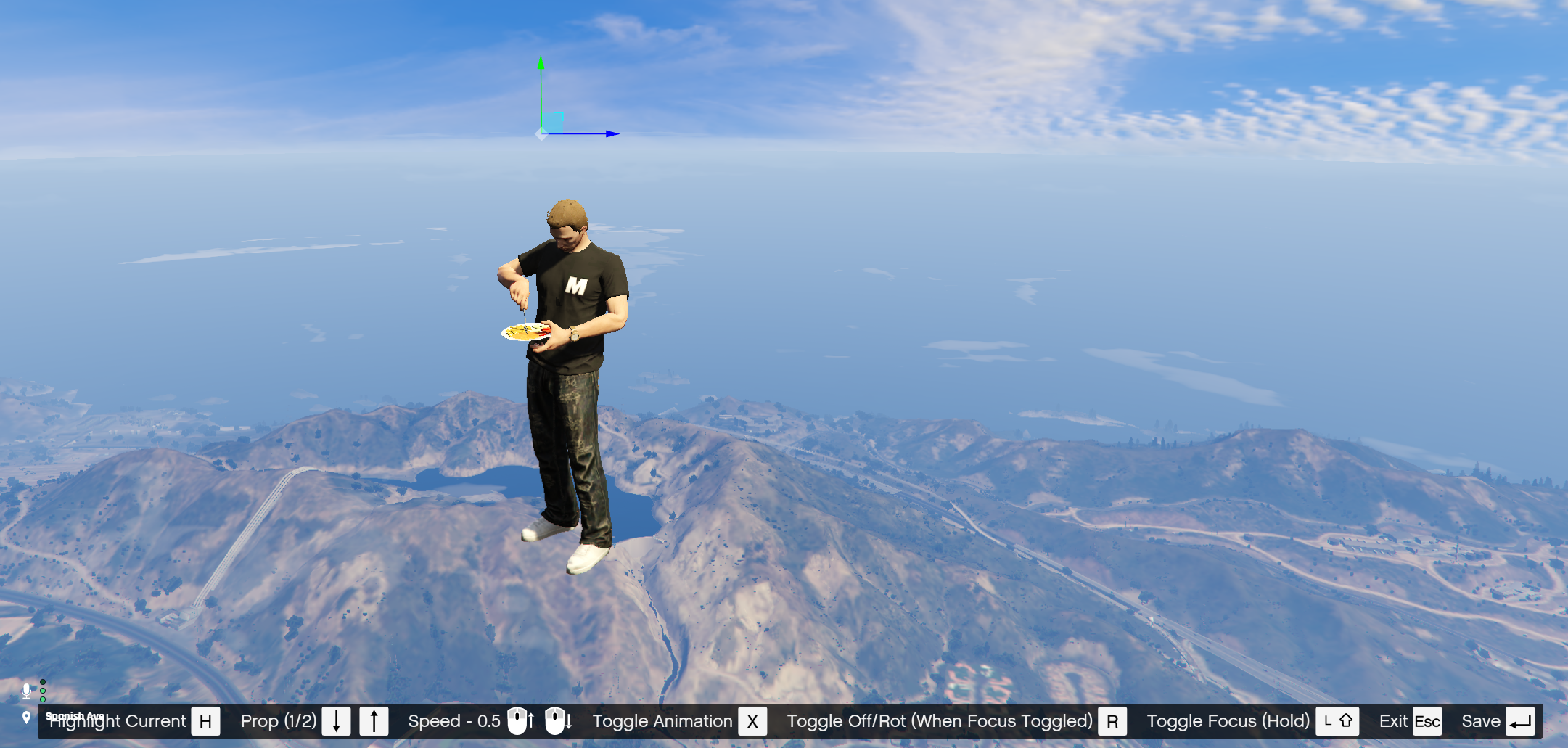 
## Development Details
* We use a rotation order of 1, see [native documentation](https://docs.fivem.net/natives/?_0xAFBD61CC738D9EB9) for more info.
## Dependencies
* [zyke\_lib](https://github.com/ZykeWasTaken/zyke_lib)
## Credits
* [https://github.com/DemiAutomatic/object\_gizmo](https://github.com/DemiAutomatic/object_gizmo)
* [https://github.com/TGIANN/tgiann-attachproptoplayereditor](https://github.com/TGIANN/tgiann-attachproptoplayereditor)
### Exports & Events
Canonical URL: https://docs.zykeresources.com/free-resources/propaligner/exports-and-events
Markdown URL: https://docs.zykeresources.com/free-resources/propaligner/exports-and-events.md
# Exports & Events
> [!INFO]
> **Types & Classes**
>
> All types & classes can be found in types.lua.
> [!INFO]
> **Suggestions?**
>
> If you wish to have any exports and or events added, please head over to our Discord and create a suggestion post. We are happy to allow for easier integration within other resources.
## Client Exports
### Configure Alignments
> Opens the menu and inserts the data you provided, and returns all configured alignments when you close the menu.\
> \
> This is mainly meant to be used within other resources where you want to grab alignments.\
> \
> In here you can also enable a back button, to void confusion when loading & then returning safely.\
> \
> **Example:**
>
> ```lua
> ---@param data AlignmentData
> ---@param backButton? boolean
> exports["zyke_propaligner"]:ConfigureAlignments(data, backButton)
> ```
### Set Alignment Data
> If you have pre-defined data you want to insert, use this. In here you can also enable a back button, to void confusion when loading & then returning safely.\
> \
> **Example:**
>
> ```lua
> ---@param data AlignmentData
> ---@param backButton? boolean | "prev" @If "prev", use the previous setting
> exports["zyke_propaligner"]:SetAlignmentData(bones)
> ```
### Set Bones
> Sets the available bones in the select menu. This is mainly meant to filter out tons of uncommon bones.\
> \
> Is using `"default"`, it will reset the bones to our base config in `shared/bones.lua`.\
> Id & idx are bone values.\
> \
> **Example:**
>
> ```lua
> ---@param bones {name: string, id: integer, idx: integer}[] | "default"
> exports["zyke_propaligner"]:SetBones(bones)
> ```
### Dependencies
Canonical URL: https://docs.zykeresources.com/free-resources/propaligner/dependencies
Markdown URL: https://docs.zykeresources.com/free-resources/propaligner/dependencies.md
# Dependencies
### Click the names to be redirected
* [zyke\_lib](https://github.com/ZykeWasTaken/zyke_lib)
### Changelog
Canonical URL: https://docs.zykeresources.com/free-resources/propaligner/changelog
Markdown URL: https://docs.zykeresources.com/free-resources/propaligner/changelog.md
# Changelog
Changelog - Version 1.5.2
## Changes
* Fixed an issue where editing particles would cause your prop to disappear.
* Added support for locking prop alignment editing controls via the `restrictedFields` config, so server owners can restrict which fields players are allowed to modify.
## Files Affected
* nui/\*
* README.md
* fxmanifest.lua
2026-05-24 15:27 CET
Changelog - Version 1.5.1
## Changes
* Rotation order conversion is now applied in the visualizer for accurate preview of rotation values.
* Added field restriction support: hosts can now disable specific alignment inputs and provide custom tooltips via `restrictedFields`.
* Collection fields (e.g., particles) now support a configurable maximum entry count through restrictions.
* Dropdown menus now support nested sub-lists, making it easier to navigate grouped options.
* Improved the data visualizer to prioritize vector format over table format when both are present.
* Fixed visualization of empty tables, which are now truncated to avoid empty or confusing entries.
* Fixed disabled buttons in the UI to show tooltips, clarifying why they are unavailable.
* Adjusted the save button color for better visual consistency.
## Files Affected
* client/alignment.lua
* shared/types.lua
* nui/\*
* README.md
* fxmanifest.lua
Changelog - Version 1.5.0
### Changes
* Updated the gizmo to be more 3D-aware, making adjustments relative to your ped's orientation.
* Added animation timeline UI with draggable playhead for precise control.
* Replaced scaleform keybind prompts with a new NUI keybind display.
* Moved the "current position" entry to the top of the alignment position list for quicker access.
* Fixed an issue where cancelling an animation while paused would not work correctly.
* Improved toggle animation sync to better match the new system.
* Added support for aligning props without playing an animation (standalone alignment).
* Added an option to disable idle animations when using the menu.
* Added export to retrieve bone data for use by external resources.
* Fixed history panel showing invalid data and incorrect entry lengths.
* Added helper tooltip in the prop list for easier object identification.
* Added 16 new language translations: Arabic, Czech, German, Spanish, French, Italian, Japanese, Lithuanian, Dutch, Polish, Portuguese, Romanian, Swedish, Thai, Turkish, and Chinese.
### Files Affected
* Replace all.
Changelog - Version 1.4.4
### Changes
* Fixed an issue retrieving the loaded state.
### Files Affected
* nui/\*
* fxmanifest.lua
Changelog - Version 1.4.3
### Changes
* Moved to the new zyke\_lib loader.
* Removed loading from incorrect button.
### Files Affected
* client/events.lua
* nui/\*
* fxmanifest.lua
Changelog - Version 1.4.2
### Changes
* Fixed animations with no set duration breaking the player.
### Files Affected
* client/alignment.lua
* client/functions.lua
* fxmanifest.lua
Changelog - Version 1.4.1
### Changes
* Selactable pre-defined base animations to get started quicker.
### Files Affected
* client/events.lua
* shared/animations.lua
* nui/\*
* locales/en.lua
* fxmanifest.lua
Changelog - Version 1.4.0
### Changes
* Removing internal values from the data that is returned & inserted into the history.
* Prohibiting attempting to open the UI before it has mounted.
* Visualizing current data & preset data.
* Optional positioning for ped during alignment.
* Extended the README.md with examples.
### Files Affected
* client/alignment.lua
* client/commands.lua
* client/events.lua
* nui/\*
* shared/config.lua
* shared/types.lua
* locales/en.lua
* README.md
* fxmanifest.lua
Changelog - Version 1.3.0
### Changes
* Started proper version tracking.
* Re-structured several nui source components.
* Changed prop accordions into buttons and moved the alignments into a modal.
* Added the ability to configure particles for each prop. Mainly to expedite adding new smokeables in zyke\_smoking.
Files Affected
* client/alignment.lua
* nui/\*
* shared/types.lua
* locales/en.lua
* README.md
* fxmanifest.lua
### Realistic Vehicles
Canonical URL: https://docs.zykeresources.com/free-resources/realistic-vehicles
Markdown URL: https://docs.zykeresources.com/free-resources/realistic-vehicles.md
# Realistic Vehicles
### Resource Description
Canonical URL: https://docs.zykeresources.com/free-resources/realistic-vehicles/resource-description
Markdown URL: https://docs.zykeresources.com/free-resources/realistic-vehicles/resource-description.md
# Resource Description
## Links
* [Download](https://github.com/Zyke-Resources/zyke_realisticvehicles)
## Information
This resource was made to more accurately capture vehicle deformation and stripped of all unnecessary functions. And recently, modifying vehicle damage multipliers.
Specifically, this resource manages the following:
* Vehicle body deformation.
* Vehicle health damage multipliers (engine, body, petrol tank).
* Torque reduction during engine damage.
* Vehicle flip prevention.
All options are practically opt-in/out, with presets ranging from arcade to balanced to hardcore.
### Configuration
You can find all of the configuration you need in [config.md](/free-resources/realistic-vehicles/config "mention").
### Config
Canonical URL: https://docs.zykeresources.com/free-resources/realistic-vehicles/config
Markdown URL: https://docs.zykeresources.com/free-resources/realistic-vehicles/config.md
# Config
### Settings
> General resource settings that affect development and diagnostics.
#### debug
> Enables debug behavior for the resource. Only enable this in development environments because it exposes dangerous commands.\
> \
> **Example:**
>
> ```lua
> debug = false
> ```
### DamageSystem
> Configures the realistic vehicle damage system. The selected preset is loaded from `shared/presets.lua`, then any values in `overrides` are applied on top of that preset.
#### enabled
> Master toggle for the entire damage system. When set to `false`, all damage-related logic is disabled and the resource skips damage processing entirely. Visual deformation syncing continues to work independently regardless of this setting.\
> \
> **Example:**
>
> ```lua
> enabled = true
> ```
#### preset
> Selects the preset level that defines the default values for all damage-related settings. Valid levels are `1` for Arcade, `2` for Casual, `3` for Balanced, `4` for Realistic, and `5` for Hardcore. Balanced is the recommended default. If an invalid level is configured, the resource falls back to Balanced.\
> \
> **Example:**
>
> ```lua
> preset = 3
> ```
#### overrides
> A table of key-value pairs that override individual damage settings after the preset is applied. Each key must match a valid damage system key from `shared/presets.lua`; for example, `{ limpMode = true, damageFactorEngine = 5.0 }` changes only those values while keeping the rest of the selected preset.\
> \
> **Example:**
>
> ```lua
> overrides = {}
> ```
**Choosing Between Presets And Overrides**
Use `preset` when you want a complete difficulty profile. Use `overrides` when you like a preset overall but want to tune one or more values.
The resource resolves the damage system in this order:
1. Reads `Config.DamageSystem.preset`.
2. Loads that preset from `shared/presets.lua`.
3. Falls back to preset `3` if the selected preset does not exist.
4. Copies every value from the preset into `Config.DamageSystem`.
5. Applies every value from `Config.DamageSystem.overrides` on top.
You normally should not edit `shared/presets.lua`. Edit it only if you want to permanently change the built-in preset definitions for the whole resource. If you only want to customize your server, keep using `shared/config.lua` and place changed values inside `overrides`. After changing preset definitions and restarting the resource, players should re-enter their vehicle so the new handling values are applied.
```lua
Config.DamageSystem = {
enabled = true,
preset = 3,
overrides = {
limpMode = true,
damageFactorEngine = 5.0,
},
}
```
**Preset Values**
| Key | Arcade | Casual | Balanced | Realistic | Hardcore |
| ----------------------------- | ------------: | ------------: | ------------: | ------------: | ------------: |
| `damageFactorEngine` | `0.4` | `0.8` | `1.2` | `1.6` | `3.2` |
| `damageFactorBody` | `0.5` | `1.5` | `2.0` | `3.0` | `5.0` |
| `damageFactorPetrolTank` | `10.0` | `30.0` | `48.0` | `64.0` | `100.0` |
| `deformationExponent` | `0.6` | `0.5` | `0.45` | `0.4` | `0.3` |
| `collisionDamageExponent` | `0.8` | `0.7` | `0.65` | `0.6` | `0.5` |
| `engineDamageExponent` | `0.8` | `0.7` | `0.65` | `0.6` | `0.5` |
| `deformationMultiplier` | `4.2` | `5.6` | `7.0` | `8.4` | `11.2` |
| `weaponsDamageMultiplier` | `0.5` | `1.0` | `1.5` | `2.0` | `3.0` |
| `degradingFailureThreshold` | `240.0` | `360.0` | `420.0` | `480.0` | `540.0` |
| `cascadingFailureThreshold` | `150.0` | `250.0` | `300.0` | `360.0` | `450.0` |
| `engineSafeGuard` | `200.0` | `150.0` | `120.0` | `100.0` | `80.0` |
| `degradingHealthSpeedFactor` | `0.4` | `1.0` | `1.6` | `2.0` | `3.0` |
| `cascadingFailureSpeedFactor` | `0.4` | `0.8` | `1.2` | `1.6` | `2.4` |
| `torqueMultiplierEnabled` | `false` | `true` | `true` | `true` | `true` |
| `torqueDegradationThreshold` | `200` | `400` | `500` | `600` | `700` |
| `limpMode` | `true` | `true` | `false` | `false` | `false` |
| `limpModeMultiplier` | `0.4` | `0.25` | `0.19` | `0.19` | `0.15` |
| `preventVehicleFlip` | `false` | `false` | `true` | `true` | `true` |
| `classDamageMultiplier` | default table | default table | default table | default table | default table |
**Override Keys**
| Key | What It Controls | Notes / Range |
| ----------------------------- | ------------------------------------------------------------------------------------------------ | --------------------------------------------------------------------------------------------------------------------------------------------- |
| `damageFactorEngine` | Multiplies engine health damage. | Higher values make engine damage harsher. |
| `damageFactorBody` | Multiplies body health damage. | Higher values make body damage harsher. Also affects weapon damage handling normalization. |
| `damageFactorPetrolTank` | Multiplies petrol tank health damage. | Higher values make petrol tank damage harsher. |
| `weaponsDamageMultiplier` | Sets weapon damage handling for vehicles. | Use `0.0`-`10.0`, or `-1` to leave weapon damage handling untouched. |
| `deformationExponent` | Compresses each vehicle's original deformation handling before applying `deformationMultiplier`. | Lower preset values make deformation tuning more aggressive. |
| `collisionDamageExponent` | Compresses each vehicle's original collision damage handling toward `1.0`. | Used when applying `fCollisionDamageMult`. |
| `engineDamageExponent` | Compresses each vehicle's original engine damage handling toward `1.0`. | Used when applying `fEngineDamageMult`. |
| `deformationMultiplier` | Multiplies visual deformation handling. | For manual overrides, use `0.0`-`10.0`, or `-1` to leave deformation handling untouched. The Hardcore preset uses `11.2`. |
| `degradingFailureThreshold` | Engine health threshold where slow passive degradation starts. | Higher values make degradation start earlier. |
| `cascadingFailureThreshold` | Engine health threshold where rapid cascading failure starts. | Higher values make severe failure start earlier. |
| `engineSafeGuard` | Minimum engine health floor while not in fire mode. | Lower values allow the engine to degrade further. If limp mode is disabled, vehicles below this point become undriveable. |
| `degradingHealthSpeedFactor` | Speed of slow passive engine degradation. | Higher values drain engine health faster between the degrading and cascading thresholds. |
| `cascadingFailureSpeedFactor` | Speed of rapid engine degradation. | Higher values drain engine health faster below the cascading threshold. |
| `torqueMultiplierEnabled` | Enables torque loss as engine health drops. | Boolean. Uses `torqueDegradationThreshold`. |
| `torqueDegradationThreshold` | Engine health below which torque starts degrading. | Higher values make torque loss begin earlier. |
| `limpMode` | Allows a damaged vehicle to keep moving at reduced power near the safeguard threshold. | Boolean. Uses `limpModeMultiplier`. |
| `limpModeMultiplier` | Torque multiplier used during limp mode. | The override guidance in `presets.lua` recommends `0.05`-`0.25`; higher values make limp mode less restrictive. The Arcade preset uses `0.4`. |
| `preventVehicleFlip` | Helps prevent upside-down vehicles from being flipped back over by throttle input. | Boolean. |
| `classDamageMultiplier` | Per-class damage multiplier table for vehicle classes `0`-`21`. | Higher values make that class take more damage. Classes not listed use `1.0`. |
**Default Class Multipliers**
`classDamageMultiplier` lets you tune damage by GTA vehicle class. For example, the default table makes motorcycles weaker than most cars and makes industrial vehicles tougher.
| Class | Vehicle Type | Default |
| ----: | --------------- | ------: |
| `0` | Compacts | `1.0` |
| `1` | Sedans | `1.0` |
| `2` | SUVs | `1.0` |
| `3` | Coupes | `1.0` |
| `4` | Muscle | `1.0` |
| `5` | Sports Classics | `1.0` |
| `6` | Sports | `1.0` |
| `7` | Super | `1.0` |
| `8` | Motorcycles | `1.25` |
| `9` | Off-road | `0.7` |
| `10` | Industrial | `0.25` |
| `11` | Utility | `1.0` |
| `12` | Vans | `1.0` |
| `13` | Cycles | `1.0` |
| `14` | Boats | `0.5` |
| `15` | Helicopters | `1.0` |
| `16` | Planes | `1.0` |
| `17` | Service | `0.75` |
| `18` | Emergency | `0.75` |
| `19` | Military | `0.75` |
| `20` | Commercial | `1.0` |
| `21` | Trains | `1.0` |
Cycles, helicopters, planes, and trains are excluded from the damage loop, so their default multipliers are listed for completeness but are not used by normal damage processing.
```lua
overrides = {
classDamageMultiplier = {
[0] = 1.0, -- Compacts
1.0, -- Sedans
1.0, -- SUVs
1.0, -- Coupes
1.0, -- Muscle
1.0, -- Sports Classics
1.0, -- Sports
1.0, -- Super
1.25, -- Motorcycles
0.7, -- Off-road
0.25, -- Industrial
1.0, -- Utility
1.0, -- Vans
1.0, -- Cycles
0.5, -- Boats
1.0, -- Helicopters
1.0, -- Planes
0.75, -- Service
0.75, -- Emergency
0.75, -- Military
1.0, -- Commercial
1.0, -- Trains
},
}
```
### Exports & Events
Canonical URL: https://docs.zykeresources.com/free-resources/realistic-vehicles/exports-and-events
Markdown URL: https://docs.zykeresources.com/free-resources/realistic-vehicles/exports-and-events.md
# Exports & Events
> [!INFO]
> **Types & Classes**
>
> The public data shapes used by these exports are documented below in [#data-types](/free-resources/realistic-vehicles/exports-and-events#data-types "mention").
> [!INFO]
> **Suggestions?**
>
> If you wish to have any exports and or events added, please head over to our Discord and create a suggestion post. We are happy to allow for easier integration within other resources.
## Data Types
> These are the public data shapes used by the exports below. Internal debug and runtime-only classes are not part of the public API.
>
> ```lua
> ---@class NativeDeformationEntry
> ---@field [1] number @ Local x offset
> ---@field [2] number @ Local y offset
> ---@field [3] number @ Local z offset
> ---@field [4] number @ Deformation strength
>
> ---@class VectorDeformationEntry
> ---@field [1] vector3 @ Local offset
> ---@field [2] number | vector3 @ Deformation strength or native deformation vector
>
> ---@alias VehicleDeformationEntry NativeDeformationEntry | VectorDeformationEntry
>
> ---@class WheelLossStateEntry
> ---@field index integer @ Wheel index detached from the vehicle
> ---@field reason? string @ Detach reason stored for repair/debug flows
> ---@field time? integer @ Server os.time timestamp when the wheel detached
>
> ---@class WheelLossStateData
> ---@field entries? WheelLossStateEntry[] @ Detached wheel entries in the vehicle state bag
> ---@field integrity? table @ Wheel integrity keyed by wheel index
>
> ---@class VehicleDamageData
> ---@field version integer @ Data format version
> ---@field deformation VehicleDeformationEntry[] | nil @ Saved vehicle body deformation
> ---@field wheelLoss WheelLossStateData | nil @ Saved wheel-loss and wheel-integrity state
> ```
## Client Exports
### Get Vehicle Damage Data
> Grabs all custom damage data managed by this resource in one master table. Use this in framework vehicle-property or garage save functions so future damage data can be added without changing integrations again.\
> \
> **Example:**
>
> ```lua
> ---@param veh integer
> ---@return VehicleDamageData | nil
> local damageData = exports["zyke_realisticvehicles"]:GetVehicleDamageData(veh)
> ```
> \
> **Example Data:**
>
> ```lua
> {
> version = 1,
> deformation = {
> {1.20, -2.40, 0.00, 0.18},
> },
> wheelLoss = {
> entries = {},
> integrity = {
> [0] = 100.0,
> [1] = 74.5,
> },
> },
> }
> ```
### Set Vehicle Damage Data
> Applies custom damage data that was previously saved with [#get-vehicle-damage-data](/free-resources/realistic-vehicles/exports-and-events#get-vehicle-damage-data "mention"). Run this after the framework has applied its normal vehicle properties.\
> \
> This is the preferred integration export for garages and framework vehicle-property functions. The lower-level deformation and wheel-loss exports remain available for custom tools.\
> \
> **Example:**
>
> ```lua
> ---@param veh integer
> ---@param damageData VehicleDamageData
> ---@return boolean
> local success = exports["zyke_realisticvehicles"]:SetVehicleDamageData(veh, damageData)
> ```
> \
> **Example Result:**
>
> ```lua
> true
> ```
### Set Deformation
> Sets the deformation of a vehicle. This should be triggered right when it is spawned, like in a garage script.\
> \
> This shouldn't be triggered all by itself, it should only set the deformation that has been captured by the [#get-deformation](/free-resources/realistic-vehicles/exports-and-events#get-deformation "mention") export.\
> \
> **Example:**
>
> ```lua
> ---@param veh integer
> ---@param deformation VehicleDeformationEntry[]
> exports["zyke_realisticvehicles"]:SetDeformation(veh, deformation)
> ```
> \
> **Example Data:**
>
> ```lua
> local deformation = {
> {1.20, -2.40, 0.00, 0.18},
> {-1.20, -2.40, 0.00, 0.11},
> }
> ```
### Get Deformation
> Grabs the deformation of a vehicle. This should be used when you want to save the current state to apply later, like when parking your vehicle in a garage.\
> \
> This, by itself, does nothing. It should be used in combination with [#set-deformation](/free-resources/realistic-vehicles/exports-and-events#set-deformation "mention") to retrieve & apply deformation.\
> \
> **Example:**
>
> ```lua
> ---@param veh integer
> ---@return NativeDeformationEntry[] | nil
> local deformation = exports["zyke_realisticvehicles"]:GetDeformation(veh)
> ```
> \
> **Example Data:**
>
> ```lua
> {
> {1.20, -2.40, 0.00, 0.18},
> {-1.20, -2.40, 0.00, 0.11},
> }
> ```
### Fix Deformation
> Fixes the deformation on a car. As this is written, all the export does is run the [SetVehicleDeformationFixed](https://docs.fivem.net/natives/?_0x953DA1E1B12C0491) native, but this may be changed in a future update. So if you want stability, trigger this export, even if it's not necessary right now.\
> \
> **Example:**
>
> ```lua
> ---@param veh integer
> exports["zyke_realisticvehicles"]:FixDeformation(veh)
> ```
### Wheel Index Reference
> A wheel index is the number used to choose which wheel you want to check, damage, repair, or detach. Cars and bikes use different numbers.\
> \
> **Cars:**
> - `0` = Front left
> - `1` = Front right
> - `2` = Back left
> - `3` = Back right
> \
> **Bikes:**
> - `0` = Back wheel
> - `1` = Front wheel
> \
> For example, `0` means front left on a car, but back wheel on a bike.
### Get Detached Wheels
> Grabs the wheels currently tracked as detached on a vehicle. This is useful when another resource needs to save, inspect, or display the wheel-loss state.\
> \
> Each entry contains the wheel index, the stored reason, and the server `os.time()` timestamp from when the wheel was detached. If the vehicle does not have detached wheels, this returns an empty table.\
> \
> See [#wheel-index-reference](/free-resources/realistic-vehicles/exports-and-events#wheel-index-reference "mention") before displaying or manually using the returned `index` value.\
> \
> **Example:**
>
> ```lua
> ---@param veh integer
> ---@return WheelLossStateEntry[]
> local detachedWheels = exports["zyke_realisticvehicles"]:GetDetachedWheels(veh)
> ```
> \
> **Example Data:**
>
> ```lua
> {
> {
> index = 0,
> reason = "landing_integrity_failure",
> time = 1747382400,
> },
> {
> index = 3,
> reason = "direct_hit",
> time = 1747382442,
> },
> }
> ```
### Get Wheel Integrity
> Grabs the current wheel integrity values for a vehicle. This is useful when a garage, repair, or inspection resource needs to show or save the current condition of each wheel.\
> \
> The returned table is keyed by wheel index. A higher value means a healthier wheel. `0` means the wheel has fully failed, or has been detached by the wheel-loss system.\
> \
> See [#wheel-index-reference](/free-resources/realistic-vehicles/exports-and-events#wheel-index-reference "mention") before turning the table keys into player-facing wheel labels.\
> \
> If the vehicle is not valid, this returns an empty table.\
> \
> **Example:**
>
> ```lua
> ---@param veh integer
> ---@return table
> local integrity = exports["zyke_realisticvehicles"]:GetWheelIntegrity(veh)
>
> for wheelIndex, value in pairs(integrity) do
> print(("Wheel %d integrity: %.1f"):format(wheelIndex, value))
> end
> ```
> \
> **Example Data:**
>
> ```lua
> {
> [0] = 100.0,
> [1] = 74.5,
> [2] = 0.0,
> [3] = 92.0,
> }
> ```
### Open Wheel Integrity Menu
> Opens the zyke_lib context menu overview for wheel integrity. If a vehicle is passed, that vehicle is inspected. If no vehicle is passed, the export inspects the vehicle the player is in, or the closest supported vehicle within `Config.DamageSystem.wheelLossIntegrityMenu.maxDistance`.\
> \
> This is meant for overview-style inspection tools. If `Config.DamageSystem.wheelLossIntegrityMenu.enabled` is `false`, this export returns `false` and does not open the menu.\
> \
> **Example:**
>
> ```lua
> ---@param veh? integer
> ---@return boolean
> local opened = exports["zyke_realisticvehicles"]:OpenWheelIntegrityMenu(veh)
> ```
> \
> **Example Result:**
>
> ```lua
> true
> ```
### Toggle Wheel Integrity Menu
> Toggles the zyke_lib context menu overview for wheel integrity. If the overview is already open, it closes it. If it is closed, it behaves like [#open-wheel-integrity-menu](/free-resources/realistic-vehicles/exports-and-events#open-wheel-integrity-menu "mention").\
> \
> This is useful for keybinds, radial menu entries, or inspection tools that should use one action to open and close the overview.\
> \
> **Example:**
>
> ```lua
> ---@param veh? integer
> ---@return boolean
> local toggled = exports["zyke_realisticvehicles"]:ToggleWheelIntegrityMenu(veh)
> ```
> \
> **Example Result:**
>
> ```lua
> true
> ```
### Detach Vehicle Wheel
> Detaches a wheel from a vehicle and stores that wheel as detached in the vehicle state. This should be used when another resource wants to force a wheel-loss event, such as a mechanic tool, scripted crash, or admin/debug action.\
> \
> The export also sets the wheel integrity to `0`, stores the detach reason, and prevents the same wheel from being detached twice.\
> \
> See [#wheel-index-reference](/free-resources/realistic-vehicles/exports-and-events#wheel-index-reference "mention") before choosing the `wheelIndex`, especially when supporting both cars and bikes.\
> \
> This returns `true` when the wheel was detached and persisted. It returns `false` if the export fails for any reason.\
> \
> **Example:**
>
> ```lua
> ---@param veh integer
> ---@param wheelIndex integer
> ---@param reason? string
> ---@return boolean
> local success = exports["zyke_realisticvehicles"]:DetachVehicleWheel(veh, wheelIndex, "mechanic_tool")
> ```
> \
> **Example Result:**
>
> ```lua
> true
> ```
### Clear Wheel Loss Data
> Clears only the wheel-loss data from a vehicle. This removes the stored detached wheels and resets the stored wheel integrity state, so the wheel-loss system no longer treats the vehicle as having broken wheels.\
> \
> This does not repair, reattach, or visually fix any wheels by itself. Use this when another resource has already repaired the vehicle and you only need to clear this resource's saved wheel-loss data.\
> \
> This returns `true` when the data was cleared. It returns `false` if the export fails for any reason.\
> \
> **Example:**
>
> ```lua
> ---@param veh integer
> ---@return boolean
> local success = exports["zyke_realisticvehicles"]:ClearWheelLossData(veh)
> ```
> \
> **Example Result:**
>
> ```lua
> true
> ```
### Repair Vehicle Wheels
> Fixes the vehicle tyres and wheel health, then clears the wheel-loss data for that vehicle. This should be used by repair flows that are meant to reset wheel-loss tracking, not by save/load logic that only wants to clear stored data.\
> \
> This returns `true` when the repair/reset ran. It returns `false` if the export fails for any reason.\
> \
> **Example:**
>
> ```lua
> ---@param veh integer
> ---@return boolean
> local success = exports["zyke_realisticvehicles"]:RepairVehicleWheels(veh)
> ```
> \
> **Example Result:**
>
> ```lua
> true
> ```
### Repair Vehicle Damage
> Clears this resource's custom repair state for a vehicle. This fixes deformation, clears saved deformation data, repairs wheel-loss damage, and clears wheel-loss data. Use this after another resource has already run its normal vehicle repair, such as `SetVehicleFixed(vehicle)`.\
> \
> This returns `true` when the repair/reset ran. It returns `false` or `nil` if no valid vehicle was provided or found.\
> \
> **Example:**
>
> ```lua
> ---@param veh integer
> ---@return boolean?
> local success = exports["zyke_realisticvehicles"]:RepairVehicleDamage(veh)
> ```
> \
> **Example Result:**
>
> ```lua
> true
> ```
### Get Wheel Loss Data
> Grabs all wheel-loss data in one table. This is the easiest export to use when saving vehicle properties in a garage or framework vehicle-property function.\
> \
> The returned table contains detached wheel entries and wheel integrity values. Store it together with the rest of the vehicle properties, then apply it later with [#set-wheel-loss-data](/free-resources/realistic-vehicles/exports-and-events#set-wheel-loss-data "mention").\
> \
> **Example:**
>
> ```lua
> ---@param veh integer
> ---@return WheelLossStateData
> local wheelLoss = exports["zyke_realisticvehicles"]:GetWheelLossData(veh)
> ```
> \
> **Example Data:**
>
> ```lua
> {
> entries = {
> {
> index = 1,
> reason = "direct_hit",
> time = 1747382442,
> },
> },
> integrity = {
> [0] = 100.0,
> [1] = 36.5,
> [2] = 100.0,
> [3] = 100.0,
> },
> }
> ```
### Set Wheel Loss Data
> Applies wheel-loss data that was previously saved with [#get-wheel-loss-data](/free-resources/realistic-vehicles/exports-and-events#get-wheel-loss-data "mention"). This is meant for vehicle spawn/load flows, especially garages that already apply framework vehicle properties.\
> \
> This restores detached wheels and partial wheel integrity. If `nil` is passed as the data, the stored wheel-loss data is cleared.\
> \
> This returns `true` when the data was applied or cleared. It returns `false` if the export fails for any reason.\
> \
> **Example:**
>
> ```lua
> ---@param veh integer
> ---@param wheelLoss? WheelLossStateData | WheelLossStateEntry[]
> ---@return boolean
> local success = exports["zyke_realisticvehicles"]:SetWheelLossData(veh, wheelLoss)
> ```
> \
> **Example Result:**
>
> ```lua
> true
> ```
### Changelog
Canonical URL: https://docs.zykeresources.com/free-resources/realistic-vehicles/changelog
Markdown URL: https://docs.zykeresources.com/free-resources/realistic-vehicles/changelog.md
# Changelog
Changelog - Version 2.1.0
## Changes
* Vehicles now respond to different terrain materials (grass, dirt, sand, mud) with realistic handling changes, including suspension sink and traction adjustments.
* Terrain sink visually lowers the vehicle on soft surfaces.
* Acceleration, top speed and traction are affected based on surface material.
* Introduced wheel integrity notifications and a wheel inspection tool.
* Players receive warnings when wheel health drops below thresholds.
* The 'wheel_scanner' item opens a wheel integrity overview menu.
* Fixed vehicles becoming incorrectly undriveable at low fuel levels.
* The resource now prevents the native engine stalling bug and properly disables the engine when fuel runs out.
* Added an export for repair scripts to properly clear wheel and deformation damage after full repairs.
* RepairVehicleDamage export resets synced damage data to prevent detached wheels from reappearing.
* Integration instructions for popular mechanic scripts like JG Mechanic are included in the documentation.
## Files Affected
* client/\*
* server/unlocked/main.lua
* shared/config.lua
* shared/unlocked/config.lua
* shared/unlocked/presets.lua
* AGENTS.md
* README.md
* fxmanifest.lua
2026-05-30 01:29 CET
Changelog - Version 2.0.0
## Changes
* Added a wheel loss system: wheels can detach on hard landings and impacts, with integrity checked per wheel.
* Fixed vehicle damage multiplier stacking that could cause excessive damage after reloading or exiting vehicles. Damage multipliers (including weapon damage) are now properly saved and restored, resetting correctly on vehicle entry.
* Improved deformation handling to prevent deformity from progressively accumulating after repairs and made deformation calculations more reliable by caching target data.
* Realistic presets now restrict airborne tilting, preventing vehicles from flipping unrealistically in the air.
* Added a wheel scanner item for checking wheel integrity, with inventory definitions and images for ox_inventory and qb-core.
* Added full locale support for 16 languages (ar, cs, de, en, es, fr, it, ja, nl, pl, pt, ro, sv, th, tr, zh).
* The resource now requires the zyke_lib dependency. Ensure it is installed for the resource to function.
* Added server exports GetVehicleDamageData and SetVehicleDamageData, enabling frameworks to persist vehicle damage data. Integration instructions for ESX, QBCore and Qbox are provided in the README.
## Files Affected
* client/\*
* server/main.lua
* shared/config.lua
* shared/presets.lua
* README.md
* extras/items/images/wheel\_scanner.png
* extras/items/ox\_inventory.lua
* extras/items/qb-core.lua
* fxmanifest.lua
Changelog - Version 1.1.2
## Changes
* Double-check type mismatch that can be caused when switching deformation scripts.
## Files Affected
* client/deformation.lua
* fxmanifest.lua
Changelog - Version 1.1.1
## Changes
* Slower intervals for checking if your vehicle is flipped.
* Refactored the process to ensure the vehicle isn't being reset when you enter it & it's almost destroyed.
* Added a debug hud for the vehicle health.
* Limit debug prints.
* Adjusted some defaults for the presets to make vehicles last longer on average.
* Replaced the frame-loop native to set the vehicle torque to simulate the vehicle dying with editing the entities' handling data for better performance.
## Files Affected
* Replace all
Changelog - Version 1.1.0
## Changes
* Renamed the script from zyke\_vehdeformation to zyke\_realisticvehicles.
* Added damage multipliers to engine, body & petrol tank.
## Files Affected
* Replace all
Changelog - Version 1.0.0
Initial release
### Vending Machines
Canonical URL: https://docs.zykeresources.com/free-resources/vending-machines
Markdown URL: https://docs.zykeresources.com/free-resources/vending-machines.md
# Vending Machines
### Resource Description
Canonical URL: https://docs.zykeresources.com/free-resources/vending-machines/resource-description
Markdown URL: https://docs.zykeresources.com/free-resources/vending-machines/resource-description.md
# Resource Description
## Links
* [Download](https://github.com/ZykeWasTaken/zyke_vending)
## Information
A refurbished and very simplistic in-game interaction for acquiring items from vending machine with smooth animations & prop interactions.
This resource was meant to be included inside of our upcoming zyke\_consuambles, but was made into it's own resource as I believe others may be interested in it.
### Config
Canonical URL: https://docs.zykeresources.com/free-resources/vending-machines/config
Markdown URL: https://docs.zykeresources.com/free-resources/vending-machines/config.md
# Config
### Settings
> Groups the main configuration options for this resource. The child sections below document each nested setting.
#### props
> Defines a keyed collection of `props` entries. The child sections below document the fields available for each entry.\
> \
> **Example:**
>
> ```lua
> props = {
> ["default"] = {
> model = "prop_ld_flow_bottle",
> offset = vector3(0.123, -0.039, 0.033),
> rotation = vector3(-103.202, -68.066, 2.815),
> bone = 18905,
> },
> ...
> }
> ```
#### props\[x].model
> Model name spawned for this prop template before it is attached to the player during the vending purchase animation.\
> \
> **Example:**
>
> ```lua
> model = "prop_ld_flow_bottle"
> ```
#### props\[x].offset
> Attachment offset for this prop template. The `vector3` value is passed into the prop attachment step as the X, Y, and Z offset.\
> \
> **Example:**
>
> ```lua
> offset = vector3(0.123, -0.039, 0.033)
> ```
#### props\[x].rotation
> Attachment rotation for this prop template. The `vector3` value is passed into the prop attachment step as the X, Y, and Z rotation.\
> \
> **Example:**
>
> ```lua
> rotation = vector3(-103.202, -68.066, 2.815)
> ```
#### props\[x].bone
> Ped bone ID used when attaching this prop template to the player during the vending purchase animation.\
> \
> **Example:**
>
> ```lua
> bone = 18905
> ```
#### machines
> Defines a keyed collection of `machines` entries. The child sections below document the fields available for each entry.\
> \
> **Example:**
>
> ```lua
> machines = {
> [`ch_chint10_vending_smallroom_01`] = {
> interactOffset = vector3(0.0, -0.97, 0.05),
> items = {
> {name = "sprunk", prop = "sprunk", price = 2},
> {name = "ecola", prop = "ecola", price = 2},
> {name = "orango_tang", prop = "orango_tang", price = 2},
> {name = "junk", prop = "junk", price = 2}
> }
> },
> ...
> }
> ```
#### machines\[x].interactOffset
> Offset from the vending machine entity used to calculate where the player should stand for the purchase animation.\
> \
> **Example:**
>
> ```lua
> interactOffset = vector3(0.0, -0.97, 0.05)
> ```
#### machines\[x].items
> Defines a list of `items` entries. The child sections below document the fields available for each entry.\
> \
> **Example:**
>
> ```lua
> items = {
> {name = "sprunk", prop = "sprunk", price = 2},
> ...
> }
> ```
#### machines\[x].items\[x].name
> Inventory item name sold by this vending machine option.\
> \
> **Example:**
>
> ```lua
> name = "sprunk"
> ```
#### machines\[x].items\[x].prop
> Prop template key from `props` used to display the purchased item during the vending animation.\
> \
> **Example:**
>
> ```lua
> prop = "sprunk"
> ```
#### machines\[x].items\[x].price
> Cash price removed from the player when this vending machine item is purchased.\
> \
> **Example:**
>
> ```lua
> price = 2
> ```
### Dependencies
Canonical URL: https://docs.zykeresources.com/free-resources/vending-machines/dependencies
Markdown URL: https://docs.zykeresources.com/free-resources/vending-machines/dependencies.md
# Dependencies
### Click the names to be redirected
* [zyke\_lib](https://github.com/ZykeWasTaken/zyke_lib)
### Changelog
Canonical URL: https://docs.zykeresources.com/free-resources/vending-machines/changelog
Markdown URL: https://docs.zykeresources.com/free-resources/vending-machines/changelog.md
# Changelog
Changelog - Version 1.0.3
## Changes
* Reverted early check that would infinitely lock the loader.
## Files Affected
* client/main.lua
* server/main.lua
* fxmanifest.lua
Changelog - Version 1.0.2
## Changes
* Moved to the new zyke\_lib loader.
* Some misc fixes like formatting.
## Files Affected
* client/main.lua
* server/main.lua
* extras/items/qs-inventory.lua
* .luarc.json
* fxmanifest.lua
Changelog - Version 1.0.1
## Changes
* Added documentation link.
* Removing from auth list if character logs out.
## Files Affected
* server/main.lua
* README.md
* fxmanifest.lua
Changelog - Version 1.0.0
Official release.
### Sounds
Canonical URL: https://docs.zykeresources.com/free-resources/sounds
Markdown URL: https://docs.zykeresources.com/free-resources/sounds.md
# Sounds
### Resource Description
Canonical URL: https://docs.zykeresources.com/free-resources/sounds/resource-description
Markdown URL: https://docs.zykeresources.com/free-resources/sounds/resource-description.md
# Resource Description
## Links
* [Download](https://github.com/ZykeWasTaken/zyke_sounds)
## Information
This is a work-in-progress resource that I created to bring zyke\_smoking to life. When adding sounds to my resource I noticed several issues such as volume based on distance to the audio source, 0.5-1s delays and whatnot in popular alternatives. This resource solves that, allowing me to develop more immersive resources.
### Config
Canonical URL: https://docs.zykeresources.com/free-resources/sounds/config
Markdown URL: https://docs.zykeresources.com/free-resources/sounds/config.md
# Config
### Settings
> Times are in milliseconds. 1000ms = 1 second. Master settings table controlling sound system behavior and performance.
#### debug
> Shows debug markers for active sound positions and logs loaded sound files when enabled.\
> \
> **Example:**
>
> ```lua
> debug = false
> ```
#### volumeUpdateInterval
> Controls how frequently clients update active sound volume by distance. Lower values make volume changes smoother, while higher values reduce update cost. Changing this value too much can drastically affect performance, so only adjust it if you understand the implications.\
> \
> **Example:**
>
> ```lua
> volumeUpdateInterval = 100
> ```
#### commandName
> The chat command that players type to open the sound volume configuration menu.\
> \
> **Example:**
>
> ```lua
> commandName = "sounds"
> ```
#### kvpKey
> The key used to store per-sound volume multipliers in the client's persistent key-value storage. This value is read on resource start to restore saved volume settings and written whenever volumes are updated. Change this key only if you want to reset all saved volume multipliers for every player.\
> \
> **Example:**
>
> ```lua
> kvpKey = "zyke_sounds:volumeMultiplier"
> ```
#### routingBucketUpdateInterval
> Controls how frequently the server checks whether players have moved to a different routing bucket for location-based sounds. This setting is intended for advanced users who understand the implications of modifying it.\
> \
> **Example:**
>
> ```lua
> routingBucketUpdateInterval = 1000
> ```
#### unknownSoundDurationMs
> The fallback duration in milliseconds used for sounds whose actual audio length has not yet been determined. This value is applied as a temporary placeholder until the correct duration is available.\
> \
> **Example:**
>
> ```lua
> unknownSoundDurationMs = 300000
> ```
#### maxCachedSoundDurationMs
> The maximum sound duration in milliseconds that the server will trust and cache from a client report. The server ignores any client-reported sound duration longer than this value. The default is 600000 ms (10 minutes). The comment advises not changing this value unless you need to play sounds longer than 10 minutes.\
> \
> **Example:**
>
> ```lua
> maxCachedSoundDurationMs = 600000
> ```
#### soundDurationToleranceMs
> Defines the tolerance in milliseconds for sound duration reports from clients. When a client reports a sound file's duration, the server compares it against any previously cached duration for that sound. If the difference between the new report and the cached value exceeds this tolerance, the new report is discarded as invalid. This prevents incorrect duration data from being cached.\
> \
> **Example:**
>
> ```lua
> soundDurationToleranceMs = 500
> ```
#### soundCullingUpdateInterval
> Controls how frequently the server checks whether players have moved into or out of range of active location sounds.\
> \
> **Example:**
>
> ```lua
> soundCullingUpdateInterval = 1000
> ```
#### stateBagEntityStaleMs
> Controls how long muted entity sounds continue playing after the associated entity or player leaves the local client's scope. If the entity remains out of scope for longer than this duration, the sound is stopped. The value is in milliseconds.\
> \
> **Example:**
>
> ```lua
> stateBagEntityStaleMs = 2500
> ```
#### stateBagStopTtlMs
> Controls how long stop payloads remain in state bags after a sound stops. This allows scoped clients that join late to still receive fade-out or force-full stop data.\
> \
> **Example:**
>
> ```lua
> stateBagStopTtlMs = 2000
> ```
#### stateBagEmitSlots
> Controls how many temporary sync slots are available per entity for quick entity sounds. Each player entity gets its own pool of slots, so multiple players contributing sounds do not share the same pool.\
> \
> **Example:**
>
> ```lua
> stateBagEmitSlots = 4
> ```
#### oneShotStateBagTtlMs
> Controls how long one-shot entity sound synchronization data remains available in state bags before being cleaned up. Higher values can help slower clients receive the data, but also keep stale data in memory longer.\
> \
> **Example:**
>
> ```lua
> oneShotStateBagTtlMs = 10000
> ```
### Exports & Events
Canonical URL: https://docs.zykeresources.com/free-resources/sounds/exports-and-events
Markdown URL: https://docs.zykeresources.com/free-resources/sounds/exports-and-events.md
# Exports & Events
## Server Sided Exports
### Play Sound On Entity
> This export will play a sound on an entity, and regulate the volume based on your distance from it. It is dynamic and keeps following the entity.\
> \
> **Example:**
>
> ```lua
> ---@param entity integer
> ---@param id? string @Only needed if you want to manually stop the sound
> ---@param soundName string | string[] @Sound name, or list of them, will choose randomly from list every time PlaySound(JS) executes
> ---@param maxVolume number @0.0-1.0, the max volume for the sound, usually ~0.2
> ---@param maxDistance number @0.0-x, the max distance to hear your sound, usually ~2.0
> ---@param looped boolean | number | {[1]: number, [2]: number} @Basic looping, loop with time between, loop with random time between
> ---@param playCount? integer @If not looping, you can decide how many times the audio will play
> ---@return string @Sound id
> exports["zyke_sounds"]:PlaySoundOnEntity(entity, id, soundName, maxVolume, maxDistance, looped, playCount)
> ```
### Stop Sound
> Manually stop a sound playing. Allows you to fade it out or keep playing it until it ends. We do un-register the audio when fading or forcing the full to be played, so the same id can be re-used.\
> \
> **Example:**
>
> ```lua
> ---@param soundId string
> ---@param fade? number @In milliseconds, how long to fade the sound out for to avoid abrupt interruption
> ---@param forceFull? boolean @Force the audio to play out fully instead of cutting off, ignores fade
> exports["zyke_sounds"]:StopSound(soundId, fade, forceFull)
> ```
### Does File Exist
> Verify the existence of the sound file in zyke\_sounds. This is more expensive than DoesSoundExist since we are fetching the actual file instead of a quick table lookup.\
> \
> **Example:**
>
> ```lua
> ---@param fileName string
> ---@return boolean
> exports["zyke_sounds"]:DoesFileExist(fileName)
> ```
### Does Sound Exist
> Lightweight export to quickly validate if a sound has been loaded into memory on script start.\
> \
> **Example:**
>
> ```lua
> ---@param fileName string
> ---@return boolean
> exports["zyke_sounds"]:DoesSoundExist(fileName)
> ```
### Changelog
Canonical URL: https://docs.zykeresources.com/free-resources/sounds/changelog
Markdown URL: https://docs.zykeresources.com/free-resources/sounds/changelog.md
# Changelog
Changelog - Version 0.5.0
## Changes
* Overhauled sound synchronization to improve reliability and consistency across all players.
* Server-side caching ensures sounds are reliable long-term, expanding the capabilities of this resource past simple one-offs that run for a few second.
* Utilizing statebags for entities, sounds are now scoped better and are more reliable.
* Added Lithuanian language support.
## Files Affected
* Replace all.
2026-05-07 02:12 CET
Changelog - Version 0.4.0
## Changes
* Added a sounds menu for players to individually change the volume with a multiplier. Primarily to let people disable certain sounds they despise hearing, like eating sounds.
## Files Affected
* Replace all.
Changelog - Version 0.1.0
Pre-release.
### Key Minigame
Canonical URL: https://docs.zykeresources.com/free-resources/key-minigame
Markdown URL: https://docs.zykeresources.com/free-resources/key-minigame.md
# Key Minigame
### Resource Description
Canonical URL: https://docs.zykeresources.com/free-resources/key-minigame/resource-description
Markdown URL: https://docs.zykeresources.com/free-resources/key-minigame/resource-description.md
# Resource Description
## Links
* [Download](https://github.com/ZykeWasTaken/zyke_keyminigame)
## Information
A non/semi-intrusive & lightweight minigame for matching keys. This was created in the spirits of needing a minigame that does not automatically limit gameplay & requires a focus toggle, along with wanting something fresh.
This resource hasn't had a proper release, but can expand based on suggested features. It was just a smaller minigame that was for zyke\_consumables, made into it's separate project for others to use.
### Exports & Events
Canonical URL: https://docs.zykeresources.com/free-resources/key-minigame/exports-and-events
Markdown URL: https://docs.zykeresources.com/free-resources/key-minigame/exports-and-events.md
# Exports & Events
## Client Sided Exports
### Start Minigame
> Simply starts a minigame for the client executing it. Default time limit will be 10 if nothing is provided. Will throw an error if started when a minigame is already in progress.\
> \
> **Example:**
>
> ```lua
> ---@param keys string[] @Any keyboard keys except TAB & ESCAPE
> ---@param randomizeKeys? integer @If a number, the `keys` param is sample size for randomization, and this is the amount
> ---@param timeLimit? integer @In seconds, time to complete the minigame otherwise you fail
> ---@return boolean, "success" | "fail" | "cancel"
> exports["zyke_keyminigame"]:Start(keys, randomizeKeys, timeLimit)
> ```
### Start Non-Intrusive Minigame
> Starts a similar minigame to our standard export, but without any UI focusing. The minigame spawns at the top of your screen and only accepts arrow key inputs. This approach allows decent variety forcing you to really pay attention without freezing your game rendering you unable to walk.\
> \
> In situations where the player still needs to be able to walk/drive, use this.\
> \
> **Example:**
>
> ```lua
> ---@param keyCount integer @The amount of keys to press
> ---@param timeLimit? integer @In seconds, time to complete the minigame otherwise you fail
> ---@return boolean, "success" | "fail" | "cancel"
> exports["zyke_keyminigame"]:StartNonIntrusive(keyCount, timeLimit)
> ```
### Stop Minigame
> Stops the ongoing minigame.\
> \
> **Example:**
>
> ```lua
> exports["zyke_keyminigame"]:Stop()
> ```
### Is Active
> Returns if there's an active minigame.\
> \
> **Example:**
>
> ```lua
> ---@return boolean
> exports["zyke_keyminigame"]:IsActive()
> ```
### Changelog
Canonical URL: https://docs.zykeresources.com/free-resources/key-minigame/changelog
Markdown URL: https://docs.zykeresources.com/free-resources/key-minigame/changelog.md
# Changelog
Changelog - Version 1.1.1
## Changes
* Moved to the new zyke\_lib loader.
## Files Affected
* client.lua
* nui/\*
* fxmanifest.lua
Changelog - Version 1.1.0
## Changes
* Added a non-intrusive alternative to allow movement when you are still participating in the minigame. Uses arrows for all inputs & no focusing.
## Files Affected
* client.lua
* nui\_source/src/App.tsx
* nui\_source/src/components/KeyDisplay.tsx
* nui\_source/src/components/Modal.tsx
* nui\_source/src/components/NonIntrusiveText.tsx
* nui\_source/src/components/PressKeys.tsx
* nui\_source/src/components/TranslateArrowKey.tsx
* nui/\*
* fxmanifest.lua
Changelog - Version 1.0.0
Official release.
### Stabwheels
Canonical URL: https://docs.zykeresources.com/free-resources/stabwheels
Markdown URL: https://docs.zykeresources.com/free-resources/stabwheels.md
# Stabwheels
### Resource Description
Canonical URL: https://docs.zykeresources.com/free-resources/stabwheels/resource-description
Markdown URL: https://docs.zykeresources.com/free-resources/stabwheels/resource-description.md
# Resource Description
## Links
* [Download](https://github.com/ZykeWasTaken/zyke_stabwheels)
* [Showcase](https://youtu.be/lRR8RcyFLWw)
## Features
* Stab wheels to burst them.
* High performance.
* Future integration for my gang script.
* Completely free and open source.
* Uses zyke\_lib for framework or custom functions, my public repository, meaning custom inventories, progressbars, notifications etc won't be a problem as they can all easily be changed once, and work for all my resources.
### Dependencies
Canonical URL: https://docs.zykeresources.com/free-resources/stabwheels/dependencies
Markdown URL: https://docs.zykeresources.com/free-resources/stabwheels/dependencies.md
# Dependencies
#### Click the names to be redirected
* [zyke\_lib](https://github.com/ZykeWasTaken/zyke_lib) ([QBCore](https://github.com/qbcore-framework)/[ESX](https://github.com/esx-framework))
_Please note that this resource uses minimal framework dependencies and can easily be swapped out to be ran standalone_
### Changelog
Canonical URL: https://docs.zykeresources.com/free-resources/stabwheels/changelog
Markdown URL: https://docs.zykeresources.com/free-resources/stabwheels/changelog.md
# Changelog
Changelog - Version 1.0.4
## Changes
* Moved to the new zyke\_lib loader.
## Files Affected
* fxmanifest.lua
Changelog - Version 1.0.3
## Changes
* Moved to zyke\_lib v2.
## Files Affected
* All
Changelog - Version 1.0.2
### Changes
* Added future objective support for zyke\_gangs once it releases.
### Files affected
* fxmanifest.lua (Version)
* client/main.lua
* shared/config.lua
Changelog - Version 1.0.1
### Changes
* The wheel you stabbed will now deflate instead of bursting instantly, same effect as if you would shoot the wheel.
### Files affected
* fxmanifest.lua (Version)
* client/main.lua
Changelog - Version 1.0.0
Official release for ESX and QBCore.
### Burncars
Canonical URL: https://docs.zykeresources.com/free-resources/burncars
Markdown URL: https://docs.zykeresources.com/free-resources/burncars.md
# Burncars
### Resource Description
Canonical URL: https://docs.zykeresources.com/free-resources/burncars/resource-description
Markdown URL: https://docs.zykeresources.com/free-resources/burncars/resource-description.md
# Resource Description
## Links
* [Download](https://github.com/ZykeWasTaken/zyke_burncars)
* [Showcase](https://youtu.be/897XqCYc6ZI)
## Features
* Burn vehicles.
* Blacklist singular vehicles or entire vehicle classes.
* Requires items.
* Configurable requirements such vehicle being empty.
* Quality made with performance and security in mind.
* Future integration for my gang script.
* Completely free and open source.
### Dependencies
Canonical URL: https://docs.zykeresources.com/free-resources/burncars/dependencies
Markdown URL: https://docs.zykeresources.com/free-resources/burncars/dependencies.md
# Dependencies
#### Click the names to be redirected
* [zyke\_lib](https://github.com/ZykeWasTaken/zyke_lib) ([QBCore](https://github.com/qbcore-framework)/[ESX](https://github.com/esx-framework))
### Changelog
Canonical URL: https://docs.zykeresources.com/free-resources/burncars/changelog
Markdown URL: https://docs.zykeresources.com/free-resources/burncars/changelog.md
# Changelog
Changelog - Version 1.0.2
## Changes
* Moved to the new zyke\_lib loader.
## Files Affected
* fxmanifest.lua
Changelog - Version 1.0.1
## Changes
* Moved to zyke\_lib v2.
## Files Affected
* All
Changelog - Version 1.0.0
Official release for ESX and QBCore.
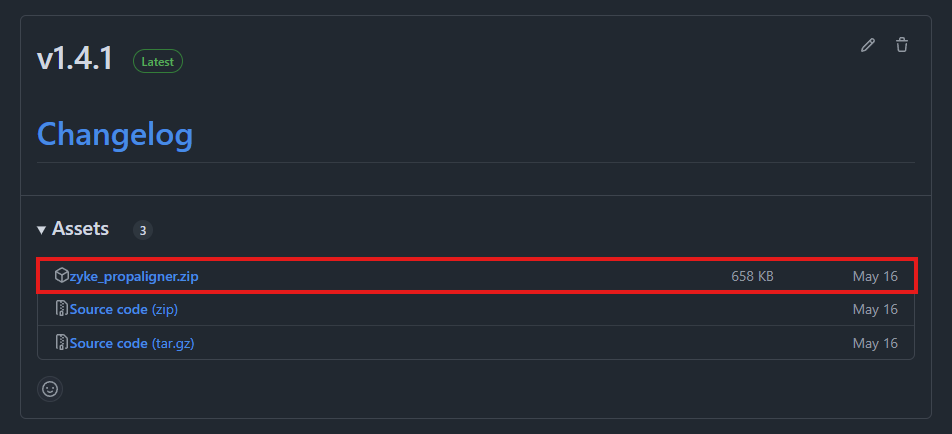
.png)
.png)
.png)