
Invalid Files
Various guides to ensure your files are correct.
#Incorrect Resource Name
The most common issue with the UI not showing is because you renamed the script without going into the JavaScript file and matching that name in there. By default, everything is set up to work with the name that I sell the script as. If you do change the resource's name, make sure to also change it in the files.
#Downloading Source Files
If you have been sent here, most likely you have incorrect files on your server. We build our UI files which means the source code is not ready to be ran on your server. This section specifically covers the fix for the console spamming about missing UI build.
Another big reason for downloading the latest release is because that has been tested. We may have breaking changes in the latest files straight in the repository that are not guaranteed to work for all of our resources.
#Examples
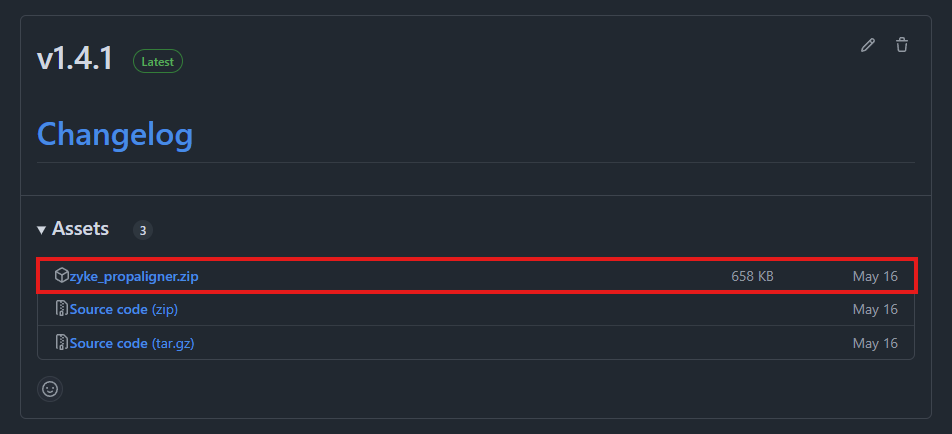
When downloading zyke_propaligner, head into the release page and download the option with the exact name of the resource.
If you download it from any other resource, it is not guaranteed that you have the correct files. Note that you need to download the <resource_name>.zip, and not the one named Source code .... The Source code ... will give you the files without the built files.
#Links
- Latest zyke_lib
- Latest zyke_status
- Latest zyke_propaligner
- Latest zyke_sounds
- Latest zyke_keyminigame
- Latest zyke_vehdeformation
- Latest zyke_burncars
- Latest zyke_stabwheels (No release download needed)
#Missing Files
When uploading using FTP (WinSCP, FileZilla etc), some files may disappear. The easiest identifier of a missing file is the server console warning it could not find certain files. This error will show up right when you start the resource. If you are unsure if you are missing any files, simply restart the resource and the console will let you know.
The fix is rather simple - reupload the missing file by itself and place it into the correct folder.